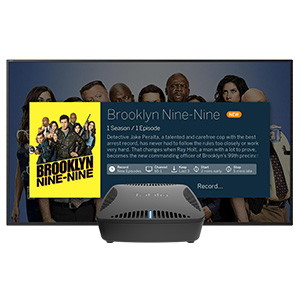
![Tablo Quad Over-The-Air [OTA] Digital Video Recorder [DVR] - with WiFi, Live TV Streaming, Black](https://m.media-amazon.com/images/I/41k4vRoig3L._AC_SL3840_.jpg)
📺 Elevate Your Entertainment Experience!
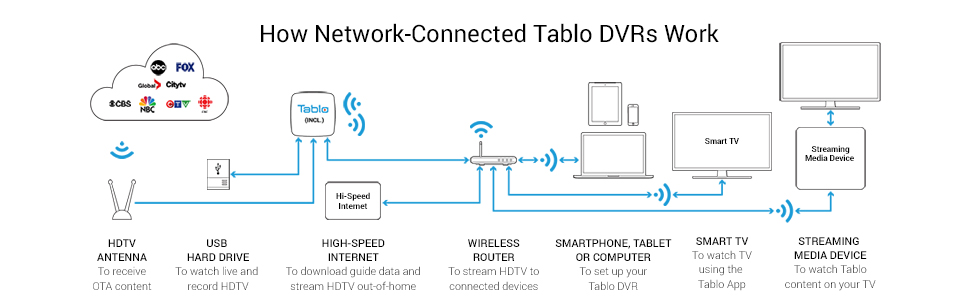
The Tablo Quad Over-The-Air Digital Video Recorder (DVR) is a cutting-edge device that allows you to stream live TV and record your favorite shows with ease. Weighing only 15.9 ounces and featuring a sleek black design, it seamlessly integrates into your home entertainment system while providing WiFi connectivity for hassle-free access to your favorite content.


| ASIN | B07PLVF8B7 |
| Audio Input | RCA |
| Best Sellers Rank | #396,390 in Electronics ( See Top 100 in Electronics ) #1,118 in Streaming Media Players |
| Brand | Tablo |
| Built-In Media | DVR, Ethernet Cable, Power Adapter |
| Compatible Devices | Television |
| Connectivity Technology | Ethernet, USB, Wireless |
| Customer Reviews | 4.0 out of 5 stars 2,266 Reviews |
| Global Trade Identification Number | 00696106000084 |
| Item Dimensions L x W x H | 4.84"L x 7.87"W x 2.01"H |
| Item Type Name | DVR for TV antennas |
| Item Weight | 15.87 Ounces |
| Manufacturer | Tablo |
| Media Format Digital Video | HLS |
| Mfr Part Number | TQNS4B-01-CN |
| Model Number | TQNS4B-02-CN |
| Product Dimensions | 4.84"L x 7.87"W x 2.01"H |
| Total Usb Ports | 1 |
| UPC | 696106000084 |
| Video Input | Coaxial |
| Warranty Description | 1 year manufacturer |
| Wattage | 24 watts |
T**Y
It really, really works!
I was not looking to "cut the cable" but was forced to when the cable company said they were getting out of the cable TV business. Weeks stretched into months as I searched for and researched various OTA solutions. The Tablo 4 tuner OTA whole house DVR looked promising, met most of my requirements, and was at the right price point. I picked up a 2TB drive to go along with my order. The end result far exceeds my original expectations! Installing the hard drive in the Tablo is a snap (I prefer internal drives over USB). The instructions for connecting the Tablo to your local network either wirelessly or via a hard-wired connection are clear and understandable. I went with the hard-wired connection to my wireless router for optimal performance and available bandwidth. Tablo is compatible with a variety of streaming platforms. I had already established ROKU as my default player. The Tablo app for ROKU was a piece of cake to install on both my smartphone and the ROKU player. The Tablo app on ROKU uses familiar ROKU navigation. Once in, the menu structure and other user interface options from the Tablo side are displayed in an easy to use manner. I set up my Tablo account online and within minutes was exploring. It only took an hour or so for me to realize that the premium guide service is definitely worth the annual fee. The user interface of the guide is very similar to the cable guide I had used for nearly 25 years. I connected the antenna to the Tablo and initiated the scan function. I already had a good idea of the available channels in my area. The Tablo found many more, but several were marginal quality; confirmed by the Tablo signal strength indicator. I had the Tablo build a guide for the 19 channels I selected. First go through took about an hour - updates go much faster. The wealth of information presented in the guide for all the channels is astounding and stretches two weeks into the future. The Commercial Skip Premium feature is totally worth it. I was skeptical about the whole idea but was blown away so much by how well it worked, I signed up even before the free trial expired. It isn't perfect, but is solidly in the 95% range for overall "it really, really works." NEVER GOT THAT ON A CABLE DVR. The Tablo user interface makes it quick and simple to point and click on a program to schedule a recording. Setting up a series recording is just as easy with a good array of options, preferences, and selectivity. So far, so good. After a few days, I was still finding new things to be excited about. The picture quality is truly HD. I can neither confirm or deny, but suspect there is some excellent signal processing going on in the Tablo. I had always heard that OTA HDTV was better than you could ever get over cable since they compress the signal so much. Close inspection shows the same signal processing is happening with the Live TV feature - at least to the naked eye. Exceptional picture quality whether live or recorded. The Tablo 4-tuner model I have allows me to simultaneously record up to 4 TV channels at once which beats my cable DVR by two. I'm having a great time using the Tablo. They have a variety of models at a variety of price points. This started out as long shot, but wound up an out of the ballpark game winning walk-off grand slam home run! IT REALLY, REALLY WORKS!!
N**I
Works good after initial set up issues / commercial skip needs work
.:: Update 03/27/20 ::. First off, I hope everyone is well. While isolated at home the past few weeks, I have been using the Tablo and TV in general more and came across several issues with Tablo. 1. Weak signal levels I found that the Tablo is very unforgiving when it comes to signal strength vs direct feed into the TV from the antenna. This was causing recordings to abort and restart as well as affected picture quality at times. I moved the Tablo out of my entertainment center to another location in the basement that is MUCH closer to the Channel Master splitter/booster. I found that while live TV on the TV via coax direct from the splitter was fine, the Tablo was having sporadic signal issues even though it was at the end of a similar 95' run of coax from the splitter to the entertainment center. Moving the Tablo from being 95' away from the splitter to 2' away seems to have improved signal quality to the Tablo as well as improve recording issues due to "weak signal levels" that I had been seeing. While I did have one show abort/restart recording it was actually due to an issue with the TV channel itself. 2. Horrible buffering when viewing live TV from Tablo to my phone. I have downgraded my live TV streaming from the recommended 5mbps to 3mbps and it has improved my ability to stream live TV to my phone. The house TVs still has separate coax feeds into them, so if I am watching live TV at home, I am doing it from the TV connections and not from Tablo as the lag while the channel loads on the Tablo is too much for me to bear when surfing channels. I'd be curious to hear from others if they have similar streaming issues using 100mbps internet or if it clears up with 200mbps. I'd also be interested in hearing what the buffer time is at 200mbps when changing channels vs. at 100mbps. 3. Channel skip is buggy at best I subscribed to the lifetime programming but am not going to ante up for the premium monthly subscription for commercial skip as it's still buggy and sometimes works and sometimes it doesn't, so I'm not paying $20 a month for it at this time. I think it should remain in beta and be free until they perfect it. *** Update 03/14/20 *** Couple of comments now that we've had this for a few weeks. DVR streaming to my phone works perfect. I am in Georgia for the weekend for a wedding and was able to stream TV shows from the Tablo at home to my Note 9 w/o any issues. Streaming live TV to my phone is another story. I get frequent buffering at the recommended rate. I've not messed with the settings yet to see if lowering the quality helps. I'm guessing that the input signal processing, conversion and transmission is too much for real time viewing from afar. We lost the local NBC channels from our Tablo channel list last week for no reason. I checked the antenna feed and NBC was nice and strong, so it was something with Tablo. Rescanning eventually corrected it after many rescans, but it was about a day that it couldn't find them. vvv Original review vvv I am quite pleased with this item so far. I did run into initial set up issues where it would not connect to the network, but it might have been a case of lacking instructions that caused the issue. Anyhow, it's up and running just fine now. My setup consists of: The HD antenna I am using is a Clearstream 4v outdoor VHF/UHF antenna. The coax comes into the house and into a Channel Master Ultra mini 4 splitter/booster. From there I run solid runs of The Cimple Co solid copper coax to the individual TVs and to the Tablo. I have a higher end Netgear C7800 router/modem combo with Comcast 100mbps service connected to the Tablo via WIFI. I am interfacing the Tablo to our Vizio D55u-D1 via a Roku Ultra streaming box (the Roku is connected to the router via a CAT6 ethernet cable connection). I have a Western Digital 5TB external SATA drive for storage. All items are current 2020 releases bought in the past few weeks as new on Amazon. My only complaint so far is the lag when changing live TV channels but I know it's because the Tablo needs to buffer xx MB of data before it will start playing. Perhaps it would be less of a gap if I had faster internet. It's not horrible but noticeable. For live TV I run the antenna directly into the TV for no delays between channel changes and use the Tablo for the guide and DVR. I am still on the free promo guide and not sure if I will ante up for the lifetime plan or just wing it. I do like the way the Tablo app runs via the Roku Ultra. The DVR FF/REW is much nicer than how FioS handled the same functions. Worth the $$ in my book - at least so far. I'll submit an update after we have more time with it.
E**T
Second Update after 11 Months + Initial Review - Was Pleasantly Surprised!
SECOND UPDATE: It is now December 2020 and after 11 months of usage, we are still enjoying the Tablo Quad. In a word, I would say the product is "exceptional" because it does everything it is supposed to do and does it very well. I wish other streaming service's DVR feature worked as well as the DVR and navigation features on the Tablo Quad. I just can't say enough good about it and wish I had cut the cable years ago. Thanks Tablo! UPDATE: I have now had the Tablo Quad installed for just over one month and couldn't be happier. It works flawlessly in all respects. Read my initial review below to see what I did to avoid all the issues. When I bought the Tablo Quad in Jan 2020 and after reading some of the poor reviews, I was a little leery of whether it could be setup without a bunch of problems and calls to Tablo's tech support, and also leery of how well it would perform once I got it running. On Amazon, it had a 3.7 star customer review rating with 526 reviews as of Jan 27th, 2020 when I initially wrote this review. I really can't understand why this product doesn't have a higher rating of at least 4 to 4.5 stars because it deserves it. Surprisingly, I didn't have to make any calls to Tablo regarding problems with installation or operation of the device. However, there are some caveats to my installation that some readers might be interested in. I think these will help some to avoid a lot of the headaches that has caused them to be frustrated and give a poor review. First, I called Tablo tech support twice BEFORE I purchased the device. Their tech staff is very helpful and answered all my questions to my satisfaction. This allowed me to hit the ground running when the unit arrived from Amazon. I will say that they are probably a little understaffed because unless you call in right when they open at 9:30 am (EST), you will be placed in a lengthy que and will be on hold for anywhere between 10 to 45 minutes before getting a warm body to talk to. I ended up talking to the same person on my two calls which were several days apart. This tells me (and I could be wrong) they probably only have a couple of people answering the phone lines. Second, because this unit MUST operate over a router network (no HDMI connection to any TVs), I decided to hard wire all connections to my router with Ethernet cables rather than use WiFi connections. I think this avoids a lot of issues especially when there is WiFi congestion going on in and around your house. And, when you consider all the brands and models of network routers that are out there, some routers are definitely a little more touchy than others, and some aren’t designed to handle as much bandwidth as others. I am using a three year old Netgear Nighthawk 7500 router (which use to be their top-of-the-line, high-bandwidth gaming router when I bought it). This router is certainly not the easiest to make it play nicely with some 3rd-party devices in many home networks. But to alleviate potential problems, I did updated the router’s firmware to the latest from Netgear before I started installing the Tablo Quad. But If you don’t have a decent router to begin with, this could present problems if you plan on connecting multiple TVs and viewing multiple programs simultaneously. If you just have one TV and will never be viewing more than one program at a time, AND you don’t have a lot of other devices such as smartphones, smart TVs, tablets, computers, gaming consoles, appliances, etc. connected to the router, then it may not be as critical to have a better router with higher bandwidth capabilities. Third, if you are just now cutting the cord to your cable or satellite (like I am), I recommend that you NOT try do everything at once. That is, don’t try to connect your new outside antenna to your new Tablo, your router, and your new internet streaming device all in one big effort. I promise you, that will only complicate things and you will be on the phone with tech support and very frustrated. Do it systematically, piece-meal: Get your outside antenna going first with it connected directly to your TV. Have your TV scan for OTA channels first and take note of how many channels you get. I live in a rural area and I am using an amplified directional antenna because I am about 40-45 miles from the broadcast towers. I get anywhere from 20 to 24 channels depending on if I rotate the antenna a little more in one direction or the other. I chose not to purchase a remote-controlled, outdoor antenna rotator because, for the money and extra headache of messing with that feature every time you want to go from one group of towers to another, it was not worth the trouble for my preferences. But once you get your reception of OTA channels nailed down solid through your TV only, then you can disconnect the antenna from the TV and go ahead and connect it to the Tablo Quad, but don’t power up the Tablo just yet. The Tablo Quad must be controlled with a streaming device such as a Roku, Firestick, nVidia Shield, X-Box, Android based device, or Apple based device. I suggest connecting your streaming device to your router first and get that set up to work properly with your TV BEFORE connecting the Tablo Quad to your router. Also wait before installing the Tablo App on the streaming device until later which I will discuss shortly. Once your streaming device is operating satisfactorily and all its functions are operating normally with no issues (maybe try it out for a day or two to familiarize yourself with it if you are not already), then you can connect the Tablo Quad to the router. And before I go on with the installation of the system, let me share something about the storage option on the Tablo Quad for recording OTA programming. I was very pleased with the fact that I was able to take an existing 6TB, 3.5-inch, SATA hard drive that I had laying around and use it for recording OTA programs from the Tablo Quad. My hard drive is not an external unit that would normally plug into the USB port on the Tablo. It is an internal SATA drive I pulled out of a two-year old CCTV DVR. To make the hard drive work, I had to buy a $5 SATA extender cable (see my attached image) from Amazon which you can find here: (https://www.amazon.com/gp/product/B00NURHUSU/ref=ppx_yo_dt_b_asin_title_o00_s00?ie=UTF8&psc=1). The Tablo Quad drive compartment is designed for a 2.5-inch drive which is substantially smaller than a 3.5-inch drive. A 3.5-inch drive will not fit in the Tablo Quad drive compartment. But if you have one, or come across one that is rated at 7200 rpm and is relatively cheap, you can still use it with the Tablo Quad if you get the extension cable that I mentioned and pictured below. I would definitely think twice before using an internal 2.5-inch drive because a number of users are reporting over-heating problems when a drive is placed inside the small drive compartment on the Tablo Quad. The Quad puts out a significant amount of heat on its own, and when that heat is combined with the heat from a hard drive placed inside the small drive compartment, temperatures will rise fairly quickly. Then, when program recording occurs which causes the hard drive to generate even more heat, the excessive heat may result in drive failure, Tablo failure or both. I don’t think the Tablo engineers designed the drive compartment properly. They should have done more R&D on potential heat issues. I avoided the whole heat issue by dumb luck because I my 3.5-inch drive wouldn’t fit in the drive compartment of the Tablo unit. I used the SATA extender cable mentioned above and put the drive on the shelf behind the Tablo where it could dissipate heat better in the open air. The instructions for the Tablo Quad state that it will accept an internal drive up to 4TB, and external drives that are connected to the USB port up to 8TB. The capacity limitation for the internal drive is not actually true as stated in the setup guide. The Tablo tech support staff mentioned that drives larger than 4TB should work fine if connected to the internal SATA port on the Tablo Quad. My 6TB drive was immediately recognized by the Tablo Quad and worked fine. Incidentally, don’t waste your money on an SSD drive because the higher cost per TB (4 times the cost) will generally not be justified by most people since the Tablo does not need the speed of an SSD to record OTA programs. My solution was a Seagate 7200 rpm Baracuda SATA drive which is extremely cost effective, fairly fast, and works flawlessly with the Tablo Quad. The SATA extender cable allows the drive to reside outside the Tablo Quad, and thus avoid over-heating issues. I placed four mounting screws in the bottom screw holes of the drive to slightly prop it up off the shelf that the drive sits on right behind where I have the Tablo Quad situated. The drive is just in the open, but out of sight so that my viewing area doesn’t look all cluttered. There is no remote control for the Tablo which allows me to hide it away on the shelf which is not visible in the room. I mentioned that an SSD storage drive is not needed nor cost justifiable in my opinion just for the extremely fast speed it provides. But there are some other potential issues you may need to be aware of when selecting your storage drive. One recent reviewer ended up giving the Tablo Quad a 2 star review related to what I am about to say. He said he was generally happy with the Tablo unit but the deal breaker for him was due to his own experience with long delays of about 12-seconds every time he changed channels. He stated (and I agree) that this was due to “video buffering” which is the time it takes for the Tablo Quad to store a history of the video data prior to actually displaying the program on your TV. Buffering helps to eliminate image jittering and improves image stability during playback. I timed my Tablo Quad and after numerous channel flips, the buffering was never more than 8 seconds and sometimes as little as 2 seconds. My quicker response time compared to the other reviewer isn’t due to me having a blazing fast internet speed. No, I am still living in the dark ages with only 8-10 mbits/sec download speed from my DSL connection. That’s like 10-year old technology, but for now it’s the only thing offered in my rural area other than satellite internet. However, I don’t like satellite internet at all, and I don’t think satellite internet would work well with any DVR recording products due to data quota limitations that fill up quick with program recordings being done on a regular basis. But let’s say you have a 5400 rpm external hard drive that only operates at USB Ver. 2 speeds and is connected through the Tablo’s USB port. That is going to be substantually slower than a 7200 rpm drive connected to the SATA port, and I think therein might be the other reviewer’s problem that resulted in longer wait times when the channel is changed. But also, if he is using a router that wasn’t specifically designed for high traffic such as a gaming router (mine was specifically designed for high traffic gaming), and if he has multiple devices fighting for bandwidth on his router, that could also slow the time it takes to buffer the video. But, I can see how a “channel surfer” might even be unhappy with 2 to 8 seconds of “buffering time” every time they change from one channel to another. Compared to cable and satellite boxes which are pretty much instantaneous, it may take some people a bit of getting used to. For me, I’m not unhappy with the 2 to 8 seconds of delay when changing channels. (NOTE to Tablo firmware developers: Please consider allowing users to configure the settings in the Tablo to be either with or without buffering and explain the drawbacks if no buffering is selected. Also, please consider allowing the remote control to immediately change the channel instead of bringing up the channel list and making the user scroll up or down. The extra step is unnecessary if the user is just wanting to move up one channel or down one channel. If the user wants the channel guide list, pressing the “back” button or some other button would suffice rather than always making it a two-step process to go up or down one channel. I am using a Roku Ultra 2019 model, so I’m not sure if it works better with other streaming devices.) …and now, back to my review. A VERY IMPORTANT THING to remember about the Tablo Quad, YOU MUST initially set it up with a computer (Ethernet connection preferred) or Tablet that are connected to the internet through your router. Things seem to work more smoothly when everything is connected to the internet through the same router so they can properly talk to each other. I don’t recommend a smartphone because the screen is too small and you may experience a screen hang during the registration of your Tablo Quad. Also, I don’t recommend using a cellular internet connection if using a tablet; use the same router your other devices are using to connect to each other and to the internet. I connected my laptop and the Tablo Quad with Ethernet cables and it zipped right through the Tablo’s setup process. The Tablo setup will format the hard drive, re-scan the OTA antenna channel reception, and download the OTA programming from the internet. Then you can disconnect your computer or tablet if you like. After the Tablo Quad scans for channel reception during setup, the results should match exactly with what you were getting when the antenna was connected directly to your TV. If not, check your antenna to see if it shifted and scan again. Next, install the Tablo App on your streaming device which is connected to the same router as everything else. The Tablo App will then search for your Tablo Quad. Once found, the OTA channels and programming will be visible in the Tablo App of your streaming device. I was able to get my new outdoor antenna installed in about a day, and then a Roku streaming device in about an hour and a half, and then marry those up to the Tablo Quad in about 2 hours. There were no hiccups or surprises and everything works great… for now that is. I’ll be keeping a close eye on our system for a while to make sure nothing goes kaput. I strongly believe doing all the installations piece-meal like I have described above will insure that the antenna is working right on its own, and the streaming device is working right on its own. THEN the Tablo Quad will have a much better chance of being setup without a hitch. Otherwise, you may be biting off too much to swallow all at once. I have already scheduled, recorded, and subsequently watched OTA programming and the quality was great and the ease of access was satisfactory. I changed the default settings of recordings and playback to a higher resolution of 1080, which is not the highest but higher than the default setting. Although this uses higher router bandwidth it hasn’t been affected by my slow DSL speed because the internet does not play a significant role in the Tablo’s recording of programming or subsequent playback (remember the video is coming OTA, not the internet). However, if you turn on the “skip commercials” feature, then your internet upload speed will definitely be a factor because recorded programming gets uploaded over the internet for processing the “commercial skip” feature. Tablo recommends a minimum upload speed of 3 mbits/sec, which is much higher than the internet speeds offered in my area. I am impressed with the fact that you can simultaneously record 4 different programs that are airing at the same time and in addition to that, users can view 2 more recorded programs simultaneously on two different TVs while the other 4 programs are being recorded. That’s a total of 6 simultaneous connections (4 live channels being recorded while 2 other previously recorded programs are being viewed). Or, you can have 4 different TVs viewing 4 different live programs. The user interface and functions of the Tablo Quad may not be quite as slick and polished as satellite or cable boxes, but then again, look at all the money that you can save. I’m not talking about a few hundred dollars but closer to a thousand per year after the first year. All the hardware that you may need to purchase initially to cut the cord (about $300 to $700 depending on what you may already have) will make your first year savings less, but the savings will be all the more in the second year and thereafter. All in all, my wife and I are pretty excited with what’s out there to watch without paying an arm and a leg and without getting a bunch of pork barrel programming you will never watch but pay for with the satellite and cable companies. That being said, I would advise not to let yourself get sucked back in to the subscription prices that are being asked on streaming device for services such as Sling, Vodo, YouTube, AppleTV and others. It all adds up quickly and you may find that you haven’t saved that much after you’ve cut the cord. But I think Hulu’s $6 per month plan for on-demand programming is an excellent choice combined with OTA programming and Amazon Prime Video (which I’ve already had for years). In a few months, I plan on updating this review after I’ve put more miles on this system, and have actually shipped the satellite receiver back. But for now, I’m very pleased with the leap we’re taking by cutting the cord.
P**Y
Unless you are Tech savvy…not as user friendly as advertised. Excellent source of frustration!!
I Purchased the Tablo Quad OTA DVR in an attempt to cut down on cable/satellite costs. After doing quite a bit of research, I decided on the Tablo due to cost and, I thought, ease of use. I wish I had looked a bit further. Tablo is okay when it works which is 75% of the time. The other 25% causes me to regret my choice. Customer service is horrible. After I received it and called for help, all they could tell me to do was read the support pages or google for solutions. I asked too many questions so, they rudely hung up after telling me that 10minutes is too much time to spend answering questions. Granted, I am not tech savvy and probably needed a little more guidance. My OTA antenna was professionally installed and aimed for best reception and produces crystal clear pictures when not hooked up to the Tablo. But as advertised, I want a cable type experience and watch programs on my schedule. After 2 months of reading all the guidance on their website and reading all the comments by other users and confirming that Wi-Fi is excellent throughout my one story 1460sq home, I am still trying to remedy the buffering and “can’t find Tablo messages by following some of the advice given in the Tablo support sites. I purchased a brand new new internal hard drive, instead of using an older external one I had. I moved the router to different areas in the house and changed the recording quality and Live tv quality down to 3 MPS then down to 2 MPS. I still get messages, that say can’t find tablo or it just buffers. I also paid for the commercial skip function which they no longer offered. I signed up for it on the last day. The skip option works on random programs with no rhyme or reason. When the system does show that commercial skip is active on a program it stops working half way through the program. When I questioned CS about this they told me to google it and hung up on me for the second time. I feel like a glutton for punishment! Since the return period has expired and Due to the initial cost of cutting the cord, I will keep using the Tablo DVR. I am hoping that a firmware update might fix the buffering and lost Tablo messages. I know that calling CS is useless and next year, I will most likely purchase a TiVo DVR and throw the Tablo in the garbage. Update 10/08/2023 Well, I have now removed Tablo from my system. I renewed the guide service and commercial skip on September 15th. Although the buffering problems mentioned in my previous review continued, I was able to record and watch most programing. Magically a couple of days after I paid for the renewal and Tablo announced the new 4th generation Tablo, the buffering got worse, literally all recorded programing and live viewing buffered continuously. Since I have already read all the “support” pages on the Tablo website, and the user comments I decided to call customer support. Again, no help, the “Guru” did send me a link to the very same information on the Tablo site. I give up!!! I have decided to sign up to YouTube TV and what a pleasure. I can actually enjoy watching tv again. Yes, it cost more but the amount of frustration caused by Tablo is just not worth saving some money. It’s still less expensive than cable. So for now, until I find a DVR that actually works, I will continue with YouTube TV. I know that others claim that Tablo is great and wonderful but, I am doubtful. My effort to get a refund for the renewed guide and commercial skip was denied. Lesson learned! As I stated before, if you love to be frustrated, Tablo DVR and their so call “Guru” customer service is highly recommended.
S**Y
Greatest invention since the GPS??
After losing CBS on my DirecTV NOW service, and having them increase my cost three times since signing up, I was looking for ways to cut the cord completely. I started to try some antennas on my TV to see how they worked. I found that I really needed to have the antenna in the window to get all the channels I needed. This wasn't going to work becuase I'd have to have cables running from room to room. Then I started researching and found this Tablo device. People seemed to like it in the review I read. I kept researching and Tablo kept looking like a good option. The great thing about it is that you can put it anywhere in the house where you get the best OTA reception. I have mine upstairs in our spare room. You then connect it to the WiFi network in your house, and from there you just download their app on your streaming device and you're watching free OTA TV on just about any device in your house. That means you just need one antenna and you can stream on all of your TVs. If that it's good enough, it's also got a fantasic guide, so it feels like you're still watching cable TV. There's a small monthly fee to keep using the full guide after the 30 day trial period, along with some other features, but you can still use it without paying a monthly fee. To me, the fee is totally worth it for all that you get with it. The other great feature is that you can connect your own hard drive via USB to use as DVR storage. The DVR on the Tablo is great! I love being able to record all the shows I want on my own hard drive. It plays the recorded shows flawlessly and even has a automatic commercial skipping feature (if you pay for the monthly subscription)! I really do think this is a fantastic product! My girlfriend was watching TV, flipping through the guide and watching recorded shows. I said, can you believe this is all free TV?? She was like, what do you mean it's free?? When I told her this was all coming through the antenna and none of it was "cable" TV, she could hardly believe it! I will say that it has disconnected from my WiFi a few times, and I've had to make some adjustments on my router and do some troubleshooting. Nothing crazy, but if you are thinking of getting this for someone who wouldn't know what to do if it didn't work one day, that probably wouldn't be a good idea. Unless you're OK with being their helpdesk. :) That said, there is a great community of Tablo users that can provide help online via forums on the Tablo website. That's been a great resource for me, as a Tablo newbie. Here's a list of the Pros and Cons, to me... PROS: Can be placed wherever you get the best OTA signal. Connects to your home network via WiFi or Ethernet. Uses your own hard drive for storage. Great guide that gives you that cable TV interface. DVR with commercial skipping. Adjust quality of live TV and recording streams separately. CONS: Connecting to the WiFi wasn't totally straight forward. If you aren't a little tech savvy and able to troubleshoot problems, you may get frustrated with it.
O**Y
Great Product - but make sure your home network is solid.
***************************** UPDATE 3/17/2022 ***************************** We recently had an ISP outage over the weekend. Unfortunately, this device WILL NOT WORK to watch already recorded shows if there is no internet connection, which is ridiculous. I contacted Tablo support that this was their response: "Unfortunately, our network-connected devices are unable to record or stream without a network connection. They use the network in order to know what time it is, which is needed to record programs. It is also used to download guide data, check for firmware updates, and in order to stream the recording back to your streaming device. Without a connection to the network, this is not possible." I can't accept this answer. Changed 5 star to 3 star review. Granted, if your ISP is down it obviously can't sync time, download guide data, etc... but there should be NO reason why you shouldn't be able to watch shows and movies that are recorded. It doesn't need to know the correct time, update guide data, or record anything to be able to do that. I can understand required access to the internet for subscription and guide data... But to simply watch what I have already recorded? This makes no sense. I did a network sniff and it seems that the app on all my TiVO 4k stream devices are trying to access my.tablotv.com. Why? This makes the device useless during an ISP outage. I can understand required access to the internet for subscription and guide data... But to simply watch what I have already recorded? This makes no sense. It would be an easy enough code change to correct this behavior. A simple if/then block of code, especially if tablo has a static IP address - there is no reason to hit tablotv.com for a device to connect to the tablo server. *************************************************************************************** Antenna Setup: > Antennas Direct 8-Element Bowtie TV Antenna > Channel Master LTE Filter > Channel Master Ultra Mini 4 TV Antenna Amplifier > Into 3 TVs and the Tablo Quad Home Network Setup: > MOTOROLA 16x4 Cable Modem > TP-Link TL-SG108 8 Port Gigabit Unmanaged Ethernet Network Switch > Google WiFi Mesh Main Node 1 > Google WiFi Node 2 > Google WiFi Node 3 > Tablo Quad Tablo hardware: Seagate BarraCuda 2TB Internal Hard Drive HDD – 2.5 Inch AC Infinity MULTIFAN S3-P (Tablo sits on top of this. I got this because a few folks mentions it can run hot in the reviews) Primary Devices with Tablo App installed: > 4 x TiVo 4K Stream Secondary Devices: Fire tablets and mobile phone When I first got the Tablo, I did not have the Tablo or WiFi Nodes 2 and 3 wired directly to my switch. I also thought I would try to get by with an old 2TB USB drive I had laying around that wasn't being used. With this initial setup, I did have frequent buffering issues but they were tolerable. After putting the internal HDD in the Tablo and wiring it and WiFi Nodes 2 and 3 all buffering issues went away. My best advice to anyone considering buying this Tablo is to *MAKE SURE* your home network is SOLID. I had already planned on wiring all my WiFi nodes directly into my switch, I just never got around to doing it until this point. With a solid network, all works flawlessly. Keep in mind it DOESN'T matter how fast your connection to the Internet is! It is not used for local streaming to local devices. It doesn't factor in at all. The internet is only used to download guide data and for remote connections, in which case you need to have a good upload speed for remote connections, not download speed. I rarely write reviews unless the product is outstanding and I remember reading many unflattering reviews prior to my purchase, which is the case here. I think most of the negative reviews here were written by users that did not have a robust and reliable home network. If you aren't sure about your network, please ask for help from one of your techy/nerdy type friends to assist in figuring that out prior to purchasing. It's a great product but I do have a list of annoyances. None of them are are worth removing a star for. Annoyances: By default, the Start and Stop time for a recording defaults to On Time for both. However, recordings always start 15 seconds early and end 1 minute late despite On Time setting for both. This causes an issue if you are recording two back-to-back sitcoms on two different channels at the same time. For instance, Bing Bang Theory and MASH at 7:00 and 7:30 on two different channels. With this default settings, at 7:30 the two 7:00 recordings won't end until 7:31 and the records for 7:30 started 15 seconds early. So at 7:30, it eats up all four tuners for a minute. You can change the default start time to 1 or 2 minutes early, which you always want to do. For MASH, you can go with one minute early. For Big Bang, you can go two minutes early. The option to set 1 or 2 minutes early is not available if you are setting the recording from the browser app, which makes it a bit more annoying. The commercial skip: It could use a lot of improvement. From the reviews, it use to work much worse so they are making improvements to it I believe. It's easy enough to fast forward through the commercials with the recording thumbnails. Overall, if you are sure you have a good network infrastructure and are looking for an OTA DVR, I highly recommend this product.
A**R
Perfect fit for my needs and all is working as expected.
Here are my needs and wants for this DVR: 1. Four tuners/transcoders, providing enough capacity for recording and playing back. I added a 1TB internal drive. 2. 14-day guide, enabling smart recording features and remote access. I just today activated the lifetime guide service. 3. In-home distribution via Ethernet and/or WiFi, with the only antenna connection at the Tablo box. I collocated the Tablo with the cable modem and WiFi router so I could easily use an Ethernet connection between Tablo and router. This limits capacity needed for WiFi distribution to onsite TVs and phones, computers and tablets. 4. Remote “connect” access for control including access to local OTA channels from home from anywhere I have reasonable internet access. I learned a LOT from reading reviews and good and bad experiences here. It seemed most of the bad experiences seemed to align with either ... a) poor OTA antenna TV reception, or b) overloading the WiFi network, and/or c) inability to successfully configure the WiFi router. I covered these limitations as follows ... a) I am lucky to live on top of a hill where I get excellent antenna reception for all primary and many secondary TV station transmitters. b) I made sure I used direct Ethernet to carry the heaviest traffic load between Tablo and the WiFi router. This means every onsite signal path only uses one WiFi hop, only from the router to the viewing device. For remote access, WiFi is avoided completely by use of Ethernet from Tablo to router and then direct internet connection to reach the remote destination. c) I ultimately replaced my outdated WiFi router with a current model, enabling automated configuration of the router and ports to support remote/offsite access. I did have one unfortunate hiccup that disabled my remote access while we were out of town for the holidays. Everything worked fine remotely for almost two weeks. Then all of the sudden the connection process failed. After a short call with Tablo technical support, I learned I was a victim of a bug that could not be resolved until I returned home. Then I was able to do a local reset from my iPhone that restored connectivity for local and remote access. Since my primary use of Tablo for now will be to extend live and recorded TV programs to my RV via internet, this bug is a potential showstopper. Based on my single conversation with technical support, I am banking on a fix to prevent or auto resolve episodes of the bug. Given my overall scenario, I am consistently getting excellent and reliable audio and video quality. Everything to do with recording management is working perfectly. I will be totally satisfied once I know I will not be blocked by the bug. My one experience with technical support was excellent. Down the road I intend to drop my limited cable TV service and my DirecTV service. I will fill in any remaining gaps with streaming services.
C**Y
Tabloo not so hot.
This is a review of the Tablo Quad [TQNS4B-01-CN] Over-The-Air [OTA] Digital Video Recorder. I purchased this at the request of my wife who wanted to record shows off-air. This seemed like a good solution after reading the specifications and the reviews. The first thing I encountered was that the device could not be found on the network. It said that it could not connect to the Internet through the network. I have lots of experience using computers and ran a computer department for four years so I know little bit about how this should work. After working with it for about an hour and 1/2, I decided to contact their customer support. I called them on the phone and fortunately was number two in the queue so I got into them fairly quickly. The technician couldn't have been nicer. Upon explaining the problem and giving him the serial and model number he told me that they knew there was a problem and that he would need to flash the firmware. He said that he saw that it was connected to their network even though it didn't show that on my end. He said to wait about five minutes and then let him know if I saw a firmware update message. I waited on the phone as it downloaded and installed. Once installed, I was able to make the connection correctly and have the software load. I asked him if it would've connected without the update and he told me there was no way it would've so I basically wasted an hour and 1/2 because they didn't keep their product up-to-date. I thanked him for his help and continued through the setup process. I should also note that I had a 1 TB external drive connected to it in order to record programs. It saw the drive with no problem. You have to set up the software through an app on your phone that you have to download from the Play store. I wanted to make sure that I could use this without a subscription as I did have any intention of paying a monthly bill and I was assured that could be done. It does come with a free 14 day trial of its software that retrieves all of the program information for the stations that you set up. I assume that after that you're on your own and program it the same way we used to program VCRs with the day, time and channel information. The one thing that was unclear when I purchased it was that you had to also have an app on your smart television, Firestick, or Chromecast device to receive the program information and to communicate with the devices from your phone. I have a Samsung television that did not have the app installed so I had to go to the app store and install it. Once installed on the television, you can control it from the remote control for the TV. The app is clunky and is slow to load the channel information. I tried recording four programs at different times and it ended up not recording two of them for some unknown reason. It showed they were recorded but showed 0.00 with no end time on the display for the recording. I'm still not sure why it didn't record the programs. I have subsequently tried to record some and it has with the exception of some that the signal from the antenna was so low it couldn't record. When that was the case, it displayed a message explaining why it couldn't have recorded. So far it's been kind of hit or miss. The quality of the recording is excellent (you have to tell it the quality of the recording you want in the settings). One of the things that it touts in its advertising is that you can do ad skipping but you can't do that on over the air broadcasts. You can fast-forward through them but you may cut off the beginning of the program as it's not very precise. One pet peeve that I have is that when you go back to play the recordings, the first screen that comes up as a button for delete and options but not for play. You actually have to scroll down the screen in order to access the play button which is stupid. Put the delete button at the bottom and the play button on the top screen. I don't want to delete the program before I even watch it. I can't figure out how this simple design flaw was not detected immediately by the program designers. Yesterday, when I started the app I got a message that said it could not connect to the Tabloo servers and to check the Internet connection. It wouldn't let me go past that screen so it makes me wonder if I don't pay for the service, what's going to happen because it won't be connecting to the servers to get the program information. I checked the Internet connection which was fine everywhere else except with the unit. I rebooted it and it came up correctly. I will continue to use the unit and try to update this review as I get more experience using this device. So far I can say that I am not impressed and I think that the old VCRs were much easier and probably more reliable than this device.
R**T
Must to have if you ready to cord cutter.
Fantastic recorder.
I**N
Buen aparato para grabar los programas de tv abierta.
Fácil instalación, llegó y le conecté un disco duro de una laptop. Tuve que instalar la aplicación Tablo para celular y AndroidTV desde afuera de la tienda de Google, no está disponible la aplicación en México. En la consola Xbox instalé Tablo sin problema, al igual que en la computadora. Lo conecté al router, le puse la antena de aire, y lo conecté a la corriente. Cuando busca los canales, la guía solo reconoce programación de Estados Unidos. Funciona bien, graba hasta 4 programas al mismo tiempo. Puedes ver tus programas grabados desde 5 dispositivos al mismo tiempo. Lo único que no he configurado, es para ver los programas fuera de casa. Gracias a Amazon, tuve buen precio con el Prime Day a meses sin intereses. Si no quieres seguir pagando televisión de paga, Tablo es buena opción para grabar tus programas favoritos de televisión abierta y verlos después saltándote los comerciales. Me llegó justo a tiempo para ver todos los eventos de las Olimpiadas de Tokyo.
R**A
Muy buena opción para grabar tus programas favoritos en tv abierta
Muy buena opción para grabar tus programas favoritos en tv abierta.
M**M
Installed 2 terabyte drive after purchase " seagate backup plus slim" USB 3
We like how it handles poor signals from our antanae, and we liked the commercial skip. We didn't like that after a month you have to pay for that feature. We like that you can do your scheduling on line or with the TV control. We switched to online so that we can use another tab for the local programing schedule to make our choices. Choice options from the device are only from LIVE TV menu once the month of free features is over. Like that it can store 4 shows simultaneously. Don't like that it lets you accidently schedule the same show when you think the scheduling was lost after the free month stuff. We like that the program is recorded in bits and pieces if the signal returns.
D**O
OTA TV at its finest
I replaced a Channel Master DVR+ with this device, and couldn't be happier: + User interface for OTA and recorded programs very slick. + Channel Master guide updates have become spotty, and the Tablo has an add on (for $) that provides 2 weeks. + Runs well with a Amazon Fire Cube as remote control (via Tablo App). + Covers multiple TVs as well as laptops, tablets,... + Pumping signal OTA through the household network gives freedom of TV placement. - Software update hiccups. However resolved once the Tablo is reset.
Trustpilot
1 month ago
4 days ago