Desertcart purchases this item on your behalf and handles shipping, customs, and support to Spain.
🚀 Amplify your game, dominate your workspace.
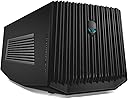
The Alienware Graphics Amplifier (9R7XN) is a dedicated external GPU enclosure designed exclusively for Alienware R2 laptops. It supports full-length, double-wide desktop graphics cards up to 10.5 inches and 375W power, powered by a robust 460W internal PSU. Featuring a single proprietary connection cable and four USB 3.0 ports, it enhances both graphics performance and peripheral connectivity in a sleek stealth black chassis.


| Asin | B00PCJXN0I |
| Best Sellers Rank | #2,772 in Computer Graphics Cards |
| Brand Name | Alienware |
| Customer Reviews | 4.1 4.1 out of 5 stars (437) 4.1 out of 5 stars |
| Global Trade Identification Number | 00884116181996 |
| Included Components | laptop |
| Item Dimensions | 16.1 x 7.3 x 6.8 inches |
| Item Weight | 7.7 pounds |
| Manufacturer | Dell Computer |
| Maximum Output Power | 460 watts |
| Model | 9R7XN |
| Mounting Type | Freestanding |
| Number Of Channels | 1 |
| Number Of Items | 1 |
| Output Power | 460 watts |
| Part Number | 9R7XN |
| Unit Count | 1 Count |
| Upc | 884116181996 |
| Voltage | 240 volts |
| Warranty Description | 1 |
User
Buy it now, while it's not too expensive.
Buy this now, because it seems as if they are gaining value every month.I bought this wonderful device for about $178. But before you buy this, MAKE SURE YOU HAVE A GRAPHICS CARD 10.5 INCHES OR LESS!!!Unfortunately they don't take big cards, and a lot of cards you see will not fit in this machine, but it is really a new concept that you can just drop in a desktop GPU and run your laptop off of it.Alienware really did it with this, a lot of companies don't really succeed, (I have never purchased another brand of amplifiers but I have heard they are not as efficient as Alienware's) this on the other hand, is absolutely marvelous.Make sure you dust it, just like desktops, they collect dust, and it can damage a computer. It will get a significant amount of dust in 2 months. Thankfully it will pop off real easy. Unfortunately mine gets stuck, and is super hard to open, but companies make lemons and I have coped with it, and it's not a big deal, just use some extra elbow grease.The real cool thing about this is, it syncs with your AlienFX, so it will change colors along with it.This is great for travel, just know, it is not made of metal, but a semi-tough plastic that I would imagine could crack if it got one good knock. Especially the grills in the front and sides. So be careful when transporting this on vacation or to a buddy's house.It's a great machine, it's not to expensive for what you get, but if you want this, I suggest you get it now, because it is getting more and more expensive (At least on Amazon.)
User
Great boost for your Alienware laptop.
Bought this for my son's Alienware 13 R2. He is into games and wanted to hook the Alienware up to a monitor with a larger screen. At first we tried to avoid buying this amplifier and just connected a monitor directly to the HDMI port in the back of the laptop, but there was a lot of lag times...it just didn't work very well.In our configuration, we use a GeForce GTX 1060 Mini 3GB GDDR5 Super Compact Graphics Card ZOTAC GeForce GTX 1060 Mini 3GB GDDR5 Super Compact Graphics Card (ZT-P10610A-10L) and for the monitor we use an Acer XF240H Acer XF240H bmjdpr 24-inch Full HD (1920 x 1080) AMD FreeSync Display (Display Port, DVI & HDMI Port, 144Hz Refresh Rate).At first, the signal from the amplifier was not picked up by the monitor. The laptop itself would not recognize the the second screen, although the light on the front of the amp would come on when we turned the laptop on. The signal just wouldn't transmit from the amp to the monitor. I then went online and downloaded the driver for the graphics card, rebooted, and then all worked well. We are using a display port connection.I highly recommend this if you want to give your Alienware a boost for gaming...it works perfectly. I also recommend the card and the monitor I mention above...no lag times, absolutely beautiful display.If things change as we use it more, I will update this review...thanks for reading....hope our experience helped!
User
What to know in 2024
While you will need an Alienware laptop from a run of models that are no longer being made, the huge advantage that the Alienware Graphics Amplifier gives these laptops is that the custom cable is directly accessing the PCI BUS - no throughput delays having to go through the USB-C controller. For how old this product is, that is pretty impressive. That said, if you're looking for used, you need to be certain the one you're adding to cart includes cables because it'll have to have that very proprietary PCI cable to connect the AGA to the laptop (and should have a default PSU cable for the AGA's power supply).I happen to have a number of Alienware laptops to work with this and I can tell you that it easily supports the 3000 and 4000 series nVidia cards up to the 3070 Ti and 4070. This is with the native power supply that can provide up to 400W. I have used it in:- Area 51m- M17R3- M17R4- M15R2Some of these have DOA PSUs, so you take a chance, but you can replace the PSU with a small form factor model such as the Corsair CX650M and be able to support a hungrier video card, which I had to do for one DOA PSU that I had. While I've read that some people have put a 4090 in one, I can't imagine that happened without leaving the lid fully open or removing it altogether and also replacing the default power supply.Other things to watch for:1) Be patient and careful connecting and disconnecting the cable. It has buttons on the sides you need to pinch inwards before it will release and it can feel nerve-wracking the first few times you need to plug and unplug it.2) Only ever connect or disconnect the cable when the laptop is 100% powered down.3) You don't have to have an external monitor to get Windows to use the AGA. Windows 11 tends to know, Windows 10 sometimes needs you to specify which GPU you want it to treat as the primary graphics card.4) You can mix GPUs - like a laptop with a 2060 that has an AGA with a 4070. You will need to install both sets of drivers, rebooting between installs, and then you're good to go.5) The nVidia Control Panel's Help-->System Information will show you two video cards once the second one is detected6) Whether the alien head lights up is anyone's guess. On one AGA I got Alienware's godawful buggy Alienware Command Center ("AWCC") to let me change the lights once, then the software crashed, the light went out, and the AWCC never saw it again. On another AGA the light lit up default blue while I was setting it up for the first time, then never lit again. On a third, the light was out until I launched AWCC, it lit blue, and I could never apply changes, so now it's forever just the default blue.7) 4000 series nVidia cards have a custom power connector cable on the top of the card that sticks out straight up or at an angle, depending on the card's manufacturer and the model. I strongly recommend NOT closing the lid all the way on these because you would be putting pressure against that proprietary cable and the socket it sits in and in the long run that can damage both the cable and the card.8) Dell support is nonexistent; for Windows 10 & 11, ignore the documents saying you need to install an AGA app, just let Windows, plug & play, and the AWCC pick up on the existence of the card.TIP: The USB hub that's part of the AGA is a fantastic way to plug in a monitor, keyboard, and mouse so it's easier to go from portable to desktop-level fun.
User
Works great with a few quirks
Installing my Gigabyte G1 1070 was easy. Connected the AGA to my Alienware 13 R3 and everything worked the first time. I bought the AGA to retire my desktop PC and to consolidate my gaming onto my laptop. Right now the 1070 taken from my desktop isn't a massive boost over my 13 R3's built-in 1060, but with the price drops on the amplifier I figured I'd just buy it now for future proofing and in case the AGA becomes discontinued soon. I don’t have any benchmarks, but performance with the 1070 feels about the same as when it was in my desktop. Also, my 13 R3 now stays cool when gaming.While it works great for what it's supposed to do, I do have a few complaints about it:1. It only has 4 USB ports and there’s no power through the AGA cable. I'd prefer if this could act as a true docking station with power, ethernet port, and sound ports. As it is, I ended up connecting a USB hub to it so that I could add a USB ethernet adapter (in addition to my USB keyboard, mouse, headset, and xbox controller). At least with the hub I only have to disconnect the AGA and power cables when I want to move my laptop now.2. The sleep and hibernate options are disabled in Windows 10 when connected to the AGA. So I have to power off my laptop whenever I'm not using it.3. I cannot update video drivers while connected to the AGA. I have to disconnect my laptop before updating the nvidia drivers.4. The AGA’s fan makes a somewhat high-pitched sound. It’s not unbearable and I don’t notice it when I’m using my headphones, but it’s there.Despite those issues, I think it’s a good product and I would recommend it. Thanks to Alienware for making an affordable solution like this.
User
no wonder they are selling so cheap....
Dell's Alienware Graphics Amplifier has got to be the biggest joke they have played on the general public. This supposed amplifier is designed to house a full size video card, thus boosting your video graphics capability. However, as you will find out if you purchase this hunk of plastic, you may be sorely disappointed, in this massive failure that Dell has produced. Some folks have managed to get their Graphics Amp to work, but not without some pain. I would HIGHLY recommend you do some serious internet digging to see if this thing will work with your system, before making a purchase. This thing cost me more money and time than it was worth.I have an Alienware 17R3 laptop with M.2 SSD drives and 32GB or RAM. The processor is an i7-6820HK, running the Alienware factory OS of Windows 10 Pro. This is not a weak system, and I've NEVER had issues running a 3840x2160 external monitor off the laptops internal Video card. But, as any gamer, I was looking for more, and decided to purchase the Dell Alienware Graphics Amplifier, and that is where things went bad...Some out there have found success with running an older BIOS. I have gone through every BIOS update possible to see if there was ONE that would work with this amplifier. I also made sure I had the updated drivers for the system and graphics card sitting in the external Amplifier.I started off with the latest BIOS 1.3.10 which has the following fixes:1) Improve user experience in Battery mode2) Add Caldera SW flag for Fn+F1/S3&S4 plug inResult: continuous reboot, until failureNext, I moved to the starting BIOS; 1.2.8, as some people have had “luck” with older BIOS versions.Result; continuous reboot, until failureNext, I moved to the next updated BIOS 1.2.15, which has the following fixes:1) Updated suspend / resume protectionsResult; continuous reboot, until failureNext, I moved to the next updated BIOS; 1.3.6, which has the following fixes:1) Caldera mode1 enter mode5 setting2) Remove TDPL method for DPTResult, continuous reboot, you know what comes next....Next, I moved to the next updated BIOS, 1.3.9, which has the following fixes:1) Alienware Graphic Amplifier enhancementResult, continuous rebootI did a lot of research and found that some folks found that installing an Operating System from Microsoft helped them. So, I purchased Windows 10 Home from Microsoft, installed it, and ….... as you can see from the video; continuous reboot.I really tried to make this work, but in my opinion, this joke perpetrated by Dell on users signifies my last computer purchase from Dell.
User
I recommend it if you need it, but avoid if you are just thinking about it.
The Alienware Graphics Amplifier is a pretty bare bones external gpu dock for their own systems. Going through them to use their laptop and this dock with planning ahead is probably a bad idea but if you were like me and had a compatible one, a strong GPU laying around, and the ability to make use of the dock then its pretty decent. In game performance is about 15-20% slower gpu wise than a desktop but moving from an old fx-8350 desktop to a laptop with an i7 6700hq and transferring my gpu to this dock it works out nicely.Features of the dock are as follows, 4 full speed USB 3 ports, the weird PCI-ish cable, and the internal PCIx16 slot. Houses most GPU's newer then the Nvidia 600 series and fits my bulky R9 290 in it and seems to do ok powering it as it has up to 16 usable pins for power (mine is using 14 of those.)Cons - I really wish the connector also charged my laptop like every other eGPU dock. Gotta do a full restart to use it and my system has a half turn on then off then does it again before it works (really weird side affect of using this). My graphics dock doesn't even close properly, though I was warned this thing feels cheap as all hell and it really did, even just inserting the GPU was painful with this things lack of intelligent design.
User
Works flawlessly (When setup properly)
PRO:The Alienware Graphics Amplifier paired with an MSI RTX 2070 Super works incredibly well. Borderlands 3 runs between 50 and 60 fps at 1440p maxed out. The performance from the amplifier to the laptop display do not appear to show any performance loss (at least to me) compared to something like a Thunderbolt dock (due to its limitations of bandwidth). This combination runs Monster Hunter World at 1440p with DLSS on at 80 frames per second. I haven't tested this with an external monitor yet.CON:The only flaw I can think of is: RTX cards fit snug into the amplifier (The ones that "CAN" fit). The height of the MSI RTX 2070 Super needs leverage placed on top of the amplifier to allow it to close fully (compared to taking the card out and attempting to close it and slide the switch to lock it closed). Ensure the graphics card you purchase is shorter than 10.5" in length (not height), otherwise it will hit the closing mechanic on the amplifier.
User
AGA + Zotac Nvidia GeForce 1660Ti + Alienware 13 R2 = better performance
Bought the Alienware Graphics Amplifier to supplement my Alienware 13 R2 with a Core i7-6500U (dual core), Nvidia GeForce 960M, 16 GB RAM, and FHD display. The video card I bought for it is the Zotac Nvidia GeForce 1660Ti. Installing the card into the AGA was a breeze since the Zotac GPU is not as long as most cards. Plugging in the power pigtails into the card was easy as well. Before I attached the AGA with the Zotac card to my laptop I verified that I had the Alienware AGA software and Command Center software installed. I also downloaded the newest GeForce drivers for the card/laptop GPU from the Nvidia site.After attaching the AGA, it seemed as though the AGA and graphics card was not being identified and that the internal GPU was not being identified as well. You just have to wait. Once Windows realizes and loads the drivers for the AGA GPU, then it just takes about 1 minute or so after the logging in to your laptop for Windows to identify if you have the AGA attached and to use the GPU inside of it, or if you are just using the laptop and to switch the laptop GPU. Yes, you must reboot each time to make either GPU re-establish themselves in the device manager. At boot up there is like a pause and a 1-2 second boot stutter when the AGA is connected, this is normal.So far just using the AGA and the laptop screen i am getting about 35 - 50% better frame rates and able to run most games at Ultra settings with no issues.This has been a great way to give my aging Alienware 13 R2 a new lease on life for at least a year or more.
User
This thing is awesome
Took a while for me to get a functional Graphics Card but now that I got one and have it hooked up correctly this really proves the processing power of Alienware laptops immensely, easy to set up, always works when set up & the best connection bandwidth with thunderbolt component for high quality gaming, Dell makes some good gaming computer consuls
User
Alienware 4C06C Amplificador Grafico, Una compra magnífica!
Tengo una ALIENWARE 17R3 con una tarjeta gráfica de 970, pero necesitaba aún mas rapidez en cuestión de gráficos, soy arquitecto y trabajo con programas demasiado pesados, además, me gusta jugar en mis tiempos libres en simuladores como el Flight Simulator que exige muchos gráficos, esto me vino de lujo sin tener que cambiar mi pc por una ALIENWARE nueva.El Amplificador viene super bien empacado, cuenta con todos sus cables y en mi caso compre una RTX 2060 de MSI y le quedo perfecta, batallé un poco para cerrar el cajón pero era cuestión de acomodar bien mi tarjeta gráfica.Contiene en el paquete:*Soportó gráficos 4K.*Hasta ahora el rendimiento ha sido espectacular, claro con su correspondiente tarjeta gráfica (que se compra aparte).*No necesité de actualizar todo el sistema para que la reconociera, solo descargue el driver en Dell y listo reinicié y la reconoció.*Cuando ya esta conectado el cable especial de ALIENWARE encienden ambas cabezas de un color blanco.Se puede cambiar la luz led de color desde el Alienware FX.*Trae su cable ALIENWARE especial.*Cable de corriente.Todo excelente, muy recomendable.
User
I just bought this graphics amplifier and its working brilliantly with me alienware 15 r2 which i bought late ...
I just bought this graphics amplifier and its working brilliantly with my alienware 15 r2 which i bought late 2016.iam using the asus gtx 1070 8gb pascal graphics and all the latest editions of the game i can play with the maxed out settings at ULTRA settings at almost 65FPS.yes portability is a hinderance for this product but if you are planning to keep it docked somewhere for a long time then i think it just works fine.all you need to do is you should get slightly bigger luggage bag.its not that big and for me its portable as iam a sailor and would like to play all the latest editions with the maxed out settings in the middle of the ocean.This product is brilliant.
User
Excelente
Llevo algun tiempo usandolo y me parece excelente, lo unico que no me gusto es que no cierra con una Strix 1080 asus, pero no se si el problema es de que hicieron la grafica mas grande o el cajon muy pequeño por eso le doy 5, igual me gusta mucho como se ve abierto, hace lucir mas la tarjeta y sus luces ademas de que se ve pro. Rendimiento increible y la instalacion solo fue conectar el cable y encender la alienware.
User
Perfect device for ones Alienware Laptop
It’d not quite as solid a design as the Razor Core (which is made out of a nice metal), and opening it is very cludgey as the plastic gets caught on stuff?!? .. but once I got my Titan X fitted inside (which took less than a minute) and connected it to my Alienware R3 17 inch it worked like a charm. Firing up by itself .. nothing I needed to do, just wait a little for it to engage. Played some games on it (Subnautica and Doom 2016). Flawless.
Trustpilot
3 weeks ago
3 weeks ago