🖱️ Power your productivity with precision and portability—because your work deserves the best.
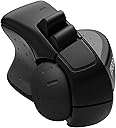
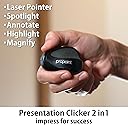
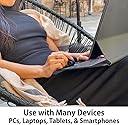
The Swiftpoint ProPoint is a feather-light (24g), ergonomically designed wireless mouse that doubles as a professional-grade presentation clicker and laser pointer. Featuring a high-precision 1800 DPI sensor, rapid 60-second charging for an hour of use, and versatile Bluetooth/USB connectivity, it’s engineered for seamless multi-device compatibility including laptops, iPads, and smartphones. Its pen-grip design reduces wrist strain, while customizable software enhances productivity with programmable shortcuts and virtual meeting tools—making it the ultimate compact companion for on-the-go professionals.


| ASIN | B07MQ2L7ZY |
| Additional Features | Ergonomic Design, Lightweight, Portable, Rechargeable, Ultra Durable, Wireless |
| Antenna Location | Office Work., Powerpoint Presentation Clicker & Remote Control., Remote Work, Cafe Work, Working at Home., Sales Presentations., Therapy for RSI, Tennis Elbow, Carpal Tunnel Syndrome or Tendonitis., Travelling Light., Using a Tablet or Smartphone with a mouse. |
| Are Batteries Included | No |
| Are Batteries Required | No |
| Battery Average Life | 2 weeks |
| Best Sellers Rank | #3,370 in Computer Mice |
| Brand | Swiftpoint |
| Built-In Media | 1 x ProPoint Ergonomic Mini Mouse for Laptops & 2-in-1 Presentation Clicker, 1 x Quick start guide & documentation, 1 x Stylish black carry case, slips in a pocket, 1 x USB charger / receiver dongle, 2.4GHz, Free download of Swiftpoint P3 Control Panel Software, to update firmware & customize settings |
| Button Quantity | 3 |
| Color | Black |
| Compatible Devices | Android Tablets & Smartphones, Mac, Macbooks, Windows PC, Laptops, iPad Pro, iPad Mini, iPad OS & iPhone iOS |
| Connectivity Technology | Bluetooth 4.0, USB receiver dongle, 2.4GHz |
| Customer Reviews | 4.3 4.3 out of 5 stars (370) |
| Enclosure Material | Strong & Durable Plastic |
| Global Trade Identification Number | 00857737002186 |
| Hand Orientation | Right Hand |
| Hardware Platform | PC Computer, Laptop, Mac, Tablet, Smartphone |
| Item Dimensions L x W | 2.2"L x 1.57"W |
| Item Type Name | Swiftpoint ProPoint Wireless Ergonomic Mouse & Presentation Clicker with Health Software, Vertical Pen Grip, Virtual Laser Pointer & Spotlight, Compatible with iPad & includes iOS App, black/gray |
| Item Weight | 24 Grams |
| Manufacturer | Swiftpoint |
| Mfr Part Number | SM600 |
| Model Name | ProPoint |
| Model Number | SM600 |
| Mouse Maximum Sensitivity | 1800 Dots per Inch |
| Movement Detection | Laser |
| Number of Batteries | 1 Lithium Ion batteries required. |
| Operating System | Windows |
| Pattern | Solid |
| Power Source | Battery Powered |
| Range | 10.0 meters |
| Style Name | Modern, Lightweight & Stylish |
| Theme | Professional |
| UPC | 857737002186 |
| Unit Count | 1.0 Count |
| Warranty Description | Swiftpoint warrants this product to be free from defects in material and workmanship for a period of one (1) year from the date of purchase. |
M**.
ProPoint does not disappoint!
This was my first experience with a swift point mouse and it by far excelled my expectations. I particularly enjoyed the pen grip design as even though the mouse is so small, it felt real comfortable to use. My favorite feature of all was the presenter mode, as I was able to present my projects with the mouse and be able to click through my slides, draw on the slides, and even use the laser pointer all very smoothly to go through my presentation perfectly. All in all, the mouse is great and very comfortable and it’s perfect for my travels since it’s timy enough to throw anywhere in my bag, it’s a great experience! I look forward to more swiftpoint products in the future!
T**6
Great little mouse
I have always loved to use a small mouse because I have small hands. The bigger mice just feel so uncomfortable after long use. This mouse has a ton of features for such a tiny mouse. It is comfortable in my hand, the battery charged up as stated, and I have enjoyed using it today for work. I have to admit, it does take a little bit of time to get used to the different buttons. After one day, I have got it down already. The features did my work easier by switching rapidly between windows and scrolling super fast using the tilt function. I haven't used the air mouse feature yet, but it seems to work as described. I would definitely recommend it.
J**N
Questionable for the price. Let's see if they get me one that works
I give it a zero for now. I got it , took it out of the package and charged it. When to turn it on to use it and no dice. Was junk out of the box. Returning for another however the new one has not shipped yet and it's been returned for a few days now. Hmmm . Edit- after using for some time now after the replacement was received, it works well, very compact and easy to use. I'll give a 4. Would be a five if the buttons were changed just a bit.
D**4
Great mouse for on-the-go working or travel!
As a grad student in architecture, I am constantly switching between multiple design and presentation software typically on the go or in a confined, lecture hall setting. This mouse was suggested to me by a friend and I have to say, while initially skeptical of its small size, I found it unbelievably comfortable and adjusted to it quite quickly. The compact size is incredibly convenient for classroom settings where you might use your laptop surface as a mouse pad and while the buttons aren't totally silent they do not produce that obnoxious heavy clicking sound of a typical mouse (another plus when you are trying to work quietly). The button layout can be configured but I have left mine as the default and the absence of the typical left/right buttons are no problem at all and I adjusted almost immediately. The tilt roller is a really nice function also. Switching the button on the bottom of the mouse turns it into a laser click/pointer which is great for switching through presentation slides and eliminates the use of trying to use a conventional mouse to do the same. Also really like that it seems to work on multiple surfaces with no problems at all. By and large, though, the compactness and comfortability of this mouse are its greatest strengths. Highly suggest giving it a try! (Bonus points for the charger being on the USB too!)
B**R
Two in one device that increases my productivity - Great purchase.
I had heard about this mouse and been waiting to purchase it. I have had some concerns about carpal tunnel and have been looking to get away from my traditional mouse. I was hesitant because I thought it would be hard to adapt to a new style of mouse. I was wrong. I have been using the Swiftpoint Propoint for a day now and I love it. It is so convenient to use on the go and I can even use it to the right of my surface pro's touchpad. It worked last night on an airplane and definitely increased my productivity. Before getting this mouse I would just use the touchpad, which is so inconvenient. As an attorney, this morning I had the opportunity to use the Propoint as a presentation device at a mediation and it worked great. I loved being able to toggle back and forth between modes and it enables me to limit the amount of gadgets I need to bring to court or settlement proceedings. The pen grip is awesome and much more comfortable. You can tell it is made with quality materials and will last. Also, it was plug and play ready. Definitely would recommend!
A**O
Ero indeciso se prenderlo visto il prezzo iniziale di per sé elevato. Poi è arrivata l'offerta e l'ho preso immediatamente perché curioso di provarlo. Premetto che mi sono interessato a questo mouse perché ho problemi di dolori alle articolazioni delle mani ed ho provato varie soluzioni tra le quali: il mouse verticale (pesante e con necessità di affaticare il pollice per premere i tasti); un trackball che mi faceva utilizzare in modo eccessivo il pollice; un "trackball" della Kensington orizzontale che però mi forzava la rotazione della mano e spesso schiacciavo i tasti senza volerlo perché tenevo in tensione le dita sollevate (click leggeri). Detto questo il ProPoint mi ha stupito perché leggero e facile da usare con tre sole dita; non mi fa sentire la fatica nel tenere la mano diritta al piano come succede con un mouse normale o quello verticale; grazie al dongle ed al bluetooth per la connessione lo posso utilizzare su più PC e posso spostarlo dove più mi comoda nella scrivania; essendo molto leggero non si fatica a muoverlo ed i tasti sono facili da trovare e premere; con il software scaricato dal sito poi si aggiungono numerose funzionalità tramite combinazioni di tasti + inclinazione (si perché, inclinandolo leggermente, di base lo si può usare per scorrere le pagine in verticale ed orizzontale); dispone di una rotellina comunque fisica sempre per lo scrolling; ha la funzione per gestire presentazioni tipo PowerPoint. Provato anche tramite bluetooth e non perde un colpo. Anche quando va in standby ci vuole poco perché si ricolleghi. Ricarica tramite dongle collegato alla USB ma per ora non ne ho avuto bisogno (lo uso da 4 giorni e la batteria è al 70%). Che dire di più: ne acquisterei un altro anche per il lavoro. Davvero ottimo e comodo. CONSIGLIATISSIMO!!!
K**K
My mouse wrist and arm are happier since using this mouse and I like the presentation mode. Could do with becoming a tad cheaper though.
M**I
スマホ携帯にこのマウスが使えました、驚き。出張先でスマホとこのマウスのみで仕事出来ちゃいました。 コンパクトで持ち運びも楽ですし、、手首の負担がなくなって2台目も購入しました。 プレゼン機能も慣れれば使いやすくて、レーザーポインターも持ち歩かなくなりました。 何種類かあって、オリジナルの設定が作れるのも魅力です。 レビューがいいのが分かります。
A**D
Die Swiftpoint Propoint ist die dritte Generation der Minimaus von Swiftpoint. Sie kommt in einem kleinen Hardcase mit einem USB Receiver und kann unter Verwendung von Bluetooth 4.0 auch ohne den Receiver benutzt werden. Die sogenannte Tilt Funktion (Maus auf die Seite kippen) klappt erstaunlich gut und auch Links- und Rechtsklick mit den übereinandergelagerten Tasten klappt sehr gut. Die Maus liegt angenehm zwischen den Fingern und auch nach längerem Arbeiten zeigt sich keine Ermüdung. Man merkt, dass hier ordentlich nachgedacht wurde. Die Gyrofunktion im Präsentationsmodus ist nett, auch die Maussteuerung von Windows lässt sich damit teilweise übernehmen. Das Unterstreichen wie im Video von Swiftpoint gezeigt erfordert allerdings einige Übung. Der Akku ist leider fest verbaut und hält angeblich 3 Wochen. Hoffentlich hält er vor allem ein paar Jahre. Die iPad Funktionalität beschränkt sich aktuell auf ausgewiesene Remote Desktop Apps (nicht MS RDP), hier wird aber durch iOS 13 ggfs. auch das Alleinstellungsmerkmal wegfallen. Das Mausrad sowie der Schalter zum EIn/Ausschalten und Wechsel in den Presentermode ist etwas schwergängig. Hier muss der Langzeittest zeigen, ob die Komponenten irgendwann nachgeben. Bei dem Preis sollte die Maus durchaus eine Weile halten.
B**U
LITERALLY NOTHING BAD TO SAY ABOUT EVERY FEATURE OF THIS MOUSE….AMAZING. And that’s what I honestly desired and wanted it to be expected at this price point but it DEFINITELY didn’t disappoint. Only thing is….2 weeks later it went down to $89 ON BLACK FRIDAY. Now if I thought it was a good value at $190 well then at 90$ this is HANDS DOWN the best portable mouse on the market that quite frankly after a while makes a regular desktop mouse feel unnecessarily HUMUNGOUS for most day to day productivity tasks
Trustpilot
2 months ago
2 months ago