🚀 Store More, Stress Less!
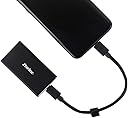
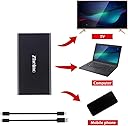
The Zheino 256GB Extreme Portable SSD is a compact and lightweight external solid-state drive that offers lightning-fast read/write speeds of up to 500/420 MB/s. With universal compatibility across various USB interfaces, it comes with essential cables included, making it the perfect storage solution for professionals on the move.
| Hard Drive | 256 GB Solid State Drive |
| Brand | Zheino |
| Item Weight | 3.52 ounces |
| Package Dimensions | 5.4 x 4.4 x 0.8 inches |
| Color | P1 256GB |
| Flash Memory Size | 256 GB |
| Hard Drive Interface | USB 3.1 |
| Manufacturer | Zheino |
| ASIN | B07LBM57WM |
| Is Discontinued By Manufacturer | No |
| Date First Available | December 17, 2018 |
J**R
Tiny, almost weightless, works nicely, write speeds a little slow.
My Mac is running MacOS X 10.15 Catalina but I still have some 32-bit apps and those won't run on Catalina. I've been booting MacOS X 10.14 Mojave from an external HDD to use those 32-bit apps and it's been fine but I wanted faster boots and better performance so I decided to get a low-capacity and inexpensive SSD. My Mojave volume is about 70gb and will never get much larger so a 128gb SSD would be more than enough. My computer is a late-2012 Mac Mini so I have a Thunderbolt-1 port (already being used), a FireWire-800 port (already being used), and 4 USB 3.0/3.1 Gen1 ports (3 available). So an SSD with USB 3 was going to be best for me and since my machine doesn't have USB 3.1 Gen2 and given that I wanted to save money more than I wanted to have the faster interface for the future whenever I might get a more modern Mac, USB 3.0/3.1 Gen1 was good enough for my purposes. I wasn't too picky: I just chose the least expensive 128gb or larger external SSD with a USB 3 interface and which would come with a cable which had the connector I needed (USB A on the computer end). For $31 it's pretty cheap, there was nothing less expensive here on Amazon that fit my needs and didn't look like a piece of junk. This Zhaino SSD is tiny! Really, really small and thin; very light, too. As small and light as it is, it does not feel like a toy or a piece of plastic crap. It has a USB 3.0/3.1 Gen1 interface with a USB C port. It comes with two cables, USB C<-->USB C and USB C<-->USB A. Both are quite short, only a few inches. Naturally any appropriate cable can be used in place of the ones that come with the SSD but the very short USB C<-->USB A cable is just what I needed. I plugged it in, it was recognized almost instantly and mounted to my Mac's desktop. I immediately launched Disk Utility and reformatted it with GUID/APFS then created two APFS volumes. One volume is for the Mojave boot system I planned to copy over to it. The second? Since I was going to have 50gb-60gb of free space left over, I added a "Miscellaneous" volume, to keep various files briefly when sneaker-netting things from one computer to another. This took only seconds. I used Carbon Copy Cloner to copy my existing Mojave boot volume over to this SSD rather than installing the system and then migrating my applications and files over. This took about 20 minutes for roughly 70gb and all the housekeeping stuff that CCC performs before and after a clone operation. First boot from the SSD was about 35 seconds. Everything performed flawlessly and felt very snappy, an order of magnitude better than the HDD I was using. Subsequent restarts into Mojave using the SSD took no more than 20 seconds. It's a pleasure to have such a snappy second boot system, it runs as well as the boot system on my internal SSD. Testing with Blackmagic Disk Speed Test gave read speeds well over 400MB/s. This is way better than read speeds of about 110MB/s which I get with a 5400rpm HDD through a Thunderbolt-1 port (obviously the TB-1 interface is faster than that but the HDD is very slow) or 80MB/s I get with a similar HDD through FireWire-800. Write speeds were initially close to 200MB/s (pretty slow for an SSD) but after just a few seconds dropped down to well under 100MB/s eventually averaging around 60MB/s which is very, very slow for an SSD. I get around 70MB/s write speeds with a HDD over USB. This is no problem at all for me, I'm just using it as a system boot disk so (except when I have to install an update), all it's really doing is reading so that's fine. In practice it doesn't "feel" slow at all – probably because all the writes in normal operation are very small and so get the 200MB/s speed. But if you are planning to use this SSD to do a lot of writing of large files, it probably isn't a good choice as even the initial "boosted" write speed isn't good let alone the sustained write speed. Knock a star or two off the rating if that's important to you. Other than the write speed, this SSD is pretty awesome and is a great value given what you get for the price. I recommend it if looking for a low-capacity SSD, although there are higher-quality options at the same or better price points as the storage capacity gets to around 500gb. I'll come back and edit this review if the drive fails or loses performance faster than expected.
T**W
So Far, So Good
I purchased 3 of these to test with Nvidea Shields. I have 3 shields that I use for streaming (using my own kodi fork) and gaming. I have them all mounted to a NAS that has 15,000+ game roms in which I use ARC browser for a gaming front-end. ARC installs on the shield's internal storage, but there was not near enough room for all the game artwork. I tried some Sandisk USB thumbs I had they were to small. I had to add more storage (formated as internal storage). , so I got x3-SanDisk 128GB Ultra Fit USB 3.1 Flash Drives (SDCZ430-128G-G46). So between the streaming doing its caching and the emulators doing save states etc, there was a bunch of read/writes going on. They worked fine for about 3 months, then each of them would make the shield to start slowing down, getting worse and worse for a few days, then would pretty much die. I could put them in a pc, get them recognized and reformatted, but when I would put them back in the shield, the shield would tell me there were to slow for internal storage. They cost me around $28 each at the time. I replaced 2 of them and they did the same thing, so I started looking for a better solution. I couldn't afford to keep replacing them every 3-4 months. I decided to try these. No one could tell me if they would work with android or shields, so I decided to be the guinea pig. I attached one of the to one to my pc's via USB 3.1 (I forgot to try USB type C). The formatted name of the drive is in chinese, but came right up. I ran crystal to see what it would do, then formatted it and ran crystal again, got about the same results. They are running x2-3 faster than the Sandisks did. I removed it and plugged it into a shield, it recognized instantly, I allowed it to format it as internal storage and let it moved files. I am getting a snappier, quicker response with these than I did with the SanDisks. Big test I suppose is, will they last????? If they last, they were very much worth it. The only thing I dislike about them is the drive activity light is on the same end where the cable attaches. I can't comment on tech support or 3yr warranty (hope I never need to...lol).
P**G
Using Zheino 128GB portable SSD to boot Raspberry Pi 4.
So far, the Zheino 128GB portable SSD has worked well. I haven’t had it long enough to determine it long term reliability. Following the directions that are in the YouTube video by Andreas Spiess (the guy with the Swiss accent), I was able to get a Zheino 128GB portable SSD to boot up my Raspberry Pi 4. To find the video search YouTube for “Boot a Raspberry Pi4 with an SSD to make it reliable and fast” I used the speed test mentioned in the video to measure the speed of both the generic Microcenter SD card I was using and the new Zheino drive. The results were a 5.5X increase in speed (SD card: 1466, Zheino SSD: 8100). There are several other advantages to using an SSD over a SD card. The only issue I had was that when I imaged the Zheino SSD, I couldn't get the "boot" fat32 partition of the Rpi image to show up in Windows 10. So I have to go through activating SSH, changing the keyboard configuration, setting up WiFi, etc... again on the SSD when I was finished. Since the boot is not done natively yet on the Rpi 4, you still need the SD card. It just transfers the boot up vector to the SSD (see video).
L**Z
very very but very portable and really fast over 40mgps transf
i like how small it is and simple to use
O**5
Very good
Very satisfied
C**S
Big upgrade over Xbox One X storage
I bought this for my girlfriends xbox one X to store some of her more played games. She plays some games online that had longer wait times to get into the action at the start. Specifically Fallout 76 Nuclear Winter, her load times to get into the map after it started went from 00:54 second average time down to 00:32 average wait time. It took on average 22 seconds off the time from start of game play to loading into the map and being able to start moving around. It also helped GTA5 load times getting into story mode but I didn't do a time test on that one. Although I did notice a big difference in load times. Usually it took over 1 minute to load up story mode and I'd guess it went down to between 30-45 seconds now. Still a long wait time for a game but significantly lower with this SDD. Doesn't require to be plugged into wall outlet and had all the necessary peripherals included with it. If you do use it for xbox one x you will have to plug it into a USB socket, it should automatically pop up a message asking to format this drive for xbox. Then it will ask if you want to start newly downloaded games to this drive or keep it on your internal xbox HDD. After I selected to format it, it seemed nothing had happened but it did what was needed. I then simply had to restart my xbox and then it showed up under the storage menu. Copying over FO76 (~65GB) took about 15-20 minutes from the internal xbox HDD to this SDD.
A**ー
SSDですよ
HDDだったと書いている人がいますが(証拠写真も無しに)、 私のところにはSSDが届いて快適に使えています。 2019年末は3000円で買えたのが現在5700円になってる。 中国商品は良いレビューが集まるとすぐ極端な値上げをするので あまり良い評価を付けたくなくなりますね。
A**ー
玩具みたいですが...
普通に使えます。当然ですが、付属ケーブルが2本ともUSB3.0ケーブルでした。 USB3.0ケーブルのtypeC to CとtypeC to Aを探していたらこれを見かけました。 値段があまり変わらないくらいだったので、本体がおまけみたいでした。
A**I
最初にフォーマットが必要
本製品は予め NTFS でフォーマットしてある状態で届きました。しかし、この状態でベンチマークをとると、読み込み/書き込み共に結果が大きくぶれてしまいます。そこで、クイックフォーマットしてやると結果が安定するようになりました。安定後の USB3.0 と USB2.0 で接続した場合のベンチマークの結果をファイル添付します。USB3.1 Gen1 ではないです。 なお、ベンチマークの実行中は、本機を素手で触っても火傷しない程度に熱くなります。
マ**ん
USB TypeA, TypeC 対応。安いし問題無し。
Mac Book Proでも正常に利用できます。 USB TypeA, TypeC 対応。安いし、外付ディスクとして利用も全く問題無し。
み**ん
これは「HDD」です。
ご注意ください。これは小型のポータブル「HDD」であってSSDではありません。 繰り返しますがこれは「HDD」です。SSDではありません。 現状、手元にないため証拠のスクリーンショットを添付出来ないのが残念ですが、これはSSDではありません。 パソコンに詳しい方はご自身でパソコンに接続して確認してみましょう、これはSSDではありません。 速度が遅いから「HDD」だとの揶揄ではなく、正真正銘「ただのHDD」です。
Trustpilot
2 months ago
1 week ago