We remain fully operational. Our teams are working around the clock to ensure your deliveries continue safely.

DOWNLOAD THE APP


Copyright © 2025 Desertcart Holdings Limited
DOWNLOAD THE APP


Buy anything from 5,000+ international stores. One checkout price. No surprise fees. Join 2M+ shoppers on Desertcart.
Desertcart purchases this item on your behalf and handles shipping, customs, and support to Spain.
🚀 Elevate your workspace—double your screens, double your impact!
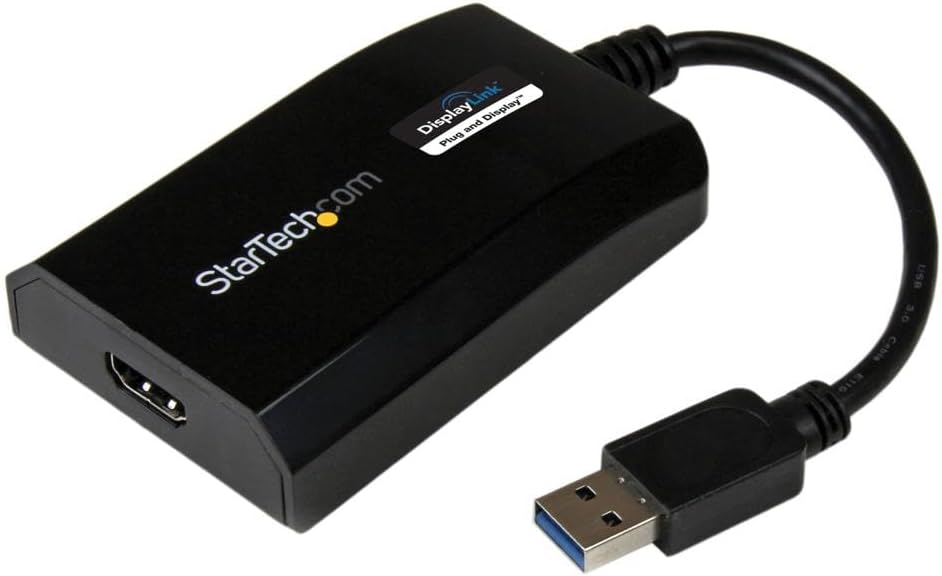
The StarTech USB 3.0 to HDMI Adapter (USB32HDPRO) is a DisplayLink certified external video card that converts a USB Type-A port into an HDMI output supporting up to 1920x1200 resolution and 5.1 channel audio. Compatible with Windows and Mac, it enables effortless multi-monitor setups with plug-and-play driver installation, all powered via USB without extra adapters. Ideal for professionals seeking to expand their display capabilities on compact laptops or desktops.


























| ASIN | B00O6G5ZGI |
| Best Sellers Rank | #42 in USB-to-VGA Adapters |
| Brand | StarTech.com |
| Built-In Media | User manual, cable or connector. |
| Color | Black |
| Compatible Devices | Audio/Video Device, Computer, Laptop, Monitor, Projector, Ultrabook, Workstation |
| Connector Type | HDMI, USB Type A |
| Current Rating | 1 Amps |
| Customer Reviews | 4.3 4.3 out of 5 stars (591) |
| External Testing Certification | CE, FCC, DisplayLink |
| Finish | Matte |
| Global Trade Identification Number | 00065030857505 |
| Input Voltage | 5 Volts (DC) |
| Item Dimensions | 3.5 x 2.2 x 0.8 inches |
| Item Type Name | A/V Cable |
| Item Weight | 2.24 ounces |
| Manufacturer | StarTech.com |
| Mfr Part Number | USB32HDPRO |
| Model Number | USB32HDPRO |
| Number of Items | 1 |
| Number of Ports | 1 |
| Package Quantity | 1 |
| Power Plug Type | No Plug |
| Smart Home Compatibility | Not Smart Home Compatible |
| Specific Uses For Product | Monitor,Projector |
| UPC | 065030857505 |
| Unit Count | 1.0 Count |
| Warranty Description | 2 Year |
| Warranty Type | Extended |
A**E
This StarTech Part #USB32HDPRO does in fact support AUDIO as well as VIDEO
I originally asked a question if this item (Specifically the StarTech USB32HDPRO) supported AUDIO in addition to video. Some people said yes, others said no. Well, since I had already ordered it - I decided to wait and see once I installed it and see for myself. It came the next day and I read the instructions completely before I even took it out of the box and then installed it exactly as the instructions stated. I can tell you, at least on my Dell all-in-one computer, YES, THIS ITEM (STARTECH USB32HDPRO) DOES IN FACT SUPPORT AUDIO AS WELL AS VIDEO. I run Windows 10 and I didn't need the CD or any other drivers to install. A word of caution: You MUST remove any other USB / Video Card drivers (from possible previous failed attempts at installing other products) before you even plug this item into the USB Port. I also can't comment on the USB 2.0 scenario since my computer is equipped with USB 3.0. Once you install it, you will have an icon in the box on the bottom of the computer that will allow you to switch between watching your computer monitor, the HDMI source you are routing to, or both. You will only have AUDIO on on of the displays - either the monitor or the HDMI source. This is by far the easiest device I have tried and it works. (I tried many others and they simply did not work. One had the instructions written so poorly that I couldn't follow along. I suppose this was similar to a word for word translation directly from China.). So, bottom line is this: This StarTech does in fact support AUDIO and VIDEO, is easy to install if you follow the well written instructions word for word and configure it correctly which is very simple to do.
R**N
Star Tech
Works great for what I need.
M**.
No Problem
No Problem
J**T
Great
I just got this n today & will update this review IF something goes wrong. Opened the box & saw a installation cd & thought great, I don't haaaave a cd driver, but thought about going to the StarTech website to download the drivers. On the website, I looked up the model number & the drivers were right there. (They're r several to choose from but they're alllll labeled as to which one they're for. Windows 11 is the first one.) Downloaded the driver & then had to extract it. (It maaaaaay have just ran out but it recommended extracting them so I did.) After they extracted I clicked on it again & selected run. Hooked up the adapter AFTER all of that. (It MIGHT have worked just hooking it up but didn't want to take a chance. Installation is a pain n the butt IF u HAVE to do all this. It miiiiight b plug & play?, but I did it this way. U can try that if u want, i didn't want to try that.) The picture quality is BEAUTIFUL. Response time has NO lag, it's just like it is on the laptop screen. Overall I'm happy about it. Wish it was simpler plug & play. Wish it didn't cost soooo much but as much as I spent buying cheaper ones with 4.5 star reviews, (that crapped out AFTER Amazon's 30 day return window, (that's not right n my opinion, it should b 1 yr or at LEAST 3 to 6 months). Arrived faster then it originally said so I'm REAL happy about that. All I can say for now is I'm THRILLED about the product itself just not the PRICE.
D**E
This Device Breaks your Computer
I've tried this on 3 computers, two running Windows 10 and one running Windows 7. On each of these computers the initial install of the DisplayLink drivers and software completes successfully. No rebooting needed, the second screen works and all seems well. After rebooting it still seems fine, you are presented with the Windows login screen. Now when you sign-in, you are left with a black screen that just sits there indefinitely. You can't do anything except power off the computer and boot into safe mode to remove the DisplayLink drivers and software. All three computers I've tried this on exhibit the same behavior. Driver updates make no difference.
J**R
PERFECT! Plug and go!
I went through a few of these to try and extend a 3rd monitor from my HP laptop. None of the USB-C versions worked on it. Not even the expensive docking station for HP! So I tried this USB-A one and I just plugged it in and boom, screen on! Did not create any drag on my system nor any flickering which I have experienced with other laptops with screen extensions. Very satisfied!
S**G
Test this under heavy load if you want to return it before return window close
Pros: Win 10 found driver, no problem. I got the second monitor over USB 3. Worked with USB 2 even through USB HUB. Cons: Win 7 required drivers. Included disk had outdated drivers. After installation, had to update drivers for both Win 10 and Win 7 to get audio through adapter. There is visible delay on screen connected with this adapter ( no matter if it's connected to USB3 or USB2. If mouse hovering over desktop application there's no delay, but if you go over simple internet page, mouse pointer just keep sticking from spot to spot, especially, when it hovers over any link. This doesn't happen with the same co conditions, but when monitor connected directly to HDMI laptop output. There is no delays in that case. The most annoying thing is when monitor, connected through startech adapte,r could not wake up after sleep unless I physically reconnect it. There was delay at first week or two aster sleep and now this. I would return it, but window of return is closed right a week later after last day of return. I wonder if this company survives on this no return window. I switched to "Cable matters" now. No problems with wake up so far. Screen delay is a bit less.
S**R
Working fine. If you connect it on USB 3 device it will work on Windows, Linux, Ubuntu 17.10 (Download latest driver from displaylink website). USB 2, currently it working only on Windows. Very good device. I have 3 monitor and my NUC has only 2 video outputs, this will help me to connect 3rd monitor.
D**S
I was having a challenge getting three screens in expand mode with my lap top as the main source. This was plug and play! Amazing.
P**K
Werkt perfect met samsung tablet samen met progamma DisplayLink app Om via hdmi naar monitor aansluiten
M**L
je m'en sers pour ajouter un 2nd ecran externe à mon pc lenovo. celui ci n'a qu'un port hdmi et son ports usb c ne gère que le transfert de données. j'étais un peu coincée et pour travailler il me fallait augmenter la surface de mon écran donc soit acheter un écran nettement plus grand et mon écran est déjà grand soit ajouter un second écran (que j'avais). le moins couteux était donc cette solution. Après avoir cherché longtemps la solution ce petit élément est fantastique. je regrette juste de ne pouvoir étendre sur les 3 écrans, je suis obligée de dupliquer l'écran de mon pc sur un écran externe et d'étendre ensuite sur les deux écrans mais cela ne me gêne pas plus que cela puisque dans la configuration poste de travail je ne travaille que sur les deux écrans externes.(mais ceci dit je vais creuser quand même cette option, j'ai peut être mal cherché). en tout cas ce produit me sauve la vue à moindre coût.
C**N
Consegna rapidissima e regolare, prodotto confezionato perfettamente. Prodotto eccellente che mi permette di utilizzare piattaforme di lavoro multi monitor senza dover acquistare un pc nuovo. Dispongo di un portatile con 1 sola uscita video (Hdmi) ed ora posso avere il desktop esteso al totale di 3 schermi: quello del portatile, quello in uscita Hdmi principale, e quello collegato all'adattatore USB di Startech. Installazione ad occhi chiusi in 3 passi (tempo richiesto: pochi secondi): inserito in usb, controllato che update di windows (win) caricasse i driver, collegato il monitor all'uscita hdmi. Consigliatissimo a chi come me ha l'esigenza di più spazio desktop senza per questo dover cambiare scheda video o pc completo. Grazie Amazon e grazie Startech.
Trustpilot
3 weeks ago
3 days ago