Buy anything from 5,000+ international stores. One checkout price. No surprise fees. Join 2M+ shoppers on Desertcart.
Desertcart purchases this item on your behalf and handles shipping, customs, and support to Spain.
🚀 Upgrade to Wi-Fi 7: Because buffering is so last decade!
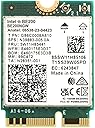
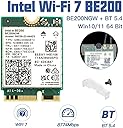
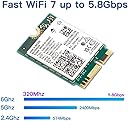
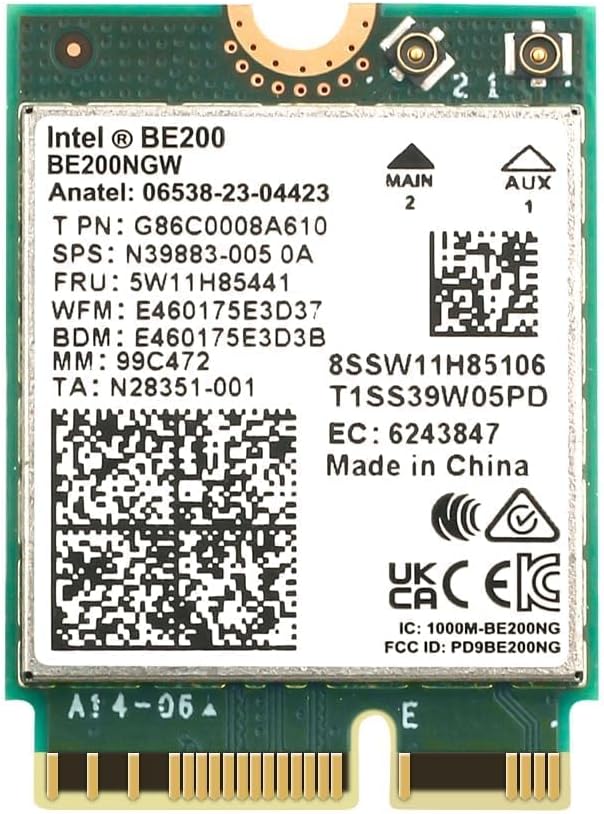
The Intel BE200 Wi-Fi 7 card delivers ultra-high-speed wireless connectivity up to 5.8 Gbps across tri-band frequencies (2.4/5/6 GHz) with Bluetooth 5.4 support. Designed for Windows 11/10 PCs with Intel CPUs and M.2 slots, it offers superior range, reduced latency, and enhanced power efficiency—perfect for professionals demanding seamless, cable-free performance.
| ASIN | B0CLV9C8TZ |
| Best Sellers Rank | #102 in Internal Computer Networking Cards |
| Built-In Media | 1 * BE200 Network card |
| Color | Green |
| Compatible Devices | Desktop |
| Compatible Operating System Family | Windows |
| Customer Reviews | 4.6 out of 5 stars 108 Reviews |
| Data Link Protocol | 802.11be/ax/ac/a/b/g/n |
| Data Transfer Rate | 5.8 Gigabits Per Second |
| Hardware Interface | Bluetooth |
| Manufacturer | Teday |
| Mfr Part Number | Intel BE200 |
| Minimum Required Operating System Version | Windows 11 |
| Model Number | Intel BE200 |
| UPC | 793481667199 793481667182 |
| Warranty Description | no warranty |
W**S
quick install, no driver issues. my wireless is now faster then my wired network.
easy upgrade for the laptop if you are comfortable opening it up. I upgraded my house wifi and the laptop was using wifi 5 still. This card bumped it up to wifi 7 and speeds shot up. Cheapest upgrade I've done for my laptop. I'll take an intel card any day and this was a great price. I'm having trouble fully testing the speed since my wired network is now slower then my wifi.
T**K
Life untethered from ethernet
This card works great on my intel based ROG laptop. I had some issues getting the existing antenna leads connected otherwise the install was a breeze. I upgraded from a wifi 6 card to this intel BE200 card. Once installed I had to forget my wireless network to get windows to connect to the existing 6GHZ channel on wifi 7. This improved my speed enough to replace my ethernet cable and go fully mobile. Huzzah!
G**N
Works with Older Intel CPU's and Extreme Range/Distance and Bandwidth Increase
I just upgraded all the WiFi chips in my devices. I have not yet upgraded the router to WiFi 7 but will be soon. For now I'm on an Asus WiFi 6 Router with 2.4GHz and 5GHz Bands. The BE200 WILL WORK ON ANY INTEL CPU AS LONG AS YOU HAVE a M.2 SLOT FOR EXPANSION - DEVICE MANAGER DOESN'T LIE!!! ***Even If all you have is some old router i would highly suggest getting this BE200 because your range/reception will increase drastically thus giving you faster speeds*** The 3 Devices i have that have an actual M.2 Slot got the Intel BE200. The other 2 devices that have PCIE for expansion got the MPE-AXE3000H which has the AX210 Intel Wifi 6e Card inside. It can see all channels ( 2.4, 5, and 6GHz) It's basically a hack card that Intel released with a M.2 Card that's inside a PCIE Adapter. That's as far as you can take older devices with only PCIE and no M.2 for expansion. Who knows, maybe Intel will end up doing the same for the BE200 Having said that. I was impressed with the AX210 which 5x'd my speeds and got a nice range increase compared to whatever WiFi cards they were using in 2011 - Massive upgrade and didn't think it could get much better. Based on reviews of the BE200 not working with anything prior to 12th Gen Intel CPU's i Bought a Couple of straight up M.2 AX210 Cards and a couple of the BE200 cards in case the BE200 didn't work with my 7th and 8th Gen Mobile Intel CPU's. Much to my surprise the BE200 Worked PERFECTLY with my older Intel CPU's. I first tried the BE200 to upgrade my M.2 Devices and WOW - it destroys the AX210. I'm easily getting 2-3 times the performance. Let me tell you The Range and Bandwidth increase is In Your Face and Obvious! My speeds 4-5x'd upgrading from the Intel AC 9650 which was the standard around 2017. I'm getting Full Speeds Wirelessly on the 5GHz channel that I am getting on a PC Directly wired to the router through ethernet. M.2 Devices - Dell Inspiron Laptop with 8th Gen Intel i5 (4 Core 8 Thread) CPU and 16GB Ram - Zotac Zbox Mini PC with 7th Gen Intel i5 ( 2 Core 4 Thread) CPU and 32GB Ram - The main office PC has an AMD Ryzen 7 5800XT 8 Core CPU with 32GB Ram and is directly wired to the router. The BE200 is said not to work with AMD CPU's so i didn't even try. For Now it has an AX210 PCIE Card in it that gets 2.5MB/s transfer speeds. However, This PCIE adapter: MSI Herald-BE WI-FI 7 MAX w/ Bluetooth 5.4 has a BE Card in it and is supposed to work with AMD Desktops: https://www.amazon.com/Herald-BE-802-11BE-Bluetooth-Multi-Link-Operation-Technology/dp/B0DFHRYRH6?th=1 PCIE DEVICES - Zotac Zbox Mini PC with 4th Gen Intel i7 (4 Core 8 Thread) CPU and 16GB Ram - Zotac Zbox Mini PC with 4th Gen Intel i5 (Straight 4 Core 4 Thread) CPU and 16GB Ram
M**T
Works fine
Works fine
S**N
Easy install, MP80 mini PC WiFi upgrade.
Used to upgrade my blackview mp80 mini pc, ran Windows update on lan, drivers installed np, now it's on wifi 7 with upgraded Bluetooth. Install was 9 screws with off terrible, 5 mins, really easy.
E**N
complicated setup
works great, definitely an upgrade from my old wifi 6 card, but only after fiddling with drivers for a few hours. if you’re not savvy, i’d bring your computer somewhere to have everything set up and save yourself from some stress.
J**R
Must have if you have a WiFi 7 Gateway
Great speeds compared to my previous network card. I had to wait for a WiFi 7 gateway to write my review and I have to say I do love the greater speeds and priority I receive with this compared to my other devices with older network cards. I also don’t experience issues with traffic like I did previous with multiple devices online at the same time.
T**K
First time well exceeding 1Gbps wirelessly
I purchased a SFF PC a year ago with WIFI6E and considered hard wiring for a speed boost. The PC is not in a convenient spot for ethernet so I decided maybe now is the time to make the switch to WIFI 7. Simply pop the old card and connect the antennas to the new card and that was it since I was upgrading from an Intel WIFI 6E card. I only recommend adding this card to devices that already support WIFI6E if the antenna cables are reused. WIFI6E introduced the 6Ghz WIFI band so if you attempt to upgrade from WIFI6 or older, the antenna might not handle 6GHz making the upgrade a waste of time/$. To maximize speed you need to use a 320MHz channel width. 320MHz width was added with WIFI7 and not all access points support such a high channel width. I'm using this card with Ubiquiti WIFI 7 access points set to 320MHz and seeing speeds in excess of 1Gbps ethernet.
Trustpilot
2 weeks ago
1 week ago