Buy anything from 5,000+ international stores. One checkout price. No surprise fees. Join 2M+ shoppers on Desertcart.
Desertcart purchases this item on your behalf and handles shipping, customs, and support to Spain.
🎨 Unlock your creative edge with precision and freedom!
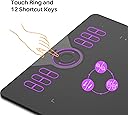
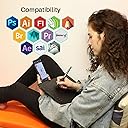
The HUION HS610 Drawing Tablet offers a professional-grade 10x6.25 inch active surface paired with an advanced battery-free stylus featuring 8192 pressure sensitivity levels and ±60° tilt support. Lightweight and slim, it supports Windows, Mac, and Android devices, making it the versatile choice for animation, design, and digital art on the go. With customizable shortcut keys and a multifunctional touch ring, it’s engineered to elevate productivity and creativity for millennial professionals seeking seamless, natural drawing experiences.


| ASIN | B07NZ4181M |
| Active Surface Area | 10x6.25 inch |
| Additional Features | 60° Tilt Support, Extra-Slim, Programmable Press Key, Shortcut Key |
| Best Sellers Rank | #20 in Computer Graphics Tablets |
| Brand | HUION |
| Built-In Media | Digital Pen, HS610 drawing tablet, OTG Adpater, Pen Holder with Pen Nibs*8, USB Cable |
| Color | Black |
| Compatible Devices | Desktop, Laptop, Smartphone, Tablet |
| Connectivity Technology | USB |
| Customer Reviews | 4.5 out of 5 stars 14,253 Reviews |
| EU Spare Part Availability Duration | 1 Years |
| Item Dimensions L x W | 6.25"L x 10"W |
| Item Weight | 0.6 Kilograms |
| Manufacturer | ShenZhen Huion Animation Technology Co., LTD |
| Mfr Part Number | HS610 |
| Model Name | HS610 |
| Model Number | HS610 |
| Native Resolution | 10*6.25in |
| Operating System | Android 6.0 and above, Linux(Ubuntu), Mac OS 10.12 and above, Windows 7 and above |
| Pressure Sensitivity | 8192 Levels |
| Screen Size | 10 Inches |
| Special Feature | 60° Tilt Support, Extra-Slim, Programmable Press Key, Shortcut Key |
| Specific Uses For Product | 3D Modelling, Animation & Desiging, Drawing |
| Target Audience | Student, Teacher, Toddler |
| Warranty Description | one-year warranty |
S**N
Still own a Wacom Intuos 3, and this is better
I have an old Wacom Intuos 3 I bought a decade ago. The intuos never worked very well with any of my computers. In photoshop it refused to implement pressure and seemingly the drivers would stop working randomly, forcing me to restart. Finally I chose to purchase the Huion HS610. I was trepidant, but at a little over $40, I wasn't risking much. I was very careful to download the correct drivers and uninstall any Wacom drivers I might have had on my rig. Almost immediately it worked flawlessly. The pressure control is very good, the shortcuts work (aside for a couple that don't but it's an issue with my software, not the tablet. For instance, I shortcutted Ctrl-SFT-Alt-S (Save for web), and that works great. However, Ctrl-T (Transform in PSD) refuses to work. Beats me why. It works in another software I have with the same shortcut for the same job. Strange. Other than that, I am thrilled with this tablet. It's smaller than my Intuos, but that's a plus. It's light and easy to handle. I added some tall rubber feet sso I can place it over my keyboard, but that's my preference. It's definitely a good tablet. I am thinking of buying a smaller one for my laptop (Which has a touchscreen and a pen, but it doesn;t work in Photoshop, which is crazy, but it has nothing to do with this tablet). I am happy with this. I have been using it almost daily since I bought it a few months ago and I haven't had any issues with it. A few more shortcut keys would be nice, but for the price it's fantastic. For the record, I had an old ipad Bluetooth slim keyboard and I rigged it to stay above the tablet on my drawing surface (A variable incline I built with pressboard and hinges). That's a lot easier tha n suing the regular keyboard for shortcuts I can't fit on the tablet. I even have a keyboard the size of a cellphone and I have integrated that too in my drawing/editing workstation. TL;DR: It's a very good drawing tablet.
M**.
This tablet is AWESOME!
I've been wanting a drawing tablet for several years to use in photoshop but the only brand I knew anything about was Wacom and the price just made one of those out of the question. When I heard about Huion and started reading and watching reviews, I decided to give them a try. I bought the H610 Pro V2 because of its drawing surface; 10X6.25 inches, and the fact it has tilt function on the pen. I do a lot of pencil drawing and the tilt makes shading with the pen just like shading with a pencil. I'm using an older computer with Windows 7 home premium and at first I couldn't get the tablet software to install correctly. Part of the driver would install but the part that actually operates the pressure and tilt funtionality, plus the tablet interface where you set up the tablet, failed to install. I could use the pen to do rudimentary drawing and painting much like using a mouse but that was it. I contacted Huion support and they were extremely helpful. After a few tries of the usual things that can affect the installation of the software, they actually wrote me a new driver. Which didn't work either at first! While they were off for the weekend, I kept working on it. Here's what I finally had to do to get it going: I did a system restore to remove any trace of the tablet software, then I ran windows update THREE TIMES to make sure I had all the important updates. (Turns out there was ONE update I was missing.) Once windows was updated, I rebooted, installed the newest driver Huion had sent me, restarted, and the software installed...most of the way. I plugged in the tablet, and it STILL wouldn't work. I unplugged the cord from the tablet, plugged it back in, and lo and behold, the rest of the driver installed and I now have a beautifully functioning tablet! So far, I've used the tablet in Krita and Photoshop and it works exactly as it's supposed to. I can't compare it to a Wacom because I've never owned one and it's been probably 15 years since I tried one. I just know if you don't have something to compare it to, you will love this tablet. The problems I had during install was purely the fault of my ancient computer - not the tablet. Krita, by nature, takes a LOT of resources so it's pretty slow on my computer. Once again, NOT THE FAULT OF THE TABLET. In Photoshop, it's no different than using a mouse in regards to speed of operation with what I've used it for. I find myself almost wishing I had bought a smaller one right now until I get used to it because I'm used to making much smaller hand movements with the mouse, but in time, I know it'll feel more natural. Just make sure you have room for it on your desk because it takes up a fair amount of space. The bottom line is, I love this tablet! Huion support worked with me every day to try to resolve the problem. If you're using an older computer like I am, make sure all the updates to windows are applied. I think Huion is a valid alternative to Wacom in terms of usability. Only time will tell how durable it is and I've only had it a few days. I'll try to update this review in a few months when I know more. If you've read this far, thank you for your time, and good luck with your new tablet.
J**R
HUION HS610 Drawing Tablet — Why Didn’t I Get One Sooner?!
After 20+ years of battling with mouse and ball for digital art, I finally took the plunge and grabbed this tablet — and wow, I’m in love. It’s a game-changer for animation and design, with the battery-free stylus and 8192 pressure levels making every stroke feel natural and precise. Setup wasn’t all smooth sailing — the driver install and getting my PC to recognize the pad gave me a bit of a headache — but once it locked in, it’s been flawless. At this price point, the value is insane. It works with ToonBoom and ToobPow which awesome since I live in those programs 18 hours a day! What a life savor for time when working from home. One other little small thing, mine although packaged as new did have some scrapes in the finish along one side showing definately that it was a demo or a return. Also, there is no protective cover for the pad to increase longevity of the pad itself over time. Just 2 little issues that should not have happened with a "new" product. If you’ve been stuck doing everything with a mouse like me, do yourself a favor and get one of these. You’ll wonder why you waited so long. 5 stars — powerful, affordable, and a total digital art upgrade.
J**I
Very good quality for a very low price.
This is a great graphic tablet for the price. I recently purchased another brand, very popular brand, as a gift for my little sister and I have to say that even though her graphic tablet was more money than mine, I believe mine is a lot better and I should've gotten two of these instead. I wanted to add a picture of something I drew to help support my review but, unfortunately, I have lost quite a bit of my artistic ability over the years and am trying to use this to get back into the habit of drawing with my wife (she sketches daily). I don't want to really get into anything spec-wise since you can read those right in the description. First, I wanted to give the only two things that disappointed me about this tablet.. it didn't work with my laptop out of the box due to windows compatibility (I had 7 installed, min is 8) and it doesn't work with my android. The reason I'm not rating lower than 5 stars for either of those is because I know that on the Huion website as well as the description, it lists the compatibility as Windows 8, 10.. and some stuff for Mac so that's not their fault. Also, it is not common for a graphic tablet to work at all on an android so I was just hopeful for that one (portability reason but battery would be horrible). Now, what I do like.. Response time on this is great- There is absolutely no lag time from the graphic tablet to the screen excluding when you have the size of your brush set really huge and even then, that's the program freezing up my six year old 1.6 dual core laptop, not the Huion tablet. Size- This one is in the description but I just wanted to mention that this is a larger tablet and my old tablet was a small 3x5 (??? Maybe..) one and although it worked okay for the time, I feel like a larger graphic tablet really makes it feel more natural.. I can't word this right.. but basically, how much you move your hand, draw on the tablet, is much closer in size to your screen, in other words, drawing on a 3x5 graphic tablet might feel more natural looking at a 4x6.5 screen but nobody wants to use a tiny screen like that. I can lay this tablet down over my keyboard on my laptop and it's pretty much the same exact size of the bottom part of my laptop. Lastly, so I don't drag this on too long.. buttons. At first, I wasn't sure how I would ever use 8 buttons on a tablet. Two on a pen, yeah, but 8 on the tablet? No.. now, I realized how useful they all are. Something specific I think is cool, using one button as Ctrl will actually allow you to remap it as 14 buttons pretty much. What I mean is, I use the two buttons to increase and decrease the pen size to do just that but when I hold the button I assigned to Ctrl, I can hold that and press the resize button and rotate my canvas instead.. I'm not sure if this is normal for a tablet but I love it. Anyway, I think this is well worth the money and I like it so much that if I do decide to buy a graphic tablet with a screen in the future, I'll stick with Huion.
A**N
Graphics tablet with stylus—incredible value for money! Highly recommended!
I purchased this product a while ago and sent it to my sister; I waited for her to put it to use so that I could write a genuine review of the purchase. This graphics tablet—complete with a stylus—has proven ideal for my sister to create graphic designs. At first glance, the tablet looks good; the stylus feels comfortable in the hand, features excellent pressure and tilt sensitivity, and the buttons are highly responsive. It is easy to set up, and in terms of value for money, it is incredible.
J**Q
Awesome (Even for folks over 58)!
I'm in love with my Huion tablet. I'm 59 years old and have just started drawing my first illustrated characters with this tablet and a fabulous pen. A whole new retired world opened up. Sturdy, very portable, EASY to set up, and readily accessible via those of us who enjoy a more "plug and play" style of learning. Compatible with some power apps, depending on how serious you are and how much you want to spend. I spend little with Medibang, and have a blast creating art of any kind. Power to the old folks! We can learn! (And have a lotta fun!)
M**S
Bad reveiws? really? (update to my previous reveiw, all good)
So I just got this tablet today, unboxed it and checked it out.. light weight? pretty comparable to other electronic devices and there accessories it felt fine. I installed the driver and attached the USB cable and tried it out in blender and no pressure sensitivity.. looked around online and there isn't much info on this. after looking around for a bit I uninstalled the drivers rebooted to make sure I had no other applications open then reinstalled drivers and opened blender again and it worked, so far I've used this in Krita, Photoshop 2017 and Blender and Hell's yes very pleased with my purchase. In response to the bad reviews... really? I'm happy with my product. ------------------------------------------------------------------ Update to my review. After using this product for a few days in various programs. Photoshop, Krita, Blender 8.0 (Grease Pencil). The issues that I had were not related to the tablet’s, hardware, firmware or software. There was no software Cd with drivers that came with the product, but instruction for downloading them from Huion's website which I'm fine with. The first driver install was problematic and the device didn't function properly because I had a graphics application open during the installation, there are clear instruction to close all application’s before installing driver's. I uninstalled Huion’s software, rebooted my computer, opened nothing and then reinstalled the driver's and everything worked as advertised, and the tablet is fully customizable via there software interface. My system.. My system is an MSI laptop with I7 2.8 MGH 16gb of ram and a 6 gig NVIDIA graphics card. any Issues I had with lag were software issues specific to the application used and not hardware related. Graphics programs are resource intensive and put a load on your system if you don't have the resources available or resources properly allocated to said software you will have problems working with larger files tablet or no tablet. Line quality? It took a minute to get used to using a tablet and figure out what was a hardware issue vs software vs user error. the pen is very sensitive and will show every mistake, In blenders Grease Pencil I used auto smoothing to compensate for my shaky hand and it worked great and felt natural like I was sketching on paper and it became a non issue. I didn't find an adjustable auto smooth in my version of Photoshop but from what I understand the latest version does have it, Krita crashed a few times and has known issues with open GL that was broken after a Microsoft update, that made figuring things out a bit buggy but once that was resolved I found that I was able to use there setting’s to set up auto smooth and improve line quality there as well. I think a good base for sorting out issues and what I did was unbox the product set everything up as directed by Huion then use Microsoft Ink to test the tablet and pen and resolve issues so you know whats what if its the hardware or system or software, and then move on to the applications that your going to use the tablet with. one last thing on line quality, another thing I realized was sketching on a letter sized document at 72 or even 100 dpi with a 10px brush is going to be problematic and look horrible vs a 10000 X 7000 px document at 300 dpi where I have more pixels to represent the line the image quality and line quality is going to be far better and print better with the larger document size, of course adjust the numbers to work with your systems resources and whats practical for you. The cons? Directed at Huion regarding the design of the pen.. you give me two switches on the pen that I cant find with my fingers, make there profile higher so there in the way enough to figure out where my fingers are on the pen, two flat spots on the sides incorporated into the grip for orientation also please, make it so the pen has sides. also seriously you cant throw in a third switch on the back end of the pen as an eraser, would that break Huion’s piggy bank? To summarize: I found no problems with the hardware or the drivers for this product that weren't self inflicted or caused by the limitations of my own computer and or software that I used the tablet with, one small complaint that I have been able to happily deal with is that the pen needs a couple of small minor changes.. and the tilt? check the software that your using the tablet in and look for tilt settings in your brushes and adjust those, my tilt seem to work as good as my ability to set up the software for it. that's all happy Huion Customer here and I look forward to using more of there products.... added note: this works flawlessly with Autodesk Sketchbook (now free)
L**A
Just okay
Long time Wacom user. Starting with a ginormous one at my first design job back in the 90s. I currently own 2 large pen tablets but I needed a small one to use with my MacBook Pro while traveling. I have looked Huion keypads and tablets for years but was hesitant to buy a different brand because those are some big shoes to fill. This seemed like a good time to try a small tablet since it will be for limited use. On first look this is a nice tablet. Looks nice, pen feels good in my hand, buttons on the tablet are responsive and easy to program. Pressure settings are a little different than I am used to but easy to figure out. So here is where my use veers a little from the typical artist or illustrator. I am a graphic designer so though I have a traditional art background I don’t draw much. I touch up art/photos for print and do layout work and document editing. Most of my time is spent in InDesign. Sadly this tablet is terrible for layout work. Yes it draws a lovely line, with delightful pressure and tilt sensitivity but to click and drag an object or select fonts or precisely line things up, not so much. I found it inconsistent in selecting an object, even on something as simple as browsing Amazon it sometimes took several attempts to click a product link. Also the seam between the bezel and the drawing surface is not as smooth as it should be. After using it for an hour or so I could feel it chafing my wrist where it drags across the edge of the tablet. For a full days work this would be unbearable, to be fair I do have very sensitive skin. Unfortunately Huion is still not quite on par with Wacom so back this tablet goes. Luckily I found an excellent deal on a small Wacom for only a few dollars more.
M**N
New Fav Brand
After using competitors for along time, I decided to give this a go. I think I'm here to stay. It's awesome, it works, it feels like an upgrade from where I was coming from, price is great spot. I think I'll stay here for my monitors too.
و**ء
رائع انزلاق سلس ومنتج ذو جودة عالية..
يعمل على أجهزة الجوال أو الكمبيوتر بشكل سريع بدون برمجة.. فقط تحتاج برمجة الازرار.. بحسب رغبتك واستخدامك.. مثلا احتاج أن يعمل الزر على التراجع عن الخطوة الأخيرة او تفعيل المساحة أو تكبير الشاشة وتصيرها أو عمل ملئ للون وخيارات اخرى بحسب استخدامك.. فقط أضف رمز الاختصار (ctrl+ z كمثال)
A**A
بائع محترم
منتج جيدا
R**.
super good for drawing and online teaching
very good drawing tablet, very useful for teaching also, several extra configurable buttons, scroll bar, wireless pen, changeable and spare tips.......
G**Y
A Frugal Artist's Best Friend
Honestly, I'm actually blown away from the quality of this tablet. It has a moderately-sized working area and its drawing capabilities are very robust. The only thing is when you set this tablet up you have to delete any Wacom drivers on the computer. If you compare this tablet to the small Wacom Intuos Tablet the drawing experience is literally night and day. This tablet I can use without my hand cramping after an hour of use. It has pressure sensitivity and even tilts controls! it has everything that an artist needs at an affordable price. Seriously consider this tablet when purchasing your first tablet, everything you need to make professional-looking art is in this tablet.
Trustpilot
4 days ago
3 days ago