We remain fully operational. Our teams are working around the clock to ensure your deliveries continue safely.

Descargar la aplicación


Servicios al cliente
Sobre nosotros
Copyright © 2025 Desertcart Holdings Limited
Descargar la aplicación
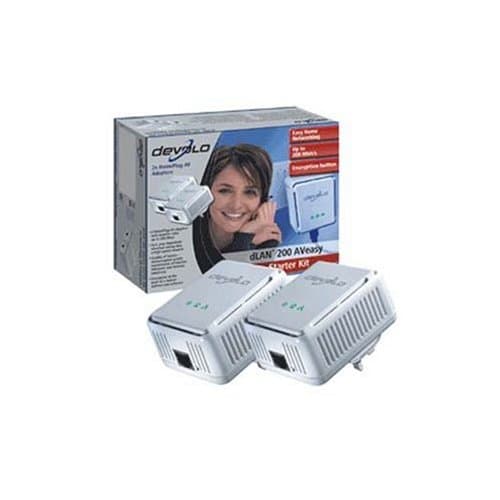
devolo dLAN 1222 Powerline Network Adapter 1 x Network, 1 x - 200 MbpsPackage Contents: 2 x dLAN 200 Mbps Powerline Network Adapter Network cable CD containing software and documentation Hard copy of installation guide Product Type: Powerline Network AdapterData Transfer Rate: 200 Mbps PowerlineDimensions: 80 mm Height x 65 mm Width x 40 mm DepthManufacturer Part Number: 1222Manufacturer Website Address: www.devolo.co.ukMarketing Information: dLAN 200 AVeasy connects network-enabled devices such as PCs, modems, routers, game consoles and set-top boxes via your household power grid. It complies with the new HomePlug AV standard and supports data speeds of up to 200 Mbps. Its speed opens the door to bandwidth-intensive applications such as Internet television, video-on-demand, VoIP telephony and fast Internet access with Interfaces/Ports: 1 x RJ-45 NetworkInterfaces/Ports: 1 x HomePlug AV PowerlineStandard Warranty: 3 YearWeight (Approximate): 148 gCoverage: 200 mManufacturer: devolo AGProduct Model: 1222Product Name: dLAN 200 Mbps Powerline Network AdapterProduct Line: dLAN Review: Very Easy to Install - I purchased this product rather than similar 1Gb products because the reviews were more consistent and few people had trouble getting the product working. Didn't go for the ones with an integral 13A socket and filter as the additional cost seemed excessive. Adapters are cheap if needed! Product arrived very promptly by courier well ahead of the desertcart due date. Product was well packed in bubble-wrap and was undamaged. On unpacking a very simple Installation guide made it clear how to install the units and connect up the ethernet leads. Product worked first time as configured from the box. At present is connecting my laptop to my router, rather than being used to route AV data to my IPTV (which is what I will do with it one I get my wireless connection sorted out for the laptop). Streaming video to the laptop seems to work ok. Installation instructions details website from which to download additional software and configuration instructions (needed if you are going to secure the comms between units). Using the button on each unit to encrypt the data stream using the downloaded instructions was easy and the units are now functioning with an encrypted datastream. I was a bit worried to start with as it took a little time (less than 1 minute) for traffic to resume after I changed to encrypted traffic - but all was OK. Review: Free At Last - What a great product and what a great price. Having lived with trailing a 15M ethernat cable from my modem upstairs to my downstairs living room for the last several months I was getting desperate to find another way of doing it without the hassle of installing a wireless modem, etc. I came across this product whilst searching the net for answers and it seemed to be what I needed - however my main concern; that it might not work because my mains sockets upstairs are on a separate ring main and on a separate power-breaker in the mains box to those downstairs - where I would be using the link most, didn't seem to be documented anywhere. I was therefore reluctant to shell out around £90 plus pp with the chance it might not work. Then I saw a starter set on desertcart at a very decent £77 (all in) and thought that would be worth a try - after all, even if it didn't work across the separate ring mains I could use it in other areas on the same ring. I plugged one in upstairs and one downstairs and switched them on. Eureka! Less than three minutes out of the box and I was up and running. Full web access first go and with no loss of speed. Why did I put up with tripping over that darned 15M cable for so long? Now I am free at last to roam the house - well anywhere within reach of a mains socket anyway. I really have nothing negative to say about starter kit; I am delighted with it, with the price I paid and with desertcart's speed of delivery (two days earlier than the predicted date) and would recommend this product without reservation. devolo dLAN 200 AVeasy (HomePlug AV) Starter Kit - Eth/ Eth
| ASIN | B0014LGNMS |
| Brand | devolo |
| Brand Name | devolo |
| Compatible Devices | Desktop |
| Compatible devices | Desktop |
| Customer Reviews | 3.6 out of 5 stars 70 Reviews |
| Global Trade Identification Number | 04250059612228 |
| Hardware Interface | Ethernet |
| Hardware interface | Ethernet |
| Manufacturer | Devolo |
| Manufacturer Part Number | 1222 |
| Model Number | 1222 |
B**R
Very Easy to Install
I purchased this product rather than similar 1Gb products because the reviews were more consistent and few people had trouble getting the product working. Didn't go for the ones with an integral 13A socket and filter as the additional cost seemed excessive. Adapters are cheap if needed! Product arrived very promptly by courier well ahead of the Amazon due date. Product was well packed in bubble-wrap and was undamaged. On unpacking a very simple Installation guide made it clear how to install the units and connect up the ethernet leads. Product worked first time as configured from the box. At present is connecting my laptop to my router, rather than being used to route AV data to my IPTV (which is what I will do with it one I get my wireless connection sorted out for the laptop). Streaming video to the laptop seems to work ok. Installation instructions details website from which to download additional software and configuration instructions (needed if you are going to secure the comms between units). Using the button on each unit to encrypt the data stream using the downloaded instructions was easy and the units are now functioning with an encrypted datastream. I was a bit worried to start with as it took a little time (less than 1 minute) for traffic to resume after I changed to encrypted traffic - but all was OK.
D**N
Free At Last
What a great product and what a great price. Having lived with trailing a 15M ethernat cable from my modem upstairs to my downstairs living room for the last several months I was getting desperate to find another way of doing it without the hassle of installing a wireless modem, etc. I came across this product whilst searching the net for answers and it seemed to be what I needed - however my main concern; that it might not work because my mains sockets upstairs are on a separate ring main and on a separate power-breaker in the mains box to those downstairs - where I would be using the link most, didn't seem to be documented anywhere. I was therefore reluctant to shell out around £90 plus pp with the chance it might not work. Then I saw a starter set on Amazon at a very decent £77 (all in) and thought that would be worth a try - after all, even if it didn't work across the separate ring mains I could use it in other areas on the same ring. I plugged one in upstairs and one downstairs and switched them on. Eureka! Less than three minutes out of the box and I was up and running. Full web access first go and with no loss of speed. Why did I put up with tripping over that darned 15M cable for so long? Now I am free at last to roam the house - well anywhere within reach of a mains socket anyway. I really have nothing negative to say about starter kit; I am delighted with it, with the price I paid and with Amazon's speed of delivery (two days earlier than the predicted date) and would recommend this product without reservation. devolo dLAN 200 AVeasy (HomePlug AV) Starter Kit - Eth/ Eth
J**S
Quick and easy setup - but pass through would be better
These homeplugs are a breeze to use. Just plug in, connect the cables and you've got an instant home network. I got them to extend my broadband connection and network to my Blu Ray / DLNA device and got an instant connection. Couple of things to note: - unless you've got lots of sockets, pay a bit extra and get ones with a pass-through electric socket - I wish I had. Mine are working on a multiplug extension, but it's not recommended by Devolo - Amazon are recommending a bundle with network cables, but this came with two cables in the box so save your pennies
P**R
Am I just really unlucky?
I went for the Devolo AV Easy devices because of all the positive 'up and running in a few minutes' style reviews. My PC can recognisxe when the device is plugged in directly to it but I can't do anything with it - the DLan configuration Wizard claims 'no DLan adapter is found'. Tried plugging into my modem/router (Netgear DG824M) and the Netgear management software does not even see the device. Later edit: I tried contact Devolo support via email. Expect a 2 day response to any email - including any followups. Had explained that I thought it was a hardware fault but responses I got were along the lines of 'upgrade the firmware' which is very poor since I explained in the email that the computer could not see one of the devices - making a firmware upgrade impossible. After a week of unsuccessful emailing I phoned their support line and immediately had it confirmed that I had a hardware problem. Explained to Amazon who sent a new pair out immediately and these worked fine. My rating now would be - the hardware 4 stars, Devolo email support 1 star and the Devolo phone support 5 stars.
D**W
great, once it's set up!
I had a nightmare getting it to work - setting it up was painful. I had to get my consultant in. Eventually after uninstalling McAfee and switching off my BT HomeHub and switching it on again, we got it to work. Before setting up, check their website for an up-to-date firmware (you'll know what this when you've read the complicated manual). Now it's running it's great. 1 star for installation but 5 stars for it once it's working
A**E
Good if you fix the firmware
When connected to a laptop I initially had problems - the networking seemed to break whenever the laptop was unplugged or went to sleep. All the problems went away when I went to the Devolo site and (with some difficulty) found a page where you could download the latest firmware - version 3.x. The firmware upgrade was trouble-free and now the product is fine. The product shipped with version 2.x of the firmware and I'm a bit surprised that they don't put the latest version on when they ship - perhaps my product had been in the warehouse a while. Once the firmware was fixed it all works like a dream - a good deal faster and steadier than WiFi, and with no problems in a large house.
J**Y
Perfect
Why oh why didn't I think of this before!!! (Because it's not advertised maybe?) This has to be the perfect option for setting up internet access to all rooms in a house, even if you have a wireless router (I have a BT Homehub) this is the better and more efficient way to do it. Plus you can expand on it so adding additional homeplugs is easy providing you have at least 1 (preferably 2) sockets in the desired room. Wireless is good but remember that the further away the receiving PC/Laptop is, the weaker the signal will be, so if your router is, shall we say in the living room or the hallway and your PC or laptop is upstairs then the signal has a long way to go, plus a some obstacles like ceilings/floors and walls to pass through, all this will take some signal strength away, and the thicker the walls the weaker it will become. (Please see addition information below under *Warning*) If you don't want an Ethernet cable (the cable used to link the homeplug to the PC/Laptop) to be visible then you can also purchase the homeplugs that are wireless, because it will be in the same room as the PC/Laptop you'll have the best signal possible. **** WARNING **** This is very important and might be overlooked when purchasing this product. As the homeplug works by sending the information through the existing electrical wiring in the property you can only use them on the same mains ring. For example. Most modern properties will have *2* ring mains for the electrical sockets, 1 for downstairs and a 2nd for upstairs, so if you connect the router in the hall to the hall's electrical socket you'll only be able to plug the other homeplug in a socket on the downstairs ring main as the signal will not be able to get to the ring main upstairs. So it would be advisable to seek an electricians advise as I'm sure they'll be able to help overcome this small problem. One other thing, I have read on the internet that mobile phone chargers that are left plugged into the mains *could* cause interference with the signals sent from the homeplugs, as I say this is just something I have read and am unsure of it's accuracy. Happy networking...
R**D
Devolo dLAN 200 AVeasy (HomePlug AV) Starter Kit - Ethernet
I was having horrendous problems with my home wireless router and needed to move it to another location but didn't want to run cables all over the house. The dLAN 200 came in very handy. I have now moved my router, thanks to the dLANs 'network over mains' capability and have solved all my problems. (and the wife is happy that I didn't have to rip up the carpets to lay cables!!) Well Done Devolo!
Trustpilot
Hace 2 semanas
Hace 1 mes