We remain fully operational. Our teams are working around the clock to ensure your deliveries continue safely.

Descargar la aplicación


Servicios al cliente
Sobre nosotros
Copyright © 2025 Desertcart Holdings Limited
Descargar la aplicación


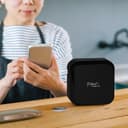
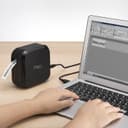

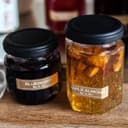
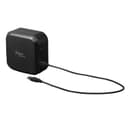
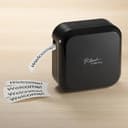
✂️📱 Label like a pro, anywhere you go!
The Brother P-touch CUBE Plus PT-P710BT is a sleek, portable Bluetooth label maker that prints up to 24mm wide labels from Apple or Android devices and desktops. Featuring a built-in rechargeable Li-ion battery, automatic cutter, and compatibility with a wide range of laminated and specialty tapes, it offers versatile, professional-grade labeling for home, office, retail, and craft businesses.


| ASIN | B07HB8LNSY |
| Additional Printer Functions | Print Only |
| B&W Pages per Minute | 20 ppm |
| Best Sellers Rank | #7,154 in Office Products ( See Top 100 in Office Products ) #17 in Label Makers |
| Brand | Brother |
| Built-In Media | P-touch Cube Plus Label Maker (PT-P710BT) 1 Black on White Starter Tape 0.94” (24mm) x 13.1’ (4m) 1 Black on Premium Glitter Gold Starter Tape 0.94 (24mm) x 6.5’ (2m) Built-in Li-ion battery ,USB cable Documentation |
| Color | Black |
| Compatible Devices | Mac OS X 1.11.x |
| Control Method | Voice |
| Controller Type | Android |
| Customer Reviews | 4.5 4.5 out of 5 stars (2,481) |
| Dual-sided printing | Yes |
| Duplex | Automatic |
| Global Trade Identification Number | 00012502653004 |
| Hardware Interface | Bluetooth |
| Ink Color | Black |
| Is Electric | Yes |
| Item Dimensions D x W x H | 2.6"D x 5"W x 5"H |
| Item Type Name | Brother P-touch CUBE Plus PTP710BT Versatile Label Maker with Bluetooth Wireless Technology |
| Item Weight | 1.4 Pounds |
| Manufacturer | Brother Printer |
| Maximum Copy Resolution Black and White | 180 dpi |
| Maximum Copy Speed Black and White | 1.2 ppm |
| Maximum Media Size | 3 x 5 inch |
| Maximum Print Resolution Black and White | 180 dpi |
| Maximum Sheet Capacity | 1 |
| Model Name | P-touch CUBE Plus |
| Model Number | PTP-710BT |
| Model Series | P-touch CUBE |
| Other Special Features of the Product | Lightweight, Portable |
| Output sheet capacity | 1 |
| Paper Size | 0.94W x 157.2L inches,0.94W x 78L inches |
| Print media | Labels |
| Printer Connectivity Type | Bluetooth, USB |
| Printer Output Type | Monochrome |
| Printer Type | Thermal |
| Resolution | 180 x 360 |
| Scanner Type | labels |
| Specific Uses For Product | Small Business, Home Office Organization, and Storage Labels |
| Total Usb Ports | 1 |
| UPC | 012502653004 |
| Unit Count | 1.0 Count |
| Warranty Description | 1 Year Limited Manufacturer |
| Warranty Type | limited warranty |
D**H
Great label printer
Easy to set up and use, works great. You can use the app to change fonts, font sizes, label lengths, margins, etc. I was pleasantly surprised at all the options available and how easy it is to use.
K**N
Great printer
Super convenient and nice to have. You can have it plugged up to your computer and use the software to print labels or you can use your phone directly with Bluetooth. Highly recommend
D**N
Good for portability
Great label printer would reccomend! The brother app makes it easy to print and the label maker is portable
P**T
Good label printer for Brother TZe series cartridges, NOT stand-alone (requires other equipment)
This review is for the "Brother P-touch CUBE Plus Bluetooth Label Maker (PT-P710BT)"; note that the Amazon listing defines this as being the version with the WHITE case color, but I received the regular BLACK color. This is a portable/desktop label printer that is designed to work exclusively with the Brother "TZe" series of cartridge-based labeling tapes. The TZe tapes are self-laminating (inside the cartridge) for durability, and have a long-life high-grip adhesive backing which is easily exposed due to the automatic slitting of the backing paper during the printing process. The printer is about 5" x 5" x 2-5/8", and it weighs about 24 ounces. The printer has NO controls or display. You MUST also use one of the three label-design applications that Brother makes available for free on their website: - P-Touch Editor is the best, easiest to use, most powerful/flexible application, and runs on a desktop or notebook computer (Windows, and maybe Apple....I did not check) - Brother iPrint&Label (for Android or Apple smart phones and tablets)....this is for making conventional/serious labels - Brother P-Touch Design & Print 2 (Android/Apple)....this is for making decorative arts & crafts type labels The printer connects to the device (that is running the design software) via either included USB cable or via Bluetooth; it does NOT support WiFi connections. Any Brother TZe series label cartridges for label widths of 1" (0.94") or LESS can be used in this printer. Except for its form factor, this printer can use the same cartridges as any of the Brother handheld or desktop label designer/printer products in the P-Touch family. The printer comes with: - printed manual (in the form of a large folded sheet of paper) - short USB cable, for charging and/or for wired USB communication with a label design device, as described above - 1" sample cartridge (black on white); example of what might be used for many conventional/serious labels - 1" sample cartridge (black on gold); example of what might be used for many decorative/arts & crafts labels The printer contains a proprietary Li-ion battery. It can run on battery power alone, or when plugged into a USB power supply or computer, it can run from that USB power source; the instructions note that the battery will NOT be used when USB power is available, and that the battery might NOT charge, or might charge slowly, if operated while connected to USB. In other words, the battery will charge faster if the printer is not in use while USB powered. The 'user interface' consists of a POWER button, an LED to provide battery status, and another LED to provide operational status; there are a LOT of color & flashing patterns for the second LED, to the point where it is useless unless the LED chart in the manual is handy. I have used Brother P-Touch / Tze label products for a LONG time, and have always used one version or other of the P-Touch Editor (label designer). I have one of the older printers with a fairly large keyboard and display, but wanted to be able to do mobile/off-site TZe label design & printing without lugging my computer and that large printer around. This PT-P710BT is a good solution to the printer portability aspect of that, and it does seem to be a quality product and seems to work well. HOWEVER, as long as I need to use my Android smart phone for portable label design, I find the Brother iPrint&Label app to be rather poor. A lot of this simply comes down to the fact that a small touch-screen interface is very limited when it comes to designing and laying out detailed text and other graphical objects (e.g. barcodes and QR codes), and the great number of sub-menus required due to small screen size on phones contributes to slow and awkward label design, unless all you want to design are the simplest of labels. In my case, I have ended up dragging my notebook computer around in order to use the P-Touch Editor software. I do want to share a nice carrying case for this printer. Amazon sells it as the "Peyyargo Case Compatible with Brother Plus PT-P710BT Label Maker". When opened like a clamshell, a Velcro-closed mesh pocket on the 'lid' half is a good place to hold the included (with the printer) short USB cable, and on the bottom half I used the included (with the case) partition, with the printer on one side of the partition and a generic USB AC-charger and TWO TZe cartridges. With one cartridge remaining in the printer, this means that I have three cartridges fitting inside the case, 1/2", 3/4" and 1" wide labels accommodated in this way.
P**I
Useful for tons of purposes, providing a professional looking way to label
Some time ago I read an article about organizing. One of the things it suggested was to get a label maker to help I.D. boxes, drawers, items in the pantry, and so forth as part of the process. This was the product that was highly recommended. And it truly is fantastic. I really like having things nicely labelled. So much better than handwritten, uneven labels. It give me real satisfaction seeing my neatly and professionally labelled things. The P-touch Cube has a lot of great features. One can download software for use on your laptop or desktop and for mobile devices—phones, tablets. The software allows you to determine the type and size of your font. It also has templates for many different types of labels—storage, kitchen, garage, office, labelling CD’s, etc. You can use the templates as is, revise or customize the templates, or not use them at all. Some templates have designs of various kinds on them. I typically find the templates are a good starting point. One can operate the label maker via Bluetooth on your phone or tablet or on your computer but connecting the cable that comes with it (with an adapter allowing for USB-A or USB-C). When I just need a quick, simple label, I make it from my phone without using a template. It’s fast and simple. The P-touch Cube has a built-in rechargeable battery, making it easy to move from room to room or take with you on a business trip. The label tape comes in cartridges that can be easily popped in and out—for instance if you need a larger size or different color background or font. I’ve used the label maker, among other things, to identify soap and lotion jars in our guest room, label small travel bottles, on the sides of notebooks, and on files. I’m about to launch a reorganization of our pantry, where I’ll be labelling the new containers I got for that purpose. Great product.
R**B
Brother iOS App provides many templates and the ability to easily create your own customs labels.
G**O
Produto de qualidade e com muitas funcionalidades.
F**E
Excelente etiquetadora
F**.
Was ich erst gar nicht wollte, Etiketten am Mobiltelefon erstellen und drucken. Ist aber so toll, dass das die bevorzugte Variante wird. Leider verbinde sich der Drucker nicht per Bluetooth mit Windows 11. Da sollte der Hersteller nachbessern. Was mir auch missfällt, dass am Anfang immer ein Stück Bank abgeschnitten wird. Beim ersten Mal, nach dem Einlegen eines Bandes, da ist das ja noch in Ordnung, aber bei verschiedenen Etiketten, wenn man mehrere verschiedene drucken will, gleich ca. 3cm verschwenden, das ist nicht nachhaltig. Woolworth-Prinzip: Verschenke die Lampen, verkaufe das Öl. Und wenn man das auf den Drucker übersetzt, dann wird hier viel Öl weggekippt. Also immer gleich mehrere Etiketten drucken und verwahren.
B**I
Utilisé particulièrement pour étiqueter mes aliments congelés sous vide mais étalement pour identifier mes documents.
Trustpilot
Hace 5 días
Hace 2 semanas