We remain fully operational. Our teams are working around the clock to ensure your deliveries continue safely.

Descargar la aplicación


Servicios al cliente
Sobre nosotros
Copyright © 2025 Desertcart Holdings Limited
Descargar la aplicación


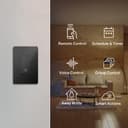


💡 Light up your life smarter, not harder.
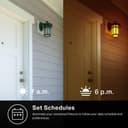
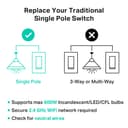
The Kasa Smart Light Switch HS200-BL is a UL-certified, single-pole smart switch requiring neutral wiring and 2.4GHz Wi-Fi. Compatible with Alexa and Google Assistant, it offers voice control, remote app management, advanced scheduling, and security features like Away Mode—all in a sleek black design that fits standard wall boxes. Ideal for professionals seeking a seamless, modern smart home upgrade without the hassle of hubs or complex setups.


| ASIN | B0CV9QG1D3 |
| Actuator Type | Push Button |
| Best Sellers Rank | #553 in Tools & Home Improvement ( See Top 100 in Tools & Home Improvement ) #1 in Electrical Light Switches #2 in Home Automation Devices |
| Brand Name | Kasa Smart |
| Circuit Type | 1-way |
| Color | Black |
| Connectivity Protocol | Wi-Fi |
| Connector Type | Screw |
| Contact Material | Copper |
| Contact Type | Normally Closed |
| Control Method | Voice |
| Controller Type | Amazon Alexa, Google Assistant |
| Current Rating | 15 Amps |
| Customer Reviews | 4.5 4.5 out of 5 stars (43,298) |
| Included Components | 1× HS200-BL; 1× Wall Plate; 4× Wire Nuts; 1× Quick Start Guide; 4× Wire Labels |
| International Protection Rating | IP00 |
| Item Dimensions | 5 x 3.3 x 1.41 inches |
| Item Weight | 3.84 ounces |
| Lower Temperature Rating | 32 Degrees Fahrenheit |
| Manufacturer | TP-Link |
| Material Type | Polycarbonate |
| Model | HS200-BL |
| Mounting Type | Pole, Wall Mount |
| Number of Items | 1 |
| Number of Positions | 2 |
| Operating Voltage | 120 Volts |
| Operation Mode | Off, Smart Switch |
| Specification Met | UL |
| Switch Type | One-way |
| Terminal | Screw |
| UPC | 840030711763 |
| Unit Count | 1.0 Count |
| Upper Temperature Rating | 104 Degrees Fahrenheit |
| Wattage | 600 watts |
J**P
Works Great – Easy Smart Upgrade
The Kasa Smart Light Switch HS200 worked perfectly for me. Setup was straightforward, and it connected to my 2.4GHz Wi-Fi without any issues. The size is just right to fit in a standard wall box, and it feels solid and well-built. Performance has been great so far — accurate control, responsive, and it works seamlessly with the Kasa app for scheduling or remote control. Overall, this was a great deal and totally worth it if you want to upgrade to a smart switch. No problems so far, super easy to use, and works exactly as expected.
M**4
great smart switch
I purchased two; they work excellently since I have other Kasa stuff. It was easy to add these to the app. I love all of Kasa products. They have an easy app to work with and understand. The black color switches looks very contemporary and futuristic.
B**L
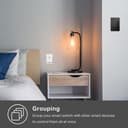
Paired switches to turn on multiple lights from 1 switch
Our townhouse has an attached garage. The garage has 2 exterior lights that can only be turned on from inside the garage but not from inside the house. Near the garage is our front door. Inside the house there is 1 switch for the single exterior light near the front door. I was searching for a way to turn on all 3 lights using just the 1 interior light switch by the front door. I bought (2) Kasa Smart Light Switches (HS200) which I then added to my new Home Assistant setup (not required) and it works great and was easy to install / setup. Installing these switches cost less than $30. You do need to be comfortable replacing and wiring a light switch. You need to have a “neutral” wire in the light switch box. If you have an older house this might not work for you. Our town home was built in 2001 so it’s not that new but not that old either and had the appropriate wires needed. You can install these switches and use the native app on a smart phone to program a variety of tasks. There is no need for a home automation system / hub. From the app I was able to set the switches so that if I turn on/off one switch it turns on/off the other switch. Essentially pairing them together. They still function as individual light switches (non-smart switch) if the wifi goes out - so the pairing feature only works with an Internet connection but they still function as single light switches if the Internet is down. This smart switch has a small circular indicator light on the bottom of the switch which I set to only turn on if the lights are on. So, if I forget that the outside lights are on - the indicator light on the wall switch will be on. I like the visual clue so I don't leave them on all night. I like being able to use the smart switch just like a regular non-smart switch by pressing the switch - mostly because my wife won't bother with voice or phone app controls so we need a physical switch. I think it's fun to be able to control the lights from my phone and also from Google Home / Assistant. I can ask Google (or Alexa or my Home Assistant) to turn the lights on or off with voice commands too. They can also be programmed to come on/off at particular times of the day but I haven't used this feature. Another cool thing is that I can turn the lights on or off remotely with an internet or data connected phone - if I'm not at home. I use this feature if friends or family are going to arrive at my place before I do and I want to have the lights on for them. These smart switches were just the thing I was looking for and it gave me a real sense of accomplishment since it took me a few years to get around to solving this issue. I can now turn on 3 lights using 1 switch without having to hire an electrician and without running new wires in the house. For under $30 this was an outstanding value and I'm very pleased with the results.
A**Y
An Easy way to control multiple devices on a single circuit.
I made the jump to a "Smart Home" a little over a month ago after Alexa joined our family. After talking to some friends, doing some research and assesing my needs I settled on TP-Link because of the variety of Smart products they offered, no requirements for a Hub, the lower cost and the ability to control everything from one simple app on my Smart phone and Amazon"s Alexa. I have not been disappointed. After a very short learning curve, I surprisingly found the installation and set-up of all the TP-Link Smart devices extremely easy and intuitive. I have installed several different Smart devices including three different bulbs (LB-100, 120 & 130) depending on the area, as well as, Smart Switches (HB-200) and Smart Plugs. All of it has installed, programed and worked with few problems. The only criticism I have is the Kasa App. I have found it to be a bit bugy at times, but since I use it primarily for programming and setting up new devices and scenes, rather than operationally, it has not been an issue since Alexa handels most of that work. So far, in the six weeks my Smart Home has been in operation I have only had one problem where Alexa and the Kasa app lost communication with most of (but not all) of my TP-Link devices. But after a bit of head scratching I was able to restore communication. So here's a tip to remember: I first tried rebooting the devices by cycling the power breaker, but that didn't work. Probably due to multiple devices signaling simultaneously and overloading Kasa. But, powering each device down for a few seconds then back up, and testing it before moving on ro the next one worked without a problem. I also recommend using a different control application. I only have experience with Amazon Alexa, but it also interfaces with Google Home among others. I have found that controlling scenes from Kasa not to be reluable for some reason, while issuing the scene commands to Alexa works 90% of the time, with repeating the command becoming necessary about 10% of the time. But even with an occasional repeated command being necessary, TP-Link devices respond extremely well through Alexa's control. Plus Alexa is able to easily "group" multiple devices so you can control areas with a single command, or program macro activities that Alexa can perform with a single command. Capabilities Kasa does not have. This is another deficiency of the Kasa app. Without the ability to group devices or run macro routines, it relies on programmed scenes which are very limiting for operational control. So another controlling app like Alexa or Home is essential to the TP-Link Smart Home system. For me, because I have Alexa for operational control, both at home and away, these short comings in the Kasa app are non-issues. But if I didnt have this capability I think I would look to a different Hub controlled platform for my Smart Home lighting and device control. HS-200 Smart Switch: I am a retired electrician, so I found the installation easy. Most DIY homeowners with a basic knowledge of electricity and components should also have few problems with the installation. I found this Smart Switch easy to control and the installation is about the same as replacing a standard light switch. But, a big drawback is not have a dimming capability. To me this should be a no-brainer and i cant understand why this featire is lacking. Because that would makevthis a 5 star product. So before you procede there are a couple of precautions that should be noted. First, you must three wires plus the ground (usually bare or green), and one must be the neutral (usually white) third wire, or the switch simply will not work. This can be an issue in some older homes (and even in some newer ones too). The neutral wire is the "common" wire that runs throughout the house and is common to all circuits. It completes the loop in the circuit from the electrical box to the receptacle. The "hot" (or "line") wire (usually black) carries the electrical load for that circuit only (usually 15-20 amps max). And finally, the "load" wire (usually black, red, or it could even be white) completes the hot side of the circuit between the switch and the receptacle. To save time and money some electricians when wiring homes "old school" would complete the light circuit by running the neutral to the light receptacle and then run a 2 conductor (plus ground) to the switch. So even though you may have a white and black wire at the switch, the white wire is not a neutral, but the load wire that that completes the hot circuit when the switch is turned on (closed). So if you don't have 3 wires, one of them being the white neutral, you are out of luck using a Smart Switch. You can control the light however, by using Smart bulbs and then grouping them in the controling app (like Alexa). Another caution is wire management. Standard light switches don't take up much room, so the original installing electrician had lots of room in the box to stuff extra wire. This is a luxury you don't have since the Smart Switch is much deeper and takes up most of the box. The new switch also uses leads that are wire nutted to the circuit wires and not terminated on the switch itself. Because of this, it may be necessay to shorten the wires to make room in the box for the extra electronics and wire nuts. My advice is to open your intended switch boxes to survey your electrical wiring BEFORE you order the switches, so there are no surprises when it comes time to install. One last safety precaution. Be sure to turn off the circuit at the electrical panel (breaker box). Also don't assume that all switches in a multi-switch box are on the same circuit. It is often the case that multiple circuits are in the box. This is especially true when a switch is controling a plug. So check all wires in the box with a meter to insure nothing is hot. Finally, when wire nutting multiple wires it is VERY EASY to leave a wire loose. This can be very dangerous, as loose wires can work themselves free and cause arking and sparking that can damage connected equipment, and worse, start a fire. This is a common cause of electrical fires, and you might not know there is a problem until it's too late. So to ensure all wire nut connections are tight and secure, tug on each wire at the nut with needle nose pliers. If you can't pull it loose it should be good to go. Also make sure there are no bare wires poking out of the nuts. The switches use stranded wire so it's easy to have some stray strands loose outside the nut. So that's about it. The install is pretty easy most of the time, but if you don't think you're experienced enough to do the job safely, put this phase of the job in the hands of a professional. It should be an easy job for any professional electrician, and should not be terribly expensive. Consider it cheep insurance!
M**.
Funciona excelente, no trae instructivo así que tuve que buscar la forma, recomiendo que se instale si tienes cerca unos contactos para que de ahí saques el neutro, en mi caso tenía el interruptor y contactos en el mismo lugar por lo cual pude ponerlo, mi instalación no tiene tierra física así que no conecté ese. En resumen es muy buen producto, pero requieres conocimiento básico sobre instalaciones eléctricas.
X**S
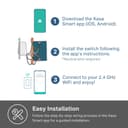
I bought one of these smart TP-Link light switches back in February when they were on sale, to compliment my two Amazon Echo devices. I have since bought another two. Each time, I waited until they were on sale ($29) before buying. Even though I like these switches, I would not pay the full prize to buy them. But at a little over half the normal price, they are totally worth it. Installing one of these switches is relatively easy, assuming that you know what to do and feel comfortable working with electrical wiring and making electrical connections. You do need the original switch that you are replacing to have a neutral (white) wire so bear that in mind if you are planning to replace a switch in an old house with old wiring that doesn’t have neutral. The switch is a little bigger than a regular switch but it in my case, all 3 switches fit in quite well after I installed them. I used the included snap-on decora faceplates with two of the switches and although it took some effort, they snapped on flash with the wall. In the kitchen, I replaced only one of the two light switches that sit side by side and it took some effort to screw back on the old dual switch decora faceplate. The smart switch stuck out a little more than the other switch and as a result the plate didn’t sit flash with the wall on one side, leaving a narrow gap between the plate and the wall. But I used some caulk and it doesn't look too bad ... I think. Actually, in my case the hardest part, was removing the faceplate from the smart switch. It comes attached to the switch out of the box and you have to snap it off it before you can install the switch. But with some effort I managed to get the faceplace off without breaking it or the switch. The TP-Link switch can work manually like any regular switch to turn the lights on and off but it permanently sits in a "switch-off" (or is it a “switch-on”?) position, unlike a regular switch which goes all the way in and out when depressed. Personally, it took me a couple of days to get used to that, especially the one in the kitchen which sits right next to the regular switch. But gotten used to it, I have. To use it as a smart switch, you need to download the free TP-Link Kasa application on your smart phone. You download the application and follow the simple instructions and prompts to get the switch added to your network. The first time I connected them to my network, it automatically found that they needed a firmware update and it downloaded and installed it automatically. Once on the network, you can use the phone application to turn the lights on or off.You can also create routines and schedules to run the lights at certain times during the day or night. You set the "on" time and the "off" time and the light connected to the switch comes on and go off per schedule. Recently when I went on a 3 week vacation to Europe, I created schedules to run the lights at certain times and was able to control the lights remotely at will turning them on and off to give the impression that the house was occupied. Very useful indeed for travelers. Lastly, if you own one, you can integrate the switch with the Amazon Echo or Google Home so that you can use voice commands to turn the lights on or off. I have two Echos and after enabling the free TP-Link Casa skill, I can now instruct Alexa to turn the lights on or off at will. I have also created a routine where at bed time I tell Alexa that I am going to bed and Alexa responds by first turning the living room light off, then turning the upstairs bedroom light on before it wishes me a Good night. :) So far, I have not had any issues with these switches and they have been functioning very well. I am very happy with them.
M**O
Excelente producto
O**E
Like the TP-Link Smart Plugs I already own this was simple to set up and works slick. TL;DR – Simple to use and rock solid performance, use the app anywhere, better than any timer from the hardware store. Look in the Apple and Google app stores for the “KASA” app. I’ve used both and they simply work without any tweaking. To use KASA you will need to create an account if you want to use the app remotely, no need if you only want to use it within your Wi-Fi range. You can do this right through the app. If your already using Amazons Alexa you’ll be happy to know that this device can be controlled through Alexa. A nice feature. When switched off there's a muted white LED that’s visible in the dark. The switch has three buttons, the big main light switch and two smaller buttons located directly beneath. To turn on the switch manually, depress and release the big switch which looks just like a standard light switch. It also fits into a standard single switch electrical box, it will also work in a dual or triple switch box as a standard modern cover plate made for the wide rocker type switches will fit perfectly over the portion around the main switch. I had looked at some of the non Wi-Fi options, the light switches that use a proprietary remote that's similar to what you would use with a TV but they all have limited range, maybe 30 meters if you’re lucky. The TP-Link system using the KASA app allows me to control these smart devices from around the house or when traveling through another province or country. Once you have connectivity to the internet it doesn't matter where you are, you can control these devices. One aspect that really appeals to me is the ability to set up schedules for the devices to turn on and off. If you already use timers to turn on lights while your away you'll appreciate that the app allows you to do that plus configure (this part isn't techy) the lights to come on randomly between certain hours which really makes it appear that someone is in the home. You can set up several schedules if you like. Any burglar with at least three grey cells knows to watch a home for a few days to see if there is a repeated sequence when lights come on. Once they discover the routine its actually the green light they need, they now know no one is at home since very few people always turn on the lights in certain rooms at the same time every night. This ability to set random schedules is a big bonus and really makes it appear that someone is in the home. There's one thing you should know here, this is not like the smart plugs when it comes to installation. Those you simply plug into the AC outlet and then plug in whatever it is you want to turn on remotely. This device completely replaces a wall switch which means you need to wire it correctly so I strongly suggest you hire an electrician or someone who has the skills to handle this if you aren’t qualified. Once the switch is installed the setup and connectivity portion is easy, it’s all done through the app and by pressing the little button to the left side (Reset) beneath the main switch. Again, this part is non-technical, simply follow the steps outlined in the very easy to follow instruction sheet which walks you through the 3 minute process. After that it’s easier to set up schedules and other features than entering a friends contact info in your phone. Comes with all the hardware needed to install in a standard electrical box including wire nuts Marretts).
J**N
Limpio, elegante y súper fácil de configurar. Después de configurar en la app Kasa pude agregarlos sin problema a la app Deco para controlar todo desde una sola app.
Trustpilot
Hace 1 semana
Hace 1 mes