We remain fully operational. Our teams are working around the clock to ensure your deliveries continue safely.

Descargar la aplicación


Servicios al cliente
Sobre nosotros
Copyright © 2025 Desertcart Holdings Limited
Descargar la aplicación
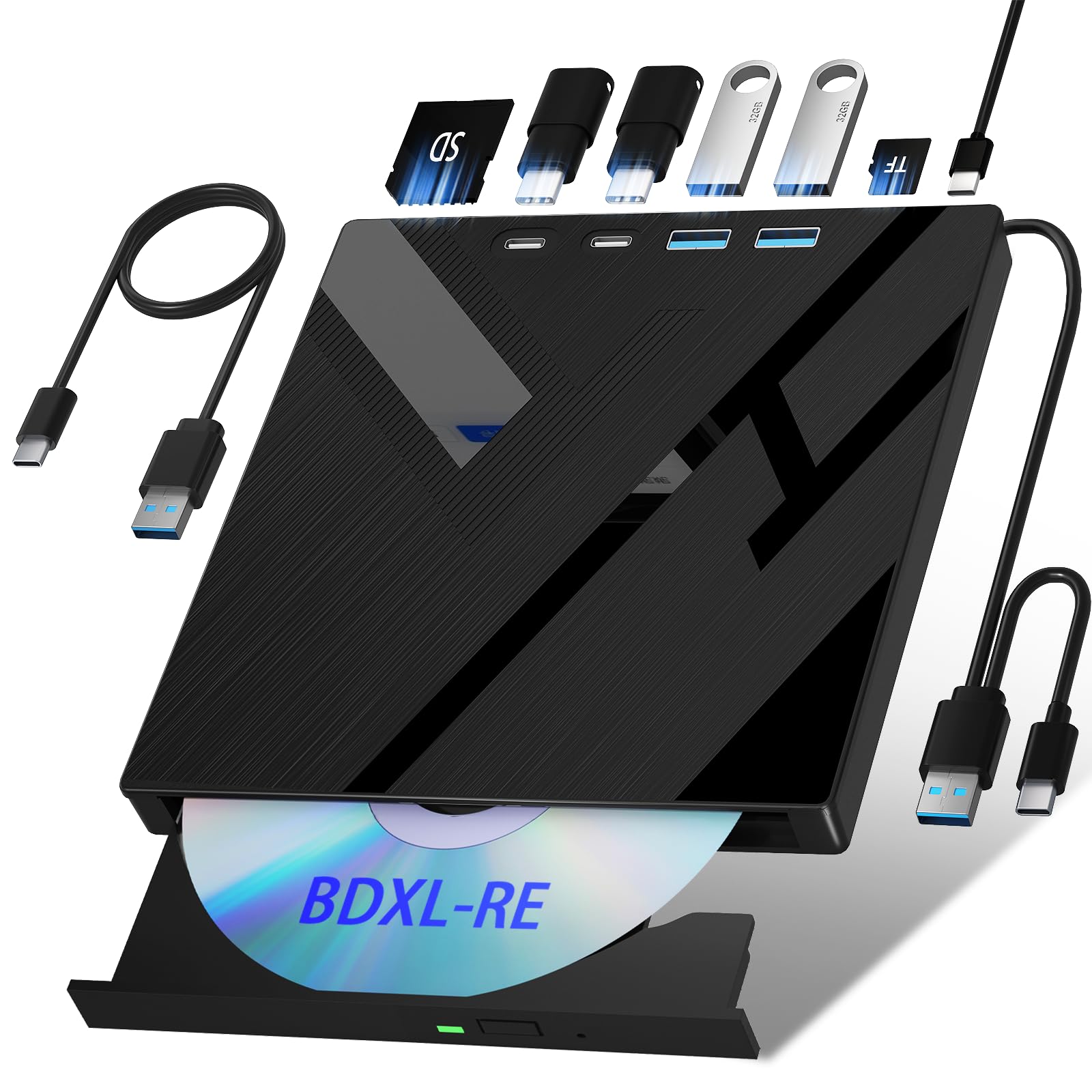
🔥 Burn Bright, Store Big, Connect Everywhere! 🔥
The Wbacon 7-in-1 External Blu-ray Drive is a versatile, high-capacity optical drive supporting 100GB disc read/write with blazing speeds. Featuring multiple ports including SD/TF card slots, USB 3.0, and Type-C, it offers seamless cross-platform compatibility for Windows, macOS, and Linux. Its compact, portable design makes it an essential tool for professionals needing reliable, on-the-go media storage and transfer.


| ASIN | B0CQJX6L9T |
| Additional Features | Bluray 3D |
| Best Sellers Rank | #1 in External Blu-ray Drives |
| Brand | Wbacon |
| Built-In Media | NO |
| Cache Memory Installed Size | 2 MB |
| Compatible Devices | laptops, PCs, Windows, macOS, Linux |
| Connectivity Technology | USB |
| Customer Package Type | Box |
| Customer Reviews | 3.8 out of 5 stars 557 Reviews |
| Data Transfer Rate | 4.5 Megabits Per Second |
| Digital Storage Capacity | 100 GB |
| Form Factor | External |
| Hardware Interface | USB 3.0 Type C |
| Hardware Platform | PC |
| Manufacturer | xiangdinglan |
| Media Speed | 1.2 MB/s |
| Model Number | Wbacon |
| Operating System | mac os, Windows XP |
| Optical Storage Read Speed | BD:6X DVD:8X CD:24X |
| Optical Storage Write Speed | 8x |
| Special Feature | Bluray 3D |
| Unit Count | 1.0 Count |
| Warranty Description | 1 year manufacturer |
H**G
Awesome Blu-ray drive !
This is plug and play device, no drivers needed, just plug it to a USB port insert your disk and it works. It runs quitely.Read and write very fast. And I am very happy with burning Blu-ray disk for high storage. Great buy for the price. Recommended...
M**.
Good bang for the buck.
So far ive used this successfully for standard bluray disc's with my computer utilizing make mkv. Only had one bluray that wouldn't read. I've also used this to read a micro sd car and a micro with the sd card adapter. That slot was very stiff to get the card in the first time but no issues after. The usb cord is pretty short and comes out the side of the case so expect to need the whole unit right next to a port. All in all for the price I am quite pleased, not the fastest drive but works well. Ive been sitting on a bunch of blurays because I misunderstood how these things worked and thought I needed a special drive.
L**1
Not A Bluray Player
I bought this to watch Bluray on my computer. I have a MSI Raider gaming laptop purchased earlier this year and I'm running windows 11 64 bit on it. I unboxed and plugged the drive into my computer using the attached USB cord and the computer recognized the drive right away. I put a bluray disc into the drive, it spun up for a few seconds then stopped. I tired right clicking on the drive emblem and choosing launch auto play and nothing. I updated my system, restarted my computer, nothing. I updated my drivers and tried again and nothing. I then put a DVD in and it started up just fine. I swapped the DVD for the blurry version and, again, nothing. I even downloaded a Bluray player app and still couldn't get it to launch. I tried 5 different bluray movies just to mske sure it wasnt the disc itself. It simply won't initialize and play Bluray disc's. Finally, I went into the drive's properties only to discover that while its labeled a BD drive, its actually a CD/DVD drive. I DO NOT RECOMMENDED THIS PRODUCT TO ANYONE.
M**R
Works as expected, requires 3rd party software to actually play blu-ray discs.
It works as expected, im only using it to actually play my blu-ray disc's, not to rip or write discs. you'll need to get a program like MakeMKV or Leawo Blu-Ray player to use it, or at least I did which is what I expected. The only reason I deducted a star was because the screw inside the case that held the actual disc drive inside it was loose and cause the drive to fall out. I had to open up the case and fit the screw on the lip it is supposed to be behind and tighten it to get it working properly as it was not connecting to the internal sata and power connections within the case, definitely something that should not have made it passed quality control but it was easily fixable if you have a small enough screwdriver for the tiny screws you need to remove to open the case. I also wish the usb cables were a bit longer as they are pretty short, about a 12 inches or so long.
C**E
👍
I haven't had this product long-term but it hasn't failed on me yet. Also, make sure you use both of the USBS connected to the PC. I didn't bother reading the instructions at first 😂. Also, there's plenty of free software out there for you to use. You just got to look around. I used this product with Windows 11** My PC had no trouble finding the device. Definitely brought back some nostalgia from my early days of burning CDs 😁😝
P**E
Verify Region setting!!!
Decent player, however, documentation is horrible. Also, a big negative was the Region setting for the drive was Japan by default which is why they don't play for most in the US out of the box. The 2 big things to make it work are: 1. The cable attached to the unit is what connects to the computer. The separate cable for power plugs into the usb c on back of unit. 2. Verify and change region setting. I did it in Ubuntu Linux.
L**D
Effortless installation, just plug and play, no drivers, etc., to fool with!
I recently purchased a Dell 15 inch laptop but it does not have a DVD drive, which I do need on occasion, and it is skimpy with just 3 USB and 1 Type C ports (most of the time it "acts" as a desktop with external keyboard, mouse, and monitor which take up 2 of its 3 USB ports. Thus, I have been in the market for an external DVD/CD drive and this 7 in 1 External Blu-ray Drive grabbed my attention with its impressive capabilities coupled with its 2 USB 3.0 ports, 2 Type C ports, 1 SD card slot, 1 TF card slot, so I decided to buy it. Set up took like 5 seconds - just plug into either a USB or a Type C port my laptop, and it was immediately recognized and ready for use. No drivers or anything else to install. I first put in an audio CD and it played the songs and I listened to the music over headphones connected to the USB 3.0 port on the player without having to use my last USB port on my laptop. Next I put in a wedding DVD and played MP4s and they looked great as I expected them to. My final test was to load software purchased on a DVD, namely TurboTax, because when I buy software, I prefer having it on a DVD versus a download. And that worked fine. This device has enormous capability with its Blue-ray 3D features and should perform well for anyone with those needs, but I do not presently have the need for those advanced features although I do like having that capability should the need ever arise. Bottom line, I'm very impressed with this 7 in 1 External Blu-ray Drive and believe it fills an important role next to my new laptop, and the price is VERY reasonable!
D**T
Works great!
It is a very nice addition to my computer systems!
Trustpilot
Hace 2 semanas
Hace 2 semanas