
Descargar la aplicación


Servicios al cliente
Sobre nosotros
Copyright © 2025 Desertcart Holdings Limited
Descargar la aplicación


🚀 Elevate your office game with speed, capacity, and smart control!
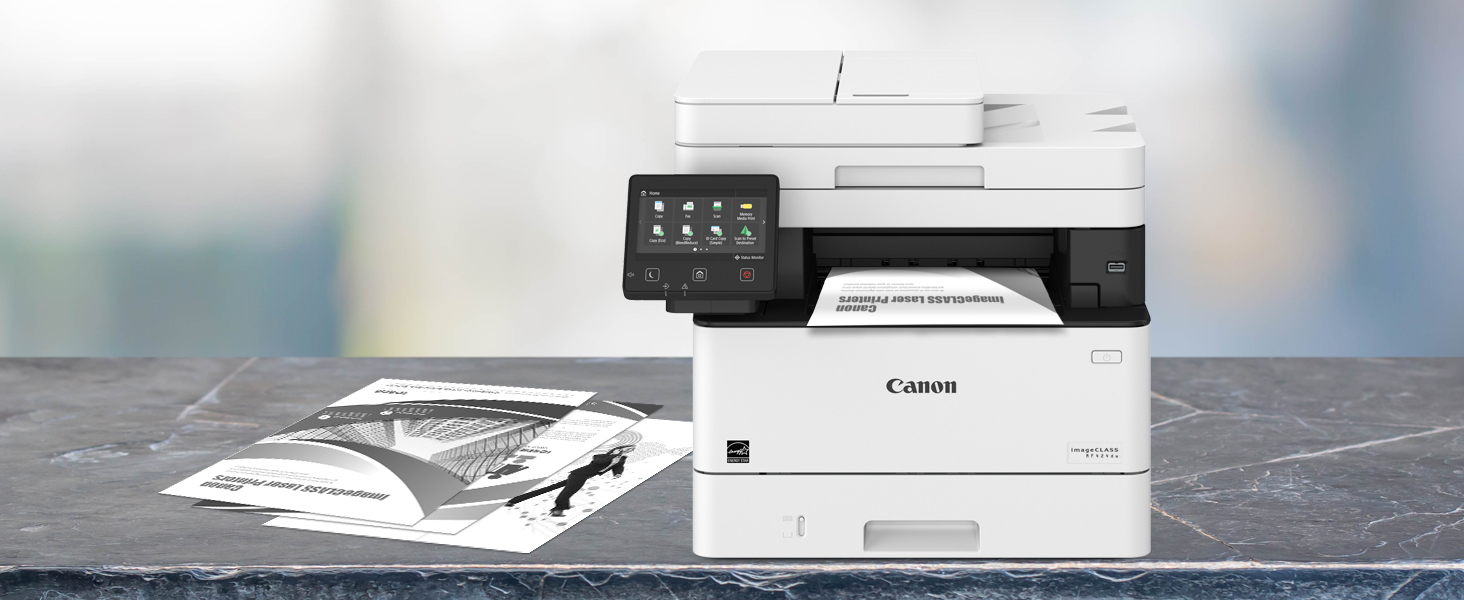
The Canon imageCLASS MF424dw is a robust monochrome all-in-one printer designed for small to medium businesses. It offers fast printing speeds up to 40 ppm, a large 900-sheet paper capacity, and a user-friendly 5-inch color touchscreen that can be customized for efficiency. With duplex printing, scanning, copying, and faxing capabilities, plus a 3-year warranty and Amazon Dash Replenishment compatibility, it delivers reliable performance and convenience for busy professionals.



| ASIN | B0792PW8W6 |
| Additional Printer functions | All In One |
| Best Sellers Rank | #700,036 in Office Products ( See Top 100 in Office Products ) #1,079 in Laser Computer Printers |
| Compatible Devices | Laptops, PC |
| Control Method | Voice |
| Controller Type | Amazon Alexa, Vera |
| Customer Reviews | 4.0 4.0 out of 5 stars (143) |
| Date First Available | March 5, 2018 |
| Dual-sided printing | Yes |
| Duplex | Yes |
| EU Spare Part Availability Duration | 3 Years |
| Global Trade Identification Number | 00013803290356 |
| Hardware Interface | Ethernet |
| Included Components | 100 Yield, Canon GENUINE Toner 052 Standard (3, ISO / IEC Standard), MF424dw Product, Power Cord, Starter Guide, Telephone Cable, User Software DVD-ROM, Warranty Card |
| Ink Color | black |
| Is Discontinued By Manufacturer | No |
| Item Weight | 35.8 pounds |
| Item model number | MF424dw |
| Manufacturer | Canon USA (Lasers) |
| Max Copy Speed (Black & White) | 40 ppm |
| Max Input Sheet Capacity | 900 |
| Max copy resolution black-white | 600 dpi |
| Maximum Black and White Print Resolution | 600 dots_per_inch |
| Maximum Media Size | 8.5 x 14 inch |
| Memory Storage Capacity | 1024 MB |
| Model Series | MF424 |
| Number of USB 2 Ports | 3 |
| Power Consumption | 1150 Watts |
| Print media | Envelopes, Paper (plain) |
| Printer Ink Type | toner |
| Processor Count | 1 |
| Product Dimensions | 18.3 x 17.8 x 15.4 inches |
| Scanner Type | Sheetfed |
| Series Number | 424 |
| Sheet Size | 8.5 x 14 |
| Supported Media Sizes | Legal (8.5 x 14 inches) |
| Total USB Ports | 3 |
| UPC | 013803290356 |
| Warranty Type | Limited Warranty |
| Wattage | 1150 watts |
T**R
Great Overall Value - Very Pleased Overall
I requested this machine as a gift to replace my 10yo Brother color laser MFC machine. I waited to play with this printer for about six weeks before I wrote my review. After six weeks of use, I must say, I'm very pleased with this machine, and I think it's a great overall value. 1. I'm really pleased with the print quality. So far, the print quality has greaty exceeded the print quality of the Brother machine that I replaced, and it's on par with the quality of the more expensive workstation laser printers that I have at work. 2. I spent quite a bit of time looking into the difference between this model (MF424dw) and the related model (MF426dw), which is about $100 more. To spare others the hassle: I learned that the only difference is that the -26 model is loaded with Adobe Postscript. I didn't know what that meant in terms of functionality, but a graphic designer friend told me that it really means that it provides expanded printing functionality for non-standard fonts, etc. He told me that even he doesn't own a printer with Postscript, and that if he needs to print anything that might require Postscript, he just prints it at a FedEx store. So far, I haven't printed anything that would've required PostScript (i.e., I usually just print stuff from Microsoft Word and other standard software), so it's been a good decision to save the $100. 3. I've been pleased with the functionality. I initially experienced some funky scanning-related glitches. I went to Canon's website, and I discovered that there was an updated version of the scanner driver thing. So, I downloaded that, and thereafter, it worked just fine. In my view, the basic features have been really easy to use. If I want to print something from my phone, my phone detects the printer, I click print, and the printer prints the document really quickly (particularly relative to the printer that I replaced). The basic features on the device are also intuitive. My wife (who isn't technologically inclined) and my 7yo daughter have been able to figure out how to print, make copies, and scan on their own and without me having to show them. 4. The build quality feels and sounds a little flimsy -- but, yeesh, what do you expect for a $200 printer. So, I'm ultimately content with that for the cost. 5. It's not a dynamic that's unique to Canon or this printer -- but, what's irritating is that a high-yield genuine Canon replacement cartridge costs almost as much as the machine itself. And, Canon lets you know that it's monitoring whether you're using a genuine Canon cartridge, as when you check the toner level on the machine or desktop, you get a message that acknowledges that you're using a genuine Canon cartridge. I have always bought a manufacturer's genuine toner cartridges -- but I'm not sure that I'll be able to bring myself to pay almost as much for the cartridge as I did for the machine. So, I'm inclined to buy a MUCH, MUCH lower-priced off-brand cartridge, just to see what happens. Under the circumstances, I think it's probably worth the risk. UPDATE [2/4/2020]: I have been using the printer for more than 15 months now, and I continue to be pleased with it. The toner cartridge that came with the printer lasted us for about 14 months, with regular / normal family use. As noted above, I decided to buy a knock-off replacement cartridge, given that the high-yield Canon-certified cartridges cost about 75% of what I paid for the printer. I have not noticed any difference at all in the print quality or in the function of the printer since I insstalled the knock-off cartridge, so it's looking like buying the knock-off cartridge was worth the risk and savings. UPDATE [5/17/24]: This bad boy is still going strong. In addition to typical family home use for which I bought it, this became my primary printer while working from home through and beyond the pandemic. This machine has turned out to be an outstanding value.
F**S
A mid-duty all-in-one that punches way above its class
Nice all in one that has a foot print and solid feel not unlike the old, bulletproof HP 4000 series Laser Jets. 20 minutes to set up to run using a Windows 10 desktop. Fast (really instant!) print, copy and surprisingly, scan speeds. Easy to use and articulate touch screen controls. Initial power up or wake up within 10 seconds. Totally capable of working well within the standard setup protocol. If you have a multi station intranet with specific needs, there are many setup options to keep your IT department happy. Observations: Make sure you download newest firmware (via the printer touch pad) and latest software (via your computer). I'm using 5g wifi to interface. No connectivity drops when sleeping or fully turned off. Speed is virtually indistinguishable from a hardwired interface. Plus I get to print remotely using Google print...priceless! Do yourself a favor and use the WPS "push button method" to initially connect to your router- easy peasy. Pay attention to miriad paper options that specify both type and weight of your copy paper. Don't tempt fate printing on 24# Bond when the machine is set on 16# recycled. I can only guess there would be bleed/fusing issues and maybe even feed problems due to this operator error. Ps. Did I mention how cool it is freaking out unsuspecting office peeps when I shoot something to the printer via Google Print.. You Tube worthy!
M**A
Perfect printing and scanning, but complex, non-intuitive features and menu
Overall, I really love this. You cannot go wrong with Canon. The printing is reliable and it does double-sided, where you can choose if the second side is upside down or not. Scanning is easy and the images straight, both manual and automatic document feeder. It has a large (double?) capacity toner cartridge included, so it will last a long time before needing a replacement. It was hard at first to print envelopes since you have to go into the menu and choose rough surface (and then remember to change it back). And you have to figure out how the manual feeder works. The first envelope came out with bad print, but now they print fine. The only bad thing is there are a lot of options, so the menu is long and non-intuitive. But it is also easy since it is touch screen and wakes up instantly. In a way, it is also good you have a lot of options. I also go back and forth between toner saver and full quality print. To toggle the options, you have to make seven (7!!) mouse clicks to do it on the printer driver menu. What's up with that? There was also a hiccup installing the drivers on my laptop, which was different than my desktop, but I figured it out. The solution was not in the manual. It also is heavy (thank goodness the USPS man brought up to my second-floor apartment) and a little pricey, but it is well built, and I love it.
A**H
Getting Scanner to connect to wireless laptop CONSTANT issue
I would never buy this printer again. One of the main reasons for buying this printer was so that I could scan medium to large size documents with ease - a limitation with smaller personal printers. I have had constant issues with the scan function. I found that I am by no means alone with this issue. There are lots of complaints on this issue that I found post purchase. It is a recurring complaint amongst buyers and unless Cannon is deaf and blind it knows that there is an issue as well but has done nothing. I didnt spend my money to deal repeatedly with tech support and to waste hours of time. Cannon has likely lost a customer for life as there are lots of companies competing in this space.
R**N
It is a very good printer that's for sure. But there are thing to set up that dose not mantioned in manual. But they have a very good technical service. They helped me to get the printer up and running .
A**R
Very good printer, the network, and wifi work great. Prints fast and does the job. Works well with Linux , and Windows 7,8,10
M**D
This unit prints 40 ppm is worth the dollars. However, when you feel the body of the product is very cheap plastic.
D**A
Impression ok sur papier ordinaire, par contre sur papier plus épais, laisse des traces d’encre. Pour les copies, le calibrage n’est pas très bon, les copies ne sont pas droite.
B**N
Easy set up, fast print times, fully featured. Very pleased
Trustpilot
Hace 4 días
Hace 2 meses