We remain fully operational. Our teams are working around the clock to ensure your deliveries continue safely.

Descargar la aplicación


Servicios al cliente
Sobre nosotros
Copyright © 2025 Desertcart Holdings Limited
Descargar la aplicación
Buy anything from 5,000+ international stores. One checkout price. No surprise fees. Join 2M+ shoppers on Desertcart.
Desertcart purchases this item on your behalf and handles shipping, customs, and support to Spain.
🚀 Own Your Speed, Own Your Network — No More Rental Fees!
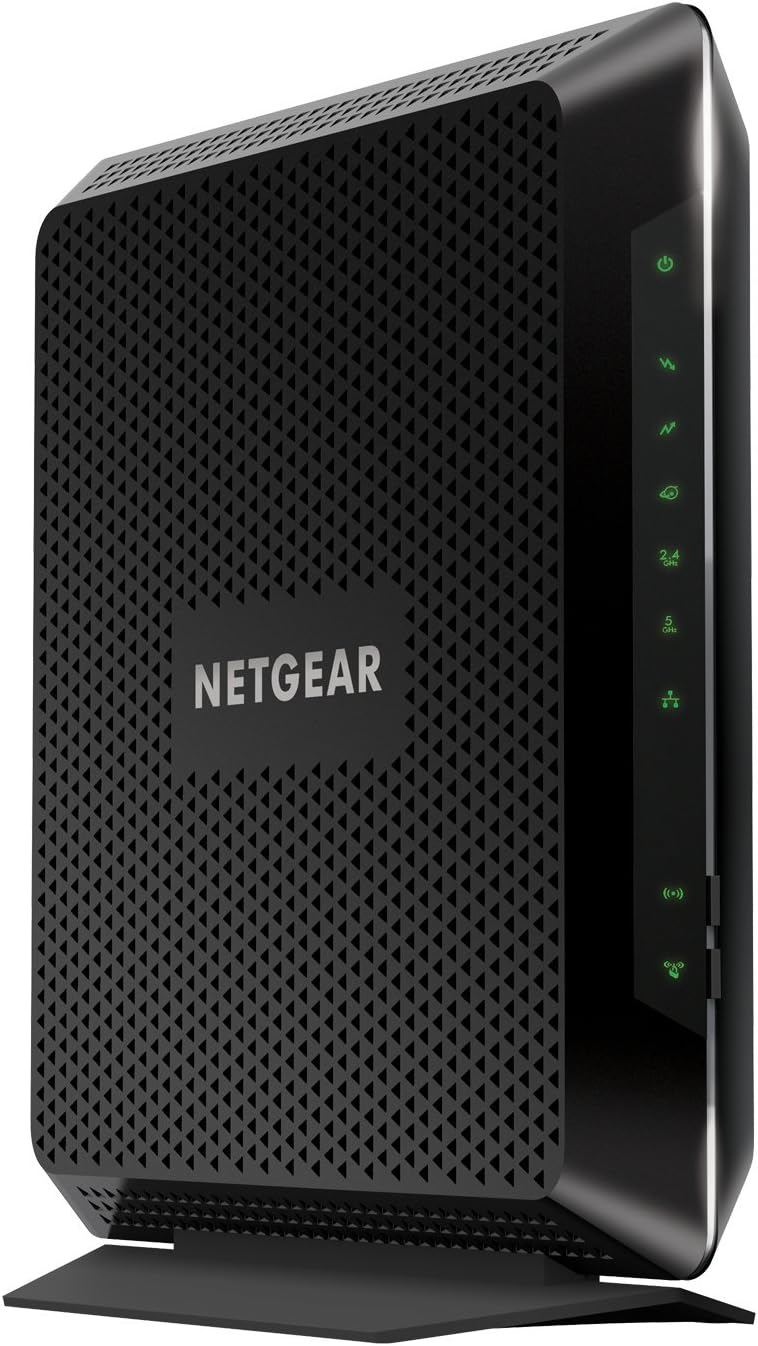
The NETGEAR C7000-1AZNAS is a high-performance AC1900 dual-band cable modem router combining DOCSIS 3.0 technology with 24x8 channel bonding to deliver up to 1.9 Gbps speeds. Certified for major ISPs like Xfinity, Cox, and Spectrum, it supports up to 30 devices over 1800 sq ft and offers versatile connectivity with 4 Gigabit Ethernet and 2 USB ports. Designed to replace costly rental equipment, it saves users up to $168 annually while providing reliable, future-proof internet for demanding households and professionals.
| ASIN | B0781Z5PCL |
| Antenna Location | Gaming |
| Antenna Type | Fixed |
| Best Sellers Rank | #46,431 in Computers & Accessories ( See Top 100 in Computers & Accessories ) #51 in Modem Router Combos |
| Brand | NETGEAR |
| Built-In Media | Nighthawk AC1900 WiFi Cable Modem Router (C7000)^Ethernet cable^Quick install guide^Power adapter |
| Color | Black |
| Compatible Devices | Phone, Tablet, WiFi-Enabled Devices, Media Streaming Devices, Computer, PC, Mac, Gaming Consoles |
| Connectivity Protocol | DOCSIS, Wi-Fi, Ethernet |
| Connectivity Technology | Ethernet, Wi-Fi |
| Control Method | App |
| Controller Type | Switch |
| Coverage | Up to 1800 square feet, 30 devices |
| Customer Reviews | 4.4 4.4 out of 5 stars (12,831) |
| Data Transfer Rate | 1.9 Gigabits Per Second |
| Frequency | 5 GHz |
| Frequency Band Class | Dual-Band |
| Global Trade Identification Number | 00606449133509 |
| Has Internet Connectivity | Yes |
| Has Security Updates | Yes |
| Is Modem Compatible | Yes |
| Item Dimensions L x W x H | 8.3"L x 1.7"W x 9.6"H |
| Item Type Name | Netgear C7000-1AZNAS Nighthawk AC1900 (24X8) Docsis 3.0 Wi-Fi Cable Modem Router Certified For Xfinity From Comcast, Spectrum, Cox, & More |
| Item Weight | 1.6 Pounds |
| LAN Port Bandwidth | 10/100 megabits per second |
| Manufacturer | NETGEAR |
| Maximum Upstream Data Transfer Rate | 310 Megabits Per Second |
| Mfr Part Number | C7000-1AZNAS |
| Model Name | C7000-1AZNAS |
| Model Number | C7000-1AZNAS |
| Number of Antennas | 4 |
| Number of Ports | 6 |
| Operating System | Netgear Genie |
| Other Special Features of the Product | LED Indicator, WPS |
| Router Firewall Security Level | True |
| Router Network Type | Cable |
| Security Protocol | WPA-PSK, WPA2-PSK |
| UPC | 606449133509 |
| Unit Count | 1.0 Count |
| Voltage | 120240 Volts |
| Warranty Description | 1-year warranty |
| Wireless Compability | 802.11ac |
S**7
Still Going Strong After 4+ Years of Heavy Use
I purchased this unit on August 7, 2021, and as of February 12, 2026, I have had exactly zero issues with it. I bought it, called Comcast Xfinity, and activation took one quick phone call. Setup was simple and straightforward. For nearly four and a half years, this unit has supported a high-demand household — competitive gaming, music production, my own audio recording work, multiple phones, a laptop, and streaming TV running simultaneously — and we’ve never experienced a single slowdown. Owning your own equipment instead of renting from the cable company is absolutely worth it. I ride things until the wheels fall off, so I won’t be replacing this anytime soon. But when I do, it will definitely be another Netgear unit.
D**K
Excellent product
Title: Excellent product Description: Have been using Netgear for years in both personal and business uses and will continue to use. Excellent product.
R**D
Reliable & High Performance
I’ve been using the NETGEAR modem/router combo for a few months, and it has exceeded my expectations in every way. Right out of the box, the setup was incredibly straightforward. The instructions were clear, and I was able to get everything up and running in under 10 minutes. NETGEAR’s app made configuration simple, even for someone who isn’t a tech expert. In terms of performance, this modem/router provides fast and reliable internet across multiple devices, with no issues when streaming HD videos, working from home, or even online gaming. The range is impressive, covering my whole home without any noticeable drop in signal, even in the farthest rooms. One feature I love is the built-in security options. The parental controls give me peace of mind, allowing me to manage internet access across devices and set up filters for family members. The firewall and other security measures are robust but easy to adjust, so I feel confident my network is secure. Also worth noting, I had a question about compatibility with my ISP, and NETGEAR’s customer service was quick and helpful. It’s reassuring to know support is there if I ever run into issues. Overall, this NETGEAR modem/router combo is a solid choice for anyone looking for a reliable, high-performance device. Highly recommend!
M**J
Boosted my download speeds!
This modem/wifi combo from Netgear works great. Set up was a breeze if you are able to read the instructions. What's nice about this product is the access control feature that you can turn on or off on the control panel using your phone or computer. It basically prevents anyone from accessing your WiFi unless you personally approve them and grant them access using the control panel. I was using another router/ modem from Netgear that worked good for what it was intended but was not fast enough for my Internet speeds. The range and improvement in speed compared to the cheaper one I had was dramatic. I gave it 4 stars because it's expensive and a bit old. It should be a little cheaper since a newer model will be coming out soon. But it works!
A**6
it takes a some time to get your return back but it goes by pretty quick when you think about it
So I've always been contemplating the switch from having to rent a cable modem router to owning one and never really went all in until this purchase. Yeah, it takes a some time to get your return back but it goes by pretty quick when you think about it. I mean I started thinking about it years ago..... So I'd say about a year ago I did try when I saw a deal on an ARRIS Surfboard SBG6580 (certified refurbished). I paid somewhere around $76 with tax and thought I could make this back in less than a year considering I pay $11 and some change a month renting a unit from Xfinity. It was a bit of a hassle getting it registered as I had to call Xfinity and provide them with key pieces of information specific to the router to get it activated. Got it activated and noticed the speeds were horrendous despite it's advertised properties. It's been awhile now so I can't say specifically what it's speed was but only that it was going way slower than the rented unit from Xfinity. So needless to say I said screw it and returned the ARRIS unit and stuck with the rented one. In all honesty, it may have been that it was a refurbished unit but if it says certified then in my mind it should run like new. Fast forward to present day and I though I'd give it one more go. Started to do some research and found the Netgear N600 C3700 cable modem router combo. Saw that it was in a whole bunch of various top 10 lists for lower to mid end ranged units and went for it. Setup was a breeze as all I did was hook it up via ethernet to my laptop and inputted the required information. Activation was almost immediate and I was off an running within 10 minutes of unboxing it. Note to those of you who don't have a laptop or computer with ethernet connection availability, you'll have to do it the old fashioned way and call up your provider for activation. This is for Netgear products, can't say the same for other brands as I don't have experience on others aside from ARRIS, which at that time I don't recall there being a direct ethernet option. Well, same story, I was getting horrible speeds over wi-fi in the range of 5-20 mbps download and maybe 1-2 mbps upload. If I was in the same room near the router I would be on the higher end of the spectrum but as soon as I went to another room it would drop off in speed significantly. So this time around I though I'd just scrap this unit and go for a higher end expensive unit. Did some more research and found the Nighthawk. Read all sorts of positive reviews on this unit and I can confidently say this thing rocks! Setup was no different than the other N600. Plugged it directly into my laptop via ethernet and followed the steps. Did numerous tests over a few days and speeds are at a constant 53 -56 mbps download and 5.78 -5.95 mbps upload. My service level from Xfinity is 60 Mbps download and 6 up so this thing is right on target. I moved around to different areas of my house and experienced very little to no speed variations. So long story short, everything about this unit is excellent. Simple set up, blazing speeds with little to no drop with distance (strong signal), options for multiple wi fi's, small footprint and extremely light. It's not built like a tank but what does that matter as it's not like you're going to be moving it around on a daily basis or even interacting with it at all for that matter once it's installed. I liked the fact that it's sleek looking, small, and light. I have to say that when it comes to cable modem routers, it's best to fork out a little more and go high end because you really do get what you pay for. It may be a tad expensive at ~$180 + tax but it's damn worth every penny. Now instead of paying myself back from having to rent a unit in 6 months I'm at more like 16 months but time flies so who really cares?
Trustpilot
Hace 1 semana
Hace 1 mes