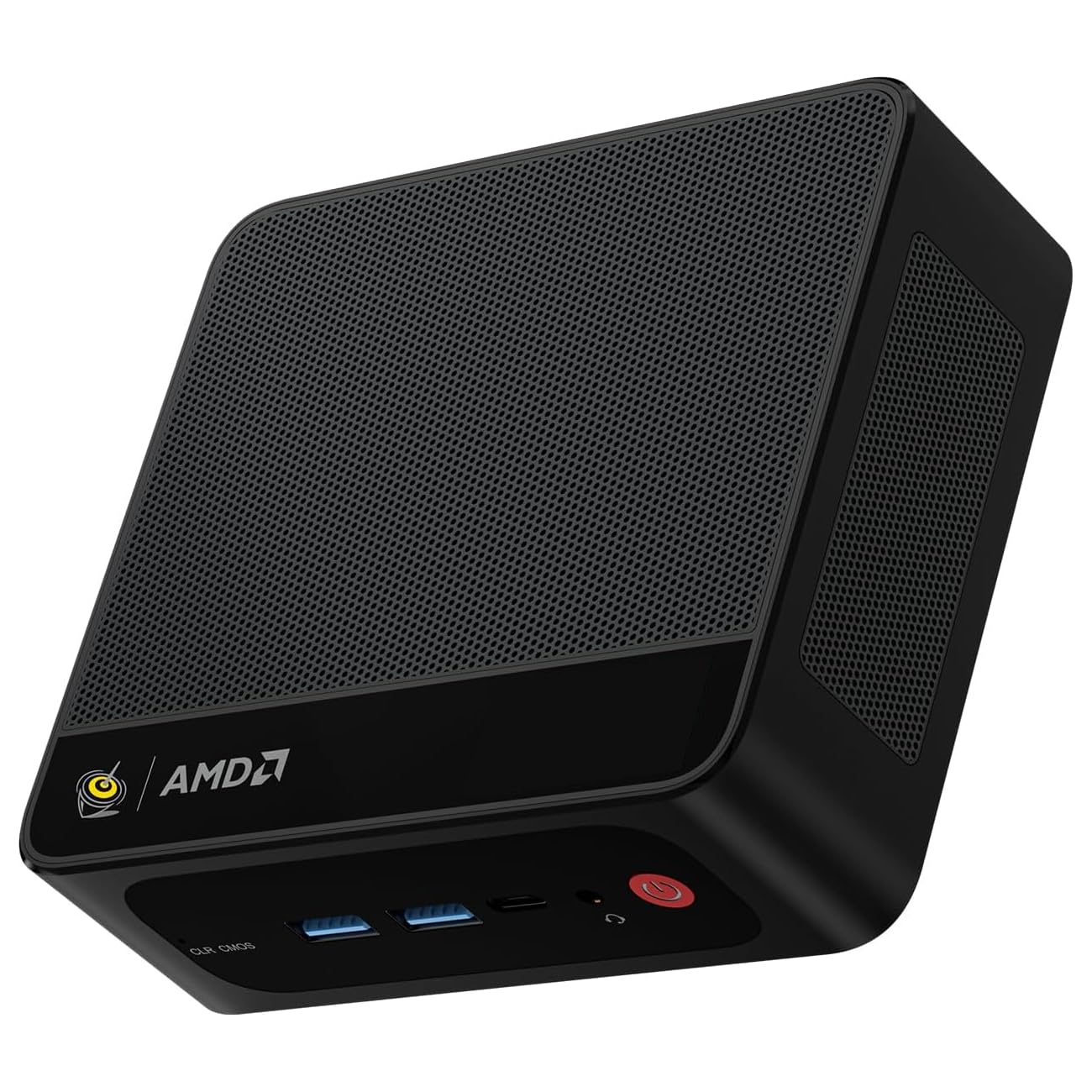
🚀 Compact Powerhouse: Elevate your workspace, dominate your day!
The Beelink Mini PC SER5 is a sleek, ultra-compact desktop powered by AMD Ryzen 5 5500U (6 cores/12 threads, up to 4.0GHz), equipped with 16GB DDR4 RAM and a speedy 500GB NVMe SSD. It supports dual 4K displays via HDMI and DisplayPort 1.4, features WiFi 6, Bluetooth 5.2, and 2.5Gbps Ethernet for cutting-edge connectivity. Its advanced cooling system maintains performance under heavy loads, making it ideal for multitasking, creative work, and professional use in a space-saving design.




| ASIN | B0CH7THPPS |
| Best Sellers Rank | #6,156 in Computers & Accessories ( See Top 100 in Computers & Accessories ) #250 in Mini Computers |
| Brand | Beelink |
| Card Description | Integrated |
| Chipset Brand | AMD |
| Color | Black |
| Computer Memory Type | SODIMM |
| Customer Reviews | 4.4 4.4 out of 5 stars (324) |
| Date First Available | September 4, 2023 |
| Graphics Coprocessor | AMD Radeon Graphics |
| Hard Drive | 500 GB SSD |
| Hard Drive Interface | Solid State |
| Hard Drive Rotational Speed | 1800.00 |
| Hardware Platform | PC |
| Item Weight | 1.96 pounds |
| Item model number | Beelink |
| Max Screen Resolution | 3840 x 2160 pixels |
| Number of Processors | 8 |
| Number of USB 2.0 Ports | 1 |
| Number of USB 3.0 Ports | 3 |
| Operating System | Windows 11 Pro |
| Package Dimensions | 8.82 x 5.43 x 2.32 inches |
| Processor | 4 GHz ryzen_5 |
| Processor Brand | AMD |
| RAM | 16 GB DDR4 |
| Screen Resolution | 3840 x 2160 |
| Series | 5500U |
| Wireless Type | 802.11ax |
R**R
Great Performance in a Compact Package – A Solid Laptop Replacement!
I replaced an old laptop setup (with an external monitor, wireless keyboard, and mouse) with the Beelink SER5 MAX, and it’s been a fantastic upgrade. The performance has been excellent—fast, responsive, quiet, and reliable. With 16GB of RAM and the NVMe SSD, everything runs smoothly, whether I’m multitasking or doing light gaming. I also bought a second one, with 32GB for a similar setup for my work. One minor issue I ran into was with the Bluetooth not working after the PC had been unplugged for a while. It turned out to be a Windows driver issue—not a fault of the Beelink itself. I updated the Bluetooth drivers, and everything’s worked perfectly since. I also love how compact it is—I mounted it to the back of my monitor, which freed up even more desk space compared to my old laptop setup. Overall, I’m really happy with this mini PC and would recommend it to anyone looking for a sleek, powerful, and space-saving solution!
V**L
Reliable. Good For The Price
Have had it for 10 months now. Heavy use during this period. Always starts, does its work and does not disappoint. Significantly faster than my previous HP which was running on Windows 10 but not lightning-fast. Overall I'm satisfied with it, especially for the price.
B**O
great little computer, good value for the money.
I was skeptical that this little box screwed to the back of my monitor could perform like my giant tower. I was wrong. This does great! Of course it doesn't have 10 drive bays and I gave up optical disk but I rarely use either and a USB op drive is less than $30 these days. For that I added a 6 bay USB hub. So far, so good and I have my desk back.
P**E
Excellent machine
Excellent little machine, fast and stable. Does not heat. Good quality SSD and DDR, not "Chinese 'noname'. I have had a few for 3 years, zero problem. Even has 2.5 gb ethernet!
T**S
Small and powerful
Purchased this mini PC to connect to the TV for online entertainment in a common area of the house. Initially thought it was only going to be strong enough for streaming videos and older games. Decided to test out some more recent games, and it rendered them pretty well once the settings for both software and PC are aligned correctly. This PC is capable of doing 4k resolution, which is overkill for me, since I can't see the difference between 4k and 1080p when images are moving quickly. The small size is great and can fit anywhere. Runs very quiet, and is easy to set up. The aluminum case looks really nice and sleek. My only complaint is that the Bluetooth signal seems spotty and makes wireless controller input lag even when only 3 feet away. I solved this by purchasing an external Bluetooth extender and shutting off the built-in Bluetooth. Overall I am pleased with my purchase, and hope that it lasts for as long as my other PCs.
T**G
Powerhouse
I waited almost a whole year to write this review. I purchased this February of 2025, it’s now December 29th and I must say this Mini PC has been able to keep up with me even through my heaviest gaming sessions. I want to add that the most intensive games I play are Sims4, Red Dead Redemption, & DayZ. I play a handful of other games & tried running City Skylines2 but that game is cursed so it’s no fault to this lovely hunk of junk that It couldn’t run It even on its lowest settings. Now I call It a hunk of junk as a term of endearment, I absolutely adore this tiny thing, it’s a freaking powerhouse. I should add that I’m also in school and I have intense study sessions and like I said this thing can really keep up ! Set up was very simple, normal PC procedure granted I had a man do It but I watched and I’m positive if I was alone I could’ve done It just fine. I don’t know how much more I can stress how great this thing is and my only regret was not buying two since they seem to be sold out. But if you’re scrolling through reviews just so you can buy It on their website then you’re in luck ! Buy It don’t even think, great hardware, solid build, & great for casual and even certain intense gaming. PS: keep a fan or some kind of cool air system around It, this thing can gets hotter than a toddlers hand holding on to an M&M on a normal day. I keep a small fan near It and It does the trick but I do have to shut down for a few just to let It cool, mainly out of fear that I’ll ruin It. Also, this thing does not suck up that much power, there was barely a dent in my light bill.
L**N
Doesnt display
I cant get this to display on anything. I spent 2 days trouble shooting. I tried the CMOS button, disconnected everything and let it sit and plugged it back in. Managed to reset it with the keyboard through the settings once i set wverything up (had to use the screen reader voice), bought new cables, bought a new monitor to make sure it wasnt just the tv. It would not display on anything. For the money, this should not happen. Looking into having to maybe do a bios update but it seems like i might not be able to do that without a display. One of the worst products ive ever dealt with.
P**O
Everything I wanted it to be, price is fair
I wanted to stop relying on my laptop to run my home setup and get a small form factor box on the desk with my 2 24" monitors, each is 1920 x 1080. I decided to buy this hoping it would run GTA IV and RDR which just game out but is an older game. It runs these fine and more! This is fast for everything I do which include personal writing, record keeping and entertainment. Games like GTA IV, Red Dead Redemption, etc run at over 60 fps at 1980 x 1080. I do not have a 4k monitor. Runs very smooth. GTA V and RDR 2 at 1920 x 1080 on high or very high and high run at 45 fps to 65 fps, and are very fluid. You won't get all the details but you get what you need for the fun of the game. SpiderMan remastered doesn't show fps but is also very fluid and has the fps you need to enjoy the game. This is stunning performance for an all in one chip and shows how far the technology has come in the last ten years when running a chrome browser was a challenge. I have not heard fan noise.
E**.
A pesar de su tamaño supero mis espectativas, funciona muy bien, y lo mejor es que no ocupa mucho espacio.
C**A
Muy bueno, compacto y eficiente. Gran relación calidad-precio.
A**D
ممتاز
K**N
Upon first inspection of my Beelink SER8 the box it came in had very clean artwork and felt like I was buying a decent quality product. Opening the box it had the very basics inside, a pamphlet on how to get started, a HDMI cable, a AC to DC power supply, and the SER8 itself. Upon holding the SER8 the product felt very sleek, smooth as well cool to the touch with its metal casing and had a good weight to it. Plugging in the cables for usage the connectors on the SER8 felt sturdy and well secured. One thing I did notice is there is no markers on what USB ports are version 2.0 or 3.0, 3.1 ect.. I originally had plugged in my keyboard to the highest bandwidth port at first which wasted that capability. No biggie a quick swap and I had my full speed USB port available for an external SSD. Upon booting Windows for the first time, I was surprised to see Windows 11 Pro 24H2 already installed saving me having to do the tedious task of installing all the windows updates that accompany with new PC's. Once Windows was setup I found the responsiveness in Windows extremely quick, I have a Gaming PC with a i9-14900k, 64gb of DDR5 6400 ram, and 2x Samsung 980 Pro SSD's and I felt that in windows navigation this mini PC was more responsive then it. The main reason for this purchase is I video edit and encode in 4K and I wanted a low cost PC to use for those encodes as they take time to encode and I wasn't tying up my higher costing 14900k computer, but it also needed to be able to do encodes at a reasonable speed. On my first 4k 10bit HDR encode, the SER8 was able to process at an average of 109fps, this is far better then I was expecting, and only about 30% slower then the i9-14900k I had been doing this task with. This is fantastic for my purpose. I monitored my CPU Core temperature while encoding the video and ranged from 75degrees Celsius to 81 degrees Celsius which again was good to see as most encoders operate all cores simultaneously at their peek voltage which stresses out the CPU. The case remained cool to the touch and the fan was not even noticeable in the shelf on the desk I had it on. In normal Windows operation temps range around 29-35 degrees. Other reviews of the SER8 claimed the WIFI was not good. I speed tested my WIFI Connection and was able to achieve around 400mb/s both ways, which is more then enough for my home network needs. I have posted CPU-Z images of the hardware for anyone considering buying the SER8. The SSD that is also included in the 1Tb model is a Crucial CT100P3PSSD8 or more commonly known as Crucial P3 Plus 1TB PCIe 4th gen. And the WIFI Card is an Intel Wifi 6 AX200 with Intel Bluetooth. There is no Mouse and Keyboard included with the mini PC something to point out for any potential buyers. Overall I am very happy with my Beelink Purchase, I was skeptical on buying a mini PC from any of the smaller manufacturer's out there and did a lot of research before pulling the trigger, it came down to the raving review by Notebook Check on the SER8 with the 8845HS to help me make the decision.
Y**G
This is my first AMD machine, and I was a bit nervous about switching from an Intel processor (I use VMWare). I initially planned to get a mini PC with an Intel processor. But I found out about known heat dissipation issues with Intel and was told AMD handles it better, especially in mini PCs. Also, the price (i.e., SER7 on a promotion) was almost half the price of the Intel mini PC (i9 13th Gen) I was going to get. If you are short on cash, get the SER7 since the performance is almost identical (don’t get fooled by the seller’s description and check real reviews on YouTube). I personally prefer the SER7 to the SER8. However, the front USB-C port on the SER7 was dropping data transfer and finally gave up. The suggested troubleshooting methods did not work, and Beelink offered a $30 discount instead of sending me a replacement (they told me to use the USB-C ports from the back, but my application needs the front one since my setup makes it difficult to access the rear end). That’s why I gave them only four stars. Luckily, I was still in the return period, and that’s why I got the SER8 instead ($100 more on a promotion at that time) and it's been doing pretty good. A few tips to set up your pc… 1. Setting up Windows is a lot simpler locally without the internet (don’t turn on WiFi and no internet cable). You can add your OneDrive account later. 2. Once the local account is set up, check if Windows 11 is missing some basic applications (i.e., MS Store, Notepad, etc. Happened to me on the SER7). The simplest way to fix the issue is to reset the OS (search for “Reset this PC” from the taskbar search box) before you do anything else. Because it is a fresh machine, it does not take too long. Remind you, you will have to set up the OS again after reset. 3. Connect to the internet, check Windows updates. 4. There is an AMD software management icon in the system tray. Launch it and check updates (There are more settings to customize if you are a gamer). Frankly, I had never heard about Beelink before until I started checking out reviews on mini PCs. Their response time is very fast (usually in a few hours) compared to other sellers on Amazon. This is the main reason why I decided to get one from Beelink. Also, I was told they have been manufacturing mini PCs for a while and are known for installing clean Windows OS. Here is my comparison of SER7 vs. SER8 based on my experience. By the way, Beelink has multiple listings for the same model on Amazon, and the prices vary. So, do your own research to get the best deal and double-check all the ports to ensure they work properly. What I can tell you is that SER7/SER8 is the best bang for the buck, and you won’t be disappointed with the performance. I don't play games so can't comment on that. SER7 Pros: Compact size Solid feel metal mesh case with a cool design External ports feel sturdier than SER8 Easier access to install 2nd M.2 SSD (the slot is right under the bottom cover) Two USB4 ports An extra slot to install 2.5 HDD Cons: Lack of USB-A ports at the back Requires more work to get to the main M.2 SSD and RAM slots than SER8 Wiggly magnetic power cable connector Hanged a few times during multitasking (this may be resolved by turning on Best Performance mode under Power Mode. Default is set to Balanced) SER8 Pros: A lot easier access to M.2 SSD and RAM slots than SER7 A normal power cable port Two USB-A (2.0) ports at the back (This is a trade-off with only one USB4 port. For me, it works better because I plug in two USB dongles for a keyboard and a mouse) Quieter fan than SER7 (I thought SER7 was very quiet, but I can barely notice if the fan is on) Cons: Not fond of the plain-looking aluminum case, which can get scratched easily Four rubber feet to open the bottom cover (It could be a pain to take them out if you don’t have the right tool) # UPDATE # I have been using the SER8 over two months now, and its performance has been solid. In contrast, the SER7 froze a few times while running multiple VMs. For me, spending an extra $100 on the SER8 was worth it.
Trustpilot
Hace 1 mes
Hace 2 meses



