We remain fully operational. Our teams are working around the clock to ensure your deliveries continue safely.

Descargar la aplicación


Servicios al cliente
Sobre nosotros
Copyright © 2025 Desertcart Holdings Limited
Descargar la aplicación
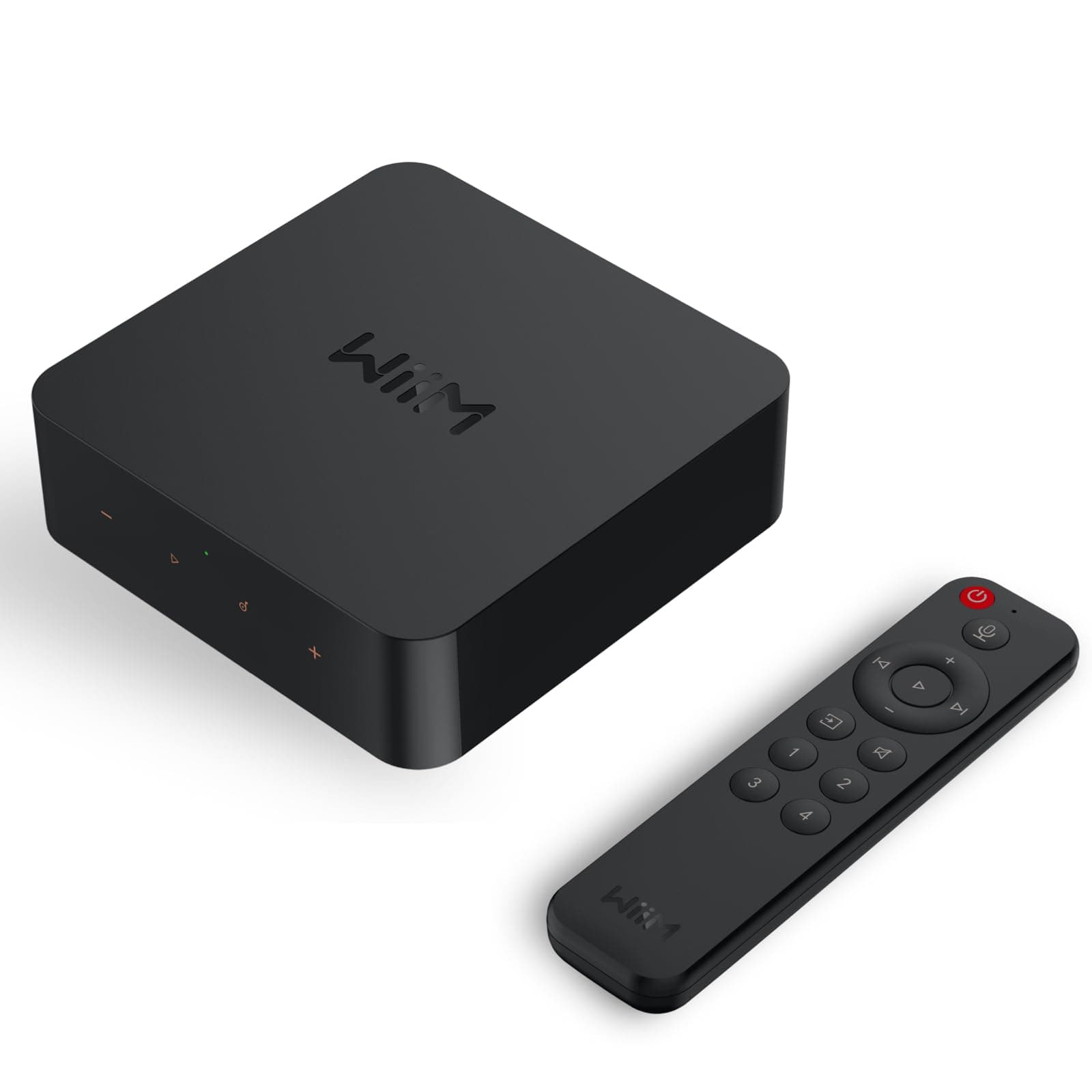
🎧 Elevate your soundscape—stream smarter, listen richer, and never miss a beat!
The WiiM Pro Plus is a cutting-edge AirPlay 2 and Google Cast audio receiver featuring a premium AKM DAC for high-resolution 24-bit/192kHz streaming. It supports multiroom playback across various smart speakers and offers seamless voice control via Alexa, Siri, and Google Assistant. Designed for audiophiles and vintage audio lovers alike, it integrates analog and digital inputs, enabling effortless streaming from Spotify, TIDAL, Amazon Music, and more, transforming any stereo system into a modern, high-fidelity wireless hub.


| ASIN | B0CC2HWC7N |
| Best Sellers Rank | #1,793 in Electronics ( See Top 100 in Electronics ) #8 in Wireless Audio Receivers & Adapters |
| Brand | WiiM |
| Built-In Media | Digital Optical Audio Toslink Cable x1, RCA to RCA stereo cable x1, USB Power Adapter x1, USB Type-C Cable x1, User Guide x1 |
| Color | black |
| Compatible Devices | Speaker, DAC, Amplifier, Mobile phone, Tablet, HomePod, Apple TV, Echo, Google Home |
| Connectivity Technology | Bluetooth, Ethernet, Wi-Fi |
| Connector Type | USB Type-C, RCA, SPDIF (TOSLINK), COAX, ETHERNET |
| Controller Type | Google Assistant, Amazon Alexa, App Control |
| Customer Reviews | 4.4 4.4 out of 5 stars (6,082) |
| External Testing Certification | ANATEL: 077462414664 / Modelo: ASR003 |
| Item Dimensions L x W x H | 5.5"L x 5.5"W x 1.6"H |
| Item Weight | 14.1 Ounces |
| Manufacturer | Linkplay Technology Inc. |
| Memory Storage Capacity | 512 MB |
| Mfr Part Number | ASR003 |
| Model Name | WiiM Pro Plus |
| Model Number | ASR003 |
| Other Special Features of the Product | Spotify Connect, Works with Alexa, Google Voice and Siri, AirPlay 2, Google Cast Audio, TIDAL Connect, Qobuz Connect, Roon Ready, NAS, DLNA, Home Media Server |
| Supported Internet Services | Amazon Music, BBC Radio, Calm Radio, Deezer, iHeartRadio, Napster, Pandora, Qobuz, Radio Paradise, SoundCloud, SoundMachine, TIDAL, TuneIn, vTuner |
| UPC | 602581806073 |
| Warranty Description | 1 Year Warranty |
G**G
This Little Box Made Music a Bigger Part of Our Life Again
I have an external hard drive with all my CDs recorded to it — over 11,000 songs — and while it was great to get the discs off the shelves, actually accessing the music was never as easy as I wanted. The WiiM Pro Plus completely changed that. Now I can get to my entire collection instantly, wirelessly, and without digging through anything. Honestly, it’s easier than when the CDs were on shelves in a different room than the system. We also have a multi‑room setup with a speaker selector box feeding speakers in the kitchen, living room, dining room, and on our deck. That system hasn’t gotten much use in the past few years, but the WiiM has brought the whole thing back to life. It’s made it so simple to play high‑quality music throughout the house that we’re using it all the time now. It’s genuinely enhanced our daily life to have great sound available whenever we want it. Setup wasn’t hard, but I did use AI to walk me through it. The first AI app I tried sent me down some unhelpful rabbit holes, but switching to a different one (Gemini) got me on track. A couple of tips to save you time: 1. Make sure everything is on the same network. Your computer, the device running the WiiM app, and the WiiM unit itself all need to be connected to the same network. I have a mesh system and a separate wireless router offering different networks, so it was easy to accidentally connect things to different ones. Once everything was on the same network, things went much smoother. 2. Don’t try to connect directly to your external hard drive or wherever your recorded music is. The first AI had me do that, and while it technically worked, the interface was awful. Gemini suggested using an app called Serviio, and that made a huge difference. With Serviio, the interface became clean, organized, and easy to navigate. Once I had that set up, I was able to use Amazon Music through the WiiM app, and I also connected it to Alexa so I can control playback by voice. I added my Spotify account too. I’m not sure why some reviewers say Spotify doesn’t work — you just open Spotify and tell it to play through the WiiM by playing a song and selecting the WiiM device at the bottom of the screen. Works great and seems pretty straightforward to me, but maybe some people don’t like that method. I haven't tried all the other built-in apps but the ones I have tried have been easy to use and sound great. There are a couple of small quirks. For example, if your phone has been off for a while, the WiiM app sometimes gets stuck showing a song that already played. But the music keeps going, and it only takes a second to “wake” the app so it shows the current track. The important part: the sound quality is excellent. The DAC in this thing is no joke. It feels great to finally access all my old CDs so easily and hear them sound this good. A lot of them are not available on Spotify or Amazon and it's great to have access to them so easily again! I’m giving the WiiM Pro Plus 5 stars, and I’m already thinking about buying another one for my family room system.
V**D
Amazing streamer - how I hooked up a turntable in a multiroom setup with two WiiM Pros
I love the WiiM Pro. Until I got the WiiM, I was sitting on the sidelines with streaming, other than having a Spotify account for playing music in the car or on my iPhone when I'm on the go. It seemed too complicated and expensive to me to buy any complicated streaming hardware for my home system. This year I decided to look again at the home streaming options to see if I should get onboard. I read about the WiiM Pro and decided to try it. I'm glad I did. When combined with a high-rez music streaming service, it's amazing how good streaming music can sound, and the cost barrier to entry is now incredibly low with the WiiM Mini and Pro. Assuming you already have some kind of music system, that's all you need (along with a streaming service). I got the Pro over the Mini because of the extra inputs and outputs, and especially the wired Ethernet cable option. I don't have a whole lot to add to other reviews, but in my review I want to explain how I hooked up my turntable to one WiiM Pro so I could broadcast that signal to my other WiiM Pro in a different room using WiiM's multiroom functionality. I have a ton of old records that aren't on any streaming service and I thought it would be nice to be able to listen to them in different rooms, since I only have one turntable. Buying two WiiMs made this possible! I connect my turntable to a vintage stereo preamp with a phono stage in the conventional way through the preamp's phono inputs. My preamp has "tape out" output jacks and I run a stereo RCA interconnect cable from the preamp "tape out" into the WiiM Pro's "line in" RCA inputs. The setup would be similar if you have an integrated amplifier (preamplifier + amplifier combined in one component) or a receiver. For that WiiM Pro, in the WiiM Home app, set the "audio input source" to "Line in". (Remember to set it back to WiFi or Ethernet when want to switch back to streaming from a music service). Play a record, and on your preamp set the "source" to phono. If your preamp has "tape out" outputs like mine (it might also be called something like "record out") then the preamp will send the music signal into the WiiM. You want to use the preamp's "tape out" outputs and not the "line out" outputs that you would send into an amplifier. This is because the "tape out" occurs after the phono equalization stage in the circuit, but before any volume, tone or balance controls; it's basically the pure unprocessed music signal. Next, in the WiiM Home app, follow the instructions in the online manual to configure multiroom audio. The included paper manual in my box was very basic and didn't explain this. As of my writing this review (Feb 2023) the way to do this is in the WiiM Home app (iOS) is to first make sure you have both WiiM's already setup. Next, start with the WiiM that's connected to your turntable. In the "device" setup area, you should see both your WiiMs. Tap the WiiM that's connected to your turntable to select it then press the nearby "link" icon (looks like two connected chain links) for that WiiM. This open a little chooser where you can see the other connected WiiM's in your network. Press the checkmark next to the other WiiM(s) that you want to play the same signal being broadcast from the first WiiM. Now go listen to your music. A few more notes and details: * With a setup like this you can plug any source, not just a turntable, into a WiiM (via a preamp or possibly directly) and play it on your other WiiM. For example, a CD player. FM tuner. Cassettes. Your beloved 8-track tapes. R2R tapes. Maybe a 78 rpm turntable? * In my configuration, playing a record, sending the signal through a ADC, into the first WiiM, streaming it over AirPlay 2 (I think that's how it goes?) into the other WiiM, and then decoding it back through the DAC in the other WiiM (or your own external DAC) is undoubtedly losing resolution compared to playing that same record through an all analog system. But it still sounds pretty darn good. I haven't compared playing a record this way vs playing the same album via a streaming service (like TIDAL, Amazon Music, etc.) but I would guess they are fairly similar in resolution and quality. If that album is in HD (like 24/92 or higher) on the streaming service, the steamed album might beat the vinyl album once it's downsampled over AirPlay. But my old albums are either not on a streaming service or if they are, they are probably in 16/44.1 or lower so it may be a wash. * One benefit of multi-room audio is to be able to play the same song in multiple systems and be able to go room to room and hear the same song seamlessly. With my configuration, I wasn't able to play the record in my main system (turntable -> preamp -> amp -> speakers), while also broadcasting it to the other WiiM, without unacceptable latency. The downstream WiiM was around 1 second behind my analog system. If you think about it, the main system is playing the signal instantaneously while the other WiiM is getting a slightly delayed broadcast. So I'm not criticizing WiiM for this, there is nothing they can do about it. By contrast, if you use both WiiM's to stream music as receivers, they are able to stay in sync because both WiiM's can "work together" to sync the music, but not when one of the two systems it not even playing through the WiiM. If the systems are close enough that you can hear the speakers from both systems at the same time, then it will be unlistenable because of the delay. But if they are far apart then you might be OK. * Earlier in this review I wrote that I am outputting my stereo preamp directly into the WiiM. Later, I placed an external analog-to-digital converter (ADC, not to be confused with a DAC which does the reverse) between the preamp and the WiiM. I ran an interconnect from the preamp "tape out" into the ADC, then connect the ADC from its digital SPDIF (optical) output into the WiiM's SPDIF input, and in the WiiM Home app, I changed the "audio input source" to SPDIF. This is purely optional but I'm putting it out there as an option for anyone who has a ADC. * I haven't done any critical listening to see if my external ADC is better than the WiiM's own internal ADC but If I get around to that, I may update my review. My ADC is a cheap Hdiwousp $17 device I got on Amazon.com which claims to convert to digital up to 96 kHz. I can't confirm that. * Finally, I left this out of my review above, but before I got the WiiM, I bought a Bluesound Node. I regret that. The WiiM is just as good. The only advantage the Node has is the HDMI input and subwoofer output which personally I'm not using. Maybe the Node app is better. The DAC in the Node might be better but I have an external DAC anyway. But you pay $450 more for the Node. I am selling my used Node on an online auction site now.
D**A
Buena calidad de manufactura, super intuitivo y funciona sin interrupciones. Lo tengo con conexión RCA a un sistema Onkyo en la Opción de "Pure Audio" que es dónde encuentro la mejor fidelidad para lo que brinda TIDAL. La app con el ecualizador paramétrico es estupenda.
P**S
Good
P**L
Bardzo dobry streamer. Jakość dźwięku świetna, łatwość instalacji i kompaktowe gabaryty to dodatkowy plus. Największym zaskoczeniem jednak jest dedykowana aplikacja, która działa perfekcyjnie i bardzo uprzyjemnia korzystanie ze sprzętu. Pilot również jest ok, można przypisać kilka przycisków do np. ulubionych stacji radiowych. Polecam niezdecydowanym 😎
C**R
I was looking for a Network streamer and did a bit of research on the internet and Youtube. After comparing the risk reward of each streamer, I finally bought one Wiim Pro Plus streamer. The initial sound from the Wiim Pro Plus connected to my Muzishare X7 integrated amp via a pair of Van Den Hul (The First) interconnect played through a pair of 92db Focal JMLab speakers was definitely better sounding than streaming via a Bluetooth receiver. Initially, even while I was streaming hi-res audio via Tidal, it sounded slightly flat and the sound stage felt a little compressed at the start. However, after watching a YouTube video on Best EQ settings by the cheapaudioman, I punch in the same setting he suggested and make some minor tweaks, and immediately the sound stage opened up, and the bass felt fuller. Now, I'm truly enjoying music that is streaming through the Wiim Pro Plus, playing Tidal via the Wiim home app. Be sure to fit this streamer with the best quality audio you can find, and it will definitely shine, it will not disappoint you. This is a highly recommended streamer at this price point for sure.
R**H
der WiiM ersetzt bei mir den zweiten doppelt so teueren, renommierteren Streamer, die in den entsprechenden Zeitschriften sehr gelobt werden Der Klang über den Digitalausgang scheint mir subjektiv deutlich besser als vorher zu sein, auch wenn ich mir der Möglichkeit eines Placeboeffektes im Sinne von „neues Gerät=besserer Klang“ bewußt bin. Den eingebauten DAC nutze ich für meine Nubert Aktivboxen nicht. Hauptvorteil ist aber die deutlich komfortablere Software. Die Einrichtung ist sehr einfach. Die Streaming Dienste sind einfach einzubinden. Deren Liste ist vielleicht nicht so umfangreich wie bei anderen. so fehlt beispielsweise für Klassik Fans Idagio, aber die gängigen sind alle vorhanden. Auch Amazon music funktioniert, allerdings nicht die Favoritenverwaltung. Das liegt nach FAQ aber an der Schnittstelle die Amazon bereitstellt. Hier würde man sich mehr Kooperation von Amazon music wünschen! Die Benützung der Amazon music App mit AirPlay ist dazu keine Alternative, da die Musikwiedergabe dann bei jedem SoundClip unterbrochen wird. Vermißt wird die Möglichkeit die Musiksammlung über USB anzubinden. Der Fitzbox Medienserver ist zwar einfach einzubinden und ermöglicht die Musikwiedergabe. Diesem fehlt aber die Anzeigemöglichkeit für album Tags. Wenn die NAS ohnehin immer läuft und man noch Wert auf die eigene Musiksammlung legt, ist das aber kein Problem. Ich habe zwar keine eigene Erfahrung mit roon, könnte mir aber vorstellen, dass die steuerungssoftware von WiiM eine starke Konkurrenz für die werden wird Resümee in aufsteigender Bedeutung: toller Preis, toller Klang, tolle Software!
Trustpilot
Hace 3 semanas
Hace 2 semanas