
Descargar la aplicación


Servicios al cliente
Sobre nosotros
Copyright © 2025 Desertcart Holdings Limited
Descargar la aplicación

🔌 Connect with confidence — legacy meets modern in perfect harmony!
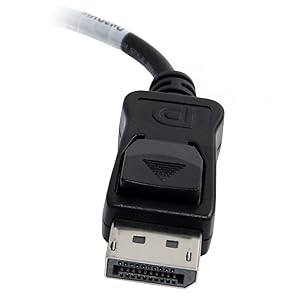
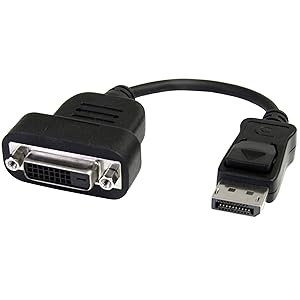
The StarTech.com DP2DVIS is an active DisplayPort to DVI-D adapter supporting up to 1920x1200 resolution at 60Hz. Featuring a secure latching DisplayPort connector and screw-lock DVI end, it ensures stable, flicker-free video output without the need for drivers. Compatible with a wide range of GPUs, including those without DP++ support, this compact adapter is ideal for professionals bridging modern workstations with legacy displays.



| ASIN | B004SUO1GM |
| Best Sellers Rank | 29,778 in Computers & Accessories ( See Top 100 in Computers & Accessories ) 5,808 in Cables (Computers & Accessories) |
| Department | accessories general |
| Guaranteed software updates until | unknown |
| Item model number | DP2DVIS |
| Language | English |
| Manufacturer | StarTech.com |
| Product Dimensions | 23 x 20 x 2 cm; 48 g |
A**L
Reliable Adapter for Legacy Displays
I needed a way to connect an older DVI monitor to a newer workstation with only DisplayPort outputs, and the StarTech DP2DVIS adapter delivered exactly what I needed. It’s a true active converter, which means it works even with graphics cards that require active signal conversion—perfect for my multi-monitor setup using an AMD GPU. The build quality is solid, with a latching DisplayPort connector that clicks securely into place, and the DVI end supports screw-locking, so there’s no risk of accidental disconnection. I’m using it to drive a 1920x1200 display, and the image is sharp and stable with no flickering or signal drops. Setup was completely plug-and-play—no drivers, no fuss. It’s also compact enough to fit behind a monitor without adding cable clutter. ✅ Pros: Active conversion supports a wide range of GPUs and monitors Crisp resolution up to 1920x1200 @ 60Hz Latching DP connector and screw-lock DVI for secure connections No drivers or software needed Works with Windows, macOS, and Linux ⚠️ Cons: Slightly more expensive than passive adapters, but worth it for compatibility Short cable length (15cm) may require an extension in some setups
R**M
Very Reliable - Better than the Sapphire Equivalent
I've been using this now for several weeks, and I've had none of the issues with intermittent connection that I was having from my Sapphire adapter. This item is plug & play and works like a dream. Why a Startech adapter should work better than the Sapphire item on a Sapphire graphics card (I'm using a Sapphire Radeon 6850HD), I have no idea, but it does. It's also on the AVI official supported adapters list. I now have my 3 screen Eyefinity setup working perfectly at last. Recommended.
N**.
Stopped working after just half a year of usage
Bought this in June 2015 for use in a multi monitor setup with a 980TI. Worked for the most part for a months without any issue, but then started experiencing an intermittent issue when booting the machine up where the monitor this adapter was used for didn't come on. Found that unplugging and replugging the adapter back into the graphics card seemed to fix the issue for the session, which I wasn't particularly happy with, but it was less effort than actually replacing it. Anyway, this morning I tried to start my machine up and the monitor didn't come on. Tried the steps above as per usual, but it wasn't coming on. Switched cables around so check that it wasn't the graphics card port, but it still didn't come on. Using the DVI connection for now, but I've ordered another Sapphire active dvi to displayport adapter (http://www.amazon.co.uk/dp/B00433C5Y4/ref=pe_385721_37986871_TE_item), the adapter my other monitor uses, which I've had for over 4 years and has worked without issue. I'd recommend anyone else considering buying this product to do the same.
A**R
Works, but not long enough. Should last be more than 3 yrs.
TLDR : Does what it is suppose to do, but just not for as long you want. 3 years is not acceptable. Used this to drive a legacy 1920x1200 DVI-D display from a Dock with DisplayPort output. Dock connected to an 8 year old laptop using Thunderbolt cable. As laptop lid was opened/closed and started/suspended, legacy display worked as required doubleing up with laptop display when lid was open and defaulting to being main display when lid was closed. Delivered reliable recovery from suspension,... until a few weeks ago. Intermittent recovery from suspend and then growing infrequent operation from start up marked the gradual decline until finally it simply would not work. During the declining days I noted an inability for the THunderbolt link to train/sync the link as startup. Replacing this Startech Active DP->DVI-D adapter has solved the problem. Knocking off two stars because it should last more than 3yrs.
T**R
3 Screens? Just plug and play with HD 6850 and HD 7950
I've used this with two graphics cards now and it works perfectly with both. There are some things worth worrying about with a computer, overclocking, optimising, actually using it and that sort of stuff for example. But worrying about a simple monitor connection isn't one of them. This little gem just solves the problem, makes my third monitor work and I can go back to gaming/working without giving it another thought. I've used it with three different monitors and they all work perfectly, both when using EyeFinity and when using the standard 3 screen desktop arrangement. There just doesn't seem to be anything you need to worry about with this adapter, it's great. It helps that it's on the list of supported hardware and all that, but honestly, it just works so get it and forget it.
A**W
Spot on perfect, exactly what was needed
Quality looking product arriving in a small plastic bag. Plugged into the displayport connection and out to a dvi cable then on to the monitor. Bam, worked first go perfect picture. Only thing to watch out for is if you need to remove the cable, you have to squeeze the adapter a little to release it. If you have found this review helpful, please let me know by hitting the “helpful” button! or if you have any questions then feel free to ask :)
R**N
good
this is essential for running 4 or 6 monitors with the club graphics card. You only need one adapter for 4 monitors. And 3 for the 6 monitors. Overall works out cheeper than daisy chaining
M**S
Use this with a three screen display
I am using this with 2 x Asus HD 6850 in Crossfire. If you want to combine three monitors in one Eyefinity group then you need to connect all three monitors to the first graphics card. Mine have 2 x DVI, 1 x DisplayPort and 1 x HDMI. I am using the two DVIs and this adapter and it works perfectly. Once you get used to the "unfair" advantage of three screens, you'll never want to go back to the blinkered view that you get with just one screen. In a driving sim (depends on the game), the central monitor is the windscreen and the others show the wing-mirror and side view.
A**A
Funzionamento perfetto, buona qualità costruttiva, robusto e compatto. Sostituisce perfettamente i classici cavi DP-DVI che tendono a pesare sull'attacco DP.
A**G
Acheté en septembre, ne fonctionne plus en janvier..
A**N
This active displayport to DVI adapter works great to connect more than 2 monitors to my video card. I currently have a triple monitor Eyefinity set-up on my workstation and it works without a problem out of the box. You need an ACTIVE displayport adapter if you want to use an ATI video card to have 3 monitors. Your 3rd monitor will not work with a passive cable. In addition, I really like how the Displayport part of the adapater watches into my video card, it's almost impossible that it disconnects by itself while I'm working, since you have to press a button to release it from the computer. There is no flickering on the monitor and it passes through my 1680x1050 resolution without any complaints. Highly recommended for triple monitor enthusiasts !
V**O
Por alguna razon que desconozco un monitor apple cinema display no funciono con mi nueva nvidia 1050Ti, conectado directamente al puerto DVI y despues usando un adaptador HDMI a DVI, navegando en google me di cuenta que probablemente lo que necesitaba era un adaptador ACTIVO y por suerte encontre este a un precio bastante atractivo y decidi probar suerte ya que no estaba seguro si me serviria, afotunadamente funciona a la primera y estoy satisfecho...la calidad del producto es de primera el cable es flexible y resistente lo que ayuda a no poner stress inecesario en el puerto DP y asi extender su vida util.
J**H
This works fine for connecting your external DVI monitor to a computer with a Display Port slot. There are two potential problems, though. One is that this plugs right into the slot on your computer, so it may block whatever ports or jacks are on either side of the Display Port slot. For example, I have a Lenovo laptop, and it prevents me from using the USB jack right next to the display port, and it makes it almost impossible to use the ethernet jack unless I use a cable with a very small hood on the plug. The other issue is that it seems like with a heavy cable that's always moving, you'd place a lot of undue strain on the plug in your computer, and maybe the motherboard. I could see problems in the long run there. I eventually went with another plug that's more of an adapter cable, with a very small plug on either side and a piece of cord between the two, so I don't run into problems, and don't block the other ports. But this would work in the short term.
Trustpilot
Hace 1 mes
Hace 3 semanas