
Descargar la aplicación


Servicios al cliente
Sobre nosotros
Copyright © 2025 Desertcart Holdings Limited
Descargar la aplicación

⌨️ Elevate your workspace: one keyboard, endless possibilities.
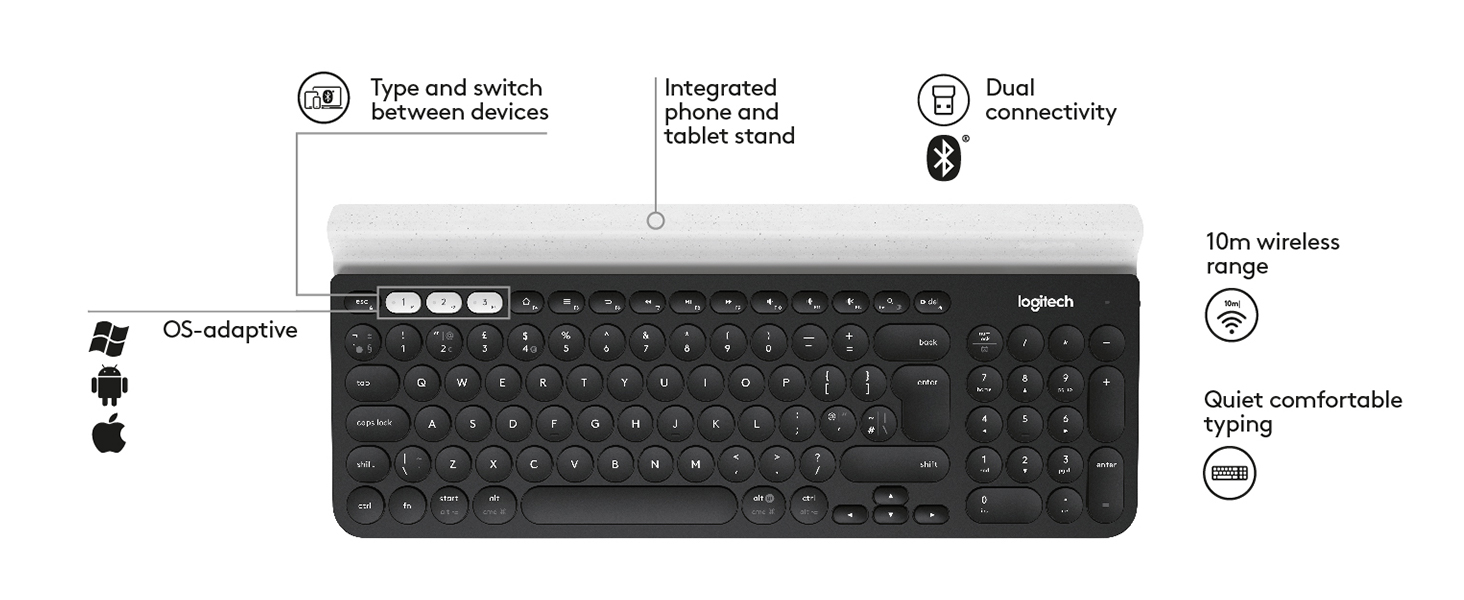
The Logitech K780 is a premium multi-device wireless keyboard designed for professionals who demand seamless switching between up to three devices via Bluetooth or USB. Featuring a full-size layout with whisper-quiet keys and an integrated cradle for smartphones and tablets, it offers universal compatibility across major operating systems. With robust build quality and up to 12 months of battery life, the K780 combines convenience, comfort, and durability for the modern multitasker.

| ASIN | B01GV6HP0E |
| Are Batteries Included | Yes |
| Batteries | 2 AAA batteries required. (included) |
| Best Sellers Rank | 5,176 in Computers & Accessories ( See Top 100 in Computers & Accessories ) 79 in Keyboards (Computers & Accessories) |
| Brand | Logitech |
| Colour | Dark Grey/White |
| Computer Memory Type | DDR3L-1600 SDRAM |
| Customer Reviews | 4.6 4.6 out of 5 stars (4,433) |
| Date First Available | 29 Jun. 2016 |
| Guaranteed software updates until | unknown |
| Item Weight | 830 g |
| Item model number | 920-008041 |
| Manufacturer | Logitech |
| Number of Batteries | 2 |
| Operating System | Android,Chrome,Mac,Windows |
| Power Source | Battery Powered |
| Product Dimensions | 38 x 2.2 x 15.8 cm; 830.07 g |
| Series | K780 |
| Standing screen display size | 15.6 |
| Supported Software | Mac OS X 10.11 El Capitan |
| Wattage | 3600 watts |
T**R
Versatile and Premium: A Keyboard That Makes Life Easier.
I held off on reviewing this keyboard until I had time to get familiar with it, and now I feel ready to share my thoughts. First, the weight: it’s substantial, which gives it a premium feel and keeps it securely in place on the table. It also includes a USB dongle for devices without Bluetooth, which is a nice touch. Some reviews mention that the round keys take time to get used to, but I didn’t find that to be the case. Then again, I’m not the fastest typist. The keys themselves feel fantastic, like a premium laptop keyboard. My favourite feature though, is the ability to connect to up to three Bluetooth devices simultaneously, or with the press of a button at least. I love being able to switch seamlessly between my laptop and phone. It makes typing messages so much easier, and who doesn’t appreciate a little added convenience? Another neat feature is the option to configure a few buttons for different functions. It’s surprisingly handy, once you remember which function you assigned to each button! Overall, very happy to give this Logitech keyboard top marks.
N**N
Amazing keyboard! Solidly built, excellent battery and excellent switching!
I've had loads of keyboards, including quite a few wireless ones. I'm probably going to go out on a limb and say this is the best of the wireless keyboards I've ever used. The keyboard itself is very slim, far slimmer than mose, and the keys have a low profile, which makes it great for sliding on a shelf, or down the side of the sofa when you're not using it. The top of the keyboard has a toblerone-shaped device-stand. I assume this is for people who want to prop up a tablet or phone. I don't use it for this, but it looks like a far better solution than I've seen elsewhere, using legs and arms. The keyboard is SOLID. It's quite heavy, heavier than it looks like it should be. My guess is that there's a solid piece of metal forming the back of the keyboard, making it very stiff, and unlikely to bend/break if you accidentally sit on it. I'm really impressed by how solid it is. The key action is nice and clacky, so you get good tactile feedback. Of all the low-profile keyboards I've used, I'd say the key action on this one is as close to a 'proper' keyboard as I've got. The keys have a nice resistance, good spring and stop at the end of their travel with a nice firm 'tack' sound, not the muffled plastic of some chiclet-style keyboards. The pairing of the Unifying is relatively painless, but needs a PC to do it. Once the keyboard and dongles are paired, you can unplug them and stick them in anything that recognises a standard USB HID keyboard (which is pretty much anything, probably even including PS4s). Pairing of the bluetooth is very easy, and doesn't need a PC. You can have the keyboard paired with up to two dongles AND a bluetooth connection all at the same time. You switch between the paired devices by pressing the function keys F1->F3. if you want the actual function key, you need to press Fn and the function key. This can be reversed, so you need to press Fn in order to switch. There is a way of doing this via the software (if I remember correctly), and you can do it with a special key combination on the keyboard, but some people say this is non-permanent, so if the batteries run out, you need to do it again. Battery life is excellent. I've not had to replace them in a year, and I've used the keyboard for about a day a week. I bought this with an M720 Triathlon mouse. The keyboard is able to pair up to the M720's dongle, and the M720 mouse can pair up with the K780's dongle. This allows you to have a proper Keyboard+Mouse pair for two different devices, and you just switch between them with the Function keys on the keyboard and a toggle switch on the mouse. I use this M780 with a MisterFPGA, a SteamLink and a Sony TV (via bluetooth). It works flawlessly with all three. Overall I'm extremely pleased with this keyboard, it's absolutely the best wireless keyboard I've ever owned, and absolutely the best designed. The only slightly negative thing is that you need the Windows software to pair it and set up things on the keyboard, but I'm sure there's a Mac version too now.
A**R
Perfect external keyboard (for me)
This is my third one of these. I have one at home and one at the office (my daughter has the third). So handy to have the slot to rest a phone / tablet in and switch between the connections. Batteries last for ages (I still haven't had to replace the batteries in my original one). Handy to have the numberpad too when using a MacBook. It's very quiet to type on. The keys have good travel, somewhere between a laptop and a normal external keyboard. Can't fault it and would happily buy more if I had the need!
D**H
Very handy
I bought this keyboard to replace a previous version whose spacebar inexplicably stopped working one day. It’s the same make, so I’m making these comments after a few months of decent use. I’m hoping that the flaw that killed the previous one is no longer at issue for this one. This is a solidly built keyboard. Much bigger and heavier than its predecessor, but yet comfortable in the lap whilst seated. The front strip has a hollow to enable you to stand a phone or table whilst working with it - a thoughtful touch. Like the other keyboard, this has the ability to support 3 different devices via Bluetooth. There are 3 keys which, when individually pressed, select their respective associated device. There is no light to offer feedback on which is selected - this is surprisingly irksome, and could have been avoided easily. The action on the keys is responsive, fast and good. The buttons provide satisfying feedback, and typing quickly is comfortable and accurate. I have never known the device to lose connection. After 4 months of decent usage I am yet to need to change the battery. That’s good, but I would still have preferred a rechargeable battery. All in all this is a well made and really useful tool, especially when paired with a multi device mouse. Apart from the few quibbles listed above (for which I am deducting one star) this is a good piece of kit, which makes it really easy for me to switch between my home and work PCs and my phone.
W**Y
I first bought a Logitech Triathlon mouse from Amazon where I was first introduced to Logitech's Easy-Switch technology which impressed me so much that I decided to buy this keyboard. Based on this keyboard's sticker price, I thought it was on the expensive side. Externally the keyboard is made almost entirely of rubber and plastic which further fed my growing skepticism. After setting it up and using it though, I was delightfully surprised how responsive the keys are to the touch and how solid the entire keyboard feels and sounds. This is definitely one of the best keyboards (wireless or otherwise) I've ever used. Despite the unconventional (and quirky) shape of the rounded keys, I never found myself poking the wrong keys -- I'm a touch-typist. With both mouse and keyboard on Easy-Switch I feel I now have a truly wireless KVM solution for my home. Both this keyboard and the Triathlon mouse are able to switch pairings from my Mac mini and my MacBook Pro, quickly and flawlessly. If this keyboard lasts a few years, it will be well worth the money.
J**E
Rien a dire, la qualité du clavier est au RDV. Coté pratique c'est aussi top : un jeu de trois touches permet de switcher de le l'ordinateur vers la tablette ou le smartphone et vice versa. Coté mise en route; c'est un jeu d'enfant. L'emballage ne comporte qu'un guide succinct de mise en route rapide mais il suffit d'aller sur le site Logitech pour avoir accès à un guide Online téléchargeable (merci pour la planète) et à une base de connaissances. Pour l'ordinateur, j'ai déjà un souris Logitech (protocole Logitech Unifying) donc je n'ai pas eu besoin d'utiliser le dongle USB présent dans le compartiment à piles du clavier. Ce protocole permet de connecter jusqu'à 6 périphériques sans fil via le même dongle (1 seul port USB occupé). Pour le smartphone ou la tablette c'est une connexion Bluetooth, la procédure est classique : activer le Bluetooth sur le device, appuyer longuement sur la touche de switch du clavier que vous voulez affecter au device, device qui propose un code à entrer sur le clavier pour jumeler les deux (ne pas oublier d'appuyer sur la touche Entrée après avoir saisi le code). C'est terminé; il suffit d'appuyer ensuite d'appuyer sur une des touches 1,2 ou 3 (en haut à gauche du clavier) pour l'affecter à l'appareil désiré. Les + : qualité du clavier, frappe agréable, clavier numérique Les petits inconvénients : c'est un clavier multi périphérique, donc avec certaines touches avec 2,3 ou 4 entrées donc il demande un certain d'adaptation - clavier relativement mais ce n'est pas un nomade et il doit pouvoir supporter le poids d'une tablette et d'un smartphone Les - : le voyant (vert) indiquant la mise sous tension s'éteint au bout de quelques secondes, et comme le bouton de mise en route ne comporte pas d'indication ON/OFF, il n'y aucun moyen (visuel) de savoir si le clavier est sous tension. Nota c'est ce voyant qui s'allume en rouge quand les piles sont à changer. Il manque aussi un voyant d'indication de verrouillage MAJ. L'absence de ces voyants est peut être voulu dans le but d'améliorer la consommation. De ce coté, je n'ai pas d'information, venant d'acquérir l'appareil.
K**D
نسخه مقلده من الحقيقيه وليس اصلي
C**O
Avevo già comprato un'altra tastiera con mouse Logitech a mio figlio, e ne ho apprezzato le grandi potenzialità, al punto di prenderla anche per me, per il lavoro, avendo 2 pc ed un tablet. Un consiglio: molte domande sono sul fatto che Logitech Flow non si attiva, a volte si, a volte no. Semplice, per farlo funzionare dovete accendere prima un pc, agganciare tastiera e mouse (la prima volta con l'aiuto di Logitech Options) poi tutte le altre volte che accendete la postazione, dovete allineare tastiera e mouse con il pc, tramite i tastini bianche di scelta del dispositivo. Questo perche' il programma Logitech Options una volta partito e agganciate le 2 periferiche mouse e tastiera, è pronto per fare da server master all'altro pc collegato sulla stessa lan o wifi. L'altro pc, in tutto questo frangente deve rimanere spento, se parte insieme al pc di cui sopra, non si aggancera' con FLOW. Quindi, finita la partenza del primo pc, facciamo partire il secondo pc o mac, lasciando tastiera e mouse collegate sempre al primo pc. Anche qui, se cambiamo manualmente dal primo pc al secondo, Flow non vedra' l'altro pc, semplice fin qui. Fatto partire il secondo pc, vedremo l'icona di Logitech Options diventare bianca all'orlo del mouse, e nera dentro, perfetto, il secondo pc è partito correttamente con Logitech flow e logitech options in modalita' slave (cliente), ha riconosciuto il pc master (ovvero logitech flow e options sul primo pc in modalità server). Se userete questa accortezza, flow funzionera' al primo colpo, essi' perche' è solo all'avvio che flow si imposta correttamente in modalita' server, o client, se vede o meno i 2 dispositivi collegati o meno. Per essere più chiari, se faccio partire il primo pc con solo 1 tastiera attiva, ed il mouse è predisposto sull'altro canale (dell'altro pc) non si vedranno mai. Riepilogando, spiego facile: accendo il primo pc, verifico prima che parta flow, di avere connessi sia tastiera che mouse al pc che sta partendo. In questo modo Flow parte al primo avvio in modalità server. Deve rimanere cosi' la sistuazione fino alla completa partenza del secondo pc. Finito ai far partire il primo pc con tastiera e mouse connessi, facciamo partire il secondo pc. Flow non vedendo alcun dispositivo connesso parte al primo avvio in modalità cliente, riconoscendo l'altro flow master server, e la connessione tra i 2 flow avviene con successo. Dunque il segreto per avere flow attivo e perfettamente funzionante sta nell'aver capito che solo al primo avvio, capisce come impostarsi, se client o server. Qualunque altra combinazione utilizziate, flow non sincronizzerà mai i 2 pc. Il terzo pc, idem, deve partire per ultimo (se connesso con pennino usb Unifing, se associato in Bluetooth flow non sincronizza. il terzo pc deve partire quando il secondo ha finito, e sempre col primo attivo in modalità server, quindi nessuno switch di mouse e tastiera dovra' essere fatto fino a quando tutti i pc / mac con FLOW sono sincronizzati. L'ordine di partenza, coincide col primo avvio dell'applicazione Options/flow. Spero di aver chiarito ed aiutato tanti, anche io all'inizio ero scettico, poi capito il funzionamento, consiglio a tutti coloro che devono gestire 2 o 3 apparecchiature, è di una comoditaà unica, avere il copia e incolla insieme al seguimi con Flow, non tornerei più indietro. La mia abbinata è K780 + master 2S con usb unifing. Avevo un mouse logitech con pennino Unifing, e non solo Options ha aggiornato il firmware del pennino che avevo già, ma è rimasto l'uso del vecchio mouse, che utilizzo col portatile quando devo spostarmi, se invece sono in postazione, ho un vantaggio innegabile di avere mouse e tastiera che Vedono 3 apparati, senza che impazzisca con collegamenti vecchio stile con switch KVM. Tutto essenziale, in ufficio poi assenza totale di cablaggi extra. Voto 10 su 10, ampiamente meritato. Allego delle foto per farvi capire come l'icona Options si presena sul primo pc server è la prima a sinista con forma mouse ed una X al centro. Poi sull'altro pc, che se parte al primo avvio come specificato, è in modalita' client, con la forma di un mose orlo bianco e interno nero, significa che è partito al primo avvio correttamente. Da questo momento in poi è solo goduria pura, perche' non l'ho preso prima ? Mi domando....
O**B
Un peu lourd mais super, Le clavier de mon ordinateur portable était pratiquement HS, j’ai mis celui-ci par dessus directement. Il est plutôt simple à installer il suffit juste de telecharger le logiciel ‘options’ de logitech.
Trustpilot
Hace 1 mes
Hace 3 días