We remain fully operational. Our teams are working around the clock to ensure your deliveries continue safely.

Descargar la aplicación


Servicios al cliente
Sobre nosotros
Copyright © 2025 Desertcart Holdings Limited
Descargar la aplicación


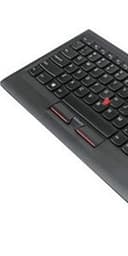
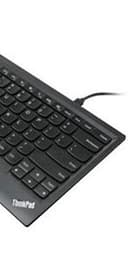
⌨️ Elevate your desk game with the legendary ThinkPad keyboard experience!
The Lenovo ThinkPad Compact USB Keyboard with TrackPoint is a full-size, slim wired keyboard designed to replicate the premium typing experience of ThinkPad laptops. Featuring an ergonomic scissor lift key mechanism, integrated TrackPoint for precise cursor control, and a rechargeable battery lasting over a month, it offers seamless NFC pairing and micro USB charging. Ideal for professionals seeking a reliable, high-performance keyboard that enhances productivity and comfort.
| ASIN | B00F3U4TQS |
| Antenna Location | PC/server |
| Best Sellers Rank | 98,119 in Computers & Accessories ( See Top 100 in Computers & Accessories ) 1,573 in Keyboards (Computers & Accessories) |
| Box Contents | USB Cable |
| Brand | Lenovo |
| Brand Name | Lenovo |
| Button Quantity | 87 |
| Colour | black |
| Compatible Devices | Devices with USB port |
| Compatible devices | Devices with USB port |
| Connectivity Technology | USB |
| Connectivity technology | USB |
| Customer Reviews | 4.3 out of 5 stars 611 Reviews |
| Enclosure Material | Acrylonitrile Butadiene Styrene |
| External Testing Certification | BSMI, C-Tick, CE, c(TUV)us (USA/Canada), FCC, KC (Korea), TuV Mark, UkrSEPRO, VCCI |
| Global Trade Identification Number | 00887619390865, 04923123158549 |
| Hand Orientation | Ambidextrous |
| Item Dimensions L x W x H | 30.6L x 16.4W x 1.4H centimetres |
| Item Weight | 0.97 Pounds |
| Keyboard Backlighting Color Support | Single Color |
| Keyboard Description | Wired, USB |
| Keyboard Layout | QWERTY |
| Keyboard description | Wired, USB |
| Manufacturer | Lenovo |
| Model Name | 0B47190 |
| Model Number | 0B47190 |
| Number of Keys | 87 |
| Number of Sections | 1 |
| Power Source | Corded Electric |
| Product Features | Integrated pointing device, Keyboard, PC/Mac |
| Product Warranty | Manufacturer Guarantee |
| Recommended uses for product | PC/server |
| Series Number | 2692190 |
| Special feature | Integrated pointing device, Keyboard, PC/Mac |
| Style Name | Professional |
| Switch Type | scissor |
| Theme | RGB |
| Total USB 2.0 Ports | 1 |
| UPC | 887619390865 034754151756 |
| Unit Count | 1.00 count |
| Water Resistance Level | Not Water Resistant |
J**S
Good laptop-style keyboard, pair with magnetic right-angle USB cable
I bought this in my search for a US-layout laptop-style wired keyboard for use with Windows & Mac machines. I'm only a few days into it, but so far the accuracy is dead-on and I'm very happy with it. (I had previously tried a Matias tenkeyless keyboard, but that one generated way too many duplicated and missed keypresses.) Since so many people have warned about the fragility of the USB connector on the keyboard, I've paired it with a USB cable with a magnetically switchable right-angled connector. My hope is that this will act a bit like the magsafe connectors on older Mac laptops and absorb any stress that would otherwise weaken the USB connector. The one I'm using is the LAMA "Right Angled Charging Cable, LAMA [3A 6.6ft] Magnetic USB Cable Multi Charging Cable with Lightening Type C Micro USB Magnetic Connectors for Charging/Data Transfer/i-Products/Android Devices Red" ( https://www.amazon.co.uk/gp/product/B07WDBBJMD/ ). At first I was disappointed that the 6M version was only available in red, but I realized that it more or less matches the trackpoint nub! I'll update this if more problems crop up later.
A**R
ThinkPad experience for and machine!
A standard, high quality, Lenovo product, one that improves the experience of any USB-attached machine. The famous TrackPoint mouse pointer enables the focused touch typist to navigate fields and applications without breaking away from the home row. As perfectly evolved as any professional ThinkPad keyboard, the only single negative is that's the micro-USB connector on the product can wear aggressively due to constant disconnecting, reconnection (if a traveling worker). This aside, it provides a quality user experience at a good price-point.
H***
Quite good
Gripes are that the ctrl key is not in typical position 😭😥😢, x the micro usb is weak and disconnects often not happy about thatt the slot seems bad..
L**H
and I am totally satisfied and happy with the Lenovo Thinkpad Compact keyboard
I bought this to use with my Microsoft Surface Pro 4, since I can't stand the keyboard that goes with the Surface Pro, and I am totally satisfied and happy with the Lenovo Thinkpad Compact keyboard. I like the size of the keyboard , the spacing of the keys is perfect for me, the touch/feel of the keys is great for my typing (I touch-type), and having the little mouse tracker is a real bonus. It is a little plasticky feeling after years of using a MacBook Pro (which I find sublime to type on), but compared to the Microsoft Surface keyboard, the Lenovo is great. The only thing, is that I was expecting a wireless Bluetooth keyboard, but received one with a cable? Not such a big deal except that the Surface Pro has only one USB port...
C**M
Great keyboard, especially if you're already used to the ...
Great keyboard, especially if you're already used to the ThinkPad laptop keyboards. I find the arrow keys & pageup/pagedown keys a bit too cramped and keep miss hitting them but I knew that was a risk from looking at the layout. Very nice to type on otherwise. NOTE: This is a US keyboard layout (which is what I wanted).
E**.
It has *** US LAYOUT ***
It has *** US LAYOUT ***. It's amazing how the product description won't say the most important thing.
A**R
Not genuine item
Arrived in damaged packaging, item is scratched, charging port is damaged, item seems like been abused rather than used - but I've ordered new one. Delivery took 2 weeks. The keyboard itself does not look genuine - is very poor quality, noisy squeaks and cracks and so on.
J**R
Would be better if a UK keyboard
Other than that works great
Trustpilot
Hace 2 meses
Hace 2 meses