We remain fully operational. Our teams are working around the clock to ensure your deliveries continue safely.

Descargar la aplicación


Servicios al cliente
Sobre nosotros
Copyright © 2025 Desertcart Holdings Limited
Descargar la aplicación

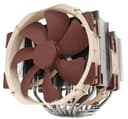
❄️ Stay cool, stay ahead — the NH-D15 means business.
The Noctua NH-D15 is a premium dual-tower air cooler featuring 6 heatpipes and two ultra-quiet 140mm PWM fans, engineered for exceptional thermal performance rivaling liquid coolers. Compatible with a wide range of Intel and AMD sockets, it includes high-end thermal paste and an easy-to-use mounting system. With over 250 awards and a 6-year warranty, it’s the definitive choice for professionals demanding silent, reliable, and powerful CPU cooling.


| ASIN | B00L7UZMAK |
| Air Flow Capacity | 140.2 Cubic Metres Per Hour |
| Batteries | Unknown batteries required. |
| Batteries Required? | No |
| Batteries included? | No |
| Best Sellers Rank | 31,631 in Computers & Accessories ( See Top 100 in Computers & Accessories ) 449 in Fans & Cooling |
| Colour | Brown |
| Customer Reviews | 4.8 4.8 out of 5 stars (11,254) |
| Date First Available | 17 April 2014 |
| Included components | NH-D15 |
| Item Package Quantity | 1 |
| Item Weight | 1.3 kg |
| Item model number | NH-D15 |
| Manufacturer | Noctua |
| Material | Copper (base and heat-pipes), aluminium (cooling fins), soldered joints & nickel plating |
| Noise Level | 24.6 Decibels |
| Part number | NH-D15 |
| Product Dimensions | 16.1 x 15 x 16.5 cm; 1.3 kg |
| Size | 165 x 150 x 161 mm |
| Specific uses | personal |
| Specification met | No |
| Style | Classic |
| Voltage | 12 Volts |
| Wattage | 1.56 watts |
C**N
AIO levels of cooling in an air cooler
I begun having issues with my 240mm AIO, temperatures would reach 70°c at idle and would hit 100°c and throttle on any load. Obviously something was wrong and needed to get a replacement. I had seen many reviews of the Noctua NH-D15 online and was sceptical. How can a air cooler come close to the performance of my once beloved AIO? What tipped the balance for me was a change in requirements. My system runs 24/7 almost, and having a pump fail again during the night isn't really an option. Also, the NH-D15 is significantly cheaper than any quality 240mm which made me want to try. That plus Amazon's incredible returns policy meant is was pretty much risk free. The box arrived, it's rather large and heavy for its size. The packaging is mostly cardboard and minimal non recyclables, which is nice to see. Unpackaging the cleverly arranged box is almost a pleasurable puzzle. Installation instructions are simple, to the point and accurate. Just what you want. Out of the box I had Intel and AMD install options which is great. No AM4 support out of the box but you can order the bracket from Noctua free of charge if you require it. Installation goes fairly simple. I installed mine on an ASUS X-99 A 2 (socket 2011-3). Two brackets around the CPU slot, screw in. Add the included Noctua thermal paste. Then screw the cooler to these mounts with the included long reach phillips head screwdriver - a fantastic touch for simplifying the install process. Slight issue getting the second screw in to attach the cooler which took a few moments to sort out - turns out I wasn't pushing down hard enough. Clip on both fans using the metal wire brackets, plug shorter than case fan cables in to your motherboard, you can use the included Y-cable if you don't have the slots for 2 individual cables, you can also install the adaptors to quieten the fans - i personally set a fan curve in my computers BIOS, but it's up to you. You may also have conflict issues with your graphics card and RAM but you can rotate the cooler and move the fans if you do struggle to fit the cooler around your RAM. This cooler is VERY large and to get it in I did have to remove my graphics card to make the install a little easier. And that was it for install. Fairly straight forward, a lot quicker than an AIO. Into the first boot, MSI Afterburner reports a significant drop from the AIO temps to 32°c, some of the lowest temperatures I've ever seen on my system, even during winter. Loading up some benchmarks and stress tests to warm up the cooler proved un-eventful. With temperatures on a 4.2ghz overclock on an Intel 5820K only reaching 59°c. Pushing the overclock further to 4.6ghz (the highest my system has ever gone) got the temperatures to creep just north of 70°c. Doing this whilst remaining whisper quiet at full RPM - I couldn't notice any additional noise over my case fans. Negatives of the cooler: Aesthetics, Noctua does love it's beige and brown fans, it's symbolic to the company and is an instantly recognisable. You can replace the fans with the chromax series, these are all black fans with multiple colour rubber edges to stop vibrations at a cost. Pushing the cooler into quality AIO price territory. You can also get covers for the fin stacks if you'd prefer these to be a certain colour. However, for me that's not really an issue. Size of the cooler. It fits in my system, just. Some may have issues with RAM and graphics cards. Graphics cards can always be moved to another lower slot. RAM however, if you have particularly large RAM modules could be an issue. You can rotate the cooler and move the fans to accommodate the RAM but it is something to be aware of before buying. Overall though, this is a fantastic cooler cannot rate it highly enough. It's exceeded my already high expectations and lived up fully to it's reviews.
B**.
It's huge, but works well!
It's huge! Works well with good instructions on fitting, but take your time and get it right. Seems well made and designed and it is keeping my CPU within temperature range when gaming.
A**M
Excellant bit of kit
My AIO died suddenly, no warning dead. After 2 years I should have expected it. Luckily I had an old Evo 212 in my spares box which got me up and running. I searched through Amazon and on-line to find an alternative to liquid cooling. I was never really comfortable having liquid in an electrical environment. Eventually I came across the Noctua NH-D15. Every review both on Amazon and on the web, Highly recommended it. Basically it's one of the best. Probably the best out there. OK it's big and you need a good sized case to fit it in. My Corsair 540 case had plenty of room. After reading the difficulties others had fitting it. I was pleasantly surprised how easy it was to install. I have low profile hyper x memory cards so the adjustment to clear them was minimal. High profile cards would profit changing the 140mm fan in the front to a 120mm fan. Air flow in my case is good. So it is fed from the front of the case by 2 140mm and out the back by another 140mm fan. Coupled by 2 overhead 140mm fans which remove any hot air pockets. I have to say the temps inside the case have reduced incredibly well. The CPU and Core temps are better than what I was achieving with an AIO which I had to have running at full belt when heavy gaming. With the Noctua NH-D15 I'm running cool and quiet and not going over 40 degrees. That was the big eye opener. Not to mention the reduced amount of power I am using when gaming. Which in the present environment of energy hikes from greedy companies is a good thing. My power consumption has been reduced by half. Which for parents out there, is a good thing. Keeping the kids happy and saving money on energy. The Noctua NH- D15 is a good all rounder. Giving excellent cooling, far superior to many AIO's out there. With energy saving to boot and half the price of AIO's. Air cooling is getting better and better which is a good thing for those like me on a budget and to be honest there isn't any sudden breakdowns apart from a fan failing. Which can be easily and cheaply rectified. All in all the Noctua NH-D15. Is an excellent product. From the moment you turn it on it is giving you the best cooling and energy savings out there.
M**N
Worth the money
I am running an i7 9700k at 4.9 GHz on an MSI Z390 Gaming Plus board (in a standard ATX case), so obviously need a decent cooler. I had previously been able to get 4.5 GHz using a cheaper Arctic cooler, which ran well, but the system was at it's limit. So, my observations: - Not the easiest in the world to fit, but ok. Fitting instructions come in paper form, and are easy enough to follow. It has to be said, I do have some spatial awareness issues, so I'm not the best at this type of thing, but I got it done (maybe in half an hour after having a good read at the instructions and separating out the different fittings to avoid confusion). It's a big beast, and it gets bigger if you add the second fan (which I was not able to at the time of fitting). The second fan might have fitted, but it would have meant crushing the cabling up into a corner, something I wasn't comfortable with. I might be able to sort this out with cable ties at a later time. Do what I didn't, and take out the GPU before fitting! My case also had 2 silly fans built into the case wall, and I had to remove these to get the case closed again. Also, I observed that for my own board, the second fan would only fit onto one side of the radiator nearest the front), as on the other side, the board heatsink impeded this. RAM clearance was not an issue for me. I have one block of regular RAM, and the radiator overhangs it. If you think you will be pushed for space in a standard case, you are quite right! - Performance: Well, first class. My system will now run Handbrake at 4.9 GHz, reaching a maximum of 64C after a while. Previously at 4.5 GHz with the Arctic cooler (a good cooler in it's own right), it was hitting 90-100C immediately. Basically, at 4.9GHz, I'm hitting other issues with the overclock, but heat is not one of them. Bear in mind, this is without the second fan fitted. - Noise: There isn't any, fairly much. Under full load it sounds the same as it does with no load. It's as quiet as a machine at idle. I'm quite amazed by that, since the other cooler I used (like I said, pretty good) was working like crazy at 90C, and was a bit noisy. I have no experience with liquid cooling (nor do I want any), but I gather that this cooler might be as quiet. I wanted a cooler I could throw pretty much anything at, and I appear to have it. It's not cheap, but if you can afford it, and need it, go for it. It has a 6 year warranty as well, so all in I'm pretty pleased. It's probably easier to fit for someone with more experience than me, so I wouldn't let that put you off. Just read the instructions! Comes with thermal paste (which I didn't use as I have some already), a low noise adapter (I have no idea why and I didn't use) and a Y splitter cable to allow 2 fans to be linked to one CPU fan port on the board. Additional information 25 Mar 2023. Been using for 2 years now, does exactly what I need, and has never missed a beat. My clock speed has been increased to 5Ghz recently, temperatures are still in the 70s, maximum. As for my statement regards the noise of the cooler under load, it sounds more like a sales pitch than I'd want. On reflection, there is a bit more noise when running the system under full load, although it is not offensive, and I'm quite noise sensitive. This is possibly a moot point as my GPU is reasonably noisier than this cooler when the system is working hard. And it obviously depends on fan settings in the BIOS. I can never see the noise of the cooler becoming an issue, as it's rare that the CPU is working alone, the TV sound is off etc. In the real world it solved two problems for me: noise and heat. I simply don't have to think about them. I am so pleased I am in the process of getting another for a new PC build, there is no choice for me, this is it.
U**T
Some remarks for the undecided
The review is split to a couple points: - do you need it / who should buy it - performance - built quality - extras out of the box - assembling it So scroll down to the topic of your interest if you don't want to read it all do you need it / who should buy it? If you think of using the newest CPUs if Intel or AMD, it makes a lot of sense buying the NH-D15. I went with a BeQuiet Shadow Rock Slim, which was sufficient before. But highly powered CPUs need better cooling if you want to use them more efficiently. Don't get me wrong, the BeQuiet cooler is still enough, but you will have to think of two things. First, for how long do I want to use my CPU? Longer than a couple of years? Then you need better cooling to ensure the performance to last by cooling the CPU sufficiently. Secondly, what do you want to do with it? High res gaming? Bit of overclocking but not willing to invest in a water cooling loop? Well... The best air cooler for CPUs is the NH-D15 so far. You can't make anything wrong with that beast! I personally don't trust the AIO water cooling solutions so far on the market to hand them my precious hardware to, although I thought about it for a long long time and nearly went for it. Hence, buying the best product in air cooling then is no question really. And if you don't want to replace any pump, look out for leaking pipes, etc. AND want to be able to use that thing for more than a couple of years then this is a no-brainer. Durability is the key word here. You basically invest in a cooler which will most definitely run more than twice as long as AIO watercooling loops. As for the performance: In short it is cooling very well! Never reached levels above 70 degrees Celsius (prime95 included). Stress tests were not sweating this beast! NOW I have no doubts about the CPU being cooled enough and to be honest after having made stress tests and always having looked at temperature within the day, I have let it be as it never let me down on my expectations. Thus, I don't feel the need to check the temperature anymore. Noise wise I think it is known by now that noctua is first class in building silent, high performance fans. Yes, you hear the air being pressured in full speed mode, but come on! Physically it doesn't seem to be possible to not hear a sound if you pressure air! And as I said, FULL SPEED! But just hearing air is something different than hearing the fan itself which doesn't happen with noctua fans, but with most other. So conclusion noise wise: great, silent to no sound performance even at full load. The built quality of noctua is also very well known and doesn't have to be further mentioned I guess. Very well built, quality material all over. The lamellae are very quality made as well as the heat pipes and the CPU heat plate conductor. Simply put: great quality! Extras out of the box It comes with a second fan, screws, backplate, thermal paste, instructions for all of AMD AM boards and Intel 115 and 2011 boards AND (which is simply great) a screwdriver which is the most useful one in the world! Noctua simply knows about problems in assembling such a beast! Further you get low noise cables (called L.N.A. look it up if you don't know what it is) and a y-cable to get to fans into one fan header on the mainboard. So a lot of extras... Great packaging and great quality all over here as well. Assembling it is tricky IF you have a midi case like me (fractal design define r4) but it could be much worse if noctua didn't send the tools and made assembling it simple via its backplate. IF you have a midi tower it might be quiet tight with the roof fans when assembling it. Also I had to get the graphics card out of the way in the process. But as I said it is very easy to assemble, I made my life a bit harder when doing it anyway. After the beast is assembled there is enough space for everything so NO WORRIES! you will get your roof fans and the upper slot for you graphics still fit into that. But again: noctua made it very easy to install. So all in all a GREAT PIECE OF HARDWARE NOCTUA! Again perfectly executed guys!
J**D
be very careful it actually fits. But a great cooler
I was using a 240mm AiO water setup, but after a pump failure (6 months in) decided to go back to air! Ive 3 points to make about this cooler. The first is some clumsy design which could put many off. It seems to be driven around the use of 140mm fans. So the fans poke under and over the cooling fins which isnt great for efficiency. There is no real thought put into airflow, just throw as much air at as many fins as possible. Its not just an airflow issue however, the back fan will have to be raised which then prevents it fitting into many cases. My Zalman as a blown side which allows about 2mm clearance... Next point is it is a very well made piece of kit. Id pay the asking price for the fans alone. And that fitting mechanism. Thats a joke, i dont build my own pc's for an easy life. Come on Noctua, give us a challange. The final point is it works. It out cools my 240mm AIO (just) and does so silently. My 4.44ghz 6700 maxes at 78c with 20c ambiant with the fans on minimum. As we all know this a great cooler, it could do with a bit of an update to make it atleast look like its seen a windtunnel, its heavy, uses a lot of space and costs a bit. But it can be fitted in 4 seconds and it works. You can do a lot worse.
A**K
Fantastic cooling but not without caveats
Used in conjunction with a Corsair Airflow 540 case and a Overclocked i7-6700k and 4.6ghz After the failure of both my CPU and GPU hybrid cooling systems within a short period of time I decided to swap back to the much more reliable air cooling set up. As such I decided I wanted the best of the best and without a doubt, the Noctua NH-D15 is the best. Once I got the cooler installed I ended up with some of the best CPU temps I've ever had. On average both my idle and under load CPU temps where a good 5 degrees lower than anything I saw with my old Corsair H100i V2. 25c on Idle and between 50c to 55c depending on the game I was running. Even pushing my CPU a little higher up the overclock ladder temps didnt rise more than a degree or 2. As such on cooling alone (and a lot of personal research and practical hands on with coolers) I'm just going to say that you can not do better than this cooler. It is hands down the best unit and keeping your hardware cool. But that of course, that means I have to address the aforementioned caveats. The first is the size of this unit. It's big and you need a big case (with room to spare) to fit it into. Not a problem if you tend to go for the larger cases. I can honestly say this is a perfect cooler for an Airflow 540 case but I would not like to try to fit it into anything smaller. The second is a combination of noise / airflow. This cooler needs good airflow. The two included fans do a good job but you'll want to add some additional fans into your case to make sure it really is doing it's job. Something to bring the air into the case and something to expel all the warmed air out of the rear of the case. No matter what fans you go for (I'd suggest fans from the Noctua line up), this raises both the noise level, which is quiet but far from silent and the price due to additional costs. The third is the price. On it's own, the Noctua NH-D15 is a bit more expensive than other coolers. Sure it's a little better but for the sake of a degree or 2, it might not be worth spending the additional cash on this cooler. That just gets worse when you add in more case fans if you want to get the most from this unit. All in all it really is a brilliant cooler and quite rightly earns it's crown as one ofm if not the best coolers on the marker but it's certainly something more geared towards hardware enthusiast and hardcore PC gamers who want the best (something I need as I enjoy VR gaming). I do think it's great but I can see it's flaws from other peoples point of view.
B**E
Everything about this product screams class
Having had positive experiences with their case fans over the years, and after a faulty Corsair H110i GT which has put me off AIO coolers for the foreseeable, I decided this beast was the one that should be given the task of cooling my i7 6700k. Everything about this product screams class. The packaging is first rate with nothing cluttered or rattling around and every single box clearly labelled. The attention to little details - such as the provision of a screwdriver in the accessories box - is extremely noteworthy. The instructions are clear, non ambiguous, with a level of detail such that my 6 year old was able to describe to me exactly what the next step was. When you finally open up the box containing the heatsink / fan combination, the sheer size of the unit takes you by surprise unless you've seen one before. It is enormous, make no mistake. Despite the size, fitting was a breeze thanks to a functional mounting kit. Noctua supply their own thermal compound but I opted to go with my favourite, Thermal Grizzly Kryonaut. You have to remove the centre fan to screw it into place but this is not a problem as the fan is held on by metal clips which are a cinch to replace. The additional fan is attached at the front of the heatsink via the same style clips. One point that may be of interest here is that Noctua state this cooler is compatible with 32mm RAM due to the fan placement, yet I can confirm the compatibility range is better than that due to the adjustable way the fan clips on. I am running G.SKILL Ripjaws V Series RAM modules that are about 40mm and I have adjusted the fan accordingly to accommodate these. Really impressive. One word of caution: If you are considering this option, please ensure you have clearance in your case as it does make the cooler taller than stated (sounds obvious but sometimes it can be easily overlooked). In terms of cooling, I'm running the 6700k in turbo mode (4.2Ghz) and idling at 22, with as near to silence as you'll ever get from both fans. Under load it doesn't budge much, or often, past 45. Noise under load from the fans does increase as you would expect, but they are still unable to be heard over the increased sound made by my other 4 case fans (also Noctua range). This solution runs rings around my pre-AIO cooling solution for 2700k, the CoolerMaster Hyper 212 Evo. Some people may rightly say it should do give then price premium, but the difference in quality for is there for all to see; night and day difference in my opinion. I can't recommend this product highly enough. If your case and build specification allows for this cooler to fit, you don't mind the signature Noctua colours (I personally love them), and you can justify the expense, you simply will not be disappointed.
Trustpilot
Hace 3 semanas
Hace 1 mes