We remain fully operational. Our teams are working around the clock to ensure your deliveries continue safely.

Descargar la aplicación


Servicios al cliente
Sobre nosotros
Copyright © 2025 Desertcart Holdings Limited
Descargar la aplicación

🎯 Nail perfect color every time — because your vision deserves precision.
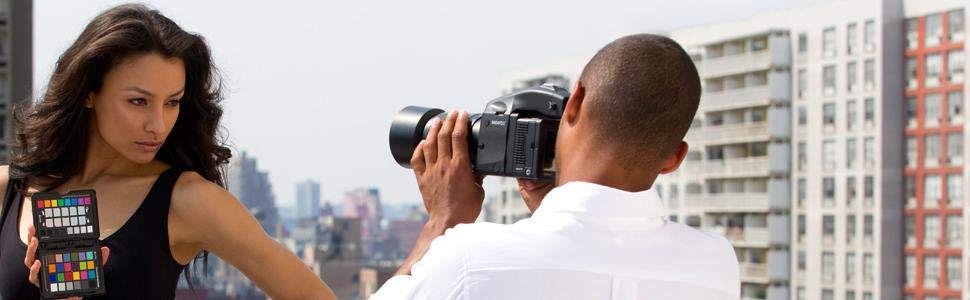
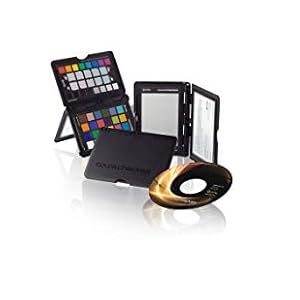
The X-Rite ColorChecker Passport is a professional-grade color calibration tool combining three photographic targets in a compact, portable case. It ensures accurate white balance and consistent color capture, integrates seamlessly with Adobe software, and includes calibration software to create custom camera profiles. Trusted by photographers to save time and deliver true-to-life colors across diverse lighting conditions.
| ASIN | B002NU5UW8 |
| Brand | X-Rite |
| Colour | Black |
| Customer Reviews | 3.7 3.7 out of 5 stars (1,247) |
| Date First Available | 14 Jan. 2010 |
| Guaranteed software updates until | unknown |
| Item Weight | 100 g |
| Item model number | MSCCPP |
| Model year | 2009 |
| Package Dimensions L x W x H | 18 x 13.4 x 2 centimetres |
| Package Weight | 0.16 Kilograms |
| Part number | MSCCPP |
| Product Dimensions L x W x H | 21.6 x 27.9 x 4.4 centimetres |
| Style | ColorChecker Passport Photo |
B**K
Essential kit
It sounds like a cliché, but I thought my colour accuracy was pretty good until I used the ColorChecker Passport. It's all very well having a colour-calibrated monitor (a LaCie 526) but if the camera isn't also calibrated, an unknown variable is introduced into the workflow and while the Nikon D3 can be expected to produce excellent results, and it does - it's still an unknown. I installed the provided software (and immediately updated it to the current version) without issue and it correctly identified the ColorChecker I'd included in one of my images. Once the profile was created and saved I applied it (Lightroom under Win7 Pro 64-bit) to some RAW images and they came to life in a subtle yet impressive way - a clear improvement. As a Lightroom plug-in is also provided and automatically installed the process is easily incorporated into the usual RAW workflow without having to use an external program so rather like a white balance card (which the ColorChecker also incorporates), it's a simple matter to include a snap of it during any photo-shoot session to obtain excellent accuracy irrespective of lighting conditions.
R**N
You need this
I bit the bullet and reluctantly stumped up the price for this x-rite colour checker. Prior to this I had been trying to calibrate with a cheaper printed card version. I had given up and ended up using the adobe 4.4 profile in lightroom as it seemed to do a far better job. Once I opened the x-rite I realised immediately how inaccurate the spurious printed card was and why I had had so many problems. Also how much time I had wasted. It's also very easy to create profiles in lightroom and I now have one for each studio light set up. It works, the colours on my calibrated monitor look spot on and I can relax in the knowledge they are accurate. With the time it saves and the accuracy it adds I feel silly for not having this before. I couldn't work without this and I have gone from thinking it was overpriced to an essential tool for which I would be prepared to pay double.
C**E
Time Saver
Last year I caught the long exposure photo bug; I have enjoying just watching the world for a few minutes whilst my sensor catches up. What I didn't enjoy was fixing the red color cast on my photos. I read about the ColorChecker and its abilities to automatically calibrate color on images through a a ligthroom plug in. I held off buying it for a while; as for an amateur this is a considered purchase. I finally had the chance to use it over the past few weekends taking pictures of snow melt in the peak district. On the day of your photo shoot you need to take an image of the chart in the scene with the same camera and lens (and filters) you are going to use for the shots. My example is attached. When you get back you import the photo into the included ColorChecker software and give it a name. The colorchecker software then finds the card in the image and creates a custom color preset (you give it a name) that you can apply in Lightroom from the Camera Calibration profiles menu. Once you have the preset you can quickly color correct all your photos from that scene in one pass. For long exposure shots it was a bit of a palaver getting the color card in the scene; but once it was loaded as a correction it quickly removed the red shift from my long exposures; and so for me was perfect. In the Colorchecker box you get color card; along with a greyscale card. The card itself isn't water protected so you need to keep it dry otherwise the color chips might run. You also get a CD to install the software from (though if like me your laptop doesn't have a drive you can download it from the x-rite website. Having tried it with long and short exposures the speed of correcting colors in images is definitely worth the money; and if you are a professional photographer this will likely save you hours recovering colors on images. As an amateur its a considered purchase; but likely worth the investment. 4*
A**N
Mindblowing
I use a 5D4 and a collection of Canon's best L lenses. I shoot mostly studio portraiture, outdoor portraiture in mixed lighting (natural + strobe), landscapes and travel photography. I am obsessed with image quality. I process in Capture One, and make my colour profiles with Lumariver Profile Designer. This product has totally revolutionised the colour accuracy and quality of my pictures, and saved me massive amounts of time in post. It's a whole new World. I will never be without one of these again. In fact, I'd go so far as to say that without this product (or one like it), truly accurate colour rendition is not possible. It's an absolute must-have. If you're a pro, this is a no-brainer.
A**R
Good quality colour checker
I liked it when I got this colour checker in this nice box, with disc to set up software and plug in to your computer, well I downloaded everything straight from the site, they send you links when You register your product. It doesn’t look cheap as many people tell, and yeah it’s expensive, overpriced? Maybe, but I believe it makes its job, the colours are true and checked by this company who works specific with colours for years, and for me it’s another purchase to minimise my time for corrections, especially when you are that kind of perfectionist and time saver, this one not for video but I’ll use it for both ways anyway.
V**R
The X-Rite ColorChecker Passport is an absolute game-changer for anyone serious about photography or videography. This compact color calibration tool has streamlined my workflow and significantly improved the accuracy of my color editing. The quality of the color targets is outstanding, and the passport fits easily into my camera bag. It’s incredibly easy to use—simply take a shot of the passport in the lighting conditions you’ll be working in, and you’re set! The included software makes it a breeze to create custom camera profiles, ensuring that the colors in my images are spot-on. I’ve noticed a significant reduction in time spent correcting colors during post-processing. The difference in color accuracy is remarkable, especially for portrait and product photography where true color representation is crucial. If you’re looking to elevate your photography to the next level, the ColorChecker Passport is a must-have. Highly recommended for both amateurs and professionals alike!
P**Y
This is the best color calibration standard and white balance system for non-studio uses. It's totally portable, very sturdy and does a superb job. Not only does it provide a basic white balance capability but it also: * Allows subtle tweaking of white balance for portraits and landscapes by selecting a different white balance target that will warm up or cool down your photo for a more subjectively pleasing result. This is very fast and easy to do and is also easily reproduced across multiple sessions. This capability is valuable regardless of format you are shooting - RAW or JPEG. * You can compare the targets to your final prints or monitor output to help do color management on those devices. * Allows you to create a color correction profile for Lightroom for processing raw images for your particular camera and optimized for either a specific light source (single light source profile) or for a range of light sources (where you take two photos, one cool and one warm, and your raw processor interpolates the correction based on color temperature - this is the standard for most raw profiles) There's a Lightroom plugin to do this, or a standalone program. Both are exceedingly intuitive and easy to use. The color standards cover the center-point of most real-world color situations, so it is a solid color correction table that results from using this. And even if you don't use the color correction profiles, the white balance portion is extremely useful, especially with the slightly tweaked spots. It's small enough to easily carry, and it's durable enough in its plastic case to actually be able to use it and not destroy it. I take mine everywhere, and if I am in an unusual lighting situation, a couple of shots is all it takes to make color management dramatically easier. Caveat - if you care about color, you also need to color manage your displays. Get a color calibrator such as X-Rite or Datacolor. If you are printing critical color, you will likely need to do the same for your printer. Commercial printers are pretty good at color management. (And you don't have to worry about buying ink!)
U**Z
Hi, I'm a photographer and studio cum lab owner and it's the best buddy for on the go color correction on photoshoot. Best when working on Camera RAW format. It's magic starts from Adobe Lightroom. Where we can make a single profile for a particular location and take great shots without any hassle. X-Rite is my favourite brand. Update : 3rd July 2021 - A sudden rise in price from 8k to 18k on discount (Original Price 20k INR) is unnatural and looks overpriced form a product that's for a minimal purpose. With current transition of x-rite to Calibrite i hope to see a good build quality which doesn't break the hings and shatter in two piece as previous build. But as a part of photography workflow it is a important tool and for that reason doing monopoly with price and interest is not right. Currently the price is higher than 8K and loosing interest in buying another one.😮💨☹️
A**N
Muy conveniente para crear perfiles de cámara y asegurarse de que los colores de las fotografías están lo más próximos a la realidad posible. Muy fácil de usar. Si bien las instrucciones dicen que conviene cambiarlo a los dos años, mi experiencia es que conservándolo bien y si no se usa de forma frecuente ni se expone al sol de forma frecuente, dura y es fiable durante bastante más tiempo, vamos que no obtienes diferencias apreciables de resultados entre uno nuevo y otro con seis años, por ejemplo.
N**T
Tout simplement indispensable quand on travaille avec des images au quotidien... Je m'en sers uniquement en vidéo, pour rattraper les quelques petites erreurs de balance des blancs qu'il peut y avoir entre celle enregistrée sur la caméra et la réelle... Processus d'utilisation (Pour enregistrement Prores ou autre format compressé) : - On check la balance des blancs au sekonic ou au posemètre doté de la fonction white balance. A ce propos l'application iphone nommée "posemètre" donne un résultat plutôt pas mauvais si assez de lumière et correctement exécuté ... - On règle alors dans la caméra la balance des blancs mesurée à l'étape précédente. - On pointe alors le colorchecker devant la caméra, puis sans couper la caméra on enregistre son plan. - En post prod, grace au logiciel GRATUIT Davinci Resolve lite, on corrige ses couleurs automatiquement en 1 clic ou 2 avec l'outil adapté... (Le logiciel fait la différence entre les couleurs enregistrées par la caméra sur le lieu de tournage, et la charte couleur X-rite préenregistrée dans le logiciel... L'ajustement se fait alors automatiquement par comparaison entre les deux... Efficace !!!!!) Le résultat est juste exceptionnel... Surtout pour les formats compressés comme le Prores ou le H264 basique genre celui des Canon 5DIII et autres DSLR. Avec cette façon de procéder, on peut récupérer des couleurs fidèles sans trop de problèmes, meme avec un codec en 8 bits sur la luminance. (DSLR...) Idem pour la photo. Récupérez des teintes de peaux idéales... des couleurs justes et calibrées... Mais je m'en sers moins en photo et je ne connais pas bien le processus sur photoshop ou lightroom. En définitive, je conseille ce colorchecker à 100% aux photographes et autres vidéastes désireux de conserver des couleurs justes tout le long de leur process. Depuis que je l'ai, je me demande comment je pouvais bien faire avant... au jugé... A l'oeil... C'était faisable quand on a un oeil exercé... mais avec le colorchecker ca devient rapide et sans tergiverser... Service amazon toujours sans reproche depuis plusieurs années... Félicitations.
Trustpilot
Hace 1 semana
Hace 2 días