


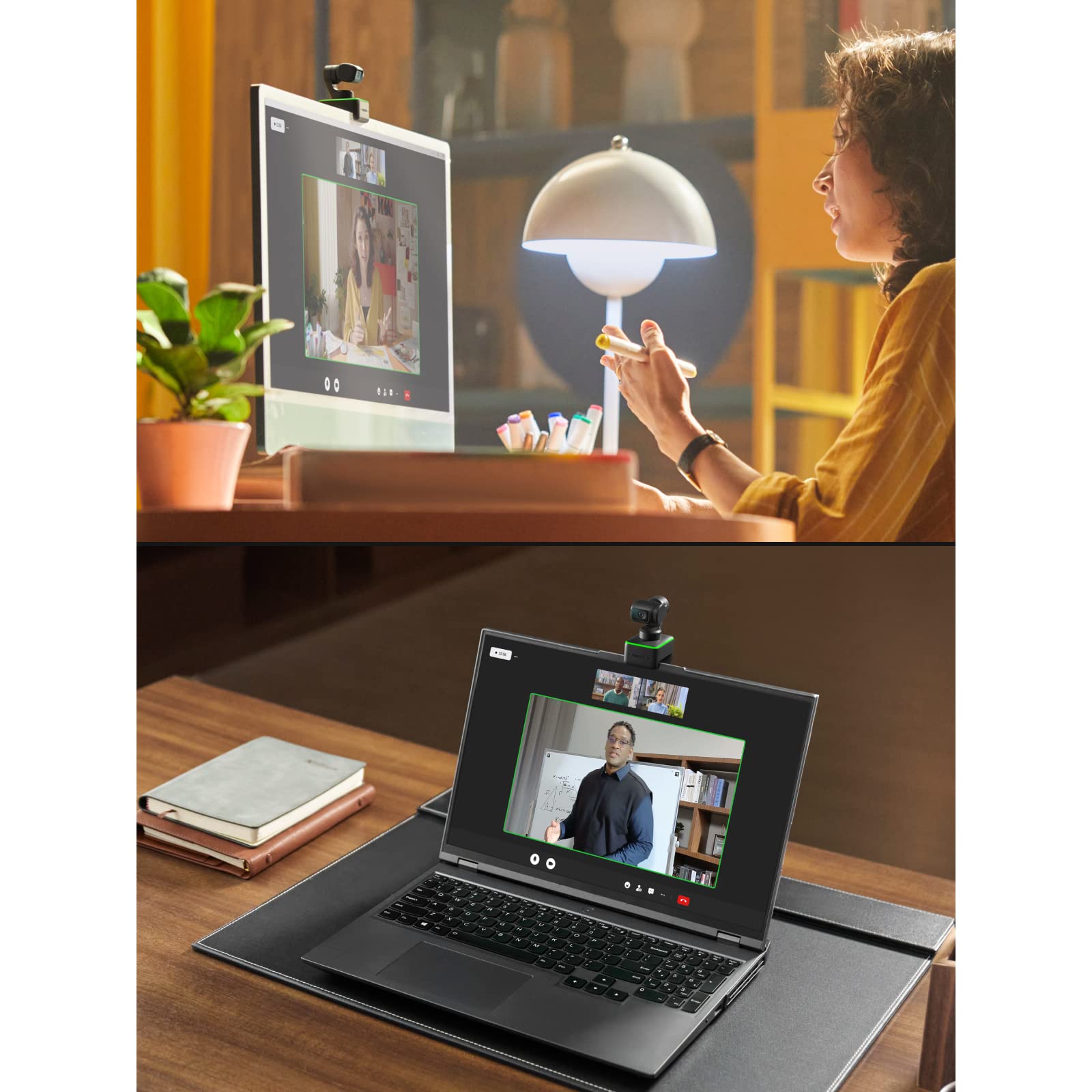


🎥 Own the room with AI-powered 4K clarity and hands-free control!
The Insta360 Link is a Zoom-certified 4K PTZ webcam featuring a powerful 1/2" CMOS sensor, AI-driven gimbal tracking, and gesture controls. Designed for professionals who demand flawless video and audio, it offers specialized modes like Whiteboard and Overhead, dual noise-canceling microphones, and seamless compatibility with major conferencing platforms. Elevate your virtual presence with dynamic framing, ultra HD clarity, and intuitive hands-free operation.


| ASIN | B0C2CFW1QV |
| Are Batteries Included | No |
| Best Sellers Rank | #408 in Webcams |
| Brand | Insta360 |
| Built-In Media | Insta360 Link |
| Camcorder Type | Video Camera |
| Color | Black |
| Compatible Devices | Laptop |
| Connectivity Technology | Wi-Fi |
| Customer Reviews | 4.3 out of 5 stars 1,922 Reviews |
| Display Resolution Maximum | UHD |
| Effective Still Resolution | 8 MP |
| Effective Video Resolution | 8.29 MP |
| Exposure Control Type | Automatic |
| Features | Low Light |
| File Format | MP4 |
| Flash Memory Bus Interface Type | UHS-I |
| Flash Memory Speed Class | Class 10 |
| Flash Memory Type | Micro SD |
| Flash Memory UHS Speed Class | 1 |
| Flash Memory Video Speed Class | V30 |
| Focus Type | Auto Focus |
| Form Factor | Adjustable/Moveable |
| Has Image Stabilization | Yes |
| Image Aspect Ratio | 16:9 |
| Image stabilization | Dynamic |
| Lens Type | Zoom |
| Log Gamma Curve | Possibly supported |
| Manufacturer | Insta360 |
| Maximum Aperture | 2.8 f |
| Maximum Focal Length | 100 Millimeters |
| Minimum Aperture | 280 Millimeters |
| Minimum Focal Length | 100 Millimeters |
| Model Name | insta360 |
| Model Number | CINSTBJ/A-ST |
| Number of Batteries | 1 Lithium Ion batteries required. |
| Operating System | Windows / Macos |
| Optical Zoom | 4 x |
| Photo Sensor Size | 1/2-inch |
| Photo Sensor Technology | CMOS |
| Screen Size | 3 |
| Sensor Type | CMOS |
| Shooting Modes | Portrait |
| Style Name | Standalone+Offical Sticker |
| Supported Audio Format | AAC, MP3, PCM, FLAC, Dolby Digital/AC-3 |
| Supported Image Format | JPEG, PNG |
| Video Capture Format | MP4 |
| Video Capture Resolution | 4K |
| Video Resolution | 4K |
| Water Resistance Level | Not Water Resistant |
| White Balance Settings | Auto |
| Wireless Compability | Bluetooth |
| Zoom | Optical |
A**M
Great Webcam with Smooth Gimbal
The Insta360 Link is likely the Best Webcam I’ve ever used. Though I have never used another gimbal-based camera, it is truly a quality webcam with some pretty slick features. Over the course of the past week or so, I’ve been using the Insta360 Link to record videos, and have video calls through Skype and Zoom. I also wanted to test it as a second camera angle for use during my live stream which I’ll get into as well. Upon unboxing the Link, I plugged it in using the included (maybe 3-foot long) USB-C to USB-C cable and it quickly installed the drivers and I was up and running. Unlike other cameras that I’ve used that had a shorter cable, this one seemed like the perfect length to not only use with a laptop but have enough length when using with a desktop setup located on the floor. Obviously if you needed to put the camera at a longer distance, you could pick up a cable from one of the popular manufacturers here on Amazon. First off, as I mentioned, there are a number of slick features that combine the flexibility of the gimbal-based hardware with the power of the Insta360 software. Besides the things that you would expect in a webcam like auto exposure, auto-white balance, etc, the Link offers a really novel usage of A.I. motion tracking with gesture control to enable or modify certain features. When enabled in the app, hold up your hand and the LED light on the webcam flashes from its normal Green to Blue to indicate that motion tracking is turned on. You can also do this by simply single tapping on the front of the camera base and then tap again to turn it off. I gotta say, this is a nice implementation to toggle the gesture control feature on and off. There are three modes that you can modify in the app including Normal (default), Fast and Slow. During my usage, I pretty much stuck with either Normal or Slow as I think fast could make people on the other side of your video call a little nauseous. If you think you will be moving around at a normal speed, then Normal is perfect. However, if you only plan on making small movements, use the slow setting. The camera did a great job to track and follow me, pretty much without any lag. There are two other gestures that you can use including holding your left hand up in the shape of an L to enable zoom. While holding your hand in that position, either raise or lower the “L” to zoom in or out, respectively. It works pretty well but it worked a little better when I was located 3-4 feet away from the camera vs when I had my laptop on my lap. There is also a whiteboard mode that you can enable by making the “V” gesture with your hand. I tried it and it turned on the mode but since I don’t have a whiteboard, couldn’t really test this feature. There are a few other modes that you can enable in the app including a slight downward angle which is good if you are trying to capture an image of your keyboard or something right in front of the monitor. There is also a true “overhead” view that would be incredibly handy if you had the proper setup to utilize this mode. I definitely have to play with this one more. I believe that Insta360 offers a specific extendable tripod for the camera that can be screwed into the quarter-20 thread on the bottom. Overall, the color and brightness is good and sharp, especially in a properly lit scene. If you are using a ring light or something like the Elgato Key Light, Godox ES45 or the Boling P1 Vlogger, this camera will shine and make you look fantastic. If you are using the camera in a darker environment, you may have to tweak the brightness to your liking. I had to bump it up by 6 or 7 notches in the app to get it where I was happy. Again, in a bright setting, the HDR looked great but it was a bit too dark for my taste when the lights were turned off. I think this is more of a function of HDR vs the way the camera handles it. As I mentioned, I’m also a live streamer, so I wanted to see if it would work with my current setup. I personally use a software called VMix and it did struggle a bit with the video, making it look a little jumpy. I THINK this is more of a problem with VMix since the other 2 or 3 webcam’s I’ve tried also faced the same issue. When I opened up OBS, and added the Link as a camera source, the video was smooth as normal. I’d love to see Insta360 contact VMix to see if some optimization could be done. Final Thoughts: I REALLY like this webcam and think it would make a great addition for anyone that is constantly on conference calls, especially if you tend to move around a bit. Comparing to the video in my Dell XPS 15 laptop and it truly not a fair fight. Exposure, color and the ability to enable motion tracking are all really well done.
C**E
Super Skeptical, Reviews Didn't Lie, This Thing Is Great!
Hardly write reviews, certainly dont take pictures and upload them. This is sitting on a 49" monitor on my desk, streaming to Zoom on the TV mounted to the wall. Without showing my face or my office, you'll have to trust me when I say this thing packs the most bang for the buck I've seen so far. I actually tested it mounted on the TV using a longer USB cable and it auto focused on my face immediately. I got up, it followed me around just fine. The gestures take a second, but once you have them down, it's easy. I did have to manually move the camera to face me once as I was testing it because I was moving too quickly for how close it was... but that's not the cameras fault. You can adjust the tracking and auto focus in the desktop app that you need to download. Go slow with app, clicking takes a second for it to register and it doesn't really acknowledge the action as obviously, just give it a second. There is also a way to scan a QR code to control the camera from your phone thru an integrated server. I dont know why I expected this gigantic conference room sized camera like I have at my office... it's TINY and when it's not on and the 3-axis motors aren't powered, it feels like it's going to break... ...nope. It has plenty of torque when it's turned on. It kept fighting me trying to take the plastic lens cover off with it plugged in and tracking my face, was kind of hilarious and I'm glad I wasn't live. I can't say I have tried dozens of cameras recently, but I have access to them at work and honestly, for the price, this is very solid for what you get. I found this last night by accident, read the reviews, especially the ones that left solid technical reviews and I figured 'why not'. The ONLY complaint is that the fold out stand part of the camera (the piece that you sit on top of the monitor as a ledge), could have a little more grip or length to it... but that's a byproduct of being small and it is NOT remotely an issue for me. Just throwing it out there.
B**L
Wow. Finally a Web Cam That I LOVE!
As a professional photographer, I'm used to images coming off of $3K camera bodies with $1000+ lenses. I don't expect a little web cam to match that, but I've always felt like there was no reason why they couldn't at least try. Most have fuzzy, low contrast, poor color balance and badly focused, overly compressed, soft images that constantly disappoint. Not the Insta360 Link. It's trying to kick-in the door of the streaming with large sensor DLSR cameras ball game - and it's more than splintered a few boards. You can read what everyone else is saying about this great feature or that one, how some work great or need improvement. Nothing is perfect. But this little gem is the least less then perfect web cam I've ever run accross so I'm just going to two main questions: How does the insta360 Link compare to one of the current "best" web cams, Elgato Facecam and to a much more expensive dedicated DLSR / Lens / Capture device setup? Simple - It's better in every way to the first and good enough (and far simpler and more flexible) in most cases for the second. Mainly... image quality is very good. not as good as my Nikon Z7 with f/1.8 S glass ($4000) and not as good in low light... but I don't need that for game streaming or even 90% of the professional stream situations if I have good lighting to keep things within it's capabilities. Anyone could use this camera to create a pro looking stream or training/sales/courses/promos or web shows. With just some good lighting and a little tweaking, only professionals would ever notice that it's not as good as a setup costing 10-20x or 50x's as much! It's that good. In low light, it blows the Facecam away (which really blew everything else in the web cam world away just last year! Much less sensor noise at higher ISO's and lower noise in the dark shadows in low light too. Much more color accurate image and pretty decent dynamic range. You don't have to fuss with it much, you can if you want to (including photoshop like curves and LUTs), but it just looks really nice from the get go. The Insta360 Link is not just trying to get into the ball park of professional quality video for streaming, it's standing on the home plate looking and pointing to the left field fence! Great little camera. Better than everything else. Home Run!
S**P
Best webcam bar none
I owned the Opal C1, various Logitechs (including the Brio), etc. This is the best webcam among all of them. The gimbal is a game changer since you can pretty much position it anywhere you want. The image quality is far superior to the competition in my view. The Opal C1 has a tendency to cut out intermittently (unclear whether it is a software or hardware issue). No such issues with the Insta360 Link. I don't use the mic since I have a great external Shure mic. The Controller software is simple, intuitive, and works well. It has most of the important features. The only minor feature request would be the ability to set virtual backgrounds and stickers within the app itself so that I do not have to deal with replacing backgrounds on every teleconference app (Zoom, Teams, etc.). I would also appreciate better AI virtual background without the need for green screens. This is the only software feature that is present in the Opal Composer than I miss, though it is not a major one. The Opal software is rather poorly maintained and updates are very sporadic (instead, they seem to focus on useless new hardware like the tadpole). Logitech does not have any of the useful features to speak of.
B**6
If you're not an influencer, do not expect any customer service
I bought this camera 8 months ago. Good camera, good picture quality and I like the ability to zoom. During presentations and important calls you may want to disable gestures and auto-follow because they tend to fail in the most interesting ways. As long as it worked it was a great camera - worth the price? Debatable. About three weeks ago the camera stopped functioning: it turns on, does the calibration dance and shuts down. No way of using this camera on my Mac - funnily enough: on my LInux machine it turns on and actually can be used - but without all the controls or the ability to zoom or move the camera. That's when I first contact Insta360 support. It goes like this: I send a message, get no reply, in the middle of the night I receive a response: 'Respond if you're still having the problem...' - I wake up in the morning, since I don't sleep by my computer waiting for Insta360 support to reply, and the case is closed because I didn't reply in time. Finally I manage to get someone to answer - four days in - and you won't be surprised to know that the very expensive webcam is supported by a call center in Hong Kong, so their working hours are about 12 hours off, 8PM to 4AM for US central. Not very handy. Over a week in - haven't had any answers in a couple of days now - and my camera is still not functioning and being 8 months late I can't return it and they will not honor the 1 year warranty to repair or replace the device. And you think back to the YouTube and Tik Tok influencers peddling these devices and saying how responsive the customer service is and then you realize it: influencers have their own dedicated representative from Insta360 - you don't. Before you press that 'Add to cart' button, think about it for a minute, and think about how long you can be without support or a functioning camera once the 30 days return window is gone. UPDATE: Amazon great customer support made an exception since I got no support from Insta360 and allowed me to return the device. This is why I buy on Amazon.
K**K
Awesome hardware; software needs work. Expensive!
The insta360 Link far surpasses all my logitech cams in functionality and image quality. I made my purchase after reading many reviews online and I can say it definitely lives up to the (sometimes sponsored) hype. I haven't compared it personally, but I watched enough video reviews to reach the consensus that it is far superior to the similarly functioning Osbot; although its also twice as expensive... FUNCTIONALITY: the Insta360 allows you to control its PTZ features, either in the app or using hand gestures; or automatically based on your movement. It tracks you really fast and the gimball makes it very smooth. You can adjust the speed at which it moves. If you've used other webcams or security cams with similar features, this will blow that experience out of the water. IMAGE QUALITY: The surprisingly large image sensor, quality optics and AI insures that the image quality is pretty amazing. The default settings appeared kind of dark in my setup, but not with any of the typical low-light distortions of other cams. And the app allows you to adjust the image Exposure (with compensation in Auto mode), white balance, and all the usual image adjustments: Brightness, Contrast, Saturation, and Sharpness. The auto focus is ridiculously fast and smooth to the point where I don't really notice it happening. The AI does a good job and keeping the image consistent and I find I don't have to constantly adjust it even if I have most settings on Auto mode and I change my shirt color or the amount of light on me fluctuates. My other webcams struggle a bit with that. Prior to this, I had been using an older Google pixel 4a I bought second hand as my webcam... which STILL provides better image quality than any USB webcam - when combined with a mobile and desktop app combo like CAMO STUDIO. However, the Insta360 comes pretty close. And its PZT functions make it a much more versatile solution for multi-cam streaming setups. FIRMWARE/SOFTWARE: Here is the one place where the Insta360 could use some improvement and the reason I deducted a star from my rating. The app DOES provide a fantastic user experience for setting the PZT - allowing you to drag directly on the image to reposition. And the image adjustments are easy to set up, and precise to control. But it is a little frustrating that there is no way to SAVE multiple image adjustment settings... and the ability to save ONE setting is a little strange in that it is a toggle and its not clear how it works. Oddly, You CAN save multiple PZT settings, which makes the software design seem inconsistent. And when it powers up, The cam DOES remember the last image settings; but it doesn't automatically return to the last (or any saved) PZT settings, so you have to go into the app to re-select it. So overall the app seems a little unfinished. So in summary: The best solution for a fixed webcam experience is still a relatively recent mobile phone (google pixe, iPhone, or Galaxy?) and a software app such as CAMO STUDIO. This may be a more economical proposition too, if you have an old phone or don't mind using your current one. But when it comes to the functionality and image quality provided by the Insta360 Link, you can't find a better out of the box webcam solution, in my opinion. Hopefully, at some point the Insta360 Link software will become as functional as the CAMO STUDIO app. Until then, it seems a little half-baked. In any case; you have to decide if the additional functionality and convenience of the Insta360 is worth the steep price tag. (Currently ~$300.)
W**T
Game Changer!
The Insta360 Link - PTZ 4K Webcam is an absolute game changer in the world of webcams. While it is certainly expensive, it is worth every penny for anyone who is serious about video conferencing. Whether you're using Zoom, Skype, or any other video conferencing app, this webcam is incredibly easy to set up and use, making it a great choice for anyone who needs a versatile and reliable webcam. One of the reasons why the Insta360 Link - PTZ 4K Webcam is a game changer is its ability to pan, tilt, and zoom. This feature allows you to adjust the camera to capture the perfect angle, ensuring that you always look your best on camera. The 4K resolution also produces stunningly clear and detailed images, providing a level of detail that was previously only available to professional cameras. While the price of the Insta360 Link - PTZ 4K Webcam may seem high, it is a worthy investment for anyone who values high-quality video and wants to elevate their online presence. The webcam's features are top-notch and its ease of use is unparalleled, making it a great choice for professionals and hobbyists alike. I hesitated buying it but, now am considering buying a 2nd one for my wife. if you're looking for a webcam that will take your video conferencing game to the next level, the Insta360 Link - PTZ 4K Webcam is definitely worth the investment. It's a game changer that provides unmatched image quality and versatility, making it a 5-star product in my book.
T**D
Great camera
Great camera, the auto zoom may need adjusting but overall really good quality
Trustpilot
Hace 1 mes
Hace 1 mes



