We remain fully operational. Our teams are working around the clock to ensure your deliveries continue safely.

Descargar la aplicación


Servicios al cliente
Sobre nosotros
Copyright © 2025 Desertcart Holdings Limited
Descargar la aplicación
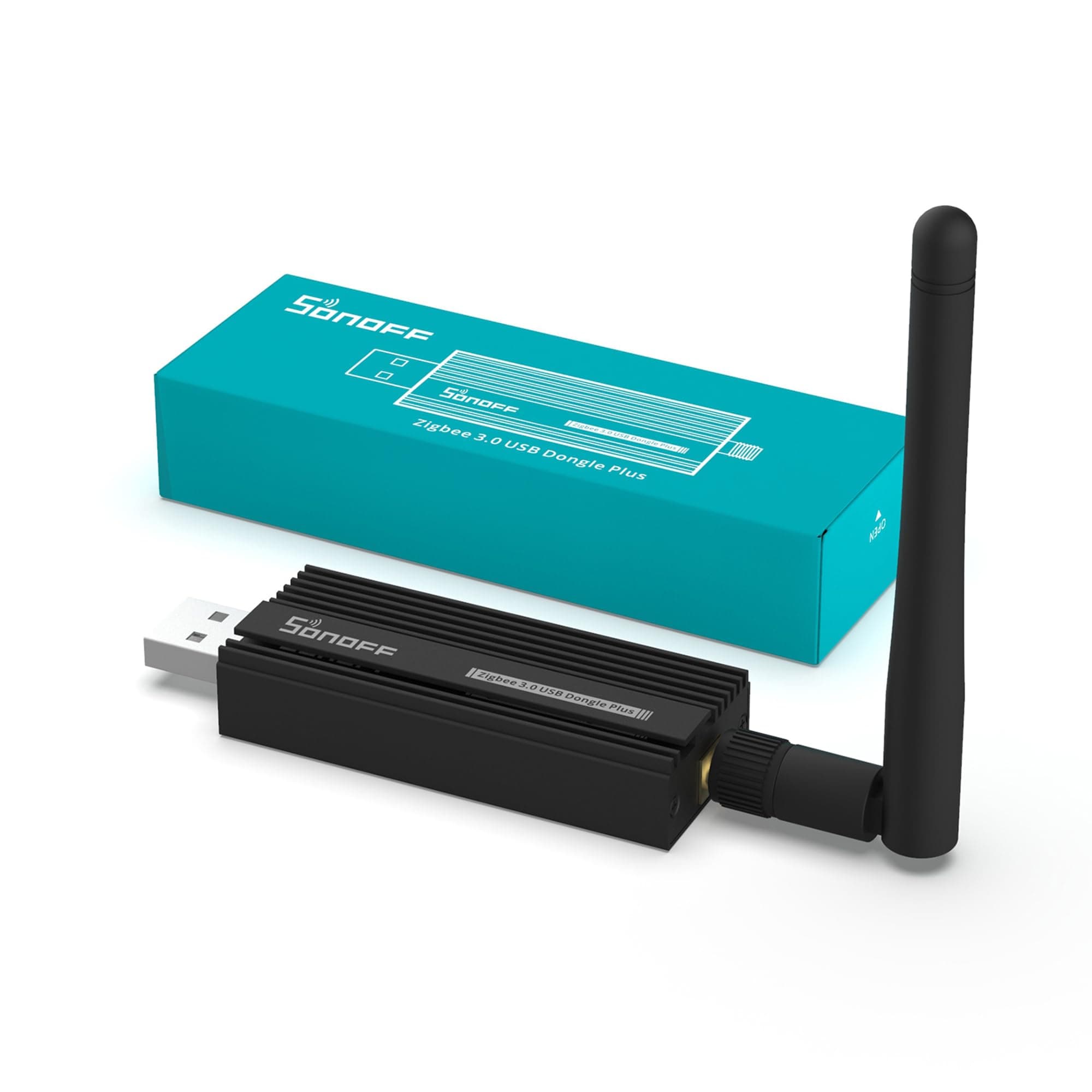
🚀 Elevate your smart home game with the ultimate Zigbee USB gateway!
The SONOFF Zigbee 3.0 USB Dongle Plus Gateway is a compact, high-performance USB adapter pre-flashed with Z-Stack 3.x.0 coordinator firmware. Featuring a TI CC2652P chipset, 20dBm output gain, and an SMA external antenna housed in aluminum, it delivers strong, interference-resistant Zigbee mesh networking. Compatible with Home Assistant, IoBroker, and major OS platforms, it’s ideal for professional-grade smart home setups spanning multiple floors.


| ASIN | B09KXTCMSC |
| Best Sellers Rank | #55 in USB Computer Network Adapters |
| Brand | SONOFF |
| Built-In Media | 1 * Antenna, 1 * User Manual, 1 * Zigbee 3.0 USB Dongle Plus |
| Color | Black 1Pack |
| Compatible Devices | Desktop |
| Compatible Operating System Family | Linux, MacOS, Windows |
| Customer Reviews | 4.6 out of 5 stars 5,314 Reviews |
| Data Link Protocol | IEEE 802.15.4 |
| External Testing Certification | Não aplicável |
| Global Trade Identification Number | 09004562659974 |
| Hardware Interface | USB |
| Item Dimensions L x W x H | 3.4"L x 1"W x 0.53"H |
| Item Type Name | ZBdongle-P |
| Item Weight | 1.3 Ounces |
| Manufacturer | SONOFF |
| Mfr Part Number | ZBDongle-P |
| Model Number | ZBdongle-P |
| Product Dimensions | 3.4"L x 1"W x 0.53"H |
| Unit Count | 1.0 Count |
| Warranty Description | One year warranty |
R**Y
Works well with Home Assistant + Synology / Docker setup
Good little USB coordinator that works everything I've tried so far... I am using one of these in 3000 sqft on 2 floors, using Sonoff smart plugs and a few Aeotec range extenders for network stability. It is stuck in a closet so antenna placement isn't ideal, but nonetheless I was able to get a good mesh net going to control lights on both floors. Will be trying some smart blinds next... In case the headline means something to you, consider this one for good compatibility. It uses the Texas Instruments CC2652 chipset which is well supported in Linux systems, including Synology. So if you have a similar setup, consider this as your coordinator. I was able to pass this device through to Home Assistant in a Docker on DSM7.2 (using Portainer to compose the device layer). That lets the USB device show up inside of ZHA without doing anything additional. Haven't tried MQTT but I assume it's similar...
V**V
Godd working product
Easy out of the box install in HA. All is as expected. Covers the house as good as other hubs.
A**N
Works great for adding zigbee for home automation!
added zigbee to my home assistant on a VM server on my synology NAS. Worked flawlessly! Took just a few minutes to setup.
L**C
A MUST HAVE!
“I couldn’t be happier with this purchase! The quality is outstanding, and it’s clear a lot of thought went into the design and functionality. This product has exceeded my expectations in every way, offering a perfect balance of performance, durability, and style. What truly sets this product apart is how well it delivers on its promises. It’s incredibly easy to use, and you can tell it’s built to last. Whether you’re looking for something reliable for everyday use or a high-performing option for special occasions, this is it. On top of all that, the value for the price is unbeatable. It feels like a premium product without the hefty price tag. If you’re on the fence about getting this, don’t hesitate—trust me, you won’t regret it. This is one of those rare finds that ticks every box!”
B**B
Got from Amazon Warehouse and it was broken - required my troubleshooting to fix - now work great!
I needed a Zigbee hub and this one is highly recommended for Home Assistant. You just plug it in and it is auto detected and installed.. or at least that’s what is supposed to happen. I ordered this in ‘ok’ condition from Amazon Warehouse to save about $7. The device came in a plain box and looked brand new. Plugged it in.. was recognized by Home Assistant, but when I tried to install it that kept failing. The logs showed some config settings weren’t being applied properly. Did some research online and followed the steps to flash the latest version of firmware onto this device. It was a major pain to do this, but I finally got the new firmware installed. Plugged this into my Home Assistant PC and it was detected, then the installation worked no problems. Yay! Was able to pair some Zigbee devices with no issues either. Has been working well for a couple of weeks. So why didn’t it work right away? I think someone may have flashed it as a Zigbee router instead of a repeater. Or maybe someone else tried to flash it, and it only partially worked, leaving the device in a broken state. I figure they tried to get this working, failed, and then gave up and returned it to Amazon. And at Amazon they look at it and see it looks OK so just resell it as working. I doubt Amazon was able to test this before reselling it. If so they would have known it was broken… I’m glad I was able to fix it, but was it worth the $7 in savings? No way! It took me about 3 hours of hacking/troubleshooting to get this working. I was very pleased to get it fixed, but next time if it doesn’t work right away, I will return it and buy a brand-new one, which I’m confident would work right out of the box. The only reason I didn’t return this was because I really wanted to get this set up during the weekend and it would have been another 2 day wait to have Amazon ship me a new one. Lesson learned!
D**L
A must for Zigbee devices (Working flawlessly with HomeBridge+Zigbee2MQTT)
In a recent trip to China I had purchased some Zigbee sensors which were a fraction of cost of what the manufacturer’s US site was selling. Unfortunately, these sensors failed to pair with the Zigbee hub I had at home. The manufacturer has the hub region locked and even after going back and forth with their support team nothing fruitful came out. Not willing to just throwaway the sensors I looked for alternatives and came across a solution to build my own Zigbee hub using Sonoff Zigbee 3.0 USB Dongle Plus. I was able to get it working with Zigbee2MQTT and paired to my Homebridge HomeKit hub. Initially the dongle was not able to recognize the sensors purchased from China but after firmware update all issues were resolved. I have been using it for 5+ months and it is very stable and solid. I also purchased some cheap Zigbee USB repeaters (from China lol) and have extended the range of my Zigbee hub to cover a 2 story house.
T**K
Works excellently with Home Assistant, using both ZHA and Zigbee2MQTT
Bought one of these a while ago to use with Home Assistant, and I'm quite pleased with it. My installation method uses Docker, so installing it wasn't exactly plug and play, but that's an expected aspect of those installation methods. Once you pass the device through to your HA or Z2M containers, though, it should be auto detected by either ZHA or Z2M accordingly and automatically configure themselves. My device was shipped with a version of the Z-stack firmware dating back to 2021, though, and updating it isn't intuitive in either software (perhaps it's different if you're running Home Assistant Supervised or HA OS, but I wouldn't know). Ultimately, if you do want to upgrade the firmware, there's a page on the Zigbee2MQTT site titled "Flashing the firmware via cc2538-bsl" with a one-liner Docker command for this specific device. I'd link the page but I'm afraid it'd trip a spam filter, so Google it yourself. On the physical side, I did have one issue that might not be a problem for others. I have my dongle attached to the underside of my desk using various adhesives, but I've found several times that the smooth metal back of the dongle isn't exactly great for adhesives like Blu-tack or Velcro tape to stick to. Several times now I've come to find the dongle just peeled right off and hanging by the extension cable it's plugged into, which gets annoying. If the surface finish was rougher, that might give the adhesives a bit more grip. My current solution is effectively to create a cradle for the dongle using several Velcro loops, then stick that to Velcro on the desk itself. That hasn't failed yet, but it's a little funny.
E**H
Upgrade from ConBee II
Would I upgrade to this if I had to do it again -Yes. My previous install a ConBee II running on HA Blue (and before that an old NUC). Now why did I choose to upgrade? Well, I didn’t originally plan to - the ConBee II was working well (had nothing to compare too). Then not long ago during a routine update to HA something just broke. My regular backups didn’t help and the ConBee II decided to just refuse to communicate. So I ordered the Sonoff as a replacement. But by the time it arrived I had managed to get the ConBee II working. I was going to send this back. But, I had to open the box didn’t I?! The Sonoff is in a aluminum case and feels so nice, and the external antenna had me wondering :) so of course I had to try it out. I went in to HA and removed the 20+ devices I had connected through the ConBee II. Yeah - I was committed:) I used ZHA instead of zigbee2mqtt - why - because it was just quicker to test. So one connected (obviously ZHA just picked it up instantly). I thought let’s see how well this picks up my six halo zigbee recessed lighting. Damn. It detected them a lot faster than the ConBee II. I was a little shocked. I then went on to create a group to see how well it’d control the lights - and damn again. The thing was way more smooth and responsive than the previous setup. Note: I installed this is the same spot I had the ConBee II. I’m not saying the ConBee II sucked. Not at all, it did it’s job and I would have been as happy as I was. But after using the Sonoff - definitely glad to have upgraded. Plus it was an excuse to muck around with nerdy stuff for an afternoon. Some other things - yes I had to add all my zigbee devices again - but that really isn’t as big of a pain if you do it in stages. Secondly a lot of my automations are in Node Red and use IEEE which doesn’t change so a majority of those still worked. Overall - I wasn’t planning to upgrade, but happy I did. Now I just have to explain to the wife why it was a good idea - and that might not be as easy :)
Trustpilot
Hace 4 días
Hace 1 mes