We remain fully operational. Our teams are working around the clock to ensure your deliveries continue safely.

Descargar la aplicación


Servicios al cliente
Sobre nosotros
Copyright © 2025 Desertcart Holdings Limited
Descargar la aplicación
Buy anything from 5,000+ international stores. One checkout price. No surprise fees. Join 2M+ shoppers on Desertcart.
Desertcart purchases this item on your behalf and handles shipping, customs, and support to Spain.
🕹️ Relive the classics with modern precision—game like a legend!
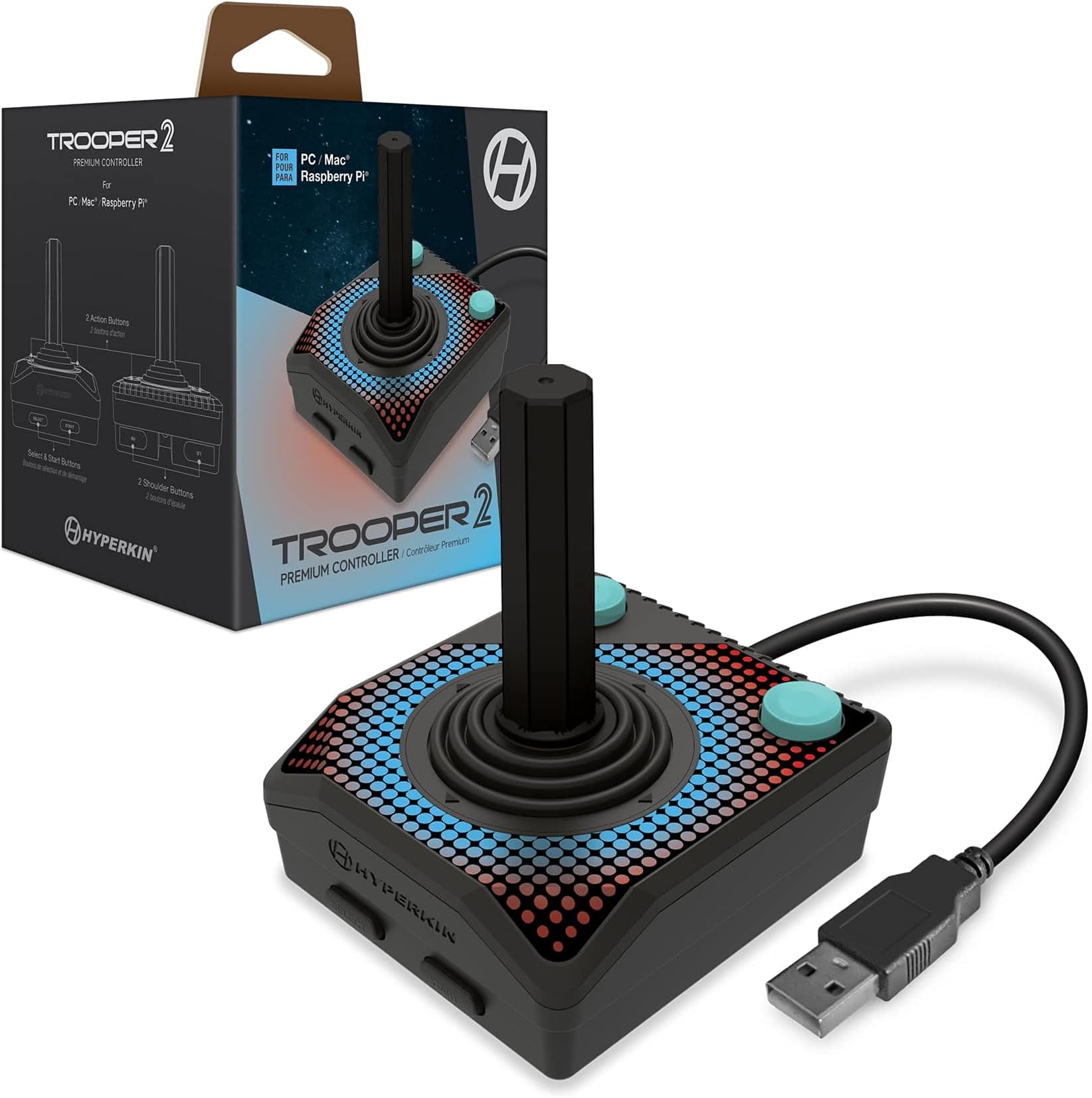
The Hyperkin Trooper 2 is a premium USB game controller designed for seamless emulation on PC, Mac, Linux, and Raspberry Pi. Featuring an ergonomic design with chamfered grips, a quiet 4-way joystick, 6 mappable buttons, and a generous 10-foot USB cable, it combines classic Atari-style gameplay with durable, high-quality construction for long-lasting retro gaming sessions.
| ASIN | B09B349TDZ |
| Additional Features | Ergonomic |
| Best Sellers Rank | #5,374 in Video Games ( See Top 100 in Video Games ) #28 in Mac Game Controllers #304 in PC Game Controllers |
| Brand Name | Hyperkin |
| Button Quantity | 16 |
| Color | Black |
| Compatible Devices | Mac, PC, Windows |
| Connectivity Technology | USB |
| Controller Type | Gamepad, Windows |
| Customer Reviews | 4.0 4.0 out of 5 stars (289) |
| Hardware Platform | linux, mac, pc |
| Manufacturer | Hyperkin |
| Model Name | PC/MAC Raspberry Pi |
| Package Quantity | 1 |
| Power Source | Corded Electric |
| UPC | 810007711645 |
X**E
A Blast from the Past! Perfect for Retro Gaming.
This joystick is pure nostalgia! I bought it specifically for playing classic arcade and Atari-era games on my computer, and it has been an absolute joy to use. It really captures the feel of those old-school arcade cabinets. Setup was as simple as it get, I just plugged it into a USB port, and it was ready to go. My PC recognized it instantly, making it easy to configure in my emulation software. The joystick itself feels solid and has that classic, clicky response you want for retro games. The buttons are well-placed and responsive. It feels much more authentic to play these old favorites with a proper joystick instead of a modern gamepad or a keyboard. The long 10-foot cord is also a huge plus, giving me plenty of room to sit back and play comfortably. If you're a fan of retro gaming and want an affordable, plug-and-play joystick that brings back that classic feel, you can't go wrong with the Trooper 2. Highly recommended
C**K
Durable, very accurate feel compared to the original Atari 2600 joysticks
Got these for my PC to play classic Atari 2600 games. Was a bit concerned about some of the reviews implying cheap quality. From my perspective, they're more durable than the ones that came with my original 2600. Those seemed to break all the time. I even let my grandkids use these and they're holding up. They were automatically recognized, so no special setup needed. I think these are good quality for an affordable price.
A**P
Great Atari style joystick for emulation
I really like this usb stick. Styled nearly identical to a 2600 joystick, but with more buttons and of course a usb connection, it's great for use with Stella, or when playing some retro systems through retro-pie or mame. It feels as good as this design can in your hand, and it's responsive. My only complaint is that I'd like to have 2 action buttons on each of the top corners instead of just 1. While there are shoulder buttons on each side, it's impractical for some arcade games or 7200 games that require both buttons and they might both be pressed at the same time or in rapid succession. But for one button games, it's fantastic.
R**N
Instant classic controls for your PC games
This is a solidly made Atari style joystick for modern gaming. It is essentially a two button controller with an ambidextrous layout. While this is perfect for Atari and 8-bit computer emulation, It can be used with a ton of different games and is best for anything that can benefit from a two button joystick. I actually played some Cave Story and modern shoot 'em ups with it and had a good time. Not all software will recognize it but only one game didn't play well with it from my experience. This is now my go-to joystick for Commodore 64 and DOS computer gaming. My only complaint is that it doesn't work with my C64 Mini but that's not Hyperkin's fault. Like retro games? You should really get it.
D**.
Hardware, okay. Support, meh. Software (drivers), nonexistent.
TL;DR: I managed to get this joystick to work for my needs, but it has a physical design flaw and so Your Mileage May Vary. Out of the box, this joystick feels sold and well-made. The base has beveled corners which make it easier to hold in one's hand than the old Atari 2600 joysticks on which the physical design of this stick is based. The addition of more buttons than the Atari 2600 classic is also welcome. There’s a significant physical flaw with these sticks, which I’ve now experienced with both of the units I’ve purchased. The stick’s method of actuating the button switches inside the base is basic leverage, with a plastic tab pressing down on one or two of the switches depending on the direction you’ve pulled or pushed the stick as you operate it. There’s four tabs, one each for up/right/down/left. The plastic component with these tabs is made of a soft, weak plastic material that will wear out, eventually causing the tabs to crack and even break completely off, which will render the stick incapable of activating the corresponding internal switch. You’ll know you’re in trouble when you start to hear the rattling of the tiny piece of plastic that’s broken lose inside the base of the stick. I’ve typically experienced this problem within about four weeks of using a new stick, and although I play a great deal, I’m not thrashing the heck out of the stick when I do. The plastic is just weak and not really up to the challenge of lasting long enough. I may try to 3D print an equivalent part from tougher plastic – not harder so much as less prone to cracking from fatigue. Though I bet making the part from metal or even hardwood would be the best long-term solution. Don’t even bother trying to get support from Hyperkin. In particular, you will find no driver software for this stick at the Hyperkin website, nor will you find any documentation, nor is there even a users forum to which one might direct questions about setting up and using the stick. There is a support form, into which you can type your request, and the response from Hyperkin was pretty quick in my case. However, the response was largely unhelpful, providing no specific information to help me solve my problem of configuration on my computer. If you do buy this joystick in order to use it with a Mac, I can recommend the USB Overdrive shareware driver, which made it possible for me to use this joystick for its intended purpose. I also tried using the Joystick Mapper driver, available on the Mac App Store, but that software did not help me. As stated before, YMMV. Summary: Hyperkin built an inexpensive and rather fragile joystick which they then fail to support in any useful way.
A**R
Great controller to play Atari 2600 games on an emulator
I didn't compare with an actual Atari 2600, but the stick and buttons feel fine. The extra buttons are very useful when playing on RetroPie. Select/Start map to game select/reset. And if you set Select as the hotkey, then you get Select + B/Start/LB/RB to reset game/exit game/load state/save state. In Batocera you can probably get something similar with the correct mappings.
M**K
Having had a couple of the Hyperkin controllers now, this one is up there with the quality. It feels really nice in the hands. From the little thins like the slight bevel around the top edge to the recessed ledge on the bottom allowing for the additional start/select and RB/RL buttons, and even on the back corners where your thumb muscle normally rests, it's all feeling really nice to hold and use. The stick itself is large and allows for easy movement. You can also twist it and remove it from the base completely. The plastics used seem high quality and will probably outlast me. This is the USB version and was plug and play on Windows 11. It's identified by Windows as a Trooper V2, but it does seem to detect 8 buttons rather than the 6 it has. Doesn't seem to affect it's use in games though. It works with Steam without an issue as an X input device and you can remap the buttons to anything you want. So plenty of compatibility. If you're using it like I am with the Atari 50: The Anniversary Celebration on Steam, the entire interface and set of games can be all played using the controller alone. It works really well out of the gate. Just have to get used to the RB/RL moving around the top menu instead of having quick access to what would be the X button. The games play just as I remember them and are still as much fun as they were back then. While you don't get a USB-C adapter in the box, I have used one with it and it works great as does using a USB hub. Cable length is long as it is so if you're using it with a MiSTer for TV setups it should be ok, but if you're extending with a USB hub or extension cable you won't have an issue. Overall, it's a nice controller. Rugged and feels really nice to use.
F**O
Produto bacana, porém algumas ressalvas a haste(alma) não é emborrachada, ao contrário do CX40 do atari, com tempo machuca a mão, tem botões a mais da primeira versão, mas só serve para atalhos nos emuladores, (Atari) para o resto dos emuladores não é interessante.
Y**Z
Excelente
D**D
Super expensive and does not work with normal PCs on Windows 11, even though the USB port fits.
M**G
I love the one made for the Atari 2600 and 7800. This one here works perfectly well on my macOS M4 with Steam and C64 emulator. It is not only confortable, but I am able to use 2 button (fire and trigger) at once while holding the stick. So it is perfect for simple platformer where 1 button is jump and the other is fire. A positive also is that the joystick can be use left and right handed. It is juste the perfect tension, perfect feel, the buttons are clicky. It is so confortable that for a second I was thinking about using it for FPS. lol I am tempted to buy another one just because they feel so good in hand. Hyperkin, you make the best classic joysticks (from a guy who have 40 controllers and joysticks). PS : It does not work on C64mini, but its probably just because that stupid mini computer has no button remapping.
Trustpilot
Hace 1 mes
Hace 5 días