We remain fully operational. Our teams are working around the clock to ensure your deliveries continue safely.

Descargar la aplicación


Servicios al cliente
Sobre nosotros
Copyright © 2025 Desertcart Holdings Limited
Descargar la aplicación

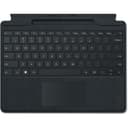
⌨️ Elevate your Surface game — type, write, and create like a pro everywhere!
The Surface Pro Signature Keyboard is a premium, mechanical keyboard designed for Surface Pro 8 and Pro X users. Featuring 104 tactile keys, backlit illumination, and a large glass trackpad, it offers precise typing and navigation. Its magnetic attachment ensures secure, instant connection, while compatibility with the Surface Slim Pen 2 enables seamless writing and charging. Available in four stylish colors with a luxurious Alcantara® finish, it combines functionality with professional flair.


| ASIN | B09DKCMZFK |
| Additional Features | Magnetic |
| Antenna Location | Office |
| Best Sellers Rank | #329 in Computer Keyboards |
| Brand | Microsoft |
| Built-In Media | Surface Pro Keyboard |
| Button Quantity | 104 |
| Color | Black |
| Compatible Devices | Surface Pro 8, Surface Pro X |
| Connectivity Technology | Bluetooth, wireless |
| Customer Reviews | 4.4 4.4 out of 5 stars (1,259) |
| Enclosure Material | fabric |
| Global Trade Identification Number | 00889842779660 |
| Hand Orientation | Ambidextrous |
| Item Dimensions L x W x H | 12.53"L x 10.01"W x 0.7"H |
| Item Weight | 1.08 Pounds |
| Keyboard Backlighting Color Support | Single Color |
| Keyboard Description | Mechanical |
| Keyboard Layout | QWERTY |
| Manufacturer | Microsoft |
| Model Number | 8XA00001 |
| Number of Keys | 78 |
| Number of Sections | 2 |
| Power Source | Battery Powered |
| Series Number | 889842779660 |
| Style Name | Contemporary |
| Switch Type | Mechanical |
| UPC | 889842779660 |
| Unit Count | 1.0 Count |
| Warranty Description | 1 year manufacturer |
T**.
Well worth the price
I’ve had it for almost a year, the quality is really good. Keyboard works perfectly, fits my surface and it’s still really thin so it can fit in its carry case. Brightness and volume can be adjusted with ease and I can flip my surface and use it with ease. No battery on the keyboard itself which I appreciate.
E**K
Stand out with matte red
This is hands down the best keyboard for my Surface Pro 11! The matte finish is excellent, but the backlight is a great feature to have. The keys feel nice, not to mention that if you do have the new slim pen (2), it has a bay to charge the pen while you have it connected. Overall, I am pleased with this purchase
A**G
Works good
Keyboard randomly stopped working. Ordered this, clipped in and works fine.
T**D
Works great with keeping the pen charged at all times, and the keyboard feels good
Well first thing I have to say, I had a Surface Pro 3 before this Surface Pro 8, and I used an aftermarket keyboard on the Pro 3. It was through BT only and had to keep that charged separately. Now with the Pro 8 I went with the official Surface Pro keyboard. I really do like this better than my other one. Once it is connected it is just like a normal keyboard where you can hit the F keys during bootup. You can't do that with a Bluetooth keyboard. I also don't have to turn the keyboard off when I am done either like with the aftermarket BT ones. Pros: 1) No need to charge the keyboard - gets the power from the Surface 2) When you close the keyboard, it uses magnets to hold it shut. 3) Protects the screen when it is closed 4) Keeps the Slim Pen always charged and ready - no more looking for the pen with the holder 5) Large touchpad 6) Keeps the Slim Pen secure Cons: 1) Price is a bit high, and pen is not included 2) Attracts TONS of dust as you can tell by pictures - Also it is not easy to get the dust off 3) Timeout for the backlight - haven't found anything to increase how long it stays on yet if it is even possible. 4) Pen can be tough to remove from holder. Don't get me wrong it is not really hard. Just with the magnets if you don't get a hold of it, it can get pulled back into the holder. But on the plus side if the pen is on the keyboard in the corner like in the pictures it is also held down by magnets. All in all, I am glad I purchased this keyboard for the Surface Pro 8. I like the feel of the keys when I press them. and you can hear the clicks when you are typing. But that doesn't bother me at all to me it just feels like a solid keyboard. I took off the one star just because of how much dust it collects, and with it having a fuzzy texture it is impossible to remove the dust also. I hope this review helps you in your decision on this keyboard. If it does plese click the helpful button.
A**R
Microsoft did it right!
Love it. It went on sale like 2 days after I bought it🤦🏽♀️ but I needed it and love it. It doesn't kill the battery like so many of the Bluetooth keyboards do and it was made for the tablet so has the smoothest timeline and typing process
B**R
DEFECTIVE
This sucks in 5 mts this (productive is DEFECTIVE) is a disaster and CONTACT with Microsoft is impossible. In 3 years (c. $800) the Surface Pro crash. NO one should purchase any product from Microsoft. A TOTAL WASTE OF TIME AND MONEY
J**.
Very well done, folks! If this thing is refurbished, I'd never know it... just like new!
I bought this keyboard because my original, factory keyboard, just stopped working. I didn't want to lose the pen charging capability and the factory keyboards are pretty expensive, so this was a great option. When I opened the box, I was thrilled - it looked like brand new!!!
B**H
OEM and works perfect - love the color
This keyboard worked perfect as a replacement for my Surface Pro 8. Charges the surface pen. My original keyboard was grey, I love the red color, adds a nice refreshing pop. Keys are smooth, and light up for typing in the dark. I would purchase again if ever needed.
O**E
Está excelente
F**A
Ms key board is no Comparison with after market Bluetooth keyboard. Very happy funcion very nicely and very good price. Thank you
A**O
Protege a tela, resistente, mas achei o teclado meio ruim e barulhento
I**R
المنتج مطابق تماما شكرا علي المصداقيه
I**Z
Funciona muy bien, se adhiere con buena resistencia a la surface. Lo recomiendo
Trustpilot
Hace 2 semanas
Hace 1 semana