We remain fully operational. Our teams are working around the clock to ensure your deliveries continue safely.

Descargar la aplicación


Servicios al cliente
Sobre nosotros
Copyright © 2025 Desertcart Holdings Limited
Descargar la aplicación






🎤 Own the stage, captivate every screen.
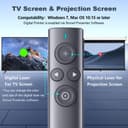
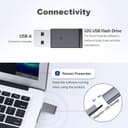
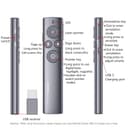
The NORWII Presentation Clicker is a cutting-edge wireless presenter designed for modern professionals who demand flawless control over TV and projection screens. Featuring a powerful 164 ft wireless range, a rechargeable 300mAh battery lasting weeks on a single charge, and a 32GB USB flash drive preloaded with Norwii Presenter software, it offers advanced digital pointer functions including highlight, magnify, and annotation. Compatible with Windows 7+ and macOS 10.15+, it ensures seamless integration with laptops, smartboards, and electronic whiteboards. Smart vibration alerts help you manage your presentation time effortlessly, making it the ultimate tool for polished, interactive presentations.


| ASIN | B081SVDQ2S |
| Batteries | 1 Nonstandard Battery batteries required. |
| Best Sellers Rank | #246,796 in Office Products ( See Top 100 in Office Products ) #113 in Office Presentation Remotes |
| Brand | KNORVAY |
| Color | Silver Grey |
| Customer Reviews | 4.0 4.0 out of 5 stars (393) |
| Date First Available | January 11, 2021 |
| Item Weight | 1.2 ounces |
| Item model number | N95 |
| Manufacturer | Shanghai Norwii Technology Co., LTd. |
| Manufacturer Part Number | N95 |
| Product Dimensions | 5.16 x 1.17 x 0.52 inches |
S**N
Very nice presentation clicker
The NORWII Presentation Clicker with Digital Pointer has been a total game-changer for my presentations. I often present on large TV screens, and traditional laser pointers never worked—but this digital pointer is crystal clear on any display. The wireless range is impressive, allowing me to move freely around the room, and the rechargeable battery lasts through multiple sessions without worry. Setup was effortless—just plug and play, and it worked flawlessly with PowerPoint and Google Slides. The ergonomic design feels great in hand, making long presentations more comfortable. The only minor downside is that in very bright rooms, the pointer’s visibility can slightly diminish, but it’s never been a dealbreaker for me. If you need a modern, reliable clicker that works on any screen, I highly recommend this one—it’s made my presentations smoother and more engaging!
J**S
Tono bueno pero la luz del puntero pases no es muy fuerte. Deberían exorar la intensidad del láser
S**N
Good presentation pointer for LED screens...but overpriced.
Setup is pretty straightforward. You need to download some software to your laptop and insert the usb dongle. When not in use the dongle stores securely in the back end of the pointer. The pointer dot can be adjusted to the size you want, but the smallest size is slightly larger than you'd get from a laser pointer (Of course lasers don't work on LED screens). The projected dot is crisp and has no lag. This pointer has several other modes (magnify, highlight, air mouse, timer). Fortunately you can, and should, turn these off if you only use the pointer function. The reason for that is that to switch between modes, you simply do a fast double click. If you do it accidentally during a presentation, you have to cycle through the modes with more double clicks to get back to your red dot. Not good. Happily I figured this out while rehearsing, and not in the middle of a real presentation. As for value, the price is too high for what is essentially a wireless mouse, but it was the lesser of two evils compared to better known brands. As for quality of build...meh...lightweight plastic feels cheap. It is usb rechargeable and I never go more than a couple of 1-hour lectures without recharging. (The light weight and small form tells me the battery is probably pretty small. Norwii gives no clue as to mAh capacity). I still give it four stars for its functionality...it gets the job done very nicely. I've used it for presentations on very large theatrical LED screens on Viking cruise ships and it performed admirably with no loss of resolution or any other problems. Good pointer.
P**T
Great Presentation Pointer
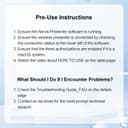
This device is what I have been looking for. Most presentations are now on LCD or TV displays making the days of a simple laser pointer useless. I needed something that would show very professionally and electronic laser for my power point presentations just like the electronic built in laser on the power point slides, but you cannot use that during a standup presentation. It took me a bit of figuring out that you really need to simply download the simple SW from the USB file then the magic happens. You can use the spotlight, laser and the magnifier which is just incredible. You can switch between those modes without your audience even knowing. it is like magic. However, you cannot do those things by just using the USB without the SW. Using the USB without the SW will simply give yo an electronic laser which is average but OK if you cannot download the SW. I then had to play with it to figure it out. You have to go through the tutorial because you will not likely figure it out. I started out a little frustrated but then when I figured it out it worked really well.
R**.
Don't buy it. It doesn't last long
I thought buying an expensive pointer would be cool and it would last forever, right? Wrong! Got mine about 1 year ago. I did not make an intensive use of it (2 or 3 conferences) and when I needee it, it stopped working. There is a small battery inside but you can't replace it as it is glued to the circuit. Good ild AA or AAA are way more reliable. Additionally, in order to have the screen pointer (not the laser, but the LCD zoom and airmouse) the dedicates software must be installed. It is another Chinese company trying to install something suspicious in your computer. Just don't do it - not worth the time and the money and you can't use it when presenting in a conference or somewhere else in another person's computer. It becomes a regular laser pointer and for that price might as well buy a cheap one that doesn't install anything on your machine. Remember: 1 year of use (three times). It's like I paid $15 per use. Might as well buy a cheap pointer if I ever need one again and if it lasts 2 conferences it's a deal!
J**J
unable to access all functions
This is a great product, in theory. As a teacher, I like having the ability to progress through slides from any point in the classroom. That is really the only function that I can get to work though. I was really looking forward to the zoom function where I could zoom in to a specific point or image on a slide, but I can't get that to work. I'm not sure if it is just the software or that things are blocked on my school issued computer, but I'm disappointed that I can't actually use this for what I bought it for.
B**N
Same features as more expensive pointer/remotes. Need to be able to install software, though
Excellent answer to the problem of presenting on an LCD or TV. Also has built in laser for traditional projection! All the same types of features as compatible brand name. Worked well. Tutorial takes you through all the modes of using it. If you have a work computer that is locked down, you will need IT to install the software as administrator to get all the features. I present from my personal laptop though so had no problems. Also, charges quickly and I have noticed it has a good range.
C**J
This works very well for giving presentations that are hybrid, so that you can turn on a laser pointer cursor in Powerpoint, which is then visible to all online and in the room, and walk around with the same freedom as when using a standard laser pointer (which this is as well, if needed). You can install software to make the buttons do more, but I find it's perfectly adequate not to use extra software, and just double-click the pointer button after plugging in the dongle, and then it controls the mouse constantly, very easily and sensitively. Good value for money for what it is. And it looks great!
R**.
Quick delivery and received in good condition
J**A
Muito bom equipamento slide. Conforme anunciado. Comprem sem receio....
E**T
For office slide
C**Y
I upgraded to this model from an N26 and it was such a good purchase. The extra features are so useful and work perfectly. Spotlight parts of the screen with highlight/magnify/red dot plus the red laser. Works with the smartboard software in my class too, so it's seamless swapping from ppt to smart board and back. A really great purchase. 5*
Trustpilot
Hace 1 semana
Hace 1 mes