We remain fully operational. Our teams are working around the clock to ensure your deliveries continue safely.

Descargar la aplicación


Servicios al cliente
Sobre nosotros
Copyright © 2025 Desertcart Holdings Limited
Descargar la aplicación
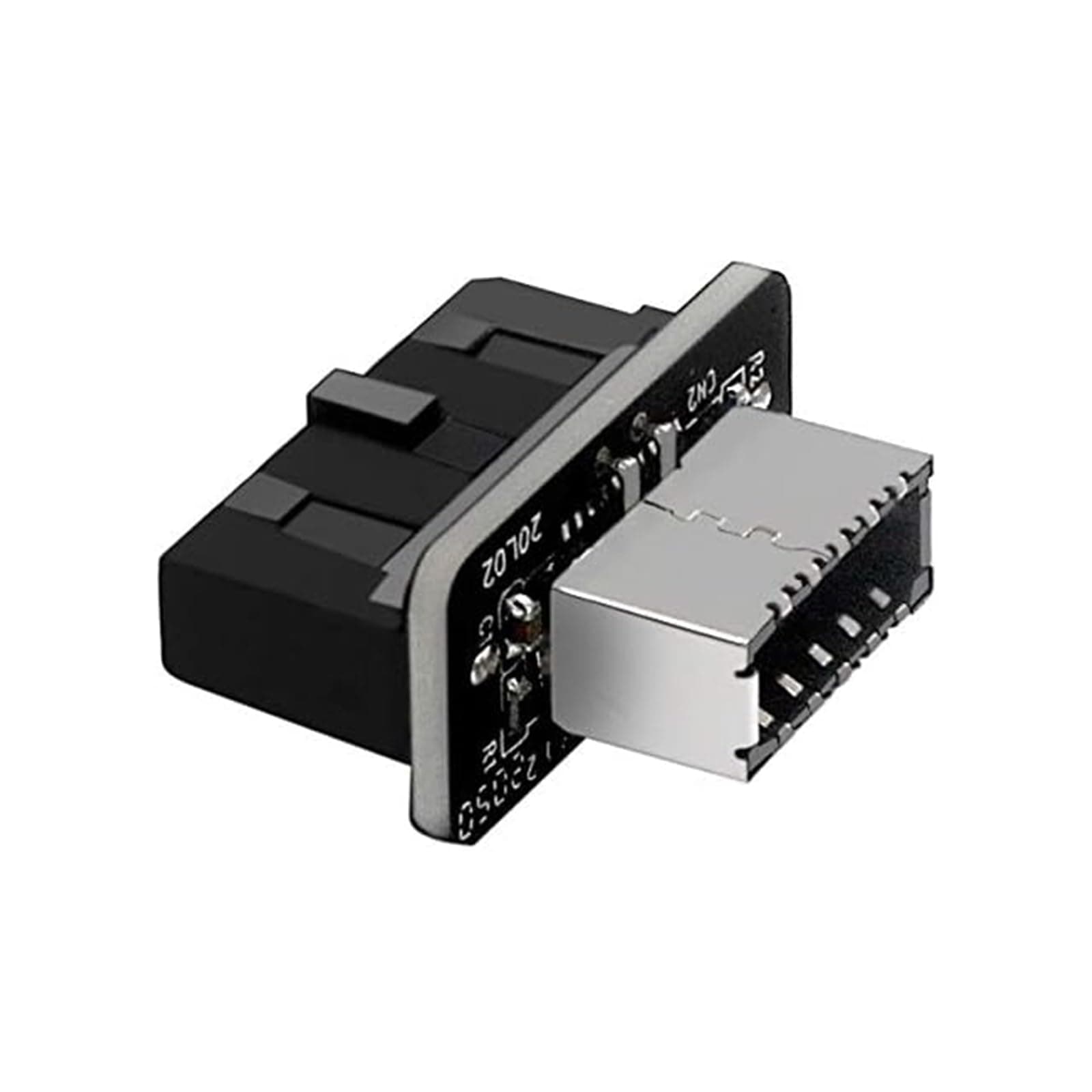
🔗 Upgrade your rig’s front panel with future-proof USB-C power!
The JoyReken USB Front Panel Adapter converts a motherboard’s 19-pin USB 3.0/3.1 Type-E header to a 20-pin USB 3.0 front panel interface, enabling easy USB-C connectivity at speeds up to 5Gbps. Designed for plug-and-play installation, it supports USB 3.x devices but does not boost speeds beyond 5Gbps or support USB 2.0 headers. With a compact, matte black design, it offers a practical solution for adding USB-C ports to older motherboards while maintaining stable power delivery up to 4.5W.








| ASIN | B08TW9S7B3 |
| Best Sellers Rank | #304 in USB-to-USB Adapters |
| Brand | JoyReken |
| Color | Black |
| Compatible Devices | Tablet |
| Connector Type | USB Type C |
| Current Rating | 0.9 Amps |
| Customer Reviews | 4.4 4.4 out of 5 stars (744) |
| Finish | Matte |
| Input Voltage | 5 Volts |
| Item Weight | 0.01 Kilograms |
| Manufacturer | JoyReken |
| Model Number | JR-UE180 |
| Nominal Power | 4.5 Watts |
| Number of Items | 1 |
| Number of Ports | 2 |
| Package Quantity | 1 |
| Power Plug Type | No Plug |
| UPC | 192882005898 |
| Unit Count | 1.0 Count |
| Warranty Description | 1 year warranty |
| Warranty Type | Limited |
J**S
Does the job
Needed this for a front panel usb-c port. My motherboard doesn’t have the newest connector, but I still wanted access to the port. Performance is decent, and it’s easy to install. I haven’t had any connectivity issues. I already have a 3.2 gen 2x2 pcie card, and a 3.2 gen 2 port on the back. I use those for my data transfer and backups. This is just for the convenience of having quick access to a front panel port. That said, my testing saw a pretty consistent 4-5Gbps. So I’m getting more or less the full potential speed from the port on my mobo, and the connector isn’t really a limiting factor in any noticeable capacity. If you’ve got the old style headed, and you need an easy way to convert, this will work without issue. Definitely worth it.
R**Y
USB 3.0
I have a port on my desk top that allow for a USB 3.0 connection but needed this connector to complete the circuit. Knowing just a little about hardware, I did some reseach to determine if I could do this myself. So, it looked to easy and thus I order this part which allowed me to do the work myself. Part well made and worked great. My suggestion is for those with this same available plug on your motherboard, take the plug and order this part. Product cost is low enough to invest in the upgrade on your desktop. R
C**R
If you need it, go ahead and get it.
Ladies and Gentlemen! If, for whatever reason, you find yourself in a situation where you need this, you can't go wrong here. It's works right out of the box, with no silliness that's come from it. In my situation, I have a NZXT H510 with a USB C port in the front panel, but the x470 motherboard that I have doesn't include the right plug. I did, however, have an unused USB 3.0 port, so I searched for an adapter and was led to here. It arrived two days later, and once I plugged it in, it worked like a charm. It's now about 2 weeks after the fact, and I haven't had an issue out of it. :)
C**1
Does exactly what it's supposed to do, but the price could be better
This little adapter is exactly what I needed to connect up the USB type C connector on my NZXT H510 Elite case to my MSI X570 motherboard that was lacking a Type C header but provided two USB 3.0 headers. This particular one has the connectors in line with each other which fit the right angle connectors on my board, whereas the 90 degree adapters also available would not have fit properly in my case. I plugged in a type C SSD and it worked at the proper speed no problems and shows up as a superspeed gen 2 device in dmesg (Linux). My only complaint is the price. $13 for a pin header, a tiny PCB, and a USB type C internal connector seems way too much to me. This thing would be better priced under $10 as it appears to be a completely passive adapter. At least it came in a fancy box with a velcro strap (for whatever reason).
A**R
THIS WORKS FOR X570 RYZEN BOARDS IF YOU USE A CUSTOM 20-Pin Usb 3.0 Splitter Cable
This is the 2nd type E to 20 pin Usb 3 adapter I bought for my specific PC build. I have an NZXT H1 case with an ASUSx570i motherboard. My motherboard has 1 Usb 2.0 and 1 Usb 3.0 header. I bought a custom cable that splits the Usb 3.0 header into 2 separate headers, one for this adaptor and the other for the 3.0 port on my case. I did run into issues with device not being properly recognized, but was able to fix that somehow. Possibly through windows update or just plugging my phone into my pc a few times till something fixed itself. Recommend this adapter if you are limited to 1 Usb 3.0 port without any Usb C ports on your pc.
T**J
It adapts!
In my new build, I had a case with the 3.1 connector and a motherboard without. This thing looked to be the simplest solution and sometimes things are exactly what they seem. After a very simple connection, I booted up the PC and the top USB-C port was working exactly as expected. Would recommend as a cheap and simple fix when your case and motherboard don't precisely match.
C**2
Works!
Works as it should!
B**B
Didn't fit motherboard connector
Didn't fit in my MSI x570 Gaming Edge Wi-Fi motherboard. I applied a LOT of pressure and never managed to get it to connect properly. I gave up because I didn't want to break the port on my motherboard.
M**O
Primero compre otro que está el doble de caro y no me funciono, con el reembolso compre este que es más barato y si funciono.
C**S
did the job, very happy about it
G**O
Hace rato buscaba para ponerlo a mi pc y le quedó muy buen
S**E
I don't care about speeds, just wanted the usb c port to work on the front of my Fractal design north case, and this did just that. Super thankful for this.
M**T
Worked great no issues fast transfer speeds
Trustpilot
Hace 1 mes
Hace 1 día