We remain fully operational. Our teams are working around the clock to ensure your deliveries continue safely.

Descargar la aplicación


Servicios al cliente
Sobre nosotros
Copyright © 2025 Desertcart Holdings Limited
Descargar la aplicación


⏳ Take control of your time and energy—because your smart home deserves smarter timing!
The BN-LINK Indoor Digital Timer Outlet is a versatile, ETL-listed dual outlet timer with 8 programmable on/off settings, supporting minute-level precision and customizable day schedules. It features a backup battery to retain settings during outages, a vacation mode to randomize lighting for home security, and a simple daylight savings adjustment. Rated for 15A/1875W, it’s designed to save energy and automate your home devices with reliable performance.





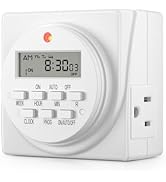


| ASIN | B00MVF16JG |
| Best Sellers Rank | #583 in Tools & Home Improvement ( See Top 100 in Tools & Home Improvement ) #1 in Wall Timer Switches |
| Brand Name | BN-LINK |
| Color | White |
| Customer Reviews | 4.3 4.3 out of 5 stars (26,887) |
| Item Dimensions D x W x H | 2.7"D x 3.5"W x 3"H |
| Item Type Name | plug-in-timer-switches |
| Item Weight | 0.5 Pounds |
| Manufacturer | BN-LINK |
| Manufacturer Part Number | FD-60/U6 |
| Material Type | Plastic |
| Model Number | FD-60/U6 |
| Number of settings | 8 |
| UPC | 746264393471 680474115587 |
| Unit Count | 1.0 Count |
P**N
Great Timer
Old purchase, but I’ve had this timer for a few years now and it’s perfect for my bearded dragon. I have her schedule set to it & it still runs great. Very easy to use and it’s not noisy.
P**.
3RD review:They replaced the lemon works great! AND refunded my $! 2nd 4 star for Customer Service, 1ST review, product garbage.
This is the 3RD and final review. This company actually looks at reviews and strives to get 4 or better yet 5 stars. I think 5 stars is fair at this time. They appeared to bend over backwards. Once I received the replacement I tested it several times and it is functioning. 5 stars to customer service. I thanked them for compensating me for the trouble I had. Customer service programmed it well for me. The other one was a lemon. It happens. They do need to improve quality assurance and directions in the manual before sending it to market. At least with light I can see the tiny printed week days. The manual operating light timers are much easier to use. Not as much detail to remember. Once one learns to use the electronic timer, there are multiple options one can program it for. Not going to concern myself with that at this time. In summary: Thank you Customer service for your help. Other companies could learn from you folks. I do feel cared about as their customer. A+. I just fired a doctor today for lousy care & service. He could learn some lessons from these folks about respect, showing concern and truly being helpful! That says a lot about Century Products costumer service! 2ND review 4 stars because of Customer Service [cs]. Spoke to Victoria of CS. She talked me through entire procedure start to finish assuring it would turn light on next morning 1/10/2018 @ 5 am and off @ 6 am. Told her instruction manual is terrible for ME to understand. She said company working on improving them with customer feedback. She asked me to please give a higher star for this assistance. As of 1/11/2018 I'm giving 4 stars for excellent customer service. Not 5 because of aggravation I've had up to now. [When light didn't activate I over slept almost missing ride to work and did miss Doctors appointment!]. Victoria walked me through programing and if it still didn't work, she offered the option in making amends:full refund and "E cycle" toss appliance out & get replacement no charges and get refund if still didn't work. She said she will call back 1/11/18 on status-did light turn on? Light did NOT turn on. Another offer proposed: Before they ship it out they will quality assure checking programing correctly (which I had done b4 BTW) and set the timer for me. Without further thought I agreed. Now if it does work consistently I will certainly give a 5 star rating for excellent product and customer service. If it doesn't work, I'll give 1 star saying I'd prefer zero stars. Lousy product and manipulative CS. Stay tune for follow up. Hope these reviews help. I combined them. I Hope I didn't make a mistake accepting this alternative offer, given other complaints I had. If still doesn't work, will speak to supervisor and demand refund never getting this Century brand again! They take ratings seriously- good! 1st review one star- it didn't work. The reviews were great so I took a big chance.The digital print of the week days is too small to see comfortably. When programming, the internal battery must be charged for at least 30 minutes. It has to be unplugged from wall socket and must not have anything plugged into it either while programming it. The red light that indicates it is "automatically" programmed to turn itself on and off is very dim. Countless times it has not turned on itself as I had programmed it to do. I even tested it and it worked but not when needed! The instruction booklet for me seemed easy until I couldn't get product to work. But in fact they are VERY confusing. Can't suggest this product. Sorry... Not dependable regardless of MY testing. Tried trouble shooting, switching electrical outlets etc. Infuriating!
C**E
Works fine; easy to program; larger than expected
I found it fairly easy to follow the directions, but I programmed it only for a simple on-off same time every day of the week. So far, it has performed as expected. The timer protrudes from the wall more than expected, so that a decor item I have in front of the timer (a vintage suitcase that's blocked by the stretcher bar in a large table the suitcase sits beneath -- more than you wanted to know....) is pushed forward a bit. It's okay, but another quarter-inch, and I'd have had to move the table out from the wall.
P**Y
It’s a good timer and not bad to setup
I got this to turn on /off a grow lights for my greenhouse that I did a dyi project. It works great so I don’t have to worry about making sure the lights get turned on or off when I need them on/off and with my work schedule it works great.
R**D
works great
easy to setup after watching you tube video
E**E
I still love it after two years. It's well designed and relatively easy to set up
Two Year Update: After a little over two years, I still love this timer. It's worked flawlessly and has been a night-and-day improvement over the analog timers I used to use. I use it for setting a radiator-style space heater to run in the evening and early morning. Unlike the analog timers I formerly used, I never have to correct the time and I never have to worry about bumping it and changing the programming inadvertently. The main potential problem is that how to program it is not obvious. I keep the original instructions handy for when I want to change the schedule. It's not a big problem. After you've learned to program it initially, changing the programming is pretty easy, but it helps to have the instructions as a reminder. Overall this is a great timer that I recommend highly. Original Review From Two Years Ago: I’ve only had the timer for a day, so I can’t attest to its reliability yet, but I am impressed with how much of an improvement it is over the mechanical timers I’ve used for years. Set up is fairly easy, however many people may be confused by the setup and programming instructions, so here is how I did it. Setup ===== Follow the instructions to initially set the day and time. Be sure to set it to standard time even if you’re currently on daylight savings time. If you’re currently on daylight savings time, then after you set the time, press the HOUR and MIN buttons simultaneously. The time will automatically advance an hour for daylight savings time. In the fall, to return to standard time, press HOUR and MIN again to set the timer to standard time. Programming ========== This is the part that will confuse a lot of people. Here’s how I did it. There are 8 program settings, each of them with a separate ON-OFF setting. Each time you press the PROG button, it will advance. The first time you press PROG, it displays 1ON (1 + ON in smaller, raised letters). The second time you press PROG, it displays 1OFF, the third time it displays 2ON, the fourth time 2OFF, etc. The programming steps are: 1. If 1ON isn’t displaying, press PROG until you get to 1ON. (1 + ON in smaller, raised letters) 2. Press WEEK. You’ll see all seven days display. If you want the timer to turn on all seven days, then just go to step #3, otherwise press WEEK again until the days you want are displayed. 3. Press HOUR until the hour you want the timer to turn on is displayed 4. Press MIN until the minute you want the timer to turn on is displayed 5. Press PROG once. It will now advance to 1OFF. 6. Repeat steps 2 - 4 for the day, hour, and minute you want the timer to turn off. 7. If you want to set another day and time for the timer to turn on and off, press PROG once and then repeat steps 2-6. Continue this process until you’ve set up to eight day-time combinations for the timer to turn on and off. 8. To activate the programs you’ve just set, press ON/AUTO/OFF twice. It should now display AUTO. In the future, if you want to override the programming and force the timer to be either on or off all the time, press the ON/AUTO/OFF button until either ON or OFF displays. A red light on the timer will turn on whenever the timer is on. The light goes off when the timer turns off automatically or when you turn it off manually by pressing ON/AUTO/OFF. CAUTION about using this with a space heater ==================================== I’ve used 1500 watt space heaters on timers for decades, but YOU HAVE TO BE CAREFUL! Make sure the timer is rated for more than the wattage of the heater. This timer is rated for more than 1500 watts, so theoretically it is safe, but it nonetheless can still start a fire if you don’t take precautions (and even if you do take precautions). 1. Never plug the timer into an extension strip or surge protector if you’re using for a heater. 2. Never plug the timer into an extension cord that isn’t rated at least for the heater. 3. Try to avoid running the heater at full 1500 watts. It’s easier for me to follow this rule because I don’t experience extreme cold weather where I live. On the rare occasions when I do run the heater a the full 1500 watts, I don’t leave it unattended. 4. Periodically unplug the heater and examine the plug. Over time, the heater’s plug may deteriorate. I’ve thrown out several heaters when they’ve reached this point. Last week I threw out both my 30 year old oil-filled radiator heater and my last timer because the heater’s plug showed signs of deterioration and had visibly damaged the socket in the the timer. The timer still worked, but would have been unsafe to use. I’ve seen two forms of plug deterioration: the plug’s smooth plastic surface becoming rough around the metal prongs, and the metal prongs themselves showing signs of beginning to disintegrate. So far I'm really impressed with this timer. If something happens to lower my star rating, I'll update this review.
G**E
Fácil de programar.
M**S
Buen Producto, de uso y programación sencilla, con la ventaja de que si se va la luz, no piede la programación por contar con bateria interna recargable con el uso diario.
M**.
Esté temporizador si funciona para todo el día y a diferentes horarios
C**N
Buen producto y útil. Te facilita el encendido y apagado de algo eléctrico como la luz.
G**G
It was the most inexpensive digital timer outlet I saw, but it works great. I use it to reboot my modem every 3 hours because we have horrendous internet service. Internet goes down often and needs a reboot to work again. I needed a digital plug like this, because it works when there’s no wifi, unlike “smart” outlets. No wifi make smart outlet go dumb. This thing stays smart. Love it !
Trustpilot
Hace 2 semanas
Hace 2 días