We remain fully operational. Our teams are working around the clock to ensure your deliveries continue safely.

Descargar la aplicación


Servicios al cliente
Sobre nosotros
Copyright © 2025 Desertcart Holdings Limited
Descargar la aplicación


🎮 Elevate Your Entertainment Game with SofaBaton U1!
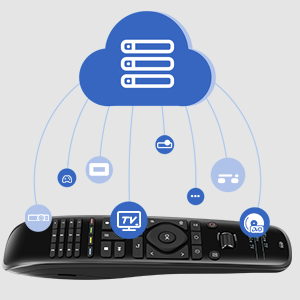
The SofaBaton U1 Universal Remote is a cutting-edge device that allows you to control up to 15 entertainment devices seamlessly. With compatibility for over 500,000 devices from 6,000 brands, it features Bluetooth and infrared connectivity, a user-friendly app for easy setup, and customizable macro keys for ultimate convenience. The OLED display and ergonomic design make it a stylish addition to any home entertainment setup.






| ASIN | B08FXK18BY |
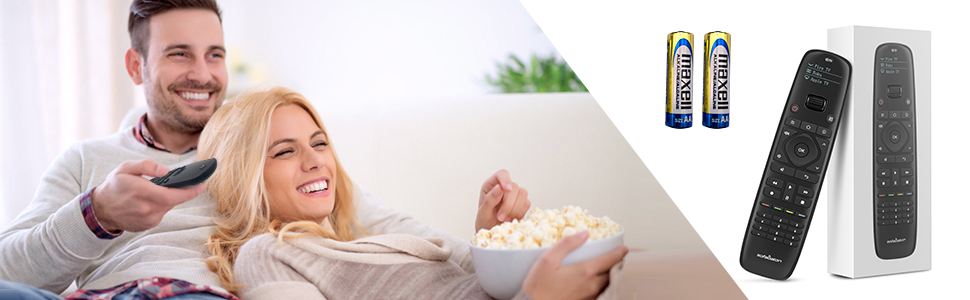
| Batteries | 2 AA batteries required. (included) |
| Best Sellers Rank | #168,466 in Electronics ( See Top 100 in Electronics ) #12,687 in Remote Controls (Electronics) |
| Customer Reviews | 3.6 3.6 out of 5 stars (2,650) |
| Date First Available | August 14, 2020 |
| Item Weight | 9.9 ounces |
| Item model number | U1 |
| Manufacturer | SofaBaton |
| Product Dimensions | 7.7 x 1.9 x 1.2 inches |
C**T
Quality Feel, Quality Function. BUY IT!!
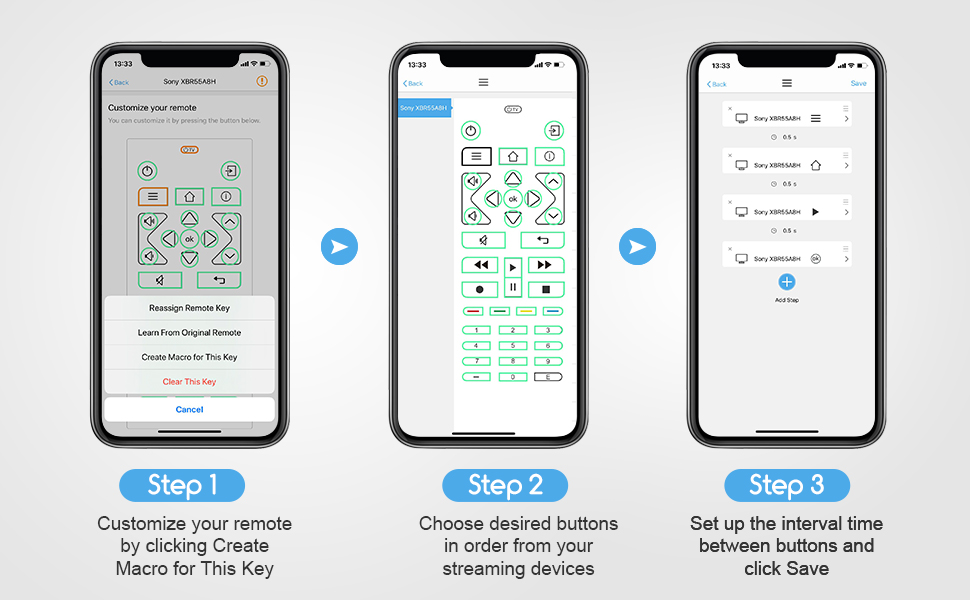
I have 3 things that needed to convert to this remote: LG TV, Pioneer Amp/Receiver, Fire TV. The remote first made me download the app, which is very user friendly. It walked me through pairing the remote with the app and was easy to get started. The search for device function is pretty slow and not very accurate. I put in my exact make "LG" and model number "UJ6300" and I got the spinning wheel for a long time. FIXED: Simply type in the make, NOT model of the unit. For example, I typed in "LG" only and it brought up 5 or 6 categories under "LG" or there was a list of "popular models." This is where you want to be. You can just scroll through all of that brand until you get to your model (in alphabetical order). So it helped a lot, because I was typing in UJ6300, but it was listed as 55UJ6300 (which still should have been found, but ok). Once I found the model, I let it program and BOOM! I was having an issue with the ARC function of either my TV or my Home Theater Receiver. The sound works fine, but the ARC function has faulted and I have to control the TV and Receiver with separate remotes. This solved that. I also have kids running around and one, in particular, loves to mess with the stereo buttons/inputs. Many times, the stereo gets bumped off of "TV" and onto something like "DVD." So I programmed one of the color buttons to be "TV INPUT" from the list. This way it doesn't matter what he changes it to, I can hit that button and bring it right back. TIP: Each time you program the remote to take over for an old remote, compare the two. Start testing buttons, etc. I found that the "back" button wasn't working. So, on the app, I used the diagram of the remote to choose the button that I assume is meant to be "back" and I found a list of all known commands. It was a quick fix: instead of "back" it needed to be "BACK." I know that's a little buggy...but anyone with common sense should be able to work it out. TIP: If there is a command that just isn't in the list and you can't figure it out, try "learn from original remote." On the app you choose the button in question from the diagram. Then choose the learn from original remote" option and follow the directions (basically just point the old and new remotes at each other and press/hold the button on the original remote while the sofabaton intercepts the signal and learns it). TIP: Use the 4 colored buttons as shortcuts (I programmed mine to Netflix, Prime Video, HDMI - Fire TV, and HDMI 3 (Game). TIP: If you use a separate audio system (Home Theater Amp/Receiver or Sound Bar), consider using macros for the volume and mute buttons. You can program the remote to know that even if you are on the "TV" mode, when you press one of these volume buttons, it automatically applies it to the sound system and not the TV. This is a nice shortcut to actually having to use the wheel to scroll down to the audio system and then change the volume. I programmed this macro for both my "TV" and "Fire TV" modes. TIP: Reprogram the very top "TV Power" button to be an "ALL POWER" button. Simply go through each mode and reprogram that "TV Power" button using a macro and select each mode's "power" setting with no input delays. This way, when you hit "TV Power" it will shut down all programmed devices. (You do need to be generous with pointing the remote towards all devices at once. I do have instances where one doesn't get the signal and gets left on. Just scroll the wheel to that device and hit the power button). My 4 year old was able to use this remote to find her shows within 30 seconds after I let her loose. It's not a complicated setup at all. 100% RECOMMEND
D**T
Finally, a remote that makes me feel like a tech wizard...
Let me just say — the SofaBaton U1 is almost the universal remote of my dreams. It’s sleek, it’s got buttons that light up, and it comes with a Smart App that lets you pretend you’re programming the Mars Rover, when really, you're just trying to get Netflix to work without switching three remotes like a caveman. 🛠 Setup: Oh sure, the setup process is “easy” — if you have a PhD in remote control anthropology. The app is smart, in the way your uncle says he’s “between jobs”: technically true, but not always functional. The pairing process involved me pointing my old remote at the SofaBaton like I was about to duel it. 10 minutes later, I had programmed the TV… and also somehow the garage door. 📺 Functionality: When it works, it’s magical. One button press and BAM — the soundbar turns on, the TV wakes up, the input switches, and I feel like Tony Stark. Except… sometimes, only the soundbar turns on. Other times, nothing happens except the remote vibrating like it’s saying, “Yeah nah, not today.” And don’t even try using it from across the room unless you have the precision aim of a Navy SEAL. One inch off and it’s like, “Sorry, I don’t speak that angle of infrared.” 📱 The App: The Smart App is both a blessing and a curse. You can customize buttons, add macros, rename devices — it’s great. But heaven help you if you tap the wrong thing. One slip and suddenly your "Watch TV" button is launching the Xbox and dimming your smart lights like you’re about to host a séance. 🧻 Build Quality: Feels good in the hand, and the buttons are backlit, which is nice — especially when you’re fumbling around in the dark trying to pause a movie during an awkward scene when someone walks into the room. But don’t drop it. I dropped mine once and it stared at me like, “Guess I’m retired now.” Final Thoughts: Would I recommend the SofaBaton U1? Sure! If you enjoy minor tech puzzles and pretending your living room is mission control, this one’s for you. It’s a great budget universal remote with just enough quirks to keep your evenings spicy. 4 out of 5 stars, with a bonus star for ambition and a minus star for making me question my sanity during setup.
S**R
These guys are fantastic, the library was missing codes for one of my items and I got that in less than 24 hours! Remote works, service rocks!
M**I
Great product. Easy to setup and able to get all my devices connected with ease.
D**S
It’s a pity / the unit was promising / unfortunately totally unable to learn IR / true that their customer service is particularly reactive
Trustpilot
Hace 3 días
Hace 1 mes