We remain fully operational. Our teams are working around the clock to ensure your deliveries continue safely.

Descargar la aplicación


Servicios al cliente
Sobre nosotros
Copyright © 2025 Desertcart Holdings Limited
Descargar la aplicación


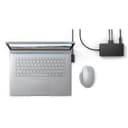
⚡ Elevate your Surface game — dock, power, and connect like a pro!
The Microsoft New Surface Dock 2 is a premium docking station designed to transform your Surface device into a full desktop experience. Featuring dual 4K 60Hz display support, a powerful 199W power supply, and multiple USB-C Gen 2 ports, it offers seamless connectivity and robust performance for the modern professional. Its extended cable and security lock compatibility make it ideal for dynamic workspaces.





| ASIN | B086Q92563 |
| Best Sellers Rank | #75,067 in Computers & Accessories ( See Top 100 in Computers & Accessories ) #139 in Docking Stations |
| Generic Name | Docking Station |
| Importer | Microsoft |
| Included Components | Surface Dock 2 |
| Item Dimensions LxWxH | 13 x 7 x 3 Centimeters |
| Item Weight | 513 g |
| Item model number | SVS-00001 |
| Manufacturer | Microsoft, Microsoft |
| Net Quantity | 1 Count |
| Packer | Microsoft |
| Product Dimensions | 13 x 6.99 x 3 cm; 512.56 g |
P**.
No Warranty ...Cheated
I had purchase this product on Amazon. After using it for few months know I am having some trouble with it. I contact Microsoft and they said that this product is not covered under their warranty as it is not sold by Microsoft India. It has been imported by someone and sold into India. At least we expect the Amazon vendors to inform the buyers that this product will not be covered under any warranty. I feel cheated
P**R
Price is expensive for india
Actual price should be around 13000 (as per amazon.com). 28000 is too much to pay to pay for this dock.
A**.
Perfect technology to give flexibility to a Surface for connectivity of peripherals,... USB, HDMI
D**N
Estuve pensando comprar un Dock Thunderbolt para utilizar con mi Surface Laptop Studio, ya que solo tiene 2 puertos USB-C con Thunderbolt, pero ya que tengo otros 2 dispositivos Surface (Pro 7 y Go 2) pensé que sería una mejor inversión este ultimo ya que les pemitiría acceder a los mismos recursos. El Surface Dock 2 es bonito, a pesar de que simplemente es una "cajita con ranuras". Se siente premium al tocarlo...su exterior, el cable de calidad y con un plástico muy fino. Es PESADO, para nada ligero...pero esto hace que lo puedas colocar en un sitio en el escritorio y que no se deslice o que lo puedas empujar fácilmente y que se caiga, aparte tiene sistema anti-derrapante, por lo que se queda donde lo colocas. El cable de conección a la laptop tiene muy buena longitud, por lo que te ayuda a posicionar bien el dispositivo en tu área de trabajo. Conectores: Tiene casi todo lo que necesitas. Tengo conectados 2 dispositivos USB-A, 1 USB-C y 2 Monitores HD. Utilicé la conección LAN sin problemas, aunque normalmente no la requiero. La carga es de 100 watts, por lo que carga mis laptops rapidísimo. ¿Qué podría pedir del dispositivo? Me hubiera gustado tener 2 salidas HDMI nativas para no tener que conectar 2 adaptadores USB-C a HDMI Me gustaría fuera un poco menos caro Me gustaría que pudiera ser utilizado por otro sistema de dispositivos, por medio de conección con Thunderbolt. Pero ahora es rápido y eficiente simplemente conectar un cable a mi latpop y tener TODO listo y a la mano: monitores, mouse, teclado, impresora, escáner. Muy satisfecho con la compra.
D**E
I've been using a Surface Dock 2 (purchased from another retailer) with a Surface Pro X. I connected the Dock to the monitor using a VGA adapter I'd been using with an older computer. At first the new setup worked fine but after a few months the monitor began to flicker. Sometimes the monitor wouldn't display anything at all. Each time I turned the computer on I had to fiddle with the connection but eventually, fiddling no longer worked. Eventually I stopped trying and made due with just the Pro X monitor. Needless to say, I was quite frustrated. As time when y I continued to search for a solution directly with Microsoft, on the web and here on Amazon's pages. I noted that many other Dock 2 users were having similar frustrations. The monitor I was using was an older model so I bought a one. The problems continued with the new monitor. Thinking the VGA cable I was using might have been the source of the trouble, I tried a new one of those, another VGA. That didn't fix the issues either. Well, the other day I decided to take last shot with an HDMI cable, purchased here on Amazon (USB C - HDMI 6 ft Benfei) for about $10. Today I plugged it in. Immediately, the monitor worked flawlessly! I don't know if all VGA connectors fail with the Dock 2 but clearly, mine did. So my recommendation is to go the HDMI route from the start and save yourself a lot of potential grief. By the way, I've loved the Pro X itself from the beginning.
T**G
Working perfectly with my Surface pro 7 and external monitor via Uni usbc- to HDMI cable. It is worth every single cent
A**O
Recibí el producto sin ningún problema o desperfecto. Su compatibilidad con mi Surface Pro 9 se siente muy natural y sin ningún inconveniente. Algunas consideraciones que se deben tener en cuenta antes de la compra: - Es un producto muy poco portable ya que es pesado y bromoso. Cuenta con una base hecha de material antiderrapante diseñado para estar fijo en un escritorio o cualquier superficie plana. Esto es parte de su diseño como un dock de escritorio, por lo que si estas buscando un hub de acoplamiento que provea puertos extras a tu Surface y que puedas traer de manera portátil cómodamente, este no es el producto ideal. - Considerar que no tiene entradas HDMI para display, ya que ambos puertos para este fin son USB-C. Si se desea acoplar a un monitores externos a través de HDMI es necesario un adaptador adicional.
Trustpilot
Hace 1 mes
Hace 1 semana