We remain fully operational. Our teams are working around the clock to ensure your deliveries continue safely.

Descargar la aplicación


Servicios al cliente
Sobre nosotros
Copyright © 2025 Desertcart Holdings Limited
Descargar la aplicación

⌨️🖱️ Elevate your workspace comfort and control — because your hands deserve the best!
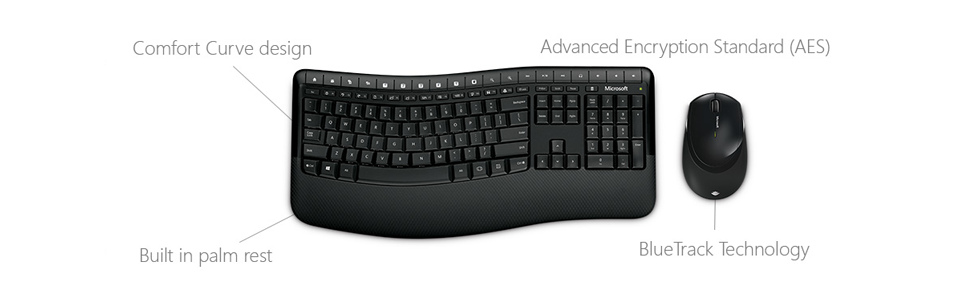
The Microsoft Wireless Comfort Desktop 5050 is a sleek, black keyboard and mouse combo designed for professionals who demand ergonomic support and seamless wireless freedom. Featuring an ergonomist-approved comfort curve keyboard with built-in palm rest, AES 128-bit encryption for secure typing, and a versatile ambidextrous mouse with programmable buttons, this combo enhances productivity and protects your data. With customizable shortcut keys and BlueTrack technology, it works flawlessly on virtually any surface, making it the ultimate upgrade for your modern workspace.



| ASIN | B014W20C90 |
| Average Battery Life (in hours) | 3 years |
| Batteries | 2 AAA batteries required. (included) |
| Best Sellers Rank | #1,453 in Computer Keyboard & Mouse Combos |
| Brand | Microsoft |
| Color | Black |
| Customer Reviews | 4.4 4.4 out of 5 stars (3,725) |
| Date First Available | September 1, 2015 |
| Hardware Platform | PC;Mac |
| Is Discontinued By Manufacturer | No |
| Item Dimensions LxWxH | 1.89 x 8.74 x 21.57 inches |
| Item Weight | 1.97 pounds |
| Item model number | PP4-00001 |
| Manufacturer | Microsoft Input |
| Operating System | Windows |
| Power Source | Battery Powered |
| Product Dimensions | 1.89 x 8.74 x 21.57 inches |
| Series | MICROSOFT CORP/LICENSING |
| Wireless Type | 2.4 GHz Radio Frequency |
B**E
best keyboard ever!
So I looked a long time for the perfect keyboard, and I was less picky about the mouse but I wanted that to be a particular way too. This combo is quite perfect. The mouse is a perfect size, with comfort grip on the sides and a programmable button on either side that defaults to forward/back for whatever software you're working in at the time. The keyboard feels soooo good. The base where your hands rest has a soft feel but is very sturdy, the keys are soft touch (a little loud but not bad at all) and all those extra function keys, whoa! It will spoil the crap out of you for ever working on a stupid "normal" keyboard again with how it streamlines tasks and just generally makes your life easier once you develop the habits of actually using them instead of the multiple steps of the old way. Best of all, it's VERY easy to use. Setup is really simple (which is good, because it does NOT come with an instruction manual), it's literally plug and play; just put the batteries into the mouse and keyboard, plug in the receiver to your computer's USB and off you go. Just be sure to download the drivers to make use of the COMPLETELY CUSTOMIZEABLE favorites bar on the keyboard and all the different options you can choose to suit your preference for both devices. Also for my fellow lefties out there, this mouse can be configured for left hand use very easily as well. Definitely worth the money - highly recommend!
G**N
Great Keyboard
This keyboard is one of the best I have ever used. It is an ergonomic keyboard well designed. Typing is easy. Installation is very easy. Windows 10 recognized it immediately by model number. The mouse also works great, it works better for me than much more expensive ones I have bought before. The mouse has a lot or programmable features. The keyboard is not large. It fits perfect on my table and does not look bulky or take up too much space. The color and look is beautiful. There are plenty of programmable keys on the keyboard also. It has volume controls and pause and play buttons for music. Has a lot of pre programmed keys on the top rows. I even love the clacking of the keys. The keyboard is very durable and easy to clean. The only problem, if even I can consider it a problem, is that batteries on the mouse do drain pretty fast. I think this is a great value and an excellent keyboard. I love the look of it and the feel of the keys. The mouse, for me, fits my hand perfectly and is easy to use.
J**J
Great price and quality. Happy worker
Great quality
W**K
Does What It Is Supposed To Do.
I ordered this Microsoft wireless keyboard-mouse combo a few weeks back to replace another set by another manufacturer that had been developing hiccups since the day I bought it, specifically pages scrolling randomly by themselves and a series of "keyboard error" messages that weren't cleared by reloading the software. I haven't owned it a tremendously long time, but here are my observations to date: THE POSITIVES: 1) I was taken aback at first by the fact that the keyboard did not have fold-out legs to tilt the keyboard toward the operator. However I soon discovered that the design of the keyboard included a built-in tilt, not as pronounced as my previous keyboard but sufficient, plus the fact that the keyboard sits on four rubber grips vs. two grips and two plastic pegs on the previous board, means it sits solidly on my computer stand and does not slide around when being used. 2) A little message appears in the lower right corner of the screen whenever the keyboard goes to caps on or caps off. Pretty handy. 3) Mouse works on any surface. You can ditch the mouse pad. 4) Keyboard layout (moderate curve) seems to fit my keyboarding style instinctively, and the tactile feedback when keyboarding is positive. 5) Solid build for both keyboard and mouse. THE NOT-SO-POSITIVES 1) The wireless connection does not have a lot of range. I originally tried it on a front USB port on my computer but it only worked intermittently. I do have one of those multi-port connectors on my desk which I keep connected to a rear computer port, and plugging in the wireless connector into that solved the problem. However when the multi-port connector slid or was bumped toward the back of my computer desk, things would stop working. Once it was positioned back in range, though, everything was fine. The "F" keys are minuscule. Not an issue for me as I rarely use them, but could be for someone who uses them more often. BOTTOM LINE This is a no-nonsense wireless keyboard-mouse combo that does what it it supposed to do. The limited range of the wireless connector is certainly not a deal-breaker, more of a minor annoyance and is one that can be adjusted to pretty quickly. I can't speak to battery life yet, but from what I know so far, I'd certainly recommend this product.
C**Y
Love This Keyboard
I love this keyboard! Works great, feels very comfortable, and sturdy. The keyboard design is great.
W**3
Best keyboard-mouse combo I ever had.
I have had this combo before on other computers; this combo has lasted me for about 4 years now. I spend about 10 hours per day on the computer, so each gets heavy use; the mouse is usually the first to go. Convenient, easy to install and very durable. Battery replacement in both is very infrequent as compared to Logitech. The keyboard has the best feel I have experienced other than an Ergo keyboard; a lot better and comfortable than standard. The mouse is heavy and glides very good and has a rubber scroll wheel that is very comfortable, unlike cheaper mice. The downside is that you cannot buy either of these components separately; if one goes down, you have to buy the set, but for the money vs lost production time it is worth it. Amazon is the best place; found better pricing than at Fry's where it is about twice as much. Did not check Microsoft directly.
P**R
This is exactly what I was looking for - typing is so fast on this keyboard
H**O
Es un buen producto pero el teclado viene diferente por ser de importacion, recuerden que la gran mayoria de sus productos viene hacia Mexico,.
S**R
Replaced my old 5050 keyboard/mouse. Excellent product
M**A
لا يوجد حروف عربية
J**S
This item is not fit for purpose. Purchased in the UK from Amazon UK from a UK company yet it has US Querty keys and UK querty internals which means that some of the normal keys are missing completely and others are not where they are expected to be - completely useless piece of kit and don't even bother trying to get a full refund from Stuff-UK - that's not their style!
Trustpilot
Hace 2 semanas
Hace 2 días