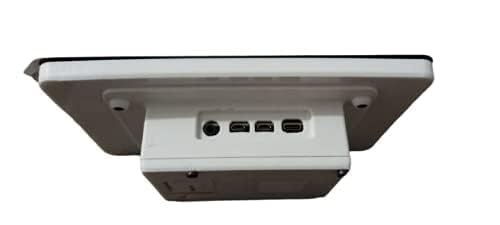


🚀 Elevate your Raspberry Pi projects with touch—because your ideas deserve the best screen!
The Raspberry Pi 7" Touch Screen Display offers a vibrant 800x480 resolution with 10-finger capacitive touch, designed for seamless integration with all Raspberry Pi models. Its compact, pre-assembled adapter board powers and converts signals via just two connections, enabling sleek, portable projects without the hassle of keyboards or mice. The complete kit includes all necessary cables and mounting hardware, making it the ultimate plug-and-play solution for professionals and makers aiming to innovate on the go.
| ASIN | B0153R2A9I |
| Best Sellers Rank | #1,686 in Single Board Computers (Computers & Accessories) |
| Brand | Raspberry Pi |
| Compatible Devices | Personal Computer |
| Connector Type | usb |
| Connector Type Used on Cable | usb |
| Cooling Method | Air |
| Customer Reviews | 4.6 out of 5 stars 2,035 Reviews |
| Form Factor | 7-inch touchscreen display |
| Global Trade Identification Number | 00702658304126 |
| Item Dimensions | 3.94 x 2.99 x 0.79 inches |
| Item Height | 20 millimeters |
| Item Weight | 381 Grams |
| Manufacturer | Raspberry Pi |
| Maximum Input Voltage | 5 Volts |
| Minimum Input Voltage | 5 Volts (DC) |
| Model Name | raspberry pi |
| Output Wattage | 7 Watts |
| System Bus Connector Type | DSI |
| UPC | 013088392127 702658304126 |
| Wattage | 7 watts |
L**I
This is the screen to get.
Wow! Plugged it in and it just works. No adjustments, calibration, driver loading, etc. I am running the most current version of the OS so that is probably the reason. At first I was afraid that the lower resolution would be an issue but at this size, I don't know if a higher resolution screen would make a difference. At least not for what I plan on doing with this. The photos show that the screen, posts, driver board, and ribbon cable are separated and I saw a video that says that you need to assemble all the pieces. My unit was already put together. I just inserted the ribbon cable into my Raspberry Pi. There are no instructions, but search Youtube and you'll find something. I purchased the Smarticase Case for the Official Raspberry Pi 7" Touchscreen Display - LEGO compatible front and adjustable angle and it fit perfectly. I highly recommend getting this case. Or some other case if you prefer, but definitely get something. There is nothing protecting the edge of the screen. It won't get damaged just by handling it, but leaving it propped up is just asking for trouble. Also the driver board is exposed so you are risking a short. One note. If you use this screen, the HDMI port on the Raspberry Pi is disabled. So you cannot use both this screen and a second monitor connected to the HDMI port. People smarter at this than I are working on this, but as far as I can tell, they haven't figured it out yet.
D**Z
Easy installation, widely supported.
This is a great plug and play solution to a lot of cool projects with Raspberry Pi. I have two of these now, one in a retro Volumio speaker project and one in a plastic case to use for Crankshaft Android Auto (car interface.) Both were simple to install and work perfectly. The jumpers to power from the Pi directly are a nice feature. The screen driver board is pre-installed and makes final assembly simple (you only need to attach the ribbon cable and power jumper wires, then mount the Pi with the supplied Phillips machine screws.) Touch is responsive and the display is bright and clear. Highly recommended if you just want it to work and have wide ranging software support.
J**N
Quality and size are great!
Picture quality is good. Screen is sturdy. ETA Prime’s video review and instructions of this made it very easy to setup. I did not use the touch quality, so I can’t speak to that. Only flaw is that I don’t think it supports HDMI out while using this screen. There might be a software fix to this, but I didn’t bother to look into. I just tried plugging in the port to see what would happen. Not much. When not directly side-by-side, screen size feel is comparable to a Switch. Also bought a case with this that paired very well. Only issue was overheating with heavy use and the back cover on. I didn’t have a heat sink.
S**.
ZERO instructions provided!
Got one of these to use with a Pi 3 B CanaKit Raspberry Pi 3 Kit with Clear Case and 2.5A Power Supply to run Kodi along with this case RS Raspberry Pi...
A**Q
Great display, easy to work with.
Built myself a Pi3 Touchscreen PC using this display and the new Raspberry Pi 3.. This display works as well as my Galaxy S4, and is more accurate with overscan turned off. When it boots, you may see a lightning bolt or a small icon like the boot screen (color chart).. this means this section is reporting a brownout.. the 2.5A power supply that comes in the Pi3 kit is not enough, but the 3A supply handles it just fine. This unit fits perfectly into the tilting container that also holds the Pi. The only wires I have connected to the display is the ribbon cable (handles video and touch response) and the 5V splitter.. they've included the wires to go from the 40-pin connector, but it might be better to use the 5V MicroUSB power port for it's protection. great color response, listed as 800x480, but I think it may be 720x480. Have even been able to scan barcodes from the screen. haven't played a video yet, though. For the 3A power supply: https://www.amazon.com/gp/product/B01L8DVOFM/ref=oh_aui_detailpage_o02_s00?ie=UTF8&psc=1
J**E
Wise Choice, but Choose Wisely
The Raspberry Pi has two popular touchscreens, so far as I know. This one is 7 inches and capacitive; the other is 3.5 inches and resistive. For users who want to turn a Raspberry Pi into a tablet, this is the right choice. However, it has a few problems. First, the screen is programmed upside down. It is easy to turn it around within an OS, such as Raspbian, but if you use NOOBS, you may find that your "tablet" boots up upside-down. Second, it is not designed to receive a right-click from a long press. Currently, the prior fix is not compatible with Raspbian. This is frustrating. Third, unlike prior Pis that could handle being powered with the display from a single battery pack connection, the Pi 3 uses too much more juice for this. You may need two battery packs, or at least two battery pack ports to power the Pi 3 and the display separately.
J**C
Works well with 3B+ using 32&64bit Raspios current
Plug and play with RaspberryPi power supply with my 3B+ running Raspios full or lite 32&64 bit current (bullseye and bookworm). Touch screen works and is readable with a keyboard instead of onscreen keys. Mine is a test bed so I made a simple stand out of L-shaped aluminum (aka aluminum angle iron) to access the Pi easily.
J**E
Great concept, flawed implementation
I was shopping for small portable displays to put on my robot that is Raspberry Pi powered. Given that this is the "official" display, I figured I'd have the least trouble using this, so that's what I ended up getting. (I searched around on a few other sites as well; there are other options, with different trade-offs.) As long as you update the software on your Raspberry Pi (and ideally use a Raspberry Pi 2,) this is easy to get working. Touch and display works as advertised. However, there are a few cons: 1) The pixels are wider than they are tall. Drawing a circle to the display will draw a laying-down oval on the screen. In this day and age, that's unbeilevably bad! If I had more time I would return it, but I don't have time to keep shopping for other displays. 2) By default, there is a backlight timeout that blanks the display until you touch it again. When developing using a real keyboard/mouse (or, better, using SSH to the RPi so I can use a big window) this becomes quite annoying. 3) The "stacked pile of circuit boards" design makes it much thicker than it needs to be. A better design would have been to put the display controller board side-by-side with the Raspberry Pi. There's enough space on the back of the display to do this, and even some mounting holes that could have been moved to make this possible. You can make it slightly slimmer if you turn the GPIO pins into the display, but that will twist the thin display cable, and the USB/network ports get blocked by a stand (if you use it.) And I really need the GPIOs! 4) The resolution is quite small. Yes, you can watch SD television on that resolution. But other options are 1024x640 or even 1280x800. 5) The black bezel surrounding the screen is very big. This is actually a problem for me; I want it as small as possible. It could easily be a centimeter slimmer on each side without losing any functionality. I don't know why they did this; it looks bad and works bad and is fragile as well. If you need a plug-and-play thing that Just Works (tm) with the limitations I've listed above, this is the right choice. Else, maybe go look for something by Lady Ada?
Trustpilot
Hace 1 mes
Hace 3 semanas



