We remain fully operational. Our teams are working around the clock to ensure your deliveries continue safely.

Descargar la aplicación


Servicios al cliente
Sobre nosotros
Copyright © 2025 Desertcart Holdings Limited
Descargar la aplicación

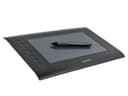
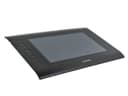
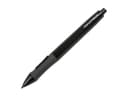
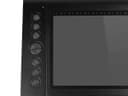


🎨 Elevate your digital canvas with pro precision and custom control!
The Monoprice 110594 Graphic Drawing Tablet offers a spacious 10 x 6.25-inch active area with 4000 LPI resolution and 2048 levels of pressure sensitivity, delivering precise and responsive input at 200 reports per second. Featuring 8 programmable Express Keys and 16 Hot Cells, it allows full customization to streamline your creative workflow. Compatible with Windows and Mac OS, and USB-connected for easy setup, this tablet is an affordable, professional-grade tool ideal for digital artists transitioning from mouse to pen.

| ASIN | B00H4LAF9O |
| Active Surface Area | 10 inches x 6.25 inches |
| Additional Features | Programmable Express Keys and Hot Cells |
| Best Sellers Rank | #918 in Computer Graphics Tablets |
| Brand | Monoprice |
| Built-In Media | Driver/Software Utilities for Windows and Mac OS X |
| Color | Black |
| Compatible Devices | Computers, Laptops |
| Connectivity Technology | USB |
| Customer Reviews | 4.1 4.1 out of 5 stars (804) |
| Global Trade Identification Number | 00757901804335 |
| Item Dimensions L x W | 10"L x 6.25"W |
| Item Weight | 2.42 Pounds |
| Manufacturer | Monoprice |
| Model Name | 10594 |
| Model Number | 110594 |
| Native Resolution | 4000 LPI |
| Operating System | XP and later |
| Pressure Sensitivity | 2048 Levels |
| Screen Size | 10 Inches |
| Specific Uses For Product | personal |
| Target Audience | Teacher |
| UPC | 757901804335 714547237538 |
| Warranty Description | 1 Year |
N**E
A Good First Tablet
I purchased the Monoprice 10594 graphics tablet a month ago as my first graphics tablet to use in Adobe Flash and Gimp. For a someone used to creating digital art using a mouse, this tablet is defiantly a worthwhile upgrade for transitioning to using a tablet. While I cannot speak for the durability of the product yet, I can give my first impressions on the features. The 10594 is a rebranded Huion H610 Pro at a slightly lower price. The drawing area is a good size to work on small details without needing to zoom in and out often. The surface texture is a smooth matte plastic that feels almost like drawing on cardstock. The 10594’s pen has around one inch of hover detection. This can feel like a lot at first and be rather finicky without a little practice to get used to moving the pen on and off the drawing surface; though this is likely an issue with transitioning to any graphics tablet. With 2,048 levels of adjustable pressure sensitivity, this tablet can be set to precisely the pressure level you feel comfortable with. The sixteen programable function buttons are very helpful for quickly changing tools, with the eight primary tool buttons being setup for Adobe software; all buttons can be configured for custom macro functionality in the Huion driver software. One issue this tablet has out of the box is that the included drivers do not work in applications, showing up as a single tool in Gimp and not at all in Flash Animator. It does work on the Windows desktop due to Windows built-in mouse emulation. These problems can resolved by installing the H610 drivers from Huion’s website, allowing the tablet to be recognized properly as multiple tools in drawing applications as well as enabling function button remapping. At this price point the 10594 is a great deal compared to similar Wacom tablets that are double the price. While it does not have all the features, such as pen tilt, of more expensive name brands, it does make for a good tablet for getting used to graphics tablets and deciding if they fit one’s art style before spending money on a more expensive model. Overall the 10594 is a good starting tablet and works well, so long as it is setup properly. It is important to spend some time experimenting with the sensitivity settings to tailor the feel to your own preference rather than using the default configuration. I would definitely recommend this tablet to anyone interested in moving from drawing with a mouse to trying a tablet due to the ease of setup and low price.
J**R
The best graphic's tablet for beginners, but get your drivers from the website.
I've worked on countless tablets in the past, including Huion, Wacom, and others. I'm a graphics designer and children's book illustrator, and have been working on tablets for over 10 years. When I say this is by far the best beginner's tablet, I mean it completely. I have had Wacom tablets completely fall apart on me, and have LESS responsivity than this tablet, for at least four times the price. This is a sturdy workhorse of a tablet, it has a large surface area, it works with every art program I've tried with it, it travels very well, and the buttons are an excellent way to navigate within the art program without taking your hands off the tablet. I've recommended this particular tablet to many artist friends, and it is far more comfortable and reliable than tablets exponentially more expensive. However, it should be kept in mind that the drivers that come with the tablet DID NOT work for my laptop whatsoever. They are about 8 years out of date from what I could tell, and were completely incompatible with modern technological updates. Go to Monoprice.com and look up this tablet specifically, download the most current drivers from there. It works beautifully afterward. An unfortunate extra step, but considering everything that is good about this tablet, still very much worthwhile. Monoprice, please update the drivers you add to the box!! It would save so much panic and frustration!!
A**E
Great Tablet
My kids are experimenting with art, and want to draw on the computer. Upon seeing recommendations for this tablet for its Linux compatibility, I decided to buy one. It was an instant hit, as it was compatible with Linux right out of the box (without having to download the Digimend drivers). Kubuntu recognized it as a pointing device automatically, and so did Krita. I then bought two more, so we all have one. The low price made this decision easy. I haven't tried to use the buttons for anything, yet, but no one seems to care about them. My only complaint is that one of the pens stopped working shortly after receiving the tablets. A new battery didn't resolve the issue, so we have one tablet down until I get a new pen.
E**H
Works great on Linux. Basically non-functional on Mac
Works great out of the box using GNOME on Linux. Tried to use it on MacOS and it woudln't register pressure above 0% -- which means it didn't work. That's without the driver. I installed the driver and it was worse -- cursor movement was erratic and laggy and it wasn't even worth anything as a mouse anymore, much less a pen. (Maybe because the Mac drivers available for download on monoprice's web site date from 2015??) Don't buy if you have a Mac, but it's a heck of a deal if you're on Linux. I don't have Windows so I don't know about that.
P**4
I'd looked at a few drawing tablets on Amazon before deciding to take a chance on this Monoprice tablet. This was primarily because I didn't want to spend any more than I needed to and at under £30 I figured it must be worth a punt and could be returned if it turned out to be a lemon. On top of that, the pictures indicated to me (as did another reviewer kindly point out) that it does indeed look like the drawing tablet that's branded as the Huion 610 Pro at a higher price point. The tablet arrived the following day after ordering with Amazon Prime and was nicely packaged in a Monoprice retail box with battery operated pen, battery, usb lead, driver disc, instructions and some spare nibs housed in a container that doubles as the tablets pen rest. I took the advice of another reviewer and didn't bother with installing drivers from the supplied disc - instead I downloaded drivers from Monoprices website as well as Huions. The thing that was immediately clear to me was that though the drivers are essentially the same Huions appear to be a newer version of the tablet drivers compared to those supplied by Monoprice. It was the newer Huion version of the driver that I installed though both drivers are otherwise identical in providing the same functionality and options for the tablet. Once installed on my Windows 10 desktop the tablet and pen interacted immediately with my computer which was a relief. Drawing with the pen on the tablet appears immediate, responsively smooth and seamless. My principal reason for wanting a graphics tablet was for photo editing within Photoshop Elements and initially the tablet wouldn't interact effectively with the program at all. I looked at the driver options and unchecked "Support Tabletpc" and this straightaway rectified interaction issues within Photoshop Elements. Checking or unchecking this option within the driver dialogue seems to be one way to counteract issues that could arise when using this tablet within certain programs though as another reviewer has suggested, the program you use may also need you to tell it to interact with a tablet through its own preference setting options. Bear in mind that these drivers need to be installed BEFORE you connect the tablet to your computer using the supplied USB lead. All in all I'm happy as the tablet is working well for me on my Windows 10 desktop and represents great value for money at the price I paid for it (I'm so pleased that I wasn't tempted by some of the recent lightning deals that would have encouraged me to spend more). Any issues you might encounter are likely to be driver related and I concur with another reviewers thoughts on this and would suggest using the newer Huion drivers if installing onto a Windows 10 machine. Its a shame the pen isn't rechargeable and requires a battery, but for the price and for what I want to do, I can happily live with that but rest assured I'll update this review should the tablet suddenly fail or stop doing what its supposed to do.
A**S
Really good for the price. Was looking for a new tablet to replace my old one but couldn't afford a lot. I'm not a professional artist but like to doodle in my spare time and this does the job. I was surprised how good it is for such a low price. Would recommend for casual artists.
F**T
Well, I must say I am very impressed with the quality of the product and the ease of installation. Much easier to install than the old Wacom it's replacing with Win 10. Much cheaper price. I have used it in Photoshop so far and it does the same as the product it's replacing. Haven't sketched with it as it's not something I do very often
A**R
سهل الاستخدام،الحجم كبير،لاينكسر بسهولها
C**N
accesible, fue para regalo de mi hijo, y la usa muy bien.
Trustpilot
Hace 5 días
Hace 1 mes