


⌨️ Elevate your desk game with the Anne Pro 2 — where sleek meets smart.
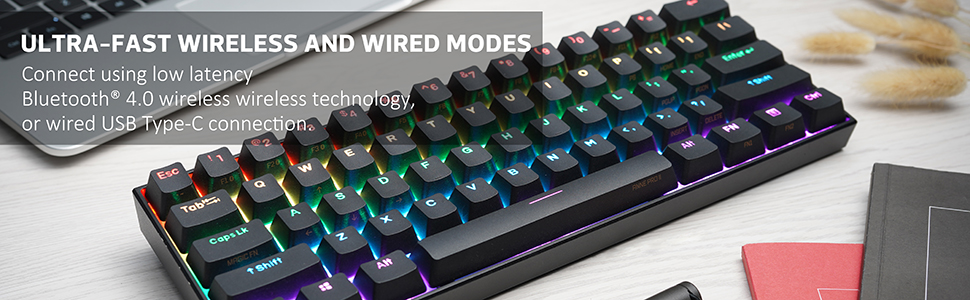
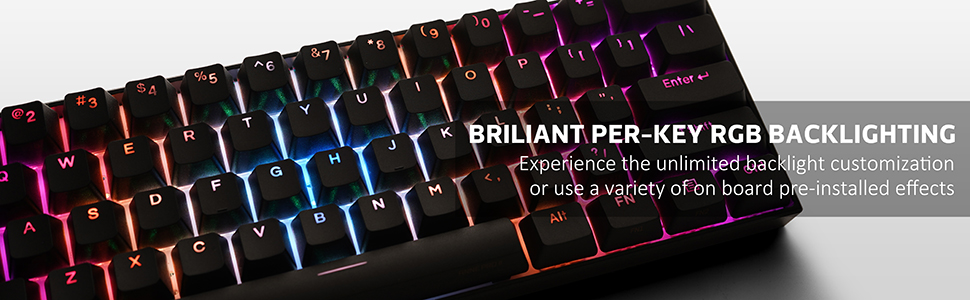
The ANNE PRO 2D is a premium 60% mechanical keyboard featuring Gateron Red switches for smooth, fast typing and gaming. It offers versatile connectivity with Bluetooth 4.0 supporting up to 4 devices and USB-C wired mode. Its compact design saves desk space while maintaining full 104-key functionality through programmable combos. The keyboard boasts true per-key RGB backlighting with 16 million colors, customizable via intuitive software. A robust 1900mAh battery delivers up to 4 weeks of wireless use, making it perfect for professionals on the move who demand style, performance, and flexibility.

| ASIN | B07XKFDJYB |
| Additional Features | Wireless |
| Antenna Location | Desk,Home |
| Best Sellers Rank | #134,347 in Video Games ( See Top 100 in Video Games ) #5,266 in PC Gaming Keyboards |
| Brand | ANNE PRO |
| Built-In Media | USB Cable |
| Button Quantity | 61 |
| Color | White |
| Compatible Devices | Laptop |
| Connectivity Technology | Bluetooth, USB |
| Customer Reviews | 4.3 out of 5 stars 1,147 Reviews |
| Enclosure Material | Polybutylene Terephthalate |
| Hand Orientation | Ambidextrous |
| Item Dimensions L x W x H | 11.18"L x 3.82"W x 1.57"H |
| Item Height | 4 centimeters |
| Item Weight | 1.4 Pounds |
| Keyboard Backlighting Color Support | RGB |
| Keyboard Description | USB |
| Keyboard Layout | QWERTY |
| Language | English |
| Manufacturer | Taicang Zhigengniao |
| Mechanical Keyboard Switch Model | Gateron Red |
| Model Name | Anne Pro 2 |
| Model Number | Anne Pro 2 |
| Number of Batteries Required | 1 |
| Number of Keys | 61 |
| Power Source | Battery Powered |
| Series Number | 2 |
| Style Name | Modern |
| Switch Type | Gateron Red |
| Warranty Description | 1 |
D**T
One of the best keyboards on the market. Plenty of features and very versatile.
Purchased on Black Friday but I wanted to wait a couple of weeks before I submitted a review. I've been using a full size Ducky Shine 4 for the last 5 years and was looking for an "upgrade." Nothing was particularly wrong w/ my old keyboard but I was very interested in trying a smaller keyboard to free up some desk space. I had a tough time deciding between a TKL and a 60% keyboard, but I ended up narrowing down my choices to the Logitech G Pro TKL, Ducky One 2 Mini, and the Anne Pro 2. After extensive time researching all 3 keyboards, the deciding factors came down to features, price and choice of switches. I finally pulled the trigger on this keyboard because it went on sale during Black Friday and I'm glad I did. My old keyboard had Cherry MX Brown switches, but I ended up going w/ Gateron Red switches for this keyboard because I wanted to switch things up and heard a lot of great things about Gateron switches throughout my time researching. These switches sound so crispy and smooth, which results in a very pleasant typing experience. This keyboard also features bluetooth connectivity, which isn't the biggest deal for me because I'll always be connected wired, but I was able to connect it to my Ipad and Fire Stick w/ no issues. Another thing w/ this keyboard is that it's fully customizable through software, which allows you to customize the lighting effects, function shortcuts and even macros. In terms of build quality and design, the keyboard feels sturdy and solid. The keyboard doesn't have adjustable feet like other keyboards, but instead sits at a set angle. Not a deal breaker for me because I like the angle that it sits at. My only two issues w/ this keyboard is: 1) The RGB lighting is not as bright compared to other RGB keyboards out there (so I've heard), and 2) Red switches, although they feel/sound very smooth, are very sensitive and don't require much force to actuate. This makes them great for gaming due to a faster response time per keystroke, but can result in typing errors at first. For that reason, I would recommend going w/ different switches if you plan on using this keyboard for all-around use. These issues are minor for me personally, and are not enough for me to take a star off my review. Overall, the Anne Pro 2 is an amazing and versatile keyboard, packed w/ a lot of features, and great switch options. Highly recommend!
T**E
Thock-Tastic! (With Gateron Red Switches)
Frankly, this keyboard is amazing. There are many different aspects to keyboards, all of which the Anne Pro 2 delivers phenomenally. Looking at the software, RGB, and sound and feel, this keyboard is the way to go for anyone looking for an exceptional pre-built option. SOUND & FEEL Talking about the sound and feel, this keyboard sounds very nice, and has that “thock” sound that many enjoy, but depending on the surface that it is on, can sound very “poppy” as many people like to call it. On a couch, which is what I have included in the sound test, the keyboard sounds poppy. On a normal desk, the keyboard would sound deeper, or more “thock”. This keyboard feels amazing, and it is very responsive. There are keys on this keyboard that feel mushy, however. The keys that feel mushy are the ones with stabilizers under them, which are backspace, the enter key, and both shift keys. The space bar feels normal. Note, if you get the red switches, the keyboard will not feel tactile, which is the nature of the smooth, linear red switches. If you want a clicky sound, go with the blue switches. The blue and brown switches are tactile, and you will feel an obvious bump when pressing the keys. RGB & SOFTWARE The RGB on here is better than any I’ve ever seen. The RGB is fully customizable with the amazing software the keyboard has to offer. The software allows you to change what keyboard layout you use, as well as optimize it for Mac or Windows. The main feature of the software for me was what you could do with all the lighting effects. There is a number of cool lighting effects that come with the keyboard, but all are in the standard rainbow colors that we are used to. The software lets you change the colors of the effects, allowing for a huge amount of customization. There are also more effects that are available once you install the software, which I find look nicer than the effects that come with the keyboard. To switch between effects on the keyboard, press FN2 + 9. The RGB is a little dim, but when working in a room with the blinds not fully open or it is closer to night time, this is not noticeable. OVERVIEW & FINAL THOUGHTS This keyboard is amazing, despite two tiny drawbacks. One of these drawbacks is that the keyboard is not hot-swappable, which means that you cannot change the switches inside of them easily (without soldering). This is only a drawback to those that want to customize their keyboard. The other drawback to this keyboard is that some of the keys are mushy, which to be honest, isn’t that big of a deal because they still work normally, they just feel a little worse than the other keys. The Bluetooth works perfectly and I have never noticed any issues with it. Charging the keyboard is barely anything I’ve had to worry about, since I use the keyboard on and off Bluetooth. Overall, this keyboard the best option for anyone looking for a nice typing or gaming keyboard that does not want to customize their keyboard.
J**E
Almost perfect
This keyboard has been nearly perfect for me. For my first real gaming keyboard I decided to go with this. No issues really, it’s been good quality for the most part. I’ve nearly gotten 3 years out of it but buyer beware: the caps lock has some glitch that causes the lighting effects to freeze until you press the caps lock again and it magically unfreezes. Pretty strange and has been an issue for essentially the entire life of the product. I have decided to not go with them going forward because there are other options to try with better performance for money. My keyboard now has ‘repeat’ key issues and will ‘flicker’ activate switches instead of hold onto the activation the way it’s intended to. Lastly sometimes, when I press a key it never activated and I have to hit it more than once and pay attention. For 86-90 USD, a very good keyboard but I’ve elected to go with a new Steelseries Apex 9 mini for the same exact price SEP. 2023. I loved my Anne pro 2 but really it seems like some bs glitches they could have worked on more, but make no mistake for the money this is a good one to start with or hang onto for a few years.
H**H
Great 60% keyboard
I recently switched to PC for gaming and have been trying various boards (Tecware, Akko, Drop). This keyboard stood out from the rest in terms of price point and quality. I snagged this when it was on sale for $92 and has been my go to for gaming and work. I use this for PC gaming and also on a Mac for work. I use the wired connection and can't comment on the bluetooth. I will update this in a few months. Pros - Board is sturdy, keycaps are nice and big fan of the switches. (Kailh Box Brown). - Stabilizers sound & feel great. No rattling. - RGB has nice options and you have the ability to change per key color using the Obins lab software. - Easy customization for setting volume up and down, media keys, etc using Obins lab software. - The magic tap functions works great since there are no arrow keys. Cons - I did run into a firmware update where it 'bricked' my keyboard but was able to fix that by holding the 'ESC' key, plugging the keyboard back in and then reflashing the firmware.
J**S
really good quality, feel, and sound
this keyboard i bought for a gaming setup i’m saving up for. i got the keyboard and opened it up, came with everything, all the lights work, amazing shipped it with care. showed up early too. i got red switches, it feels great, the sound sounds smooth, not clicky. it feels great, amazing quality, good for gaming. bluetooth i was a little confused on but the manual goes through it step by step for anyone confused on that. it has some rubber tabs under it so it doesn’t move around when using, really great keyboard. 100% recommend for any gamer.
M**G
Great Starter Mechanical Keyboard
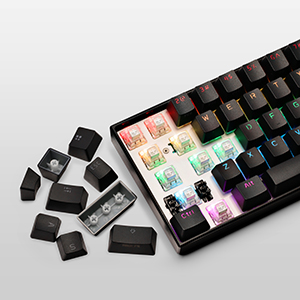
I really like this keyboard. It's a really good starter keyboard for anyone who wants to start learning/getting into mechanical keyboards. With the wide variety of switches to choose from. You're able to start learning about which switches best fit your type of style. It also comes with some extra keycaps and a keycap switcher. The extra keycaps aren't anything to be excited about but it's a really nice gesture to include them. I ended up swapping all the keycaps with some POM Jellys and they look great with the LEDs The ObinKit (The Program for the Keyboard) is simple and provide a lot of options for your keyboard. I highly recommend this product to anyone wants a solid 60% keyboard with decent switches.
A**Z
Great Product, but not great technical support
I received the keyboard a few weeks back, it's better than what I expected, the switches are awesome (Gateron Red). The key sound is awesome for this price, can't complain. The only issue is that the keyboard is not getting connected via Bluetooth to my laptop and I have not been able to find a solution to the problem. I am 100% sure that it's a software issue and not a hardware issue because it is flawlessly connecting to my Galaxy Tab8+. Would give it a 10/10 were it not for the connectivity issue or at least proper support from sellers with regards to this problem.
N**O
edit: actually /not/ hard to customize lights
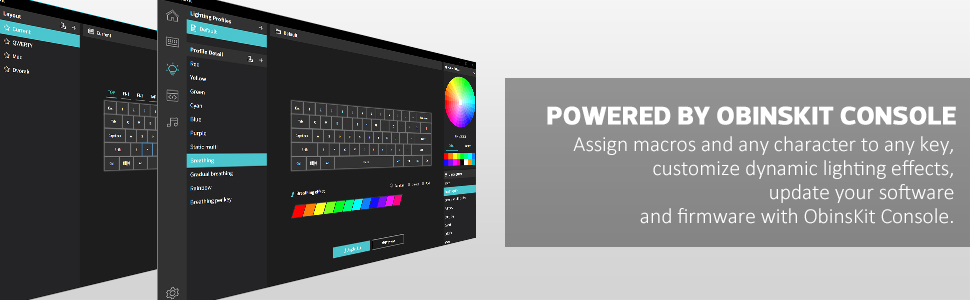
original review: It's.. a good keyboard. There's no question about it. But I have issues with setting up the RGB lights and all the other customizable parts about it. Oh and the manual DID NOT HELP. Luckily there's an online pdf of it. edit: you have to download the ObinsKit app and plug in your keyboard. Then, go the lights tab on the left side. There's a list of light modes you can click on to test out. If you right click on them, you can change the mode. There's many options, at first you see "auto, static, trigger", those indicate the type of of light mode you want, and you keep exploring from there. to change the specific colors you want, you click on the color you want from the color wheel and then click on the color spaces under the keyboard layout on the screen. you can add, replace or delete colors. It doesn't work as drag and drop, just clicking from place to place to move things. make sure to click download once you're done. Hope this helped :)
Trustpilot
Hace 2 meses
Hace 1 mes



