We remain fully operational. Our teams are working around the clock to ensure your deliveries continue safely.

Descargar la aplicación


Servicios al cliente
Sobre nosotros
Copyright © 2025 Desertcart Holdings Limited
Descargar la aplicación


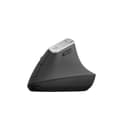

🖱️ Elevate your workflow, not your wrist pain!
The Logitech MX Vertical is a wireless ergonomic mouse designed to minimize hand and wrist strain with its vertical layout and adjustable angle. Featuring a high-precision 4000 DPI optical sensor, it offers seamless connectivity via Bluetooth or USB receiver, compatible with both Mac and Windows. With up to 4 months of battery life and 4 customizable buttons, it’s engineered for professionals seeking comfort and productivity in one sleek package.
| ASIN | B07FNHV4MW |
| Additional Features | Ergonomic Design |
| Antenna Location | Gaming, Office |
| Are Batteries Included | Yes |
| Are Batteries Required | Yes |
| Best Sellers Rank | #262 in Computer Mice |
| Brand | Logitech |
| Button Quantity | 4 |
| Color | Black |
| Compatible Devices | Büro |
| Connectivity Technology | Bluetooth, Radio Frequency , USB |
| Customer Reviews | 4.5 out of 5 stars 13,238 Reviews |
| Enclosure Material | Plastic |
| Global Trade Identification Number | 05099206081901 |
| Hand Orientation | Ambidextrous |
| Item Dimensions L x W | 4"L x 4"W |
| Item Weight | 4.59 Ounces |
| Manufacturer | Logitech |
| Model Number | 910-005448 |
| Mouse Maximum Sensitivity | 4000 Dots per Inch |
| Movement Detection | Optical |
| Movement Detection Technology | Optical |
| Number of Batteries | 1 Lithium Polymer batteries required. (included) |
| Number of Buttons | 4 |
| Operating System | Windows, macOS |
| Power Source | Battery Powered |
| Range | 5.0 meters |
| Special Feature | Ergonomic Design |
| Style Name | Modern |
| Unit Count | 1.0 Count |
L**0
Excellent Mouse!
I have had this mouse for a while now and I love it. It is so easy on my hands and I love the extra buttons that I can reprogram. I use this across my PC and my Mac and it works great. This mouse is very comfortable, high quality and definitly worth the money.
S**N
Surprisingly comfortable and natural-feeling.
I developed painful tendonitis from using a standard mouse. This vertical mouse actually works very well in my large hands. It is very intuitive to use--almost no learning curve for me since the buttons are logically laid out. I think it will be big help in my recovery and prevent future pain. The matte surface feels good and secure. I find the rather broad base provides good stability. It's also great that you can switch it between 3 devices with just the push of the button on the bottom. Another home run from Logitech.
J**Z
Calidad
Excelente producto
A**N
The only vertical mouse I love!
I now own three of these mice, and they've not only saved my arms from a lot of RSI, but they're also just generally great - three switchable bluetooth connections, very good battery life (I recharge them maybe once every few months), a good weight and size in the hand, and just generally pleasant to use. Only downside is that they eventually get some rubber degradation where your hand sits but that's been true of every mouse with similar soft-touch materials that I've owned, and that took at least two years of daily use to happen, so feels very reasonable.
R**E
Decent, but Not Good Enough
The ergonomics of this mouse did feel more comfortable to use than my previous mouse, but the lack of horizontal scroll and 1 less customizable button made it less functional than I expected. My previous mouse is a MX Master 3s, which I wanted to swap out for a new mouse to help improve wrist and arm pain from prolonged use. Overall this mouse does everything you’d expect from a high end mouse and I didn’t have any issues with the performance or connectivity. Just wished it had some functions to make daily tasks more efficient. I returned this mouse and got an MX Ergo S Plus instead, which I’ve been happy with.
T**.
Perfect
I’ve used this mouse for years, helps tremendously and no longer notice my carpal tunnel issues when working with my mouse
N**S
Great ergonomic mouse
Best ergonomic mouse I have used. I have purchased multiple for myself and others worth the cost.
B**N
I wish I had listened to the negative reviews.
I wrote off the negative reviews as personal preference but I find myself having the same experience. I came from the regular MX Master and I didn't think this would be that large of a jump to go vertical, but I am mistaken. Cons: - This mouse feels cheap, very cheap compared to the MX Master line. It's very light and easy to overshoot your mark, even after adjusting the DPI. - The wheel feels outdated and has no option for free scroll, so scrolling takes much longer now. That being said the wheel is comfortable. - There is only one light for battery power. Without going into the Logi app it's difficult to see how much battery is left. Not a dealbreaker but an annoyance. - The mouse is smaller than I imagined. I went to a store to see how the Lift felt and went with the MX Vertical knowing it was larger. That being said it's still just a little small for my hands (7.5" from wrist to middle finger-tip, 3.5" across fingers). - I find myself missing the horizontal scroll wheel of the MX Master, but that's preference. - Maybe it's the learning curve but I find my pinky finger dragging and uncomfortable. It doesn't naturally feel at place on the mouse and a little bump out may help instead of the side curving in. After using this for a week it's getting better but I have to focus on keeping my pinky higher on the mouse. - The thumb forward/backward buttons feel too far forward. The isn't very comfortable with my hand all the way on it so I find myself gripping it a little further back. I also bought a Keychron M5 Vertical to compare to this. Somehow that mouse is even lighter and the scroll wheel even worse. That has a smaller finger area because of equal size buttons that takes up finger space despite the bump out at the bottom. I ended up keeping the Logitech and returning the Keychron, but I'm not happy with it and would not recommend.
Trustpilot
Hace 3 semanas
Hace 1 semana