We remain fully operational. Our teams are working around the clock to ensure your deliveries continue safely.

Descargar la aplicación


Servicios al cliente
Sobre nosotros
Copyright © 2025 Desertcart Holdings Limited
Descargar la aplicación
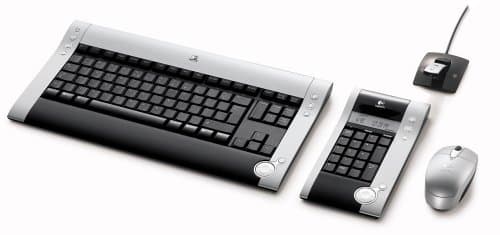
⌨️ Elevate your desk game with wireless precision and sleek style!
The Logitech diNovo Wireless Media Desktop Keyboard Kit combines a full-size ultra-flat keyboard, a versatile numeric pad with multi-function display, and a precision 3-button optical mouse, all connected via reliable 2.4 GHz wireless technology with a compact USB mini receiver and extension cable. Designed for professionals seeking a stylish, flexible, and travel-ready desktop setup.
| ASIN | B0002XGSS8 |
| Antenna Location | Desk |
| Are Batteries Required | No |
| Brand | Logitech |
| Color | Black/Silver |
| Compatible Devices | Laptop |
| Connectivity Technology | Usb |
| Customer Reviews | 3.9 3.9 out of 5 stars (37) |
| Global Trade Identification Number | 00097855028631 |
| Hand Orientation | Ambidextrous |
| Item Weight | 4 Pounds |
| Keyboard Description | QWERTY |
| Manufacturer | Logitech |
| Operating System | Windows 2000, Windows XP |
| Power Source | Battery Powered |
| UPC | 097855028631 |
I**I
Its been 3 years!
I have the diNovo desktop with the 10 key and use it almost every day. With a HDTV hooked up to my PC I can go almost anywhere in my room to use it. OK heres the pros and cons. Mouse-good till about 6-8 feet after that its only marginal. Only three buttons-no back/forward or programmable buttons. Battery life is a good very long time. I use it on a bed comforter and don't play most video games much. When I do play video games its not as good as a regular gaming mouse-but as a type of remote control it works great. Very easy to set up and use-since all my PC's use either XP or Vista I never need to install Logitech software. Oh yeah, not too comfortable. CAN USE ON PS3!!! Keyboard-Same as above however since I use the mouse in most surfing the web the battery life in the keyboard is longer-which is verrry long. The keyboard can go further about 20-30 feet from the USB transmitter. 10 key-same as above however TAX time is the only time I use it. It has a temperature reading which is cool, however I live on Maui and they have the temperature on my yahoo homepage... Like I said I brought this setup three years ago and would buy another if I cannot find a better and cheaper duo. When I brought this it was refurbished and I think around 40-50 bucks. If you discontinued you cable service and kept roadrunner, use your PC as a entertainment center, stream your TV shows, and do some work (just to balance the fun time of a PC) this is a very strong recommend. Plus you can use it on your PS3-you just have to re-plug in the USB part and press the red button.
R**S
Keyboard of my dreams!
I'm kind of a keyboard nerd, and had been searching for a wireless keyboard with nice, quiet low-profile keys with similar feel to a laptop keyboard. I also wanted one with minimal "extra" buttons and controls; I hate all those overblown toys with a bazillion internet shortcut buttons and other "hotkeys" I would seldom, if ever use. And of course I wanted one with a sleek sense of style. I happened upon Logitech's diNovo set and immediately fell in love. It took me a while to convince myself it was worth the hefty price tag, but after looking at other lower-priced models in the computer store, and getting turned off by their big, loud "clackey" keyboards, I kept coming back to the diNovo. The diNovo is offered as a higher-priced Bluetooth set with an upgraded, bigger Laser mouse and detached numbers pad that doubles as a mediapad, or the lower-priced (and lower featured) USB wireless set with smaller optical mouse and number pad that doubles as a calculator. I debated for a while, as my laptop is equipped with Bluetooth that isn't being used for anything, but couldn't justify the extra expense just so I could say it was "Bluetooth". And the smaller optical mouse is fine with me. Ultimately I went with USB wireless, especially after reading some reviews by Bluetooth purchasers who had connection and configuration problems with the Bluetooth set. The diNovo looks great on the desk, it is sleek, stylish and has a minimalist look. The few hotkeys that do exist are ones I would actually use, and are small and unobtrusively placed along the sides. The media controller "pods" look cool and are placed out of the way in the lower right hand corners of both the keyboard and the detached number pad. They are intuitive and immediately paired with Windows Media Player. Setup was as easy as installing the batteries and pluggin the receiver into the USB port. The keyboard, numpad and mouse all worked immediatelwy without installing the included software or going through a sequence of pressing "connect" buttons. I've been using the set for a few days now and haven't had to pressy a single "connect" button. I have read reviewers complaining about the included Setpoint softare, referring to it as "bloatware". I had no such experience. Installation was flawless and intuitive, and gave me the chance to customize my installation, i.e. the opportunity to opt out of installing certain components. The keyboard/mouse will work without Setpoint, but in order to take advantage of the enhanced features (enhanced function keys and on-screen display of CapsLock, etc) you need to have setpoint installed and running. It hasn't seemed to bog my laptop down at all having it running in the background. Performance has exceeded my expectations. I have had wireless keyboard sets in the past that exhibited noticeable lag in response time; not so with the DiNovo. Its response is pretty darned close to a hard-wired keyboard/mouse. Haven't experienced any loss or lag in the connections. The thing I like the most about it, though, is the main reason I bought it: QUIET, QUIET QUIET keys and comfortable typing. If you're a keyboard nerd like me, get the diNovo (or upgrade to the Bluetooth version, if that's your thing) - you won't be disappointed.
K**D
Seller is sending keyboards that are spanish language
Received the keyboard and it has a different layout and the buttons are all written in Spanish. this is not what they advertise!
O**E
Solid keyboard, great feel, but aimed more at laptop users
In my ongoing quest for the perfect keyboard, I tried this diNovo (this is the regular RF wireless model, not the poorly reviewed bluetooth model). My goal was a sturdy keyboard with excellent tactile feedback and relatively silent operation, no trailing wires, with little interest in gimmicks such as purpose-specific buttons. As expected with a Logitech product, setup is a breeze and updates for the software (hefty 40-50MB downloads) are available from Logitech's website. The software is intuitive and easy to use and is for both mouse and keyboard. The software also reports battery levels for all three pieces. Its installation will uninstall older 'mouseware' software if you were using a Logitech mouse and will control older mice as well. Keyboard battery life appears excellent after two months of sporadic usage. For some reason, caps-lock and num-lock don't have indicator lights on the keyboard and when toggled, instead flash a message on the display via the software. The keyboard is split into two pieces, the main keyboard and a numeric keypad. There's a soft cloth bag for carrying the keypad, which oddly enough has an ambient temperature readout. The main keyboard has a crisp, firm feel reminiscent of a laptop's keyboard, and true to that, is a little smaller than a standard PC keyboard (ie, one that might come with a new Dell), but not as tightly spaced as a laptop keyboard. The spacing of the keys took a day or two to get used to, but works fairly well. Notably, the backspace key is a little smaller than usual and the delete key larger than usual. The built-in wrist-rest area is just a little too wide, making it hard to use this keyboard with a normal wrist-rest. The keyboard is also very flat even when propped up on its legs, I'd be much happier with it if it sloped upwards a little bit more. The included mouse is squat and compact and not terribly ergonomic, probably most suitable for the business traveler concerned about weight. I used my MX1000 instead. I realized how much this product was aimed at the laptop user when I packed this keyboard (with USB micro-receiver and no numpad) for a recent trip. It fits inside a carry-on bag! So, if you are in a crunch for physical desk space, like the feedback of a firm laptop keyboard, or travel with a keyboard frequently, this unit is an excellent choice for you. Otherwise you might, like me, love the feel of it but find the form a little aggravating. The separate keypad just gets in the way and more often than not I just put it away. I give this keyboard 4 stars because I like the feel and design of the keyboard, and the software is excellent, but Logitech should include a better mouse in their top-end series, the separate numpad is of dubious value, and the ergonomics of the main keyboard are lacking.
Trustpilot
Hace 1 mes
Hace 1 mes