
🎯 Master your multi-device setup with one smart switch!
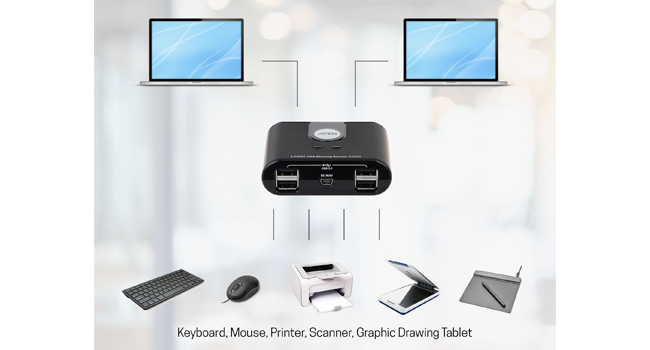
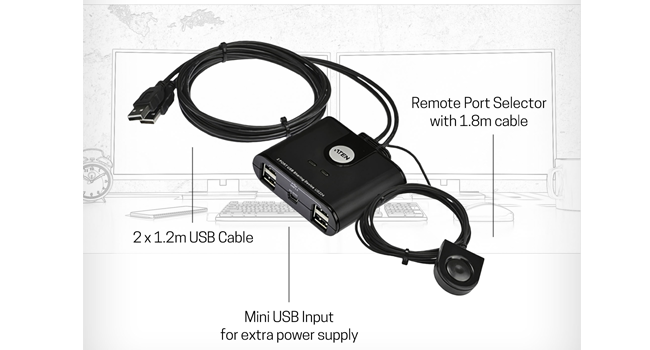
The ATEN US224 is a compact USB 2.0 switch that enables two computers to share up to four USB devices, including keyboard and mouse, via a simple remote selector. Designed to reduce cable clutter with its all-in-one build, it supports Windows, macOS, and Linux, and offers optional power adapter compatibility for enhanced performance.



| ASIN | B00B1RX0L2 |
| Best Sellers Rank | #468 in KVM Switches |
| Brand | ATEN |
| Color | Black |
| Customer Reviews | 4.5 4.5 out of 5 stars (538) |
| Date First Available | January 26, 2013 |
| Is Discontinued By Manufacturer | No |
| Item Dimensions LxWxH | 7.5 x 6.2 x 2.4 inches |
| Item Weight | 5.6 ounces |
| Item model number | US224 |
| Manufacturer | ATEN TECHNOLOGY |
| Number of USB 2.0 Ports | 4 |
| Operating System | Linux, Windows, macOS |
| Product Dimensions | 7.5 x 6.2 x 2.4 inches |
| Series | US424 |
M**K
Great purchase for multiple computers
This little device is wonderful. I am able to multi-task with two computers! I love being able to change to another PC and by the click of a button the mouse and keyboard function. There are two additional USB ports but I haven't needed them.
R**E
Worked! just wasn't for me
I tried this for a couple of weeks and it was just not effective enough for me. I only needed to connect 2 device (iMAC and macbook pro) to share a keyboard and a mouse. Again the product worked as advertised, but it was just to slow in changing from one PC to the other since it had to go through all 4 possible options. The one thing that I did not like was that the cables were extremely long; which you usually complain when too short. I don't have a huge desk, but it just made my desk look junky and untidy. I returned and looking into a software option that hopefully works better for my wants.
A**R
Works well when it wants to
PROS -- Compact design. -- The USB wires long enough for most setups. -- The button to switch between the computers long enough to place almost anywhere. -- You can easily wire manage CONS -- The wire for the switch button feels thin and might break if I pull on it. -- There are times when switching between computers were it becomes completely unresponsive and I have to switch back and forth for it come back. -- Software for certain mice and keyboards do not detect the M/K when connected to switch
L**E
recomend
Works as advertised. Works in the background as it is supposed to. Easy install. Would buy again. Has neat appearance.
M**M
Ich habe mir den Aten US224-Switch gekauft, um die Tastatur und Maus meines Gaming-PCs durch einfaches umschalten auch auf dem MacBook Air bzw. MacBook Pro verwenden zu können. Da bereits alle Kabel in den Switch integriert sind, benötigt man kein weiteres Zubehör außer ggf. ein Netzteil, wenn die Stromversorgung vom PC/Mac nicht ausreichen sollte. Andererseits ist bei einem Kabelbruch auch der gesamte Switch defekt. Ich habe ihn nun einen Tag lang im Einsatz gehabt und muss sagen, dass Maus und Tastatur in ein paar Sekunden umgeschaltet werden können. Windows 10 muss die Treiber wegen dem anderen Port bzw. Hub neu installieren, aber danach ging alles. Das Umschalten ist durch den kleinen Knopf sehr komfortable gehalten und mit vier anschließbaren Geräten sollte das meiste abgedeckt sein. Zu beachten ist, dass es sich um USB 2.0 handelt und nicht um USB 3.0! Leider musste ich feststellen, dass dass nach einem Zurückschalten von Mac auf PC meine Roccat Ryos MK (black) nicht mehr erkannt wird und nur ein PC-Neustart oder ein manuelles An- und Ausstecken hilft. Das passiert nur manchmal unter Windows, während das beim Mac nie vorkommt. Wenn ich das Problem von Mac auf den PC habe und wieder auf Mac zurückschalte, geht die Tastatur einwandfrei. Weiters kann mein PC nicht aus dem Standby-Modus aufwachen, wenn während der Standby-Phase geswitcht wird. Switche ich zurück, so reagiert er nicht auf die Geräte. Um ihn mit Maus oder Tastatur erfolgreich aufwachen zu lassen, darf man während der gesamten Standby-Phase den Switch nicht betätigen. Das heißt es muss immer derselbe Anschluss an den Computer aktiv sein. Das ist zwar nervig, aber liegt wohl einfach an der Art wie USB funktioniert. Alternativ könnte man es sicher machen, dass der PC beim Switchen aufwacht, nur dass ist auch unpraktisch. Somit muss ich ihn mit dem Start-Button immer aufwachen lassen, dann erkennt er die USB-Geräte auch sofort wieder. Fazit: Er erfüllt seinen Zweck und wirkt qualitativ nicht hochwertig, aber auch nicht nach einem billigen China-Fake, das einen Kurzschluss oder andere grobe Probleme verursachen könnte. Ich bin soweit damit zufrieden, da ich den Switch nicht täglich brauche, sondern nur ab und zu wenn ich an Videoprojekten am Mac arbeiten muss und ich dadurch meinen externen Monitor verwenden kann ohne Maus und Tastatur beiseite schieben zu müssen. Deshalb spreche ich eine klare Kaufempfehlung für die aus, die USB 2.0-Geräte auf mehreren PCs bzw. Macs verwenden wollen.
G**.
ne regrette pas mon achat. branché plusieurs ordi sur une imprimante, cela fonctionne sans problème
G**O
Due PC una sola tastiera e un solo mouse e, nel mio caso, anche un solo monitor, perché ha più ingressi e ho diversificato i collegamenti dei due PC (VGA/DVI). Finalmente ho sistemato la scrivania, cosa che non avevo fatto finora per il semplice motivo che ignoravo l'esistenza di tali dispositivi. La scelta è caduta su questo modello perché ha il pulsante separato che permette di tenere fuori vista il marchingegno. Tutto funziona perfettamente.
N**G
Excellent way to share the odd USB device between two PCs. Presently, we share a Dymo label printer and one other device without any issues.
S**R
I work from home and use both a work laptop and my own desktop. I bought a good size monitor to use for both computers and then wanted to have a single mouse and keyboard that I could easily switch between PCs. This gadget allows up to four USB peripherals to be shared between two computers and works excellently. The desk is a lot tidier and I'm no longer fiddling around plugging in cables. The remote switch can be mounted somewhere accessible (mine is blu-tacked to the monitor base) while the cables are out of the way. As others have noted it can take a couple of seconds for the devices to become visible when you switch over but you quickly become used to that. One minor niggle is that the remote control button needs to be clicked dead in the centre or it will slightly jam in its mounting and then needs clicking again. Overall I'm very pleased with it.
Trustpilot
Hace 1 mes
Hace 2 semanas



