Buy anything from 5,000+ international stores. One checkout price. No surprise fees. Join 2M+ shoppers on Desertcart.
Desertcart purchases this item on your behalf and handles shipping, customs, and support to Spain.
🎯 Dominate your game with precision and power—wireless freedom, wired speed.
The Logitech G700s Rechargeable Gaming Mouse delivers professional-grade performance with ultra-fast USB response, 13 programmable buttons, and onboard memory for 5 profiles. Designed for marathon gaming, it offers ergonomic comfort, laser precision up to 8200 DPI, and a unique hybrid wireless/wired mode that lets you game uninterrupted while charging. Compatible with Windows PCs, it’s the ultimate tool for serious gamers seeking customizable control and seamless connectivity.
| ASIN | B00BFOEY3Y |
| Additional Features | Wireless |
| Antenna Location | Gaming |
| Are Batteries Included | No |
| Are Batteries Required | No |
| Best Sellers Rank | #74,392 in Video Games ( See Top 100 in Video Games ) #2,161 in PC Gaming Mice |
| Brand | Logitech G |
| Button Quantity | 4 |
| Color | clear |
| Compatible Devices | Laptop, Personal Computer |
| Connectivity Technology | USB, Wired, Wireless |
| Customer Reviews | 4.3 4.3 out of 5 stars (3,019) |
| Enclosure Material | Wood |
| Global Trade Identification Number | 00097855093776 |
| Hand Orientation | Left |
| Hardware Platform | PC |
| Item Dimensions L x W | 5.51"L x 3.66"W |
| Item Weight | 5.92 ounces |
| Manufacturer | Logitech |
| Mfr Part Number | FBA_910-003584 |
| Minimum Required Operating System Version | Windows Vista |
| Model Name | FBA_910-003584 |
| Model Number | 910-003584 |
| Movement Detection | Laser, Optical |
| Number of Batteries | 1 AAA batteries required. |
| Operating System | Windows 10, Windows 7, Windows 8, Windows Vista, Windows XP |
| Power Source | Corded Electric |
| Range | feet |
| Style Name | Modern |
| Theme | Gaming |
| UPC | 804066558631 097855093776 803982773227 806296570254 |
| Unit Count | 1.0 Count |
P**C
As a Business User...Life is Better With the G700 Mouse [ALSO SEE MY 3 TIPS ON IMPROVING BATTERY LIFE]
-------------------------------------------------------------------------------- AT A GLANCE (+) Not just for gamers...Great mouse for business professionals (+) 13 customizable buttons streamline your work (+) Feels great in your hand (+) Buttons easily reachable (+) Intuitive app for button customization (-) Battery life abysmal, but I found fixes that work for me (-) Switching profiles is very clunky -------------------------------------------------------------------------------- I was glad to read the reviews and find that I'm not only person who has purchased this mouse for purposes other than gaming. Overall, I am ecstatic about the degree to which this mouse has condense repetitive multi-step computer tasks to just one button press. Not only that, it's motivated me to come up with some strategies to maximize battery life that I will share in this review. -------------------------------------------------------------------------------- HERE'S HOW LIFE IS BETTER WITH THE G700 -------------------------------------------------------------------------------- (+) It feels comfortable. For me that's saying a lot because for the past 2 years, I've had to switch to a vertical mouse from Evoluent because of tendonitis in my right hand. (+) Buttons within reach. This mouse pushes the envelop on the number of buttons you can have without putting them out of reach or having to make the mouse bigger. Yes, there are some buttons that are a bit of stretch, but I'm just assign them to the less frequently use functions. (+) Free spinning mouse wheel. I have no idea why this feature is not on all mice because I don't really see any downside to it...only upside. It's amazing to get to from the bottom of the a long DIGG article you just read to the top with a couple flicks. (+) Multiple profiles. You can assign up to 5 profiles to optimize for different apps you use. So far I've got two set up. -------------------------------------------------------------------------------- A SAMPLING OF MY BUTTON CUSTOMIZATIONS: -------------------------------------------------------------------------------- Aside from the ordinary assignments, I use: (+) Next on Chrome. This enables me to rapidly go from one tab to another one. This saves time when you have dozens of tabs open (+) Switch apps. This saves a bit of time instead of using Win Key + Tab. (+) Close Tab and Reopen Tab. When I accidentally close a tab, I'm able to bring it back instantly. (+) Right / Left. I use this for an app that supports right to left scrolling. (+) Change subject line. This is a macro I created which condenses about dozen keyboard steps into one mouse click. When I'm forwarding an email in Gmail, it allows me to quickly change the subject line. As well it's way less laborious than performing the entire operation via your mouse. -------------------------------------------------------------------------------- TWO FRUSTRATIONS: -------------------------------------------------------------------------------- 1) Like practically everybody else who owns this mouse, I was frustrated by the very short battery life, with pretty much amounts to half a work day of normal usage. 2) While it is possible to assign a button to switch between profiles, in practice, it's just not practical. Ideally switching profiles should be fast. And there should be away using a heads up display or maybe some indicator on your screen that tells you what profile you happen to be using. But no, it's slow. And unless you have the actual clunky big interface open, you really don't know which profile you're in. Yes, you can get lucky, but the mouse is very slow in switching between profiles, and sometimes it seems to require more than one button press. -------------------------------------------------------------------------------- HOW I HAVE INCREASED BATTERY LIFE TO 2 DAYS -------------------------------------------------------------------------------- I use my computer for about 12 hours a day. Since implementing all of the steps below, my battery life has increased from 5 hours to about 2 days. Here are the steps which helped me. Keep in mind that my configuration is aimed at non-gamers who prioritize efficiency above performance. But at the same time, I have not noticed any decrease in performance in my normal business usage: Also some, most or all of this may be documented by other reviewers. So I don't claim that any of what's below is original: 1) Switch your profile to Power Saver. 2) Reduce DPI Sensitivity to 125 3) Replace the the included 1800 mAh AA battery with something like the EBL AA 2800mAh High Performance Ni-MH Rechargeable Batteries, 4 Pack which, after 20 minutes of research, I purchased. Today is Day 2 without a recharge and I'm still at two bars. I'm guessing that by the end of the day, I'll have to recharge. That's it for now. I will update this review if needed.
P**E
Easily the best mouse out there. Works on Linux as well.
I bought this on Black Friday when the price was only $50 which was an amazing deal for a mouse like this. I wasn't sure if I wanted this or the Logitech Performance MX Mouse which was the same price at the time. The G700s has about the same form factor as the MX mouse as well as having several extra bells and whistles so the decision was no contest to get the G700s. This mouse is amazing for general use as well as gaming. Hardware: The mouse itself is a little heavier than what I was used to for a mouse, but after using it for so long it's not so bad. The top of the mouse is nice and smooth while the sides has a rough sand paper feel to it. This took a while to get used to as well but I really like it now. It also feels really great in the hand and it is a pleasure to use for long periods of time. There are 13 buttons on here. There's the normal left, right, and middle click, with 4 buttons on the side, 3 next to the left mouse button, 1 below the scroll wheel, and the scroll wheel can tilt left and right. I tend to use the 4 buttons on the side the most as they are comfortable and easy to reach. The rest of the buttons still get used but not nearly as often. The mouse is wireless as long as an option to be wired to charge during use. I will admit that the cable that comes with the mouse is thick like everyone else says, but I don't find it much of a problem. It is the same type of cable used to charge phones so what I do is use a spare phone charger cable and it works better on my mouse than the one that it comes with. I have no problem getting it to fit into the mouse as well. Battery life is mostly what everyone else says about this mouse. It comes with an Eneloop 1900mah AA rechargeable battery and I get about 2 days of battery life on this mouse. The nice thing about this is that if it's not good enough for you, you could get a high capacity battery or get multiple batteries and switch them whenever one dies. The battery life is good enough for me as I plug my mouse in every night and the cable is on my desk ready to be plugged in if it's low. The scroll wheel is a dream and was one of the biggest reasons I wanted a mouse from Logitech. It is a free scrolling wheel that you just flick once and it just continues to move. I honestly think that every mouse needs this feature and anyone wanting a new mouse in general should get a mouse with hyper scrolling. Even if you want something cheap the Logitech M500 has this feature and should be a great mouse if all you want is the hyper scrolling. There is also a button to change the scroll wheel back to the default clicky scrolling if you ever need it to be precise. Another killer feature which is also very underrated is the on-board memory. All of the settings for this mouse is stored onto the mouse itself and is not controller by a program running in the background. My computer dual boots Windows and Linux and I am constantly switching between the two. With this mouse having on-board memory, I only have to set it up once and it works the exact same no matter what operating system I'm using. I have never had a feature of the mouse not work properly on Linux and works flawlessly. The mouse can store up to 5 profiles which each store different assignments to each button. Each profile can be changed by a push of a button on the mouse. The mouse has a wireless adapter that comes with it and is plugged into your computer/laptop. I have not had any issues with latency with this adapter. The box comes with an extender to get the adapter closer to the mouse but for me I do not need it. The bottom of the mouse has an off and on switch as well as 4 large pads and the laser itself. The mouse can go up to 8200dpi. I don't go anywhere near that high for dpi but it's good to know that it's in option if I ever need to in the future. There are 3 LEDs on the side of the mouse which shows several different things. Depending on what color they are shows what it is showing. Green shows battery life, orange shows profile settings, and red shows dpi settings. Software: Logitech has software that goes with the mouse that can be downloaded on their website. This software will only work on Windows but once the mouse is setup you don't have to touch the software. Attempting to run the program on Linux with WINE will work, but the program can not detect the mouse, therefore it is useless to run on Linux. With the program you can assign each button to do absolutely anything you want it to do. You can make them do anything like back/forward buttons, volume controls, dpi control, battery life check, as well as any button on the keyboard. You can also make the mouse to macros, which is a combination of buttons on the keyboard. This is useful for making the mouse do copy and paste as well as whatever combination you want. The dpi settings let you set the dpi into 5 different notches. These notches are set from lowest to highest and you can set the dpi for each notch. When you change the dpi on the mouse it will go up and down these notches or cycle through them depending on how your mouse is set up. You can set different dpi notches for different profiles which can be useful for people who game a lot with this mouse. Other: In this section I'm going to post some settings that I have on my mouse to give a general idea on what you can do with this mouse for different situations or games. Remember that these are not the default profiles and each button can be changed if it is not to your liking. The button below the scroll wheel is universally used to change the profiles of the mouse. The dpi notches are also all the same which ranges from 1000-5000. I only use 2 profiles on my mouse but more will possibly be used as I use this mouse more. For general use, I have the bottom two side buttons as a back and forward buttons for browsing the internet. The top front button cycles through the dpi while the top back button checks the battery status. When I tilt the scroll wheel left and right, it acts as volume up and down which works really well. The top 3 buttons get used for copy/paste as well as refreshing a page. I keep another profile for playing games such as MMOs and shooters. The top two thumb buttons are used for going up and down on the dpi notches. I have the left and right scroll wheel buttons disabled while the rest of the buttons are used for buttons on the keyboard to do things such as using items for melee attacks on shooters. In conclusion there are many great things about this mouse. Anyone looking for a great mouse for any reason at all should get this mouse. The Performance MX has nothing extra compared to this and this is easily the superior mouse compared to the two. I don't like that it is classified as a gaming mouse because it works great for general computer use as well as gaming. If you need a mouse for several operating systems or devices then there is no other equal. This mouse is amazing for it's unique features. I would have happily paid the higher price for this mouse and would easily recommend this to anyone wanting a gaming mouse.
J**R
Es un producto increíble, los materiales son de alta calidad, los botones tienen buen feedback y gran sensación de tacto El ajuste de DPI sin necesidad de software adicional es perfecto para poder jugar perfectamente cualquier videojuego sin necesidad de entrar a configuraciones antes de saber como se van a comportar los DPI en el videojuego También el bloqueo y desbloqueo de la rueda del mouse lo hace un gran producto para múltiples propósitos, ya sea scroll preciso o rápido La precisión del sensor es excelente y con el ajuste de DPI aún mejor
M**L
Tastaturmakros können in der Maus gespeichert werden und werden dann auf jedem angeschlossenen PC als Tastatur ausgeführt. Enitime (Eneloop?) Akku hält lange durch.
G**E
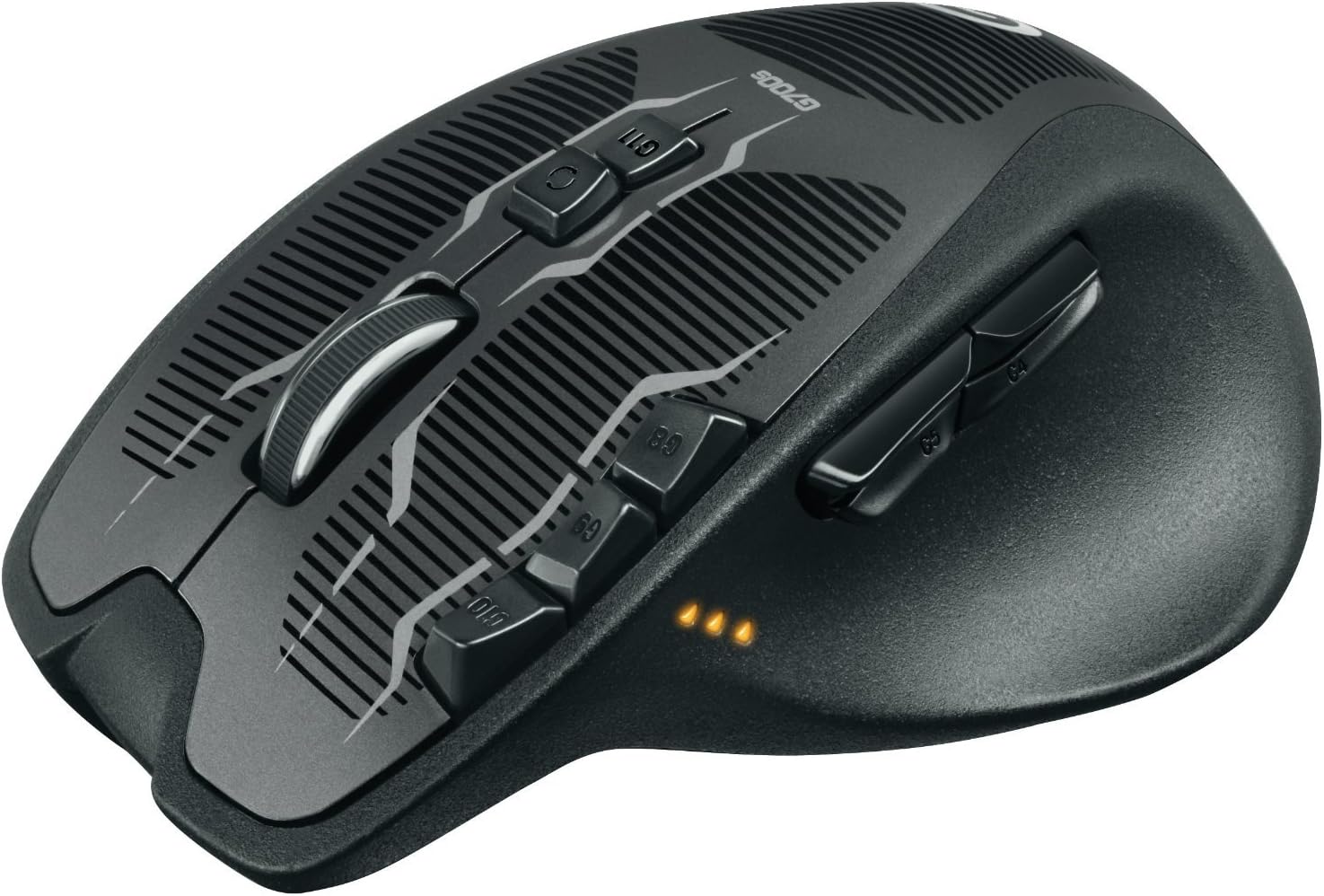
This is the second G700 mouse I've owned. I had to get a new one after the first started showing distinct signs of age (the infamous double-clicking problem). But here's the thing: Even after having the former G700 (non-"s") die out on me, I Still opted for the very same model for it's replacement - That alone would say a lot about what we're dealing with here. In my opinion, perhaps the best feature of this unit, not found anywhere else even in other Logitech mice. Besides the 13 all-programmable buttons and the ridiculously high precision and refresh speed of this piece, (I wonder in awe what sort of people would actually need a thousand polls a second at 8k+ DPI); Besides the flexible-yet-intuitive mapping software that integrates so well with the maker's other devices I can switch mouse profiles by the LCD display built into my G15 keyboard; Besides how it can operate wired or wireless at your most whimsical convenience... One feature takes the cake, The scroll wheel. This solid hunk of metal in the shape of a wheel is capable of a feat unknown to lesser mice: You can unlock the 'clicker'. Smooth as the wheel notches may be, there are situations (very common for me, as a game programmer) where a page is too long to simply keep rolling over and over one stop at a time. And that's'the 14th button, just "South" of the wheel itself. Push it to toggle the ratchet and let the wheel spin free! And this is where the mass of the metal wheel comes into play - The angular momentum of a wheel is generally proportional to it's mass, which is quite substantial (by mouse wheel standards) in the G700s. Once you give it a flick, it keeps on going until you put your finger down to stop it. Lock the ratchet back and carry on, precision and speed at the flick of a switch, literally. Some would argue that the design is not to their own comfort. Well, this is no argument to judge a mouse over, as we all got different hands with various shapes and sizes. I would say it is more on the "burly" side, anyways - so those with big and wide palms would find it to fit like the proverbial glove, whereas more slender-handed users might feel it as perhaps a little clunky to the grip. Another possible downside might be that by the end of it's service life, the G700 was known to develop the nasty habit of unreliable clicking. In which it would falter during drags or longer-held hits, producing a false double-click at increasingly often times. This was very irritating but nevertheless, It lasted just over 3 years before the first sign of problems began, and it did not have it all that easy a life under my clutches either... But this is the G700s, and the one I had before was the original all-black G700 (discontinued?) - I would hope that Logitech has taken note of the various occurrences of the double-click problem and fixed it with this new version. Either way, whenever my computer stuff breaks down, I always try to take the opportunity to not only replace, but upgrade the faulty part. This mouse was a case unlike any other I've had in previous experience: There is no "upgrade" after it. Bonus points for not looking like some alien artifact as does most of everything from it's competition. This looks very well made on Earth, by humans (I think), for humans (mostly),
G**Z
Excelente producto Este mouse es increible mas con la maneraven que puedes personalizarlo con distintos perfiles psra programas o juegos es facil. La ergonomia tambien es buena y el hecho que es recargable aun mas. Gran producto lo recomiendo ampliamente.
J**R
I've long been on a search for the perfect mouse. Considering how much the average computer user uses one, I think it's a peripheral that's been sadly ignored. This mouse is designed as a gaming mouse, and it shows. The default configuration uses the buttons near the left mouse button to adjust tracking speed (DPI) and display battery life and the button below the scroll wheel to switch profiles and lets you set the thumb buttons to MMO macros, but the truth of it is that this mouse works just as well for any power user. Set the thumb buttons to back and forward, and boom. Cursor precision is high and it works on every surface I've tested. The mouse is nicely balanced and weighted- not too heavy, but large enough to give your hand some feeling. I was worried that the index-finger buttons would be uncomfortable and I'd end up clicking them by accident, but you really don't notice them unless you're trying to hit them, and the same is true with the two sets (four) thumb buttons. All that being the case, let me highlight what I consider to be my favorite feature: the wired/wireless nature of this mouse. Yes, it's wireless. It doesn't use a Logitech unified receiver, though, so you're out of luck on that front (but I have plenty of spare USB ports so that wasn't an issue), but plug in the USB to micro USB cable, and you're good to go as a wired mouse. More than a few wireless mice have transitioned to using micro-USB for charging so that you can use the mouse as a wired mouse while it's charging the batteries, but on this mouse, when you plug in that cable, you're actually sending data over the wire. If you need to move the mouse to another computer, or you have a high-interference environment, it ignores the wireless entirely. That's a great feature for me, because it means I can sling the mouse and cable in my bag with my laptop and suddenly, I have that same great mouse without having to muck around and take the wireless receiver from my computer. All in all, this is an amazing mouse. Highly recommended.
Trustpilot
Hace 4 días
Hace 3 semanas